Icon Designer
Table of Contents
1. Introduction
2. Basic inputs
3. Image properties
4. Other local menu operations
5. Image operations
6. Paste mode
7. Selection
8. Flips, mirrors and rotate
9. Image filters
10. Drawing tools
11. Upscaling / downscaling
12. View settings
Introduction
Icon Designer is a tool directly integrated to TheIDE that allows editing .iml files. This file type acts as an image container. Each image can be directly referenced in the source code of the application. This documentation page focuses on showing Icon designer as a tool and does not discuss programming aspects.
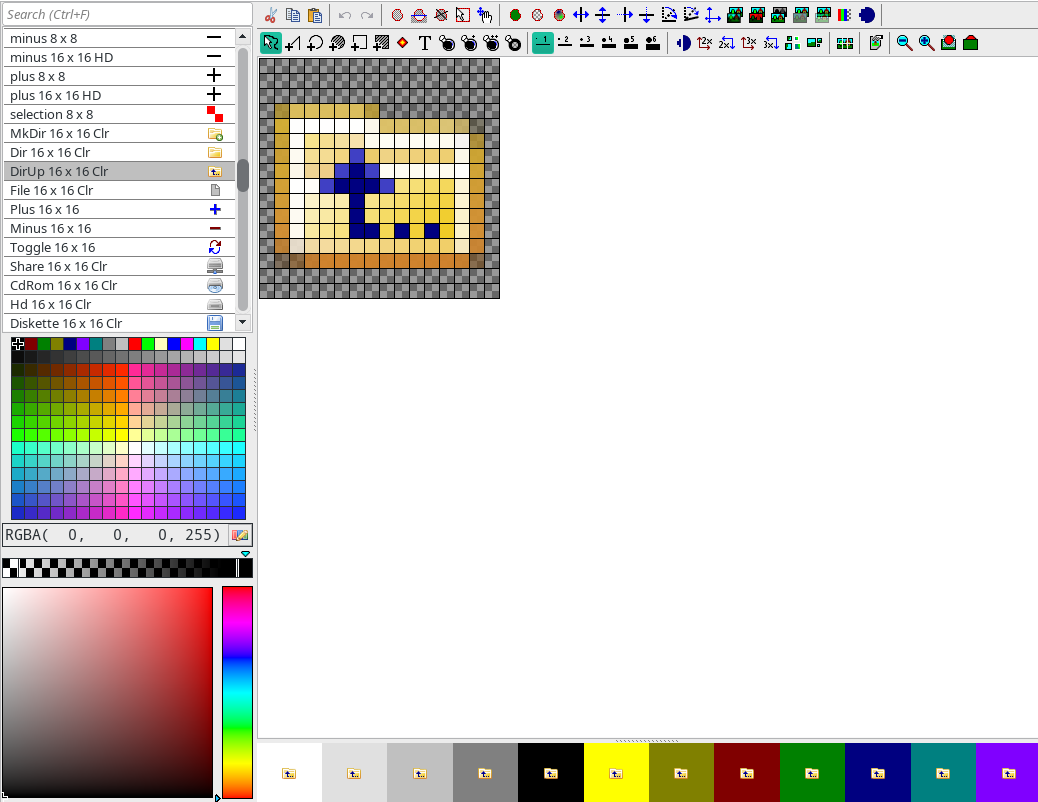
Above image shows full interface of Icon Designer.
More information about using icons in the source code can be found in the image tutorial.
Basic inputs
Left mouse button
|
Draws the current color.
|
Right mouse button
|
Picks current color (except in hotspot definition mode where it defines the second hotspot).
|
Shift+Left mouse button
|
Flood fill. The type of fill is set by associated icons in the toolbar:
|

|
Normal fill with no tolerance. |
|
|
Fill with small tolerance of filled color. |
|
|
Fill with larger tolerance of filled color. |
|

|
Antifill - selected color represents border of area filled with empty color. |
|
Alt+Left mouse button
|
In any painting mode works as free hand tool with single pixel width.
|
Shift+cursor keys
|
Move selection if any, scroll image otherwise.
|
Ctrl+Mouse wheel
|
Zoom in / out
|
Ctrl+Left mouse button
|
Scrolls edit area.
|
|
Image properties
Image properties are invoked by double clicking the image name in the list or by using local menu of the image list

|
Fixed |
The image is flagged not to be resized according to current UHD mode nor are its color changed in dark mode. |
|
Fixed colors |
The image is flagged not to change colors in dark mode. |
|
Fixed size |
The image is flagged not to be resized according to current UHD mode. |
|
UHD variant |
The image is intended for UHD (4K) mode. |
|
Dark variant |
The image is intended for dark mode. |
|
Supersampled 3x |
The image is downsampled before use, with each 3x3 pixel block representing single pixel in the result. |
|
Export as Icon.ico and .png |
The image is exported in various formats into folder of .iml file where it can be picked by build process as an application icons |
Other local menu operations
 Insert image.. Insert image..
Inserts a new image.
 Remove image Remove image
Removes image.
 Insert from clipboard Insert from clipboard
Inserts a new image from the clipboard. If there is also a text item in the clipboard, it is used as image name.
 Duplicate Duplicate
Duplicates the current image into next position in the list.
 Export to PNGs.. Export to PNGs..
Exports all images of .iml file into selected directory.
 Insert from file(s).. Insert from file(s)..
Inserts one or more files into image list. Supported formats are .iml .png .bmp .jpg .gif .ico.
 Move up Move up
 Move down Move down
Moves image up or down in the list. The order can also be rearranged using drag and drop.
 Cut Cut
 Copy Copy
 Paste Paste
 Undo Undo
 Redo Redo
Usual meaning.
Image operations
|

|
Duplicate image (image is copied to the new position with the same attributes. |
|

|
Remove current image. |
|

|
Shows all locations in the code where current image is used. |
|

|
Split current image into smaller images of given size. |
Paste mode
In standard Paste mode, clipboard image (source) is pasted over the current image (target) using alpha channel. This behavior can be changed:
|

|
In this mode all pixels of target within the source rectangle are overwritten by source pixels including alpha channel. |
|

|
"Paste back" - source image represents background and target is drawn over it. |
Selection
|

|
Starts selection mode, where drawing operations add or remove pixels from the selection. Click again to get back to drawing mode - all subsequent operations will be restricted to the selection until it is canceled. |
|

|
Inverts the selection. |
|

|
Cancels the selection. |
|

|
Starts rectangular selection. |
|

|
Starts selection moving mode - selection can be moved using mouse or Shift+cursor keys. |
|

|
Sets current color to all pixels of selection. |
|

|
Sets empty color to all pixels of selection. |
|

|
Interpolates nonempty pixels into empty ones trying to create gradient transitions between them. This is sort of legacy function, using radial or gradient tool directly is better in most cases. |
Flips, mirrors and rotate
|

|
Horizontal flip of image or selection. |
|

|
Vertical flip of image or selection. |
|

|
Diagonal flip of image or selection. |
|

|
Horizontal mirror of image or selection. |
|

|
Vertical mirror of image or selection. |
|

|
Diagonal mirror of image or selection. |
|

|
90 degrees rotation. |
|

|
Arbitrary rotation. |
|

|
Resize filter (with various methods). |
Image filters
|

|
Blur / sharpen. |
|

|
Colorize (adjust the image towards current color). |
|

|
Adjust chroma. |
|

|
Contrast. |
|

|
Remove alpha - remove pixels with "in-between" alpha, only leaving fully opaque (alpha 255) and empty (alpha 0) pixels, with alpha threshold as parameter. |
|

|
Adjust individual R G B A channels with simple equation. |
|

|
Smooth - adds half-alpha pixels to smooth rough edges. Somewhat obsolete in favor of S3 supersampled images. |
Drawing tools
|

|
Free hand tool. |
|

|
Line tool. |
|

|
Ellipse tool. |
|

|
Empty ellipse tool - sets internal pixels empty. |
|

|
Rectangle tool. |
|

|
Empty rectangle tool - sets internal pixels empty. |
|

|
Radial gradient. The color of center is the color of the starting point and gradient goes to currently selected color. Note that usually gradient tools needs selection to limit the affected areas. |
|

|
Linear gradient. The starting color is the color of the starting point and gradient goes to currently selected color. Note that usually gradient tools needs selection to limit the affected areas. |
|

|
Hotspot definition. Unlike any other tool, right mouse button sets second hotspot. |
|

|
Text tool. |
|

|
Activates antialiasing for relevant tools. Somewhat obsoleted by S3 supersampled images. |
Upscaling / downscaling
|

|
Upscales image 2x using "smart upscale" algorithm used by framework to upscale normal resolution images to UHD mode. Probably not very useful in image designer. |
|

|
Upscales image 2x by repeating pixels. |
|

|
Downscales image 2x by averaging 2x2 pixel blocks. |
|

|
Upscales image 3x by repeating pixels. |
|

|
Downscales image 3x by averaging 3x3 pixel blocks. |
View settings
|

|
Previews synthetised variants of image - upscaled for HD resolution or downscaled for standard resolution, color adjusted for dark mode. |
|

|
Previews image downscaled 2x and 3x. |
|

|
Shows additional grid of 3x3 or 4x4 pixels in edit area depending on the size of image. 3x3 is useful for pixel-perfect S3 supersampled images. |
|

|
Increases magnification ratio. Can be also done using Ctrl+mouse wheel. |
|

|
Decreases magnification ratio. Can be also done using Ctrl+mouse wheel. |
|