Home » U++ Library support » U++ Widgets - General questions or Mixed problems » DropList Items Text highlight area height (How to increase the DropList Items Text highlight area height )
|
|
| Re: DropList Items Text highlight area height [message #62056 is a reply to message #62055] |
Wed, 16 September 2026 18:38   |
 Oblivion
Messages: 1284
Registered: August 2007
|
Senior Contributor |
|
|
Hi lmonda,
Yes, you can change the height. Even independently, per-line:
#include <CtrlLib/CtrlLib.h>

using namespace Upp;

struct MyApp : TopWindow  {
	DropList list;
	MyApp()
	{
		Sizeable().Zoomable().CenterScreen().SetRect(0, 0, 400, 400);
		Add(list.HCenterPos(300).VCenterPos());

		for(int i = 0; i < 5; i++)
			list.Add(i).SetLineCy(i, GetStdFontCy() * max(i, 1));
		list.GoBegin();

	}
};

GUI_APP_MAIN
{
	MyApp().Run();
}
Oblivion
Github page: https://github.com/ismail-yilmaz
Bobcat the terminal emulator: https://github.com/ismail-yilmaz/Bobcat
TerminalCtrl package https://github.com/ismail-yilmaz/Terminal
|
|
|
|
| Re: DropList Items Text highlight area height [message #62058 is a reply to message #62056] |
Thu, 17 September 2026 18:22 |
lmonda
Messages: 11
Registered: March 2025
Location: USA
|
Promising Member |
|
|
Hi Oblivion
Thanks, that is super helpful in using native controls. I am able to adjust the selection height.
Now In some cases, we have custom drop list that was extended from upp drop list. In these controls we override the Display like this -
struct DropListFontDisplay : Display {
virtual void Paint(Draw& w, const Rect& r, const Value& q, Color ink,
Color paper, dword style) const
{
//Font fnt = StdFont(16).Bold();
Color dropbackColor = Color(153,187,255);
String txt = q;
w.DrawRect(r, dropbackColor/*SColorFace*/);
w.DrawText(r.left + 2, r.top + (r.Height() - GetTextSize(txt, _GFont).cy) / 2,
txt, _GFont, ink);
}
};
Then I do this to set the display height like below, which works fine. But the drop down color covers the Highlight rectangle color. Why? See image. Blue selection rectangle missing.
_DropList.SetDisplay(Single<DropListFontDisplay>(),35);
Thanks
lmonda
-
 Attachment: DropList.png
(Size: 26.58KB, Downloaded 78 times)
|
|
|
|
| Re: DropList Items Text highlight area height [message #62059 is a reply to message #62058] |
Thu, 17 September 2026 19:31 |
Oblivion
Messages: 1284
Registered: August 2007
|
Senior Contributor |
|
|
Since droplist expects a display object, it passed "style" variable, which is an enum part of Display
class Display : public Pte<Display> {
public:
	enum {
		CURSOR   = 0x01,
		FOCUS    = 0x02,
		SELECT   = 0x04,
		READONLY = 0x08,
	};
struct MyDisplay : Display {
	void Paint(Draw &w, const Rect &r, const Value &q, Color ink, Color paper, dword style) const override
	{
		w.DrawRect(r, style & CURSOR ? SColorHighlight : SRed());
		w.DrawText(r.left, r.top, q.ToString(), StdFont(), Black());
	}
};
struct MyApp : TopWindow  {
	DropList list;
	MyApp()
	{
		Sizeable().Zoomable().CenterScreen().SetRect(0, 0, 400, 400);
		Add(list.HCenterPos(300).VCenterPos());

		list.SetDisplay(Single<MyDisplay>());
		for(int i = 0; i < 5; i++)
			list.Add(i).SetLineCy(i, GetStdFontCy() * max(i, 1));
		list.GoBegin();

	}
};

GUI_APP_MAIN
{
	MyApp().Run();
}
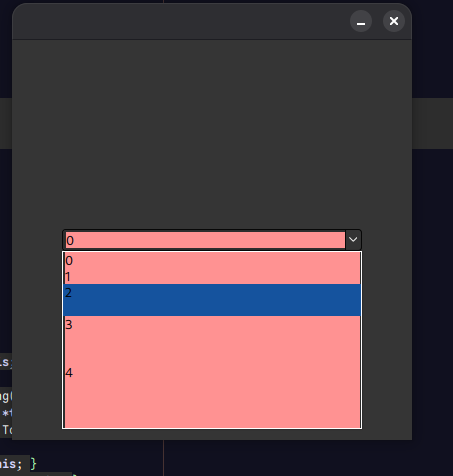
Best regards,
Oblivion
Github page: https://github.com/ismail-yilmaz
Bobcat the terminal emulator: https://github.com/ismail-yilmaz/Bobcat
TerminalCtrl package https://github.com/ismail-yilmaz/Terminal
|
|
|
|
| Re: DropList Items Text highlight area height [message #62060 is a reply to message #62059] |
Fri, 18 September 2026 06:23 |
lmonda
Messages: 11
Registered: March 2025
Location: USA
|
Promising Member |
|
|
Hi Oblivion,
Thanks, Let me try this.
Also I have a menubar popup where I add Text to the menu bar with Add().
How do I change menu item Text height? Menubar does not have set height member.
MenuBar menu;
menu.Add(t_("Print Program Test Setup"), THISBACK(PrintTestSetupReportCB)).;
menu.Add(t_("Print Brief Program Report"), THISBACK(PrintBriefTestReportCB));
menu.Add(t_("Print Options"), THISBACK(PrintOptionsReportCB));
menu.Add(t_("Print Hardware Setup"), THISBACK(PrintHdwrSetupCB));
menu.Add(t_("Print Factory Setup"), THISBACK(PrintFactoryConfigCB));
menu.Separator();
#ifndef ENABLE_PART11
menu.Add(t_("Login/Logout"), THISBACK(ShowLoginCB));
menu.Add(t_("Forgot Password"), THISBACK(ShowPasswordForgotCB));
menu.Separator();
Thanks
Lakshmi.
-
Attachment: menubar.png
(Size: 22.08KB, Downloaded 77 times)
[Updated on: Fri, 18 September 2026 06:39] Report message to a moderator |
|
|
|
|
|
|
|
Goto Forum:
Current Time: Fri Sep 25 07:11:33 GMT+2 2026
Total time taken to generate the page: 0.00795 seconds
|
 U++ framework
 Search
 Help
Help Members
 Register
 Login
Login Home
Home




