HOWTO: Submit translations to the U++ project
Before starting the translation work, get to know TheIDE and pay attention to the context of the terminology used. Try to use already established computer terminology in your language instead of inventing new terms.
1. Export .tr file
Run the latest TheIDE and load the uppsrc AllForI18n. This package uses all other uppsrc packages that need translating.
Choose Project / Export runtime translation file (*.tr):
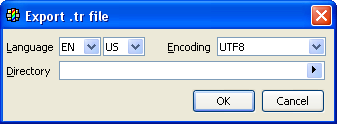
Choose the language and eventually the encoding (prefer UTF-8), choose the output directory and hit OK.
As a result, a translation template file (e.g. fr-fr.UTF-8.tr) will be created in the output directory and opened in TheIDE.
2. Translate .tr file
Translate the resulting file using TheIDE or a text editor that supports the character set you have selected. You simply need to fill in the texts in your language corresponding to the English expressions where the translation is missing - the text is empty string.
Example fr-fr.UTF-8.tr file being translated:
LANGUAGE "FR-FR UTF-8";
// CtrlLib/CtrlLib.t
"(default)",
"Par défaut";
"Undo",
"Annuler";
"Cut",
"Couper";
"Copy",
"";
......
|
|
We recommend simply searching for empty strings - "".
Important: characters '\v' and '\a' are prefix separators - you are not supposed to translate prefix or copy it to the translation.
Example:
T_("date\vMay")
// csCZ("datum\vKvěten") Wrong: Do not translate "date" prefix!
// csCZ("date\vKvěten") Wrong: Do not copy "date" prefix!
csCZ("Květen") // Correct
|
|
3. Date formatting
There are 3 texts in Core.t that are used to represent default localized. Date formatting and scanning:
T_("date-format\a%2:02d/%3:02d/%1:4d")
T_("date-scan\amdy")
T_("date-filter\aA/\r .-")
|
|
The format of these strings is described in Date formatting and scanning.
4. Submit the translation
Submit the translated .tr file to the Ultimate++ project forum for peer review and to be merged in source.
Use:
Ultimate++ forum: Home »
U++ Library support »
U++ Libraries and TheIDE: i18n, Unicode and Internationalization
5. Repeat!
U++ is evolving framework and the set of text literals is growing and changing. Therefore you are welcome to check from time to time for new texts to be translated.
|