U++ framework
Do not panic. Ask here before giving up.

Home » Extra libraries, Code snippets, applications etc. » U++ users applications in progress and useful code snippets, including reference examples! » Porting a Delphi Application
Porting a Delphi Application [message #11475] Sat, 15 September 2007 03:40 Go to next message
cbpporter is currently offline  cbpporter
Messages: 1428
Registered: September 2007
Ultimate Contributor
Hi,

I have a Delphi application that I have been (very slowly) developing for quite some time now and for a while I have been thinking about porting the code to some C++ GUI library.

I don't like C++Builders proprietary extensions to C++, GTK is too C-ish (gobject) and can sometimes be very slow on Windows (the GUI), and Qt is one precompiled mess. I researched some other GUI toolkit's too, and I think U++ would be the best for me (even though it's too nonconformist).

So I will try to do the port, at first as a test, and if it works out I will continue add future developments to the U++ version. If it doesn't work, nobody will ever know Smile.

I've gotten quite a good idea of the U++ API, but I can't seem to find and equivalent to Windows MDI Application style windows (TopWindows inserted into TopWindows, with tiling, cascading, ... support). Is MDI supported by U++ or do I have to convert my application to a SDI interface?

Thank you
Re: Porting a Delphi Application [message #11480 is a reply to message #11475] Sat, 15 September 2007 13:44 Go to previous messageGo to next message
cbpporter is currently offline  cbpporter
Messages: 1428
Registered: September 2007
Ultimate Contributor
So I started porting and managed to create the File menu with relative ease. It takes some time to get used to the package management scheme in TheIDE, it's image editor and the fact that it is it's own little world, which is surprisingly self-contained.

The layout editor is great, but is not well suited for creating really complex layouts and it seems to favour composing a large number of simple layouts to achieve this goal. And it has no frame support (which I think is a design choice) and no menu editor. But it still helps a lot and I'm glad to have it.

But even after this brief time of exposure to U++ I have identified some issues. I will describe them:

1. My applications exe doesn't have the correct icon (it uses the generic one) when I compile my application in Optimal mode. I compiled some of the example applications to, and these also lack the correct icon. But if I compile it in Debug mode, the icons are fine.

2. If the layout designer or image editor is in the main tab of the editor in the moment the application launches (F5), these editors loose their advanced functionality and revert back to a plain text editor.

3. Fullscreen windows (under Windows) get a border and a title bar if the window looses focus.

4. If I create a frame parameterised with a Button (FrameLeft<Button> for example), the Button will have a strange blue-ish skin. But if I create a Frame with a layout which contains a Button, the Button has a normal skin. Is this intentional?

5. How do you activate the MacOS theme under Windows as seen in the screenshot (this is not an issue, just a question).

I think I forgot another one, and if I stumble upon it I will post again.

Thank You.
Re: Porting a Delphi Application [message #11511 is a reply to message #11475] Sun, 16 September 2007 11:16 Go to previous messageGo to next message
cbpporter is currently offline  cbpporter
Messages: 1428
Registered: September 2007
Ultimate Contributor
I managed to solve the icon problem. Seems I need to have the icon exported into "icon.ico". I thought that those 6 bytes icons were strange...

But I found another bug. If a create a menu with a caption containing the accessor key multiple times (for example "Zoom &Out"), when I press Alt the first of that character will be highlighted (as if I had "Z&oom Out"). This is a minor detail but things like this shouldn't be ignored.

Thank You
Re: Porting a Delphi Application [message #11513 is a reply to message #11475] Sun, 16 September 2007 12:24 Go to previous messageGo to next message
mirek is currently offline  mirek
Messages: 14290
Registered: November 2005
Ultimate Member
cbpporter wrote on Fri, 14 September 2007 21:40


(even though it's too nonconformist).


Yes, it is.

Quote:


I've gotten quite a good idea of the U++ API, but I can't seem to find and equivalent to Windows MDI Application style windows (TopWindows inserted into TopWindows, with tiling, cascading, ... support). Is MDI supported by U++ or do I have to convert my application to a SDI interface?


No, there is no MDI support.

Mirek
Re: Porting a Delphi Application [message #11514 is a reply to message #11480] Sun, 16 September 2007 12:30 Go to previous messageGo to next message
mirek is currently offline  mirek
Messages: 14290
Registered: November 2005
Ultimate Member
cbpporter wrote on Sat, 15 September 2007 07:44


1. My applications exe doesn't have the correct icon (it uses the generic one) when I compile my application in Optimal mode. I compiled some of the example applications to, and these also lack the correct icon. But if I compile it in Debug mode, the icons are fine.


Debug mode is trange, however to procedure is to activate .ico export and add .rc file that uses it. See ide/.rc file as an example (the icon is BTW usually the only use for .rc in U++).

Quote:


2. If the layout designer or image editor is in the main tab of the editor in the moment the application launches (F5), these editors loose their advanced functionality and revert back to a plain text editor.


That is feature, not error Smile The problem is that these files are, through some macro hackery, in fact valid C++ sources that can be stepped through by debugger.

Press Ctrl+T to get designer back.

Quote:


3. Fullscreen windows (under Windows) get a border and a title bar if the window looses focus.


Well, fullscreen windows are not quite typical, this might be a bug. Cared to post a testcase? (BTW, next time please post problems to more appropriate forums, this is really mostly about interesting apps being developed in U++, not problem solving area... your problem might be unnoticed here).

Quote:


4. If I create a frame parameterised with a Button (FrameLeft<Button> for example), the Button will have a strange blue-ish skin. But if I create a Frame with a layout which contains a Button, the Button has a normal skin. Is this intentional?


Yes, tries to immitate the appearance of ComboBox buttons.

Quote:


5. How do you activate the MacOS theme under Windows as seen in the screenshot (this is not an issue, just a question).


Google: "uxtheme".

Mirek
Re: Porting a Delphi Application [message #11516 is a reply to message #11511] Sun, 16 September 2007 12:32 Go to previous messageGo to next message
mirek is currently offline  mirek
Messages: 14290
Registered: November 2005
Ultimate Member
cbpporter wrote on Sun, 16 September 2007 05:16


But I found another bug. If a create a menu with a caption containing the accessor key multiple times (for example "Zoom &Out"), when I press Alt the first of that character will be highlighted (as if I had "Z&oom Out"). This is a minor detail but things like this shouldn't be ignored.


Actually, nobody cares about explicitly defining '&' keys - let U++ runtime generate them for you... and perhaps do it manually in cases when you do not like automatic assignment. You can also assign only some and let U++ do the rest.

Mirek

[Updated on: Sun, 16 September 2007 12:33]

Report message to a moderator

Re: Porting a Delphi Application [message #11523 is a reply to message #11475] Sun, 16 September 2007 15:49 Go to previous messageGo to next message
cbpporter is currently offline  cbpporter
Messages: 1428
Registered: September 2007
Ultimate Contributor
Quote:


Actually, nobody cares about explicitly defining '&' keys - let U++ runtime generate them for you... and perhaps do it manually in cases when you do not like automatic assignment. You can also assign only some and let U++ do the rest.


And it seems it does quite a good job assigning the keys. But is still wish it would respect my explicitly assigned position, because a have "Zoom &In" and "Zoom &Out" and I would like to keep the "_"s aligned. But this little detail won't make me think less of U++, and I must admit that I'm impressed.

Quote:


No, there is no MDI support.


Well with owner draw widgets maybe I could emulate somehow MDI behaviour. Or at least I need a Window menu which allows you to switch between all your open documents.

Quote:


BTW, next time please post problems to more appropriate forums, this is really mostly about interesting apps being developed in U++, not problem solving area... your problem might be unnoticed here.


Sorry, I wanted to keep all info regarding this project in one place.

But to keep with the theme of this thread, I will need some custom components. Most of them are highly specialized and I don't see a general use for them, but one could be useful. It is a foldable panel. It looks like a LabelBox with a Button instead of the label, and by clicking it you can open and close it. In my original application this is done by a Panel, a Bevel, a Button and hand-coded folder behaviour. This is not that nice, and I'm going to try to develop a custom component which at least should extend to a property specified size (even better would be if I can make it to auto-detect the correct size and hide, show and align it's children. I attached a picture with this component.
Re: Porting a Delphi Application [message #11525 is a reply to message #11523] Sun, 16 September 2007 15:51 Go to previous messageGo to next message
cbpporter is currently offline  cbpporter
Messages: 1428
Registered: September 2007
Ultimate Contributor
Forgot to attach...
  • Attachment: panel.PNG
    (Size: 2.64KB, Downloaded 651 times)
Re: Porting a Delphi Application [message #11531 is a reply to message #11523] Sun, 16 September 2007 20:53 Go to previous messageGo to next message
mirek is currently offline  mirek
Messages: 14290
Registered: November 2005
Ultimate Member
cbpporter wrote on Sun, 16 September 2007 09:49

Quote:


Actually, nobody cares about explicitly defining '&' keys - let U++ runtime generate them for you... and perhaps do it manually in cases when you do not like automatic assignment. You can also assign only some and let U++ do the rest.


And it seems it does quite a good job assigning the keys. But is still wish it would respect my explicitly assigned position, because a have "Zoom &In" and "Zoom &Out" and I would like to keep the "_"s aligned. But this little detail won't make me think less of U++, and I must admit that I'm impressed.


You can, just do not expect U++ to check your assignments (yet? Smile

Quote:


Or at least I need a Window menu which allows you to switch between all your open documents.


See examples/UWord

Mirek
Re: Porting a Delphi Application [message #11536 is a reply to message #11475] Sun, 16 September 2007 23:06 Go to previous messageGo to next message
mr_ped is currently offline  mr_ped
Messages: 826
Registered: November 2005
Location: Czech Republic - Praha
Experienced Contributor
Mirek: did you understand his problem with Zoom Out?
It looks to me like you didn't. He doesn't need U++ to check his assignments, he just needs that the underlined "o" will be the one in "Out" word, not the first one in "Zoom", because he didn't specify it there in Zoom, but in Out.
Re: Porting a Delphi Application [message #11539 is a reply to message #11536] Sun, 16 September 2007 23:42 Go to previous messageGo to next message
mirek is currently offline  mirek
Messages: 14290
Registered: November 2005
Ultimate Member
I see thanks. (ops)
Re: Porting a Delphi Application [message #11542 is a reply to message #11539] Mon, 17 September 2007 05:48 Go to previous messageGo to next message
cbpporter is currently offline  cbpporter
Messages: 1428
Registered: September 2007
Ultimate Contributor
Quote:

See examples/UWord

Thanks, that served as a quick fix. I don't like the multiple windows but this way I don't have to wory about multiple documents in the same instance of the main window.

Quote:

I see thanks. (ops)

If you don't have time, maybe I could find some time in weekend to look over the code, maybe find a way to fix this.

Regarding that drop down panel control, I managed to create one. It works well enough for the time being, even though the code is rough, functionality is missing and it has problems with auto sizing. But it gets me going, so it’s a good thing. I can imagine a custom Bar component which would accept such controls as children and automatically align them vertically one under the other as their size change.

I attached the control's source. I don't have any experience in writing U++ controls, so maybe I get some feedback. And I couldn't find a centralized place where position or size change is handled (except WndSetPos, but that is OS dependent).
  • Attachment: DropPane.zip
    (Size: 1.09KB, Downloaded 568 times)
Re: Porting a Delphi Application [message #11544 is a reply to message #11542] Mon, 17 September 2007 09:50 Go to previous messageGo to next message
mirek is currently offline  mirek
Messages: 14290
Registered: November 2005
Ultimate Member
cbpporter wrote on Sun, 16 September 2007 23:48


I attached the control's source. I don't have any experience in writing U++ controls, so maybe I get some feedback. And I couldn't find a centralized place where position or size change is handled (except WndSetPos, but that is OS dependent).


Ctrl::Layout

Mirek
Re: Porting a Delphi Application [message #11545 is a reply to message #11542] Mon, 17 September 2007 10:03 Go to previous messageGo to next message
mirek is currently offline  mirek
Messages: 14290
Registered: November 2005
Ultimate Member
cbpporter wrote on Sun, 16 September 2007 23:48


I attached the control's source.


Usual custom here, when you post some sources like this, is to use package and perhaps provide another one as demonstration - that way downloaders can just unpack to some package nest, start theide, choose the test and run it.

This is not a complaint, just a note - I guess it is time to write U++ netiquette summmary Smile

Mirek
Re: Porting a Delphi Application [message #11564 is a reply to message #11545] Mon, 17 September 2007 19:40 Go to previous messageGo to next message
cbpporter is currently offline  cbpporter
Messages: 1428
Registered: September 2007
Ultimate Contributor
luzr wrote on Mon, 17 September 2007 10:03


Usual custom here, when you post some sources like this, is to use package and perhaps provide another one as demonstration - that way downloaders can just unpack to some package nest, start theide, choose the test and run it.

This is not a complaint, just a note - I guess it is time to write U++ netiquette summmary Smile


I will post another improved version (current one gives error when trying to use it as base for a template layout because it misses a SetRect function with a Rect parameter) once it is ready and I'll try to have a proper package format. Previous post was only so people get an idea of what I'm trying to do (and if can be done easier point me in the right direction).

But I have a functional (barely) DropPane and now I'm trying to insert inside an array of 2x4 ToolButtons (I'm not using button because I need them to be flat-looking), like in the attached picture.
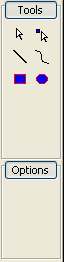
index.php?t=getfile&id=719&private=0
Layout and positioning is very important, so I did not use a ToolBar component, instead I hand placed all the buttons. I also need them to check when the user click on them. I managed to do this, but unfortunately I had to use pointers (old habits die hard). I wonder if there is a better way to do this in a U++ style?

layout
LAYOUT(ToolsLayout, 60, 200)
	ITEM(ToolButton, btnMove, LeftPosZ(8, 22).TopPosZ(24, 22))
	ITEM(ToolButton, btnEdit, LeftPosZ(30, 22).TopPosZ(24, 22))
	ITEM(ToolButton, btnLine, LeftPosZ(8, 22).TopPosZ(46, 22))
	ITEM(ToolButton, btnBezier, LeftPosZ(30, 22).TopPosZ(46, 22))
	ITEM(ToolButton, btnRectangle, LeftPosZ(8, 22).TopPosZ(68, 22))
	ITEM(ToolButton, btnEllipse, LeftPosZ(30, 22).TopPosZ(68, 22))
END_LAYOUT


code
struct ToolsDropPane: public WithToolsLayout<DropPane> {
	
	typedef ToolsDropPane CLASSNAME;
	
	ToolsDropPane();	
	
	void SetActive(ToolButton *btn);
};

ToolsDropPane::ToolsDropPane()	
{
	CtrlLayout(*this);
	
	btnMove.Image(CBPImages::Move()).Text("Modify");
	btnMove.WhenAction = THISBACK1(SetActive, &btnMove);
	btnEdit.Image(CBPImages::Edit()).Text("Edit");
	btnEdit.WhenAction = THISBACK1(SetActive, &btnEdit);
	btnLine.Image(CBPImages::Line());
	btnLine.WhenAction = THISBACK1(SetActive, &btnLine);
	btnBezier.Image(CBPImages::Bezier());
	btnBezier.WhenAction = THISBACK1(SetActive, &btnBezier);
	btnRectangle.Image(CBPImages::Rectangle()).Text("Rectangle");
	btnRectangle.WhenAction = THISBACK1(SetActive, &btnRectangle);
	btnEllipse.Image(CBPImages::Ellipse()).Text("Ellipse");
	btnEllipse.WhenAction = THISBACK1(SetActive, &btnEllipse);
	
	//btnLine.Check(true);
}

void ToolsDropPane::SetActive(ToolButton *btn)
{
	btn->Check(true);
}


On the other hand, you will notice that the third and fourth button doesn't have a Text. This is intentional. When I don't specify a text to a button inserted like this into a layout, I get a weird tool tip for it: "(Alt+Shift+address)". Does this mean anything?
  • Attachment: panel2.PNG
    (Size: 1.88KB, Downloaded 1827 times)
Re: Porting a Delphi Application [message #11570 is a reply to message #11564] Mon, 17 September 2007 22:34 Go to previous messageGo to next message
mirek is currently offline  mirek
Messages: 14290
Registered: November 2005
Ultimate Member
Oh, no, if you want to follow U++ approach, there is nothing wrong with pointing to things.

What we try to avoid is to use pointers to manage resources.

Your use of pointer here is definitely OK and optimal solution.

BTW, before you will reach that point, drawing primitices in U++ are intentionally very dumb. There is no bezier Smile

Mirek
Re: Porting a Delphi Application [message #11597 is a reply to message #11480] Tue, 18 September 2007 20:57 Go to previous messageGo to next message
mirek is currently offline  mirek
Messages: 14290
Registered: November 2005
Ultimate Member
cbpporter wrote on Sat, 15 September 2007 07:44


3. Fullscreen windows (under Windows) get a border and a title bar if the window looses focus.


This is found to be a bug; now fixed.

Quick fix:

void TopWindow::SyncCaption()
{
	LLOG("SyncCaption");
	if(fullscreen)     // ADD
		return;    // THIS :)
	HWND hwnd = GetHWND();
	if(hwnd) {
		style = ::GetWindowLong(hwnd, GWL_STYLE);
		exstyle = ::GetWindowLong(hwnd, GWL_EXSTYLE);
	}


Mirek
Re: Porting a Delphi Application [message #11600 is a reply to message #11597] Tue, 18 September 2007 21:16 Go to previous messageGo to next message
cbpporter is currently offline  cbpporter
Messages: 1428
Registered: September 2007
Ultimate Contributor
luzr wrote on Tue, 18 September 2007 20:57


This is found to be a bug; now fixed.


Thanks. It worked. Glad I could help at least in this minor way. What do you think about the strange tooltips I mentioned in my last post?

By the way, how does bug-fixing work? I fixed it in my source-tree, but will others have to wait for next release or are the bugs fixed retroactivelly?
Re: Porting a Delphi Application [message #11610 is a reply to message #11600] Wed, 19 September 2007 11:07 Go to previous messageGo to next message
cbpporter is currently offline  cbpporter
Messages: 1428
Registered: September 2007
Ultimate Contributor
On the other hand ToolButton doesn't refresh if I call Check(false) after it has been set to true if it is not inserted into a ToolBar. I get the distinct feeling that ToolButton was no intended to be used on it's own. And AFAIK there is no GetCheck or other method to verify if it is checked or not. ButtonOption has such capabilities.
Re: Porting a Delphi Application [message #11615 is a reply to message #11600] Wed, 19 September 2007 12:18 Go to previous messageGo to next message
mirek is currently offline  mirek
Messages: 14290
Registered: November 2005
Ultimate Member
cbpporter wrote on Tue, 18 September 2007 15:16

luzr wrote on Tue, 18 September 2007 20:57


This is found to be a bug; now fixed.


Thanks. It worked. Glad I could help at least in this minor way. What do you think about the strange tooltips I mentioned in my last post?


Sorry missed it.

ToolButtons show its accelerator in the tip by default. I think this is related.

Quote:


By the way, how does bug-fixing work? I fixed it in my source-tree, but will others have to wait for next release or are the bugs fixed retroactivelly?


It will be in next dev release. At that point, you are supposed to simply replace the whole uppsrc with the new one...

Mirek
Re: Porting a Delphi Application [message #11616 is a reply to message #11610] Wed, 19 September 2007 12:21 Go to previous messageGo to next message
mirek is currently offline  mirek
Messages: 14290
Registered: November 2005
Ultimate Member
cbpporter wrote on Wed, 19 September 2007 05:07

On the other hand ToolButton doesn't refresh if I call Check(false) after it has been set to true if it is not inserted into a ToolBar. I get the distinct feeling that ToolButton was no intended to be used on it's own.


Your distinct feeling is correct Wink

Quote:


And AFAIK there is no GetCheck or other method to verify if it is checked or not. ButtonOption has such capabilities.


Yes. ToolButton is specifically dedicated to be used with ToolBar and there you never access the button instance.

Mirek
Re: Porting a Delphi Application [message #11619 is a reply to message #11616] Wed, 19 September 2007 12:49 Go to previous messageGo to next message
cbpporter is currently offline  cbpporter
Messages: 1428
Registered: September 2007
Ultimate Contributor
Well I still need a button with a flat skin and random position. I'll try some experimets with multiple ToolBars and if they don't work maybe I'll fork ButtonOption to have an optional flat skin.
Re: Porting a Delphi Application [message #11623 is a reply to message #11619] Wed, 19 September 2007 14:56 Go to previous messageGo to next message
mirek is currently offline  mirek
Messages: 14290
Registered: November 2005
Ultimate Member
cbpporter wrote on Wed, 19 September 2007 06:49

Well I still need a button with a flat skin and random position. I'll try some experimets with multiple ToolBars and if they don't work maybe I'll fork ButtonOption to have an optional flat skin.


Well,

1) Maybe you can just use chameleon to skin ButtonOption. ("SetStyle").

2) "Was intended" does not mean that ToolButton cannot be extended for other uses.

Mirek
Re: Porting a Delphi Application [message #11628 is a reply to message #11623] Wed, 19 September 2007 20:32 Go to previous messageGo to next message
cbpporter is currently offline  cbpporter
Messages: 1428
Registered: September 2007
Ultimate Contributor
I have a little problem with XML loading. I couldn't find any documentation on the site so I looked at the provided examples and the Xml loader source code. Everything seems pretty straightforward and the examples work.

But I need something a little different. I need to keep the entire Xml tree in memory and populate several different trees (consider these trees as "View" and the Xml as the "model" with data computed on base of the Xml by traversing the Xml saved in the memory (multiple times). I also need to modify the Xml and save it.

So I used the ParseXml function to obtain an XmlNode, and used GetCount and assorted functions to traverse recursively it's children. For the first "view" I tried a simple mapping of the structure into a TreeCtrl. But as hard as I tried, I could get anything except a tree with an empty root and a child which has the filename as a child.

Which is the proper way to load a Xml like in the XmlView example, but by maintaining a copy of the Xml in memory?
Re: Porting a Delphi Application [message #11632 is a reply to message #11628] Wed, 19 September 2007 21:42 Go to previous messageGo to next message
zsolt is currently offline  zsolt
Messages: 702
Registered: December 2005
Location: Budapest, Hungary
Contributor
Check AddressBookXML2 example app.
Re: Porting a Delphi Application [message #11633 is a reply to message #11632] Wed, 19 September 2007 21:49 Go to previous messageGo to next message
cbpporter is currently offline  cbpporter
Messages: 1428
Registered: September 2007
Ultimate Contributor
zsolt wrote on Wed, 19 September 2007 21:42

Check AddressBookXML2 example app.

I did. I guess I have to do more in depth debugging of why it doesn't work.

On the other hand, I changed a method in ToolButton and the control now refreshes itself when Check status is updated. A further optimisation could be to check if it's parent is a ToolBar, and don't refresh in that case.

Bar::Item& ToolButton::Check(bool check)
{
	if (checked != check)
	{
		checked = check;
		Refresh();
	}
	return *this;
}


Re: Porting a Delphi Application [message #11636 is a reply to message #11633] Wed, 19 September 2007 22:26 Go to previous messageGo to next message
cbpporter is currently offline  cbpporter
Messages: 1428
Registered: September 2007
Ultimate Contributor
Nevermind my problem with Xml. It was my fault. I used:
XmlNode node = ParseXML(filename);

instead of:
String d = LoadFile(filename);
XmlNode node = ParseXML(d);


The ParseXml declaration has a char* parameter named s, and I thought if was the filename.
Re: Porting a Delphi Application [message #11655 is a reply to message #11636] Thu, 20 September 2007 18:24 Go to previous messageGo to next message
cbpporter is currently offline  cbpporter
Messages: 1428
Registered: September 2007
Ultimate Contributor
Does anybody have any experience installing and using Cairo under windows to render into a control? I would use built-in functions, but I need something powerful and Mirek said that the graphic libs are not that powerful anyway.
Re: Porting a Delphi Application [message #11656 is a reply to message #11475] Thu, 20 September 2007 19:37 Go to previous messageGo to next message
mr_ped is currently offline  mr_ped
Messages: 826
Registered: November 2005
Location: Czech Republic - Praha
Experienced Contributor
There been some experiments with AGG, search the forum.
(And I'm not sure if AGG will suffice to your needs)

I don't remember reading in forums about anyone trying to use Cairo inside Upp.
Re: Porting a Delphi Application [message #11690 is a reply to message #11656] Fri, 21 September 2007 20:12 Go to previous messageGo to next message
cbpporter is currently offline  cbpporter
Messages: 1428
Registered: September 2007
Ultimate Contributor
Well compiling Cairo under U++ sure is hell, I couldn’t get any significant progress so I decided to use the precompiled Windows dll and try to integrate that into U++ control drawing. But before that I have some problems with accessing TreeControl items.
I am trying to insert an TreeNodes with the key as the tag name of a xml tag and the value as the actual XmlNode. On WhenSel I need to obtain that XmlNode and create an object based on it's content.

But I get a dynamic_cast exception when I try to do this.

void MainWindow::Load(int parent, const XmlNode& p)
{
	int t = xml.Add(parent, CBPImages::Move(), p.GetTag(), p);
	for (int i = 0; i < p.GetCount(); i++)
		Load(t, p[i]);
}

void MainWindow::Load(const char *filename)
{
	try 
	{
		XmlNode node = ParseXML(LoadFile(filename));
		int t = xml.Add(0, CBPImages::Move(), "Image", node);
		for (int i = 0; i < node.GetCount(); i++)
			Load(t, node[i]);
	}
	catch (XmlError e)
	{
		PromptOK("XMLError");
	}
}

void MainWindow::SelectItem()
{
	const XmlNode& node = ValueTo<XmlNode>(xml.GetValue());
	lbl.SetLabel(node.GetTag());
}

Re: Porting a Delphi Application [message #11695 is a reply to message #11690] Sat, 22 September 2007 00:22 Go to previous messageGo to next message
mirek is currently offline  mirek
Messages: 14290
Registered: November 2005
Ultimate Member
You cannot add XmlNode directly this way - it is not a Value compatible type.

What indeed happens is that XmlNode -> Value conversion is in fact XmlNode -> operator bool() -> Value. So in fact, you are storing into tree a bool value that indicates whether XmlNode contains subnodes...

Then, later, bool cannot be converted to XmlNode -> dynamic cast error.

Mirek
Re: Porting a Delphi Application [message #11696 is a reply to message #11695] Sat, 22 September 2007 00:25 Go to previous messageGo to next message
cbpporter is currently offline  cbpporter
Messages: 1428
Registered: September 2007
Ultimate Contributor
Actually I did some testing and I'm reasonably sure that it is converted to a String (Value::ToString). Did IsType check and ValueTo<String> returns the key in the TreeCtrl.

So how could I store some extra info into nodes?
Re: Porting a Delphi Application [message #11697 is a reply to message #11696] Sat, 22 September 2007 01:39 Go to previous message
mirek is currently offline  mirek
Messages: 14290
Registered: November 2005
Ultimate Member
Soerry, my mistake, you are right. You are getting the key value back, which was added as GetTag. The XmlNode bool was added into value (the think which is about to be displayed).

Well, you can add almost anything as Value key to the TreeCtrl. See Value related reference examples.

Mirek
Previous Topic: How to write a dll using Ultimate++?
Next Topic: embedded configuration data/values in self for a executable
Goto Forum:


Current Time: Mon Apr 27 05:43:38 GMT+2 2026

Total time taken to generate the page: 0.01576 seconds


