U++ framework
Do not panic. Ask here before giving up.

Home » Developing U++ » UppHub » Collapsable/Expandable Frame
Collapsable/Expandable Frame [message #12019] Mon, 08 October 2007 11:56 Go to next message
mrjt is currently offline  mrjt
Messages: 705
Registered: March 2007
Location: London
Contributor
This package provides two controls that give to ability to have dynamically expandable/collapsable layouts, similar to MS Outlook (in function, if not appearance).
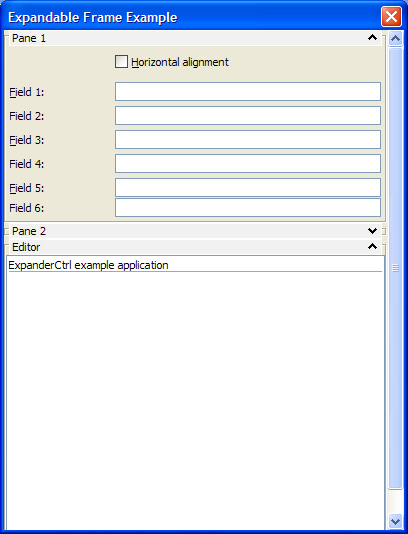
index.php?t=getfile&id=1433&private=0
The style shown is the default, but can be redefined using a Chameleon.

ExpandFrame: A frame that can be applied to any Upp Ctrl and allows the user to hide/show it's child ctrl. A simple example:
TopWindow wnd;
ExpandFrame frame;
DocEdit editor;

frame.Left(editor, 300).SetTitle("Left-aligned editor").Expand();
wnd.AddFrame(frame);
wnd.Run();

ExpanderCtrl: This is container ctrl that allows the grouping of ExpanderFrames with minimal effort from the programmer. A scollbar is automatically provided when necessary.
TopWindow wnd;
ExpanderCtrl expand;
DocEdit editor;

expand.AddExpander(editor, true, 300).SetTitle("Vertical frame container");
wnd.Add(expand.SizePos());
wnd.Run();
See the ExpandFrameExample package for a further example.

James

[Updated on: Tue, 14 October 2008 12:42]

Report message to a moderator

Re: Collapsable/Expandable Frame [message #12021 is a reply to message #12019] Mon, 08 October 2007 14:02 Go to previous messageGo to next message
Oblivion is currently offline  Oblivion
Messages: 1266
Registered: August 2007
Senior Contributor
Nice Job!.

Quote:

I only really use it once and I thought it was a bit of a waste

I don't agree. As far as I see the TestFrame code is also a good tutorial for some undocumented/rareley used features of U++. You've alredy stated that it's free to use, but still I would like to ask for your permission to use this in DockCtrl. (I'm sure that it'll work fine for the AutoHide feature -- my implementation is a bit awkward (thus disabled), but yours is really good Smile.


[Updated on: Mon, 08 October 2007 14:09]

Report message to a moderator

Re: Collapsable/Expandable Frame [message #12023 is a reply to message #12021] Mon, 08 October 2007 15:04 Go to previous messageGo to next message
mrjt is currently offline  mrjt
Messages: 705
Registered: March 2007
Location: London
Contributor
Thank you, it would make me very happy if you used it Smile It was quite easy to write really, since almost all of the code is based on code from other places (SplitterFrame, FlatButton and some of my own). That's the beauty of open source.

I've also just updated the zip to include some extra clipping that I had forgotten about so that the text/image doesn't show through the button when they overlap.
Re: Collapsable/Expandable Frame [message #12062 is a reply to message #12023] Tue, 09 October 2007 23:25 Go to previous messageGo to next message
mirek is currently offline  mirek
Messages: 14290
Registered: November 2005
Ultimate Member
mrjt wrote on Mon, 08 October 2007 09:04

Thank you, it would make me very happy if you used it Smile


Well, I think we perhaps need some "uppext" or maybe "upp3dparty" (or something like that) package for the next release, what you think?

Mirek
Re: Collapsable/Expandable Frame [message #12066 is a reply to message #12062] Tue, 09 October 2007 23:56 Go to previous messageGo to next message
Oblivion is currently offline  Oblivion
Messages: 1266
Registered: August 2007
Senior Contributor
Well, seriously, it would be a good idea Smile
You could at the same time maintain the original upp framework and expand it by selecting/eliminating through and standardizing "3rd-party" widgets?
What would you you think about this, you are the main developer?


[Updated on: Wed, 10 October 2007 00:56]

Report message to a moderator

Re: Collapsable/Expandable Frame [message #12070 is a reply to message #12066] Wed, 10 October 2007 10:45 Go to previous messageGo to next message
mrjt is currently offline  mrjt
Messages: 705
Registered: March 2007
Location: London
Contributor
It's a very good idea.

Not only would it give you a place to put all of the code that has already been contributed by the community, but I expect people would be more likely to produce/release code if it had somewhere to go. Hopefully there will be a lot more of this, the forum certainly seems to be a bit busier than when I started using Upp.

The difficult question is one of maintenance. If there is code contributed by lots of people managing the updates could be a problem.

Also, I've re-uploaded the zip file above as I fixed a minor bug with the Hide/Show behaviour.
Re: Collapsable/Expandable Frame [message #12079 is a reply to message #12070] Wed, 10 October 2007 18:27 Go to previous messageGo to next message
Mindtraveller is currently offline  Mindtraveller
Messages: 917
Registered: August 2007
Location: Russia, Moscow rgn.
Experienced Contributor

I think it`s a good idea. Even more, new "U++: 3rd party" subforum sould be added for user feedback.
Re: Collapsable/Expandable Frame [message #12080 is a reply to message #12079] Wed, 10 October 2007 18:31 Go to previous messageGo to next message
mirek is currently offline  mirek
Messages: 14290
Registered: November 2005
Ultimate Member
Mindtraveller wrote on Wed, 10 October 2007 12:27

I think it`s a good idea. Even more, new "U++: 3rd party" subforum sould be added for user feedback.


Well, "Bazaar" is meant for this... Maybe it should have a better name or description...

Mirek
Re: Collapsable/Expandable Frame [message #12081 is a reply to message #12066] Wed, 10 October 2007 18:33 Go to previous messageGo to next message
mirek is currently offline  mirek
Messages: 14290
Registered: November 2005
Ultimate Member
Oblivion wrote on Tue, 09 October 2007 17:56

Well, seriously, it would be a good idea Smile
You could at the same time maintain the original upp framework and expand it by selecting/eliminating through and standardizing "3rd-party" widgets?
What would you you think about this, you are the main developer?


Well, that is the point I guess Wink

Mirek
Re: Collapsable/Expandable Frame [message #12766 is a reply to message #12081] Thu, 15 November 2007 09:41 Go to previous messageGo to next message
cbpporter is currently offline  cbpporter
Messages: 1428
Registered: September 2007
Ultimate Contributor
I really like your Frame. I needed some simple collapsable panel a while ago and I threw some stuff together to make it, but it has nowhere near the functionality of your's, so I'm going to use it (after I change the skin).

But there is a little bug with the right pane. After the mouse enters the collapse/expand button, when it leaves, the button becomes completely black, unlike the top frame's buttons. This is under Windows Vista.
Re: Collapsable/Expandable Frame [message #12811 is a reply to message #12766] Sun, 18 November 2007 21:43 Go to previous messageGo to next message
cbpporter is currently offline  cbpporter
Messages: 1428
Registered: September 2007
Ultimate Contributor
Can confirm that it happens under XP too.
Re: Collapsable/Expandable Frame [message #12834 is a reply to message #12811] Tue, 20 November 2007 12:59 Go to previous messageGo to next message
mrjt is currently offline  mrjt
Messages: 705
Registered: March 2007
Location: London
Contributor
Hmm. Strange bug that, for me it only seems to effect vertical frames and I can't see any reason why this should be the case.

Anyway, it seems to to do with Upp backpainting and the fix is quite simple. I've uploaded the package again, and incase you've made changes yourself here is the fix:

ExpandFrame::ExpandFrame()
{
	style = NULL;
	child_size = 0;
	childfocus = false;
	ignorefocus = false;
	expand = false;
	type = 0;
	btn.Transparent(); // Bugfix
	Add(btn);
}

All this is for dev-11, as I think it was a new bug from this release, but this should not break nay older version.

And to Mirek: I'm hoping to improve the Chameleon skin for this, but I'm having problems accessing the correct theme settings. Is it possible to expose/access theme settings for window titlebars? I think the settings are available (in Win32 at least), but not currently used by Upp.

James

[Updated on: Wed, 05 December 2007 16:36]

Report message to a moderator

Re: Collapsable/Expandable Frame [message #13011 is a reply to message #12834] Wed, 05 December 2007 12:40 Go to previous messageGo to next message
cbpporter is currently offline  cbpporter
Messages: 1428
Registered: September 2007
Ultimate Contributor
Hi!

I've been working on creating a new skin for you ExpandFrame. I'm not quite done yet, because obtaining a look that is not ugly is hard.

But I've noticed a bug in your code. If you set a frame to bottom position, the Image will disappear once you expand the frame and appear again when you collapse it.

And vertical frames don't display text unless you also set an image, while horizontal ones do.

[Updated on: Wed, 05 December 2007 13:40]

Report message to a moderator

Re: Collapsable/Expandable Frame [message #13023 is a reply to message #13011] Wed, 05 December 2007 16:36 Go to previous messageGo to next message
mrjt is currently offline  mrjt
Messages: 705
Registered: March 2007
Location: London
Contributor
Sorry, both of those were really stupid bugs that I should have found (one was as simple as a misplaced bracket). I've fixed both issues.

Quote:

I'm not quite done yet, because obtaining a look that is not ugly is hard.

I agree, which is part of the reason I didn't release a very good one. I've got one that looks ok in that my app but a general one is difficult.

I'll be happy to change chameleon interface if it would help, and add your skin if possible.

James
Re: Collapsable/Expandable Frame [message #13034 is a reply to message #12019] Thu, 06 December 2007 12:40 Go to previous messageGo to next message
cbpporter is currently offline  cbpporter
Messages: 1428
Registered: September 2007
Ultimate Contributor
I don't really know how a general good design should be, so I adapted you component to have a skin similar to my old collapsible panel. The Button still need some work, but I'll use as it is for now. Maybe I'll add a Windows Explorer panel skin too.

Here's a screenshot with four panels attached to the same control.

index.php?t=getfile&id=879&private=0
  • Attachment: Expand.png
    (Size: 33.73KB, Downloaded 1793 times)
Re: Collapsable/Expandable Frame [message #13053 is a reply to message #13034] Fri, 07 December 2007 10:27 Go to previous messageGo to next message
cbpporter is currently offline  cbpporter
Messages: 1428
Registered: September 2007
Ultimate Contributor
And this is how it looks with OS defined Button skin (it looks better under XP).

index.php?t=getfile&id=880&private=0


Which do you think looks better?
  • Attachment: Expand2.png
    (Size: 46.63KB, Downloaded 1744 times)
Re: Collapsable/Expandable Frame [message #13120 is a reply to message #13053] Thu, 13 December 2007 10:57 Go to previous messageGo to next message
mrjt is currently offline  mrjt
Messages: 705
Registered: March 2007
Location: London
Contributor
Sorry for the delayed reply. Very nice.

I personally think the second verion is both prettier and clearer, partly due to the 3D effect.

I noticed the problem with the background image on the vertical bars, so I've attached a new version with seperate values for vertical and horizontal bars. If you set it like this:
background[2] = RotateClockwise(/*Image from background[0]*/)
background[3] = RotateClockwise(/*Image from background[1]*/)

It should look better.

And you getting the theme information from the OS for that look? If you are I would love see the code, I could use it for a number of other things I'm working on.

James

[Updated on: Thu, 13 December 2007 11:33]

Report message to a moderator

Re: Collapsable/Expandable Frame [message #13139 is a reply to message #13120] Sun, 16 December 2007 02:51 Go to previous messageGo to next message
cbpporter is currently offline  cbpporter
Messages: 1428
Registered: September 2007
Ultimate Contributor
Sorry for the delayed reply too.

Anyway, I cleaned up my code and made some minor visual improvements. It has your skin (StyleDefault), the skin similar to yours but with wide buttons (StyleWide) and a style with a OS determined skin for buttons (StyleButton).

I uploaded the sources if you wish to look over them. I'm using StyleButton, with Arrow(false), so it doesn't draw the arrow and it looks almost 100% as my old panel, only a lot more powerful, so I'm very happy with it.
Re: Collapsable/Expandable Frame [message #13140 is a reply to message #13139] Sun, 16 December 2007 02:54 Go to previous messageGo to next message
cbpporter is currently offline  cbpporter
Messages: 1428
Registered: September 2007
Ultimate Contributor
Here is a screenshot with all three styles. They don't look too good together, but when used only one at I time, I think they are quite versatile.

index.php?t=getfile&id=889&private=0
Re: Collapsable/Expandable Frame [message #17905 is a reply to message #13140] Tue, 02 September 2008 19:20 Go to previous messageGo to next message
mrjt is currently offline  mrjt
Messages: 705
Registered: March 2007
Location: London
Contributor
I've added this package (ExpandFrame) to Bazaar. It now also contains a container Ctrl that allows vertical or horizontal stacking of the frames (with scrolling) and cbporter's much prettier style is now the default.
Re: Collapsable/Expandable Frame [message #17907 is a reply to message #17905] Tue, 02 September 2008 19:28 Go to previous messageGo to next message
cbpporter is currently offline  cbpporter
Messages: 1428
Registered: September 2007
Ultimate Contributor
mrjt wrote on Tue, 02 September 2008 20:20

cbporter's much prettier style is now the default.

Wow, I'm flattered. It's not that pretty anyway Smile. Thinking about it, I think I do have somewhere a partially improved one, because my style did not support images (I was too lazy to hand place the images in my modified layout back then). I'm not sure it's done yet. Or did you already add the missing image support?
Re: Collapsable/Expandable Frame [message #17919 is a reply to message #17907] Tue, 02 September 2008 22:57 Go to previous messageGo to next message
mrjt is currently offline  mrjt
Messages: 705
Registered: March 2007
Location: London
Contributor
cbpporter wrote on Tue, 02 September 2008 18:28

mrjt wrote on Tue, 02 September 2008 20:20

cbporter's much prettier style is now the default.

Wow, I'm flattered. It's not that pretty anyway Smile. Thinking about it, I think I do have somewhere a partially improved one, because my style did not support images (I was too lazy to hand place the images in my modified layout back then). I'm not sure it's done yet. Or did you already add the missing image support?


Yeah, but mine was seriously ugly Smile.

I never tried it with images. If you can dig it out I'll add it in.

Re: Collapsable/Expandable Frame [message #18455 is a reply to message #17905] Wed, 01 October 2008 22:36 Go to previous messageGo to next message
forlano is currently offline  forlano
Messages: 1221
Registered: March 2006
Location: Italy
Senior Contributor
mrjt wrote on Tue, 02 September 2008 19:20

I've added this package (ExpandFrame) to Bazaar. It now also contains a container Ctrl that allows vertical or horizontal stacking of the frames (with scrolling) and cbporter's much prettier style is now the default.


Hello,

I'm interested in this package, but I've not understood where to download the latest version. Is it in SVN?

EDIT: Yes, it is in SVN

Thanks,
Luigi

[Updated on: Wed, 01 October 2008 22:43]

Report message to a moderator

Re: Collapsable/Expandable Frame [message #18457 is a reply to message #18455] Wed, 01 October 2008 23:02 Go to previous messageGo to next message
forlano is currently offline  forlano
Messages: 1221
Registered: March 2006
Location: Italy
Senior Contributor
forlano wrote on Wed, 01 October 2008 22:36

mrjt wrote on Tue, 02 September 2008 19:20

I've added this package (ExpandFrame) to Bazaar. It now also contains a container Ctrl that allows vertical or horizontal stacking of the frames (with scrolling) and cbporter's much prettier style is now the default.


Hello,

I'm interested in this package, but I've not understood where to download the latest version. Is it in SVN?

EDIT: Yes, it is in SVN.


EDIT2: I've downloaded the .deb version but I do not see any test case Rolling Eyes .

Thanks,
Luigi

[Updated on: Thu, 02 October 2008 07:21]

Report message to a moderator

Re: Collapsable/Expandable Frame [message #18463 is a reply to message #18457] Thu, 02 October 2008 07:25 Go to previous messageGo to next message
forlano is currently offline  forlano
Messages: 1221
Registered: March 2006
Location: Italy
Senior Contributor
forlano wrote on Wed, 01 October 2008 23:02

forlano wrote on Wed, 01 October 2008 22:36

mrjt wrote on Tue, 02 September 2008 19:20

I've added this package (ExpandFrame) to Bazaar. It now also contains a container Ctrl that allows vertical or horizontal stacking of the frames (with scrolling) and cbporter's much prettier style is now the default.


Hello,

I'm interested in this package, but I've not understood where to download the latest version. Is it in SVN?

EDIT: Yes, it is in SVN.


EDIT2: I've downloaded the .deb version but I do not see any test case Rolling Eyes .


Hoping to find the ExpandFrame package in the svn for windows I've downloaded it. Unfortunately the whole bazaar assembly is absent.
So, if I have not missed something, the windows and linux distro are not equivalent.
Anyway, where can I download the ExpandFrame package with a test case?
Thanks,
Luigi
Re: Collapsable/Expandable Frame [message #18644 is a reply to message #18463] Tue, 14 October 2008 12:41 Go to previous messageGo to next message
mrjt is currently offline  mrjt
Messages: 705
Registered: March 2007
Location: London
Contributor
forlano wrote:


Hoping to find the ExpandFrame package in the svn for windows I've downloaded it. Unfortunately the whole bazaar assembly is absent.
So, if I have not missed something, the windows and linux distro are not equivalent.
Anyway, where can I download the ExpandFrame package with a test case?
Thanks,
Luigi
Apologies for the delay. There never was a proper test-case before, so I've attached a zip containing both the source and an example (also added to SVN).

I'm not sure why the Bazaar assembly is missing from the SVN, it's certainly in the one I use. Is the actual Bazaar sub-directory missing?
Re: Collapsable/Expandable Frame [message #18646 is a reply to message #18644] Tue, 14 October 2008 13:17 Go to previous messageGo to next message
forlano is currently offline  forlano
Messages: 1221
Registered: March 2006
Location: Italy
Senior Contributor
mrjt wrote on Tue, 14 October 2008 12:41

Apologies for the delay. There never was a proper test-case before, so I've attached a zip containing both the source and an example (also added to SVN).

I'm not sure why the Bazaar assembly is missing from the SVN, it's certainly in the one I use. Is the actual Bazaar sub-directory missing?


Hi,

I have downloaded from http://www.ultimatepp.org/svnbuilds the latest svn (is that the place where to download the current distro with your last update? I am afraid not). I found the baazar folder but it didn't appeared in theide. I've added a bazaar.var file in the root directory and everything was OK. So seems that only this file is missing in SVN.

Thanks,
Luigi

[Updated on: Tue, 14 October 2008 13:21]

Report message to a moderator

Re: Collapsable/Expandable Frame [message #18648 is a reply to message #18646] Tue, 14 October 2008 13:37 Go to previous messageGo to next message
mrjt is currently offline  mrjt
Messages: 705
Registered: March 2007
Location: London
Contributor
To be honest, I'm a little confused about what happens with the SVN these days, I just update to wherever I'm told and generally only use the last proper release.

The downloads at svnbuilds are obviously somewhat out of date as the last update was on the 30th of September. If you want to get up-to-the minute updates you have to checkout directly from the repository.

There was some discussion about what to do about the Bazaar assembly, I don't know what conclusion was reached but having it completely missing doesn't seem right.

And I realised I forgot the .zip, so here you are.
Re: Collapsable/Expandable Frame [message #25318 is a reply to message #18648] Wed, 17 February 2010 00:25 Go to previous messageGo to next message
sergeynikitin is currently offline  sergeynikitin
Messages: 748
Registered: January 2008
Location: Moscow, Russia
Contributor

If I do a lot of sections / frames so that the scrollbar appears, I try to navigate through the fields using Tab / Shift + Tab. When I move below the scrolling region, the frame does not scroll automatically, and further movement between the fields I can not see.
To see at what I field, and generally to see this field I have to help with the mouse, what is wrong. I believe that this package is interesting primarily for editing large forms, which can not be placed entirely on the screen.

How to automatically move the scrollbar, using the Tab / Shift + Tab, the current field would be visible all the time?


SergeyNikitin<U++>( linux, wine )
{
    under( Ubuntu || Debian || Raspbian );
}
Re: Collapsable/Expandable Frame [message #25350 is a reply to message #25318] Thu, 18 February 2010 02:40 Go to previous messageGo to next message
sergeynikitin is currently offline  sergeynikitin
Messages: 748
Registered: January 2008
Location: Moscow, Russia
Contributor

SOLVED. I'll try to propose modifications of package "ExpandFrame".

SergeyNikitin<U++>( linux, wine )
{
    under( Ubuntu || Debian || Raspbian );
}
Re: Collapsable/Expandable Frame [message #25610 is a reply to message #25350] Wed, 03 March 2010 18:36 Go to previous messageGo to next message
mrjt is currently offline  mrjt
Messages: 705
Registered: March 2007
Location: London
Contributor
Cool, I hadn't come across that problem Smile I don't have time to do it myself, but it should be possible with something like ChildGotFocus?

Maybe also some custom focus shifting code that can automatically open closed frames?
Re: Collapsable/Expandable Frame [message #25619 is a reply to message #25610] Thu, 04 March 2010 00:00 Go to previous messageGo to next message
sergeynikitin is currently offline  sergeynikitin
Messages: 748
Registered: January 2008
Location: Moscow, Russia
Contributor

The idea of opening / closing frame is interesting, but I did not really get what you suggest. If possible, tell me more how it should look like.

By the way I would have uploaded the current version, but it seemed wrong to upload the product, the author of which I am not.

PS
If you do not mind I put it up in SVN. (since I started its intensive use)

PSPS
Or I can upload it under a different name.


SergeyNikitin<U++>( linux, wine )
{
    under( Ubuntu || Debian || Raspbian );
}
Re: Collapsable/Expandable Frame [message #25627 is a reply to message #25619] Thu, 04 March 2010 15:11 Go to previous messageGo to next message
mrjt is currently offline  mrjt
Messages: 705
Registered: March 2007
Location: London
Contributor
Please upload it to the SVN. And add your name as and Author/Contributor in the package comments if you like.

Re: Collapsable/Expandable Frame [message #25629 is a reply to message #25627] Thu, 04 March 2010 16:33 Go to previous messageGo to next message
sergeynikitin is currently offline  sergeynikitin
Messages: 748
Registered: January 2008
Location: Moscow, Russia
Contributor

OK, thanx.

SergeyNikitin<U++>( linux, wine )
{
    under( Ubuntu || Debian || Raspbian );
}
A small bug. [message #40696 is a reply to message #12019] Wed, 04 September 2013 09:09 Go to previous message
rxantos is currently offline  rxantos
Messages: 73
Registered: October 2011
Member
When using the Flat Style, the control crashes if the frame is expanded. This happens because the borders are set to NULL on the flat style.

to fix it change in ExpandFrame::BorderSz()
int sz = (int)(uintptr_t)(handle.style->border[0][0]);


to
int sz = (handle.style->border[0]) ? (int)(uintptr_t)(handle.style->border[0][0]) : 0;

Previous Topic: Added single and double linked lists
Next Topic: AESStream MSCx66 error and fix
Goto Forum:


Current Time: Tue Apr 28 21:33:17 GMT+2 2026

Total time taken to generate the page: 0.01437 seconds


