Home » U++ Library support » Look and Chameleon Technology » A little theming
|
|
|
|
|
|
|
|
|
|
|
|
|
|
|
|
| Re: A little theming [message #18515 is a reply to message #18493] |
Mon, 06 October 2008 08:44   |
 cbpporter
Messages: 1428
Registered: September 2007
|
Ultimate Contributor |
|
|
I did a little color theme change because the previous one was a little too dark and too gray. This one is more lively I think. I attached a small sample, only with two widgets (the rest are yet to be ported to the new color scheme).
I have a small question: when I use tab to cycle through the widgets in the window, the style for buttons gets overridden with the default Windows style for focused buttons, with a little dotted frame and Windows skin. How can I change that?
edit: deleted old exe
[Updated on: Sat, 11 October 2008 19:24] Report message to a moderator |
|
|
|
|
|
|
|
|
|
| Re: A little theming [message #18521 is a reply to message #18520] |
Mon, 06 October 2008 18:31 |
cbpporter
Messages: 1428
Registered: September 2007
|
Ultimate Contributor |
|
|
So here is the next preview. It is starting to really shape up.
Disabled scrollbars are a little bit ugly because I can't get the desired effect with hotspots yet. Also, it would be nice if the Style could specify if a disabled scrollbar shows it's thumb or not.
DropList skin is not complete.
EditFields have some problem with their border, because I can't figure out yet how to resize it. I need to define border sizes through chameleon.
And DocEdit uses yet another style of code to draw it's border, so I'm no where near as to touching it's style. But the scrollbar inside works with new skin.
Also, modifying Button::StyleScroll does not affect any scrollbars. Am I correct in assuming that I need to initialize it with the ScrollBar style?
Another question: what are ScrollBar::Style.left2, up2, etc. used for? I only modified the fields that don't end in 2.
Edit: removed old exe.
[Updated on: Thu, 16 October 2008 22:46] Report message to a moderator |
|
|
|
|
|
|
|
| Re: A little theming [message #18602 is a reply to message #18521] |
Sat, 11 October 2008 08:29 |
 |
mirek
Messages: 14290
Registered: November 2005
|
Ultimate Member |
|
|
| cbpporter wrote on Mon, 06 October 2008 12:31 |
So here is the next preview. It is starting to really shape up.
Disabled scrollbars are a little bit ugly because I can't get the desired effect with hotspots yet. Also, it would be nice if the Style could specify if a disabled scrollbar shows it's thumb or not.
DropList skin is not complete.
EditFields have some problem with their border, because I can't figure out yet how to resize it. I need to define border sizes through chameleon.
|
I cannot help without seeing the code 
| Quote: |
Also, modifying Button::StyleScroll does not affect any scrollbars. Am I correct in assuming that I need to initialize it with the ScrollBar style?
|
StyleScroll is now deprecated. It was used to paint scrollbar buttons, which was enough for XP, but not for Linux themes.
| Quote: |
Another question: what are ScrollBar::Style.left2, up2, etc. used for? I only modified the fields that don't end in 2.
|
Some GTK themes have secondary buttons (usually two up buttons, second one close to down button).
You can activate them using 'isup2' etc...
Mirek
P.S.: I hope you could write some T++ about theming when you are finished
|
|
|
|
| Re: A little theming [message #18607 is a reply to message #18602] |
Sat, 11 October 2008 19:46 |
cbpporter
Messages: 1428
Registered: September 2007
|
Ultimate Contributor |
|
|
| luzr wrote on Sat, 11 October 2008 09:29 |
| cbpporter wrote on Mon, 06 October 2008 12:31 |
So here is the next preview. It is starting to really shape up.
Disabled scrollbars are a little bit ugly because I can't get the desired effect with hotspots yet. Also, it would be nice if the Style could specify if a disabled scrollbar shows it's thumb or not.
DropList skin is not complete.
EditFields have some problem with their border, because I can't figure out yet how to resize it. I need to define border sizes through chameleon.
|
I cannot help without seeing the code
|
Hmmm, I thought that I posted a test case with source. Guess I forgot. Sorry. Anyway, wait a little (I still need some days) and I'll post something working so that everybody can start using it. Just need to iron out some details first. My approach is to have a ChameleonTheme class which can load the theming info from disk. It does the streaming itself for each Style class for now, but in the future I hope we can move streaming to each style. Also, the theme can be embedded in the exe with binary inclusion mechanism if external file is not desired. Another advantage is that we can keep multiple themes in memory, and mix and match.
Those comments about what is wrong with the theme right now where more given as information for people downloading the exe and see something wrong or ugly, not to ask help.
Except for the EditField question. I think that can be answered without seeing any of my code, because I haven’t done anything to it: how can I change the border size of EditFields through Chameleon (not sure if possible right now). And except setting thumb visibility for disabled ScrollBars.
| Quote: |
StyleScroll is now deprecated. It was used to paint scrollbar buttons, which was enough for XP, but not for Linux themes.
|
OK, I'll initialize it with ScrollBar style to keep some compatibility.
| Quote: |
You can activate them using 'isup2' etc...
|
Great, I always wanted that second down button under Windows!
| Quote: |
P.S.: I hope you could write some T++ about theming when you are finished
|
Sure, that shouldn’t be a problem. By the time I finish this theme, I'm sure to have the knowledge for that  . But there are some areas which should be improved before documenting, but we'll get to that later. . But there are some areas which should be improved before documenting, but we'll get to that later.
|
|
|
|
|
|
|
|
|
|
|
|
|
|
| Re: A little theming [message #18645 is a reply to message #18638] |
Tue, 14 October 2008 13:14 |
mrjt
Messages: 705
Registered: March 2007
Location: London
|
Contributor |
|
|
I think the problem is with your serialization. If you apply the Theme straight away after creating it (before saving and loading it) it works. My guess is that Upp somehow detects that the style is corrupt/invalid and falls back to the default theme. Which would be incredibly clever if true
I don't think you can just serialize Values the way you are attempting to, not for Images and the other Chameloen LookWith* types anyway.
[Updated on: Tue, 14 October 2008 13:15] Report message to a moderator |
|
|
|
|
|
| Re: A little theming [message #18649 is a reply to message #18647] |
Tue, 14 October 2008 14:39 |
mrjt
Messages: 705
Registered: March 2007
Location: London
|
Contributor |
|
|
Well, I've bodged it. The problems:
1- As above, you have to add code to serialize the look based on it's type.
2- The reason the style was being ignored was that you can't just create a ChStyle and expect it to work, it needs to registered properly with Upp. This is normally done by the CH_STYLE macro, but you can also do it by copying an existing ChStyle before altering it. It may also be possible to use ChRegisterStyle__ directly.
Below is the code I used. There is a bit more bodging with StringStreams because for some reason PNGRaster and PNGEncoder are slightly incompatible.
Personally I would avoid supporting saving themes, and just create a sensible file format than can be edited externally.
enum {
	ImageLookType = 0,
	ColorLookType
};

void SerializeLook(Stream &s, Value &v) {
	int type;
	if (s.IsStoring()) {
		if(IsType<Color>(v)) {
			Color c = v;
			type = ColorLookType;
			s % type % c;
		}
		else if(IsType<Image>(v)) {
			type = ImageLookType;
			s % type;
			StringStream png;
			Image img = v;
			PNGEncoder().Save(png, img);
			s % (String)png;
			Point p1 = img.GetHotSpot();
			Point p2 = img.Get2ndSpot();
			s % p1 % p2;
		}
	}
	else {
		s % type;
		if (type == ImageLookType) {
			String png;
			s % png;
			StringStream str(png);
			Image img = PNGRaster().Load(str);
			ASSERT(!IsNull(img));
			Point p1;
			Point p2;
			s % p1 % p2;
			ImageBuffer ib(img);
			ib.SetHotSpot(p1);
			ib.Set2ndSpot(p2);
			v = (Image)ib;
		}
		else if (type == ColorLookType) {
			Color c;
			s % c;
			ASSERT(!IsNull(c));
			v = c;
		}
	}
};

void Theme::ButtonStyle::Serialize(Stream& s)
{
	if (s.IsLoading())
		d = Button::StyleNormal(); // Make sure style is initialised
	s % d.cancel % d.exit % d.focusmargin;
	for (int i = 0; i < 4; i++)	{
		SerializeLook(s, d.look[i]);
	}
}
[Updated on: Tue, 14 October 2008 14:43] Report message to a moderator |
|
|
|
| Re: A little theming [message #18667 is a reply to message #18649] |
Wed, 15 October 2008 17:07 |
cbpporter
Messages: 1428
Registered: September 2007
|
Ultimate Contributor |
|
|
| mrjt wrote on Tue, 14 October 2008 15:39 |
Well, I've bodged it. The problems:
2- The reason the style was being ignored was that you can't just create a ChStyle and expect it to work, it needs to registered properly with Upp. This is normally done by the CH_STYLE macro, but you can also do it by copying an existing ChStyle before altering it. It may also be possible to use ChRegisterStyle__ directly.
	if (s.IsLoading())
		d = Button::StyleNormal(); // Make sure style is initialised
}
|
Thanks, that solved it! Not I can edit the styles again. I had no idea about the need to register styles. Just when I thought that Chameleon is done with it's surprises.
| Quote: |
Personally I would avoid supporting saving themes, and just create a sensible file format than can be edited externally.
|
A more sensible format would be better than raw serializing, but I don't really know what to use. A ZIP with PNGs and a XML comes to mind, but that is a little too much work for my current needs. Maybe if some day we'll want official explicit theme support, I'll rewrite the thing to be a much nicer solution. Right now I'll focus on theming Toolbar and then get a preview out with code, which I'll show to the author of the original theme also, so he can warn me if I've completely butchered the look .
| Quote: |
There is a bit more bodging with StringStreams because for some reason PNGRaster and PNGEncoder are slightly incompatible.
|
What do you mean by that?
|
|
|
|
| Re: A little theming [message #18669 is a reply to message #18667] |
Wed, 15 October 2008 17:41 |
mrjt
Messages: 705
Registered: March 2007
Location: London
|
Contributor |
|
|
| cbpporter wrote on Wed, 15 October 2008 16:07 |
| Quote: |
There is a bit more bodging with StringStreams because for some reason PNGRaster and PNGEncoder are slightly incompatible.
|
What do you mean by that?
|
PNGRaster doesn't seem to read quite all of the data that's written by PNGEncoder:
	int beefin = 0xDEADBEEF;
	int beefout;
	StringStream s;

	PNGEncoder().Save(s, CtrlImg::HelpCursor1());
	s % beefin;

	s.SetLoading();
	s.Seek(0);
	Image img = PNGRaster().Load(s);
	s % beefout;

	ASSERT(!IsNull(img));
	ASSERT(beefin == beefout);
In this example the Image is read correctly but 'beefin == beefout' asserts because beefout is read from the incorrect point in the stream.
I avoided this in the code above by encoding the png into a String first so that you can guarantee the correct number of bytes are read, but really it should be fixed.
Edit: Tested on 2008.1
[Updated on: Wed, 15 October 2008 17:47] Report message to a moderator |
|
|
|
|
|
|
|
|
|
| Re: A little theming [message #18707 is a reply to message #18687] |
Fri, 17 October 2008 18:56 |
cbpporter
Messages: 1428
Registered: September 2007
|
Ultimate Contributor |
|
|
So here is a first version of the theme. It is currently alpha quality only, so don't except too much from it. The format under which themes are stored will definitely change to something more robust and hopefully more editable. The interface will also surely change. Ignore all those nested classes. They are simple wrappers around the normal Styles, because normal Styles don't support any form of streaming and I can't change change their implementation to allow streaming.
The attachment contains two packages. The first one, Skulpture, creates the theme and exports it. You will need to run it once to create the theme. Just change the output path to something better than "C:\".
The second package is the Theme itself. This is the one you need. Add it to your project, and do something like:
Theme m;
LoadFromFile(m, "c:\\test.utheme");
m.Apply();
The theme covers buttons, default buttons, options, switches, tabs, edit fields, drop lists, menus and toolbars. Rest to come in future revisions.
TabCtrl is not perfect yet. A small change to it's paint is needed to allow background look for tab area.
And I still couldn't figure out how to change EditField border sizes.
|
|
|
|
| Re: A little theming [message #18712 is a reply to message #18707] |
Sat, 18 October 2008 09:10 |
chickenk
Messages: 171
Registered: May 2007
Location: Grenoble, France
|
Experienced Member |
|
|
Hello,
thanks for this theme. I tried to compile and test it on Linux. 2 remarks :
1. The tabs seems to go down a few pixels more than they should, see the picture below:
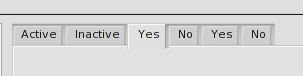
2. The Stream operator% overloading seems to make gcc unhappy. The prototype is: Stream& Stream::operator%(String& s);
Since it is passed a reference, the parameter must be a real allocated variable (at least it seems to be what gcc wants). In file Theme.cpp, line 27, the code raises an error from gcc.
I could correct it by first creating a string variable from the 'png' StringStream, then passing its reference to the operator, like this : String s_png = (String)png;
s % s_png;
Is there a better way to achieve this? Or a GCC option allowing the original contruction ? Can you confirm you compiled this code with MSVC and not mingw ?
Thanks,
Lionel
|
|
|
|
|
|
|
|
|
|
|
|
| Re: A little theming [message #18814 is a reply to message #18812] |
Thu, 23 October 2008 21:06 |
|
|
Beautiful. I use it in my own applications. I see you styled arrayctrl and multibutton. That's great. The only strange place is for example dropdown button of font height combo on the toolbar. It's too big. But maybe it's not a fault of the theme. Must check this out.
IMO the default button soft border could be blue. I think it would add some "light" to the theme. I hope you will experiment with it
[Updated on: Thu, 23 October 2008 21:07] Report message to a moderator |
|
|
|
|
|
| Re: A little theming [message #18818 is a reply to message #18816] |
Fri, 24 October 2008 11:01 |
cbpporter
Messages: 1428
Registered: September 2007
|
Ultimate Contributor |
|
|
| unodgs wrote on Thu, 23 October 2008 22:06 |
Beautiful. I use it in my own applications. I see you styled arrayctrl and multibutton. That's great. The only strange place is for example dropdown button of font height combo on the toolbar. It's too big. But maybe it's not a fault of the theme. Must check this out.
IMO the default button soft border could be blue. I think it would add some "light" to the theme. I hope you will experiment with it
|
I'm glad you like it!
Yes, I skinned MultiButton. I had to make a huge compromise with it, because MultiButton style and rules are quite complex, and my patience with endless trial & error is limited. But surprisingly, it turned out quite close to the original.
Array control is far from done, it is lacking the smooth shadows that are typical for this theme. But I will get there.
I know about DropChoice being too big. It stands out really bad, but I couldn't figure out a way to make it behave the way I want. Again, a lot of trial & error.
And there is still the huge problem with EditField border. Depending on Linux theme, it adds an extra border. Also under Windows. I've spent about six hours in the last two days trying to figure out the code, and each time I found something that looked like it would be responsible for the extra border, I hit a dead end. For this screen shot I choose a theme that has no such issues. Should I have chosen a different theme, you could have seen the extra border.
I'll work hard to get it to a beta level this weekend.
PS: How's your Oxygen style progressing? With two high quality custom themes, and one reproducing the “modern” Windows look (like in ToolKit Pro), we will have great eye-candy possibilities.
| tojocky wrote on Fri, 24 October 2008 08:59 |
What about to create a visual theme editor mechanism?
I thing that will be greater!
|
That would be great, but I don't know how it could be possible. When I started doing this theme, I thought that all that working with the images and fiddling to get shadows perfect would be horrible. But instead, that was the easies part. Figuring out how to set thing inn Chameleon so that it looks the same under all platforms was/is the hard part. It would be even harder to incorporate that into a visual editor. But it is something to think about. If you have any ideas, please share.
OTOH, I've been thinking a lot about the previous idea with an achieve with and XML and a bunch of pictures. It would make the theme more editable by the non technical people. Sure, TheIDE's image editor is quite excellent after you get used tot it (but I did manage to crash it once), but you have to write code to apply those images and extra information to a theme and export it as a shareable binary. With and XML, people could edit it easily and use their favorite image editing program. Yet, U++ theming engine is not really targeted by anybody else than us, and I think we can handle a little code .
|
|
|
|
| Re: A little theming [message #18820 is a reply to message #18818] |
Fri, 24 October 2008 14:53 |
|
|
| cbpporter wrote on Fri, 24 October 2008 05:01 |
Array control is far from done, it is lacking the smooth shadows that are typical for this theme. But I will get there.
|
I used skulpture button image to draw grid ctrl. I think it looks very good:

| Quote: |
And there is still the huge problem with EditField border. Depending on Linux theme, it adds an extra border. Also under Windows. I've spent about six hours in the last two days trying to figure out the code, and each time I found something that looked like it would be responsible for the extra border, I hit a dead end. For this screen shot I choose a theme that has no such issues. Should I have chosen a different theme, you could have seen the extra border.
|
yes, edit field frame it's a complicated piece of code. Mirek worked on it quite long.
| Quote: |
I'll work hard to get it to a beta level this weekend.
|
Great! But maybe could you start using our svn?
| Quote: |
PS: How's your Oxygen style progressing? With two high quality custom themes, and one reproducing the “modern” Windows look (like in ToolKit Pro), we will have great eye-candy possibilities.
|
The problem is I have no time right now, as always (one commercial project is almost finished the next is coming..), but I'll try to get back to it ASAP.
-
 Attachment: grid.png
(Size: 1.72KB, Downloaded 1582 times)
|
|
|
|
Goto Forum:
Current Time: Sun May 03 07:21:27 GMT+2 2026
Total time taken to generate the page: 0.01154 seconds
|
 U++ framework
 Search
 Help
Help Members
 Register
 Login
Login Home
Home


 .
.


