Home » U++ Library support » ArrayCtrl, HeaderCtrl & GridCtrl » Problem with Drag&Drop in ArrayCtrl
|
|
|
|
|
|
|
|
| Re: Problem with Drag&Drop in ArrayCtrl [message #22556 is a reply to message #22552] |
Sun, 26 July 2009 23:50   |
 |
 koldo
koldo
Messages: 3458
Registered: August 2008
|
Senior Veteran |
|
|
| luzr wrote on Sun, 26 July 2009 17:28 |
| koldo wrote on Sat, 18 July 2009 07:51 |
More simple:
Is it possible to update/refresh only one row in an ArrayCtrl ?
Best regards
Koldo
|
void ArrayCtrl::RefreshRow(int i);
|
Hello Mirek
Unfortunately RefreshRow() does not repaint the row.
To force the repaint I have to scroll up and down and then I see the row repainted.
Using instead UpdateRefresh() repaints the rows properly, but it seems it cancels the Drag & Drop possibility.
It is difficult to prepare a sample case as the application is rather big. Here I put some details:
The variable is declared under the TopWindow class as
The layout is in:
	filesList.AddColumn("Thumbnail").SetDisplay(Single<DisplayThumbnail>()).HeaderTab().Min(50);
	filesList.AddColumn("Properties").HeaderTab().Min(50);
	filesList.MultiSelect().HeaderObject().Absolute().Clipboard();
	filesList.HeaderTab(0).SetRatio(10);
	filesList.ColumnWidths("100 100");
	filesList.WhenDropInsert = 	THISBACK(DropInsertFilelist);
	filesList.WhenDrag = 		THISBACK(DragFilelist);
	filesList.WhenDrop = 		THISBACK(DropFilelist);
DisplayThumbnail declaration:
struct DisplayThumbnail : public Display {
    virtual void Paint(Draw& w, const Rect& r, const Value& val, Color ink, Color paper, dword style) const;
};
And Drag & Drop functions
	void DropFilelist(PasteClip& d)
	{
		if(AcceptText(d)) {
			filesList.Add(GetString(d), GetString(d));
			filesList.SetFocus();
		}
	}
	void DropInsertFilelist(int line, PasteClip& d)
	{
		if(AcceptInternal<ArrayCtrl>(d, "array")) {
			filesList.InsertDrop(line, d);
			filesList.SetFocus();
			filesList.SetLineCy(70);
		}
	}
	void DragFilelist()
	{
		filesList.DoDragAndDrop(InternalClip(filesList, "array"));
	}
Best regards
Koldo
Best regards
Iñaki
|
|
|
|
|
|
|
|
| Re: Problem with Drag&Drop in ArrayCtrl [message #22571 is a reply to message #22559] |
Mon, 27 July 2009 17:20 |
 |
mirek
Messages: 14290
Registered: November 2005
|
Ultimate Member |
|
|
| koldo wrote on Mon, 27 July 2009 03:03 |
Hello Mirek
This is:
void MainWindow::Timer()
{
	if (timerOn)
		return;
	timerOn = true;

	for (int i = 0; i < thumbnails.GetCount(); ++i) {
		if (!thumbnails[i].loaded) {
			if (thumbnails[i].type == TYPE_IMAGE)
				LoadThumbnail(i);
			else if (thumbnails[i].type == TYPE_VIDEO)
				LoadThumbnailVideo(i);
			filesList.UpdateRefresh();
			//filesList.RefreshRow(FindThumbnail(thumbnails[i].fileName));
			break;
		}
	}
	timerOn = false;
}
thumbnails array has all the thumbnailed images. This loops opens the first not opened yet.
With this when you open a folder all file names are viewed and every 200ms a thumbnail is loaded and viewed, similar to Nautilus in Gnome.
Best regards
Koldo
|
And LoadThumbnail* ? (I need to see commands that you use to alter ArrayCtrl content...).
BTW, I believe RefreshRow works as it should. Any chance the problem is in FindThumbnail?
(In fact, using normal "Set", you do not even need RefreshRow - it is called implicitly).
Mirek
[Updated on: Mon, 27 July 2009 17:23] Report message to a moderator |
|
|
|
|
|
| Re: Problem with Drag&Drop in ArrayCtrl [message #22577 is a reply to message #22574] |
Tue, 28 July 2009 03:06 |
|
mirek
Messages: 14290
Registered: November 2005
|
Ultimate Member |
|
|
I have tried to create a testcase:
#include <CtrlLib/CtrlLib.h>

using namespace Upp;

struct TestDisplay : Display {
	virtual void Paint(Draw& w, const Rect& r, const Value& q, Color ink, Color paper, dword style) const
	{
		Display::Paint(w, r, AsString(q) + " " + AsString(GetTickCount()),
		               ink, paper, style);
	}
};

struct App : TopWindow {
	ArrayCtrl a, b;
	Splitter  s;
	TimeCallback tb;

	void Timer()
	{
		a.UpdateRefresh();
	}

	void DnD(PasteClip& d)
	{
		if(AcceptText(d)) {
			a.Add(GetString(d), GetString(d));
			a.SetFocus();
		}
	}

	void DnDInsert(int line, PasteClip& d)
	{
		if(AcceptInternal<ArrayCtrl>(d, "array")) {
			a.InsertDrop(line, d);
			a.SetFocus();
		}
		if(AcceptText(d)) {
			a.Insert(line);
			a.Set(line, 0, GetString(d));
			a.SetCursor(line);
			a.SetFocus();
		}
	}

	void DnDInsertB(int line, PasteClip& d)
	{
		if(AcceptInternal<ArrayCtrl>(d, "array")) {
			const ArrayCtrl& src = GetInternal<ArrayCtrl>(d);
			bool self = &src == &b;
			Vector< Vector<Value> > data;
			for(int i = 0; i < src.GetCount(); i++)
				if(src.IsSel(i)) {
					Value v = src.Get(i, 0);
					data.Add().Add(IsNumber(v) ? FormatIntRoman((int)src.Get(i, 0)) : String(v));
				}
			b.InsertDrop(line, data, d, self);
			b.SetFocus();
		}
	}

	void Drag()
	{
		if(a.DoDragAndDrop(InternalClip(a, "array")) == DND_MOVE)
			a.RemoveSelection();
	}

	void DragB()
	{
		if(b.DoDragAndDrop(InternalClip(b, "array"), b.GetDragSample()) == DND_MOVE)
			b.RemoveSelection();
	}

	typedef App CLASSNAME;

	App() {
		a.AddColumn("You can paste the text here too").SetDisplay(Single<TestDisplay>());
		a.MultiSelect();
		a.WhenDropInsert = THISBACK(DnDInsert);
		a.WhenDrop = THISBACK(DnD);
		a.WhenDrag = THISBACK(Drag);

		b.AddColumn("Roman numbers");
		b.MultiSelect();
		b.WhenDropInsert = THISBACK(DnDInsertB);
		b.WhenDrag = THISBACK(DragB);

		Add(s.Horz(a, b));
		for(int i = 0; i < 200; i++) {
			a.Add(i);
			b.Add(FormatIntRoman(i, true));
		}
		Sizeable();

		tb.Set(-200, THISBACK(Timer));
	}
};

GUI_APP_MAIN
{
	App().Run();
}
I believe this is as close as possible to your app - and it seems to work quite fine both in linux and win32.
Mirek
|
|
|
|
| Re: Problem with Drag&Drop in ArrayCtrl [message #22580 is a reply to message #22577] |
Tue, 28 July 2009 09:49 |
|
koldo
Messages: 3458
Registered: August 2008
|
Senior Veteran |
|
|
Hello Mirek
Thank you for the testcase. I have changed it to show the problem.
RefreshRow works well but Drag & Drop does not work while there are thumbnails to be loaded.
To run it put the file "c:\\demo.jpg" that will be the thumbnail to be loaded.
Perhaps to do this right would I have to use multitasking ?
Best regards
Koldo
#include <CtrlLib/CtrlLib.h>

using namespace Upp;

Array <Image> imgLst;

struct TestDisplay : Display {
	virtual void Paint(Draw& w, const Rect& r, const Value& q, Color ink, Color paper, dword style) const
	{
		w.DrawRect(r, paper);
		int id = q.Is<int>() ? q : -1;
		if (id >= 0 && id < imgLst.GetCount()) {
			Rect rect(r.left, r.top, r.left+70, r.top+70);
			if (imgLst[id])
				w.DrawImage(rect, imgLst[id]);
			else
				Display::Paint(w, r, "Image not loaded", ink, paper, style);
		} else
			Display::Paint(w, r, "Image not available", ink, paper, style);
	}
};

struct App : TopWindow {
	ArrayCtrl a, b;
	Splitter  s;
	TimeCallback tb;

	void Timer()
	{
		for (int i = 0; i < imgLst.GetCount(); ++i) {
			if (!imgLst[i]) {
				imgLst[i] = StreamRaster::LoadFileAny("c:\\demo.jpg");
				a.RefreshRow(i);
				return;
			}
		}
	}

	void DnD(PasteClip& d)
	{
		if(AcceptText(d)) {
			a.Add(GetString(d), GetString(d));
			a.SetFocus();
		}
	}

	void DnDInsert(int line, PasteClip& d)
	{
		if(AcceptInternal<ArrayCtrl>(d, "array")) {
			a.InsertDrop(line, d);
			a.SetFocus();
		}
		if(AcceptText(d)) {
			a.Insert(line);
			a.Set(line, 0, GetString(d));
			a.SetCursor(line);
			a.SetFocus();
		}
	}

	void DnDInsertB(int line, PasteClip& d)
	{
		if(AcceptInternal<ArrayCtrl>(d, "array")) {
			const ArrayCtrl& src = GetInternal<ArrayCtrl>(d);
			bool self = &src == &b;
			Vector< Vector<Value> > data;
			for(int i = 0; i < src.GetCount(); i++)
				if(src.IsSel(i)) {
					Value v = src.Get(i, 0);
					data.Add().Add(IsNumber(v) ? FormatIntRoman((int)src.Get(i, 0)) : String(v));
				}
			b.InsertDrop(line, data, d, self);
			b.SetFocus();
		}
	}

	void Drag()
	{
		if(a.DoDragAndDrop(InternalClip(a, "array")) == DND_MOVE)
			a.RemoveSelection();
	}

	void DragB()
	{
		if(b.DoDragAndDrop(InternalClip(b, "array"), b.GetDragSample()) == DND_MOVE)
			b.RemoveSelection();
	}

	typedef App CLASSNAME;

	App() {
		a.AddColumn("You can paste the text here too").SetDisplay(Single<TestDisplay>());
		a.MultiSelect();
		a.WhenDropInsert = THISBACK(DnDInsert);
		a.WhenDrop = THISBACK(DnD);
		a.WhenDrag = THISBACK(Drag);
		a.SetLineCy(70);

		b.AddColumn("Roman numbers");
		b.MultiSelect();
		b.WhenDropInsert = THISBACK(DnDInsertB);
		b.WhenDrag = THISBACK(DragB);

		Add(s.Horz(a, b));
		for(int i = 0; i < 40; i++) {
			a.Add(i);
			imgLst.Add();
			b.Add(FormatIntRoman(i, true));
		}
		Sizeable();

		tb.Set(-200, THISBACK(Timer));
	}
};

GUI_APP_MAIN
{
	App().Run();
}
Best regards
Iñaki
|
|
|
|
|
|
|
|
|
|
|
|
|
|
|
|
|
|
|
|
| Re: Problem with Drag&Drop in ArrayCtrl [message #22599 is a reply to message #22596] |
Wed, 29 July 2009 13:16 |
|
koldo
Messages: 3458
Registered: August 2008
|
Senior Veteran |
|
|
Hello Mirek
I have tried both samples GuiMT amd GuiLock.
GuiLock is simpler but I have realized that while moving application window GuiLock gets stucked but GuiMT follows refreshing the window. This is a nice behaviour. What could it be ?
In the same GuiMT changing
PostCallback(callback2(f.gui, &Divisors::ShowResult, f.line, "working..." + r1 + r2));
with
f.gui->table.Set(f.line, 1, "working..." + r1 + r2));
The program works but GuiMT gets stucked.
Best regards
Koldo
Addendum:
I have tested both in linux and the window is refreshed while it is moved
Addendum 2:
Compiled with MinGW GUIMT works but GUILock gets hanged with this message "Assertion failed in C:\upp\uppsrc\Draw\DrawLock.cpp, line 28 sGLockLevel > 0".
In post http://www.ultimatepp.org/forum/index.php?t=msg&th=4145& amp;start=0& Mirek says
| Quote: |
You cannot do MT in mingw.
|
Is this just temporal ?. If not I think it would have to be indicated in the documentation
Best regards
Iñaki
[Updated on: Fri, 31 July 2009 17:16] Report message to a moderator |
|
|
|
|
|
| Re: Problem with Drag&Drop in ArrayCtrl [message #22774 is a reply to message #22608] |
Thu, 13 August 2009 13:42 |
|
koldo
Messages: 3458
Registered: August 2008
|
Senior Veteran |
|
|
Hello all
I have prepared a MT version using PostCallback that works very well.
Main change is in function LoadImageThread that substitute the timer function.
#include <CtrlLib/CtrlLib.h>

using namespace Upp;

Array <Image> imgLst;

struct TestDisplay : Display {
	virtual void Paint(Draw& w, const Rect& r, const Value& q, Color ink, Color paper, dword style) const
	{
		w.DrawRect(r, paper);
		int id = q.Is<int>() ? (int)q : -1;
		if (id >= 0 && id < imgLst.GetCount()) {
			Rect rect(r.left, r.top, r.left+70, r.top+70);
			if (imgLst[id])
				w.DrawImage(rect, imgLst[id]);
			else
				Display::Paint(w, r, "Image not loaded", ink, paper, style);
		} else
			Display::Paint(w, r, "Image not available", ink, paper, style);
	}
};

struct App : TopWindow {
	ArrayCtrl a, b;
	Splitter  s;
	Thread threadPainter;

	void RefreshThumb(int row)
	{
		a.RefreshRow(row);
	}
	void DnD(PasteClip& d)
	{
		if(AcceptText(d)) {
			a.Add(GetString(d), GetString(d));
			a.SetFocus();
		}
	}

	void DnDInsert(int line, PasteClip& d)
	{
		if(AcceptInternal<ArrayCtrl>(d, "array")) {
			a.InsertDrop(line, d);
			a.SetFocus();
		}
		if(AcceptText(d)) {
			a.Insert(line);
			a.Set(line, 0, GetString(d));
			a.SetCursor(line);
			a.SetFocus();
		}
	}

	void DnDInsertB(int line, PasteClip& d)
	{
		if(AcceptInternal<ArrayCtrl>(d, "array")) {
			const ArrayCtrl& src = GetInternal<ArrayCtrl>(d);
			bool self = &src == &b;
			Vector< Vector<Value> > data;
			for(int i = 0; i < src.GetCount(); i++)
				if(src.IsSel(i)) {
					Value v = src.Get(i, 0);
					data.Add().Add(IsNumber(v) ? FormatIntRoman((int)src.Get(i, 0)) : String(v));
				}
			b.InsertDrop(line, data, d, self);
			b.SetFocus();
		}
	}

	void Drag()
	{
		if(a.DoDragAndDrop(InternalClip(a, "array")) == DND_MOVE)
			a.RemoveSelection();
	}

	void DragB()
	{
		if(b.DoDragAndDrop(InternalClip(b, "array"), b.GetDragSample()) == DND_MOVE)
			b.RemoveSelection();
	}

	typedef App CLASSNAME;

	App();
};

void LoadImageThread(App *gui, Array <Image> *imgs)
{
	for (int i = 0; i < (*imgs).GetCount(); ++i) {
		for (int j = 0; j < gui->a.GetCount(); ++j) {
			Value ix = gui->a.Get(j, 0);
			if (ix.Is<int>() && i == ix) {
				if (!(*imgs)[ix]) {
					(*imgs)[ix] = StreamRaster::LoadFileAny("/mnt/C/demo.jpg");
					PostCallback(callback1(gui, &App::RefreshThumb, i));
				}
			}
		}
	}
}

App::App()
{
	a.AddColumn("You can paste the text here too").SetDisplay(Single<TestDisplay>());
	a.MultiSelect();
	a.WhenDropInsert = THISBACK(DnDInsert);
	a.WhenDrop = THISBACK(DnD);
	a.WhenDrag = THISBACK(Drag);
	a.SetLineCy(70);

	b.AddColumn("Roman numbers");
	b.MultiSelect();
	b.WhenDropInsert = THISBACK(DnDInsertB);
	b.WhenDrag = THISBACK(DragB);

	Add(s.Horz(a, b));
	for(int i = 0; i < 25; i++) {
		a.Add(i);
		imgLst.Add();
		b.Add(FormatIntRoman(i, true));
	}
	Sizeable();

	threadPainter.Run(callback2(LoadImageThread, this, &imgLst));
}

GUI_APP_MAIN
{
	App().Run();
}
This is the output
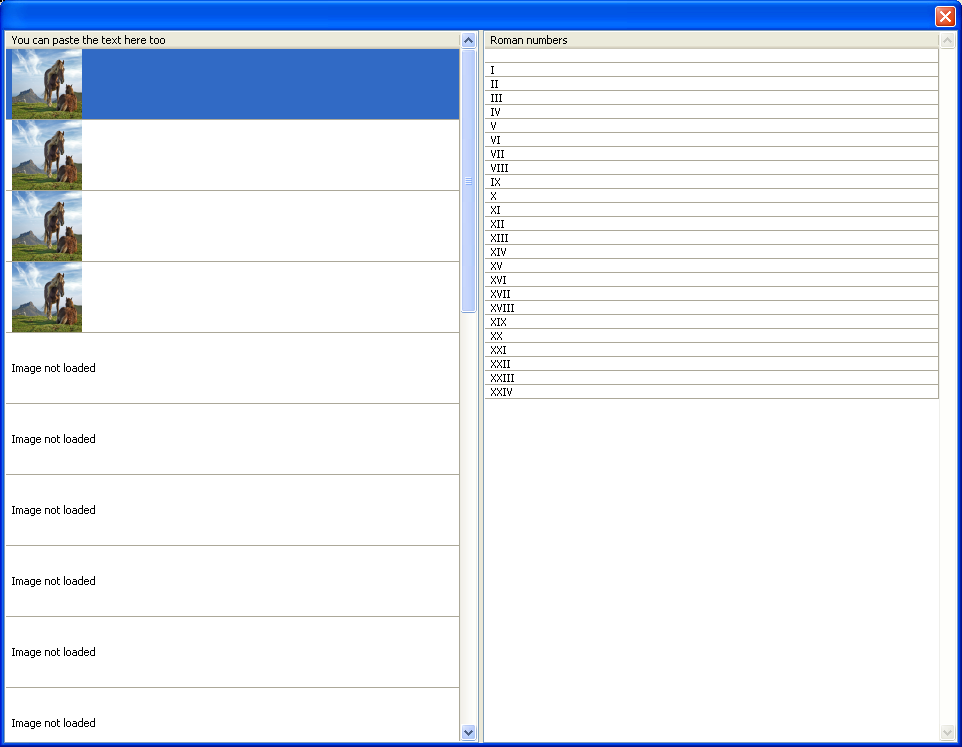
An annoying problem is that RefreshRow(row) works well in general, but if I just drag an image and does not click or roll the mouse, the image refreshing is stopped like in the image. This behavior happens both in Linux and in Windows. If I click or roll the mouse all the loaded images are refreshed immediately.
Just changing RefreshRow(row) with UpdateRefresh() solves the problem.
Best regards
koldo
-
 Attachment: dib.PNG
(Size: 84.33KB, Downloaded 668 times)
Best regards
Iñaki
|
|
|
|
|
|
Goto Forum:
Current Time: Tue Apr 28 23:43:07 GMT+2 2026
Total time taken to generate the page: 0.01001 seconds
|
 U++ framework
 Search
 Help
Help Members
 Register
 Login
Login Home
Home




