Home » U++ Library support » RichText,QTF,RTF... » Font alignment issues
|
|
|
|
| Re: Font alignment issues [message #22560 is a reply to message #22545] |
Mon, 27 July 2009 09:04   |
 chickenk
Messages: 171
Registered: May 2007
Location: Grenoble, France
|
Experienced Member |
|
|
Hi Mirek,
I tried with latest svn. Still the same.
Here are my OS characteristics (that may be relevant for you, ask if you need more):
- Linux Fedora Core 11
- X.Org X Server 1.6.1.901 (1.6.2 RC 1)
- theide-svn compiled in 'GCC Optimal' mode, the applied flags are 'GUI MAIN GCC SHARED LINUX POSIX'
- GTK+ 2.16.2 (and associates)
- Window Manager: Enlightenment DR17 (in Gnome I have the same result)
I removed the .upp/theide-svn directory to start again with a fresh configuration, to make sure it did not come from customized fonts. Still the same problem.
I don't know what else you could need, so don't hesitate to ask me.
Update: in NOGTK mode, the display works fine. I believe this may be related to gtk font handling... I'll search more.
Lionel
[Updated on: Mon, 27 July 2009 09:35] Report message to a moderator |
|
|
|
|
|
|
|
| Re: Font alignment issues [message #22576 is a reply to message #22572] |
Tue, 28 July 2009 02:38 |
 |
mirek
Messages: 14290
Registered: November 2005
|
Ultimate Member |
|
|
OK, in that case, what is the result of LOGs if everything works (font > 12pt)?
Also, more logs (for case when it does not work):
void Font::SyncStdFont()
{
	DrawLock __;
LOG(AStdFont());
	StdFontSize = Size(AStdFont.GetAveWidth(), AStdFont().Bold().GetCy());
}

void Font::SetStdFont(Font font)
{
LOG("SetStdFont " << font);
	DrawLock __;
	static bool x;
	InitStdFont();
	AStdFont = font;
	SyncStdFont();
}

void Std(Font& font)
{
LOG("Std: " << GetStdFont());
	if(IsNull(font))
		font = StdFont();
	if(font.GetFace() == 0)
		font.Face(GetStdFont().GetFace());
	if(font.GetHeight() == 0)
		font.Height(GetStdFont().GetHeight());
}
This I believe should fix the issue partially:
void Font::InitStdFont()
{
	ONCELOCK {
		DrawLock __;
		List();
		AStdFont = Arial(12);
		String name;
		int    height = 0;
		GetStdFontSys(name, height);
		int q = FindFaceNameIndex(name);
		if(q > 0) {
			AStdFont = Font(q, max(height, 1));
		}
		SyncStdFont();
	}
}
I believe this will work, but is not the correct fix...
Mirek
[Updated on: Tue, 28 July 2009 02:43] Report message to a moderator |
|
|
|
| Re: Font alignment issues [message #22598 is a reply to message #22576] |
Wed, 29 July 2009 12:41 |
chickenk
Messages: 171
Registered: May 2007
Location: Grenoble, France
|
Experienced Member |
|
|
| luzr wrote on Tue, 28 July 2009 02:38 |
OK, in that case, what is the result of LOGs if everything works (font > 12pt)?
|
Still the same:
xxxx
0
0
<sans-serif:12>
It looks like this never changes...
| luzr wrote on Tue, 28 July 2009 02:38 |
Also, more logs (for case when it does not work):
void Font::SyncStdFont()
{
	DrawLock __;
LOG(AStdFont());
	StdFontSize = Size(AStdFont.GetAveWidth(), AStdFont().Bold().GetCy());
}

void Font::SetStdFont(Font font)
{
LOG("SetStdFont " << font);
	DrawLock __;
	static bool x;
	InitStdFont();
	AStdFont = font;
	SyncStdFont();
}

void Std(Font& font)
{
LOG("Std: " << GetStdFont());
	if(IsNull(font))
		font = StdFont();
	if(font.GetFace() == 0)
		font.Face(GetStdFont().GetFace());
	if(font.GetHeight() == 0)
		font.Height(GetStdFont().GetHeight());
}
This I believe should fix the issue partially:
void Font::InitStdFont()
{
	ONCELOCK {
		DrawLock __;
		List();
		AStdFont = Arial(12);
		String name;
		int    height = 0;
		GetStdFontSys(name, height);
		int q = FindFaceNameIndex(name);
		if(q > 0) {
			AStdFont = Font(q, max(height, 1));
		}
		SyncStdFont();
	}
}
I believe this will work, but is not the correct fix...
Mirek
|
The fix provokes an infinite loop in InitStdFont(), so that a segfault is thrown. Without the fix, but with the added LOG() :
- using 16pt font size:
name = xxxx
height = 0
q = 0
AStdFont = <sans-serif:12>
SetStdFont <sans-serif:12>
<sans-serif:12>
Std: <sans-serif:12>
Std: <sans-serif:12>
SetStdFont <sans-serif:16>
<sans-serif:16>
Std: <sans-serif:16>
Std: <sans-serif:16>
Std: <sans-serif:16>
Std: <sans-serif:16>
Std: <sans-serif:16>
[...]
- using 9pt font size:
name = xxxx
height = 0
q = 0
AStdFont = <sans-serif:12>
SetStdFont <sans-serif:12>
<sans-serif:12>
Std: <sans-serif:12>
Std: <sans-serif:12>
SetStdFont <sans-serif:11>
<sans-serif:11>
Std: <sans-serif:11>
Std: <sans-serif:11>
Std: <sans-serif:11>
Std: <sans-serif:11>
Std: <sans-serif:11>
[...]
We have 11pt instead of 9 here! I believe that's the problem.
[Updated on: Wed, 29 July 2009 12:47] Report message to a moderator |
|
|
|
| Re: Font alignment issues [message #22609 is a reply to message #22598] |
Fri, 31 July 2009 20:03 |
|
mirek
Messages: 14290
Registered: November 2005
|
Ultimate Member |
|
|
| chickenk wrote on Wed, 29 July 2009 06:41 |
| luzr wrote on Tue, 28 July 2009 02:38 |
OK, in that case, what is the result of LOGs if everything works (font > 12pt)?
|
Still the same:
xxxx
0
0
<sans-serif:12>
It looks like this never changes...
| luzr wrote on Tue, 28 July 2009 02:38 |
Also, more logs (for case when it does not work):
void Font::SyncStdFont()
{
	DrawLock __;
LOG(AStdFont());
	StdFontSize = Size(AStdFont.GetAveWidth(), AStdFont().Bold().GetCy());
}

void Font::SetStdFont(Font font)
{
LOG("SetStdFont " << font);
	DrawLock __;
	static bool x;
	InitStdFont();
	AStdFont = font;
	SyncStdFont();
}

void Std(Font& font)
{
LOG("Std: " << GetStdFont());
	if(IsNull(font))
		font = StdFont();
	if(font.GetFace() == 0)
		font.Face(GetStdFont().GetFace());
	if(font.GetHeight() == 0)
		font.Height(GetStdFont().GetHeight());
}
This I believe should fix the issue partially:
void Font::InitStdFont()
{
	ONCELOCK {
		DrawLock __;
		List();
		AStdFont = Arial(12);
		String name;
		int    height = 0;
		GetStdFontSys(name, height);
		int q = FindFaceNameIndex(name);
		if(q > 0) {
			AStdFont = Font(q, max(height, 1));
		}
		SyncStdFont();
	}
}
I believe this will work, but is not the correct fix...
Mirek
|
The fix provokes an infinite loop in InitStdFont(), so that a segfault is thrown. Without the fix, but with the added LOG() :
- using 16pt font size:
name = xxxx
height = 0
q = 0
AStdFont = <sans-serif:12>
SetStdFont <sans-serif:12>
<sans-serif:12>
Std: <sans-serif:12>
Std: <sans-serif:12>
SetStdFont <sans-serif:16>
<sans-serif:16>
Std: <sans-serif:16>
Std: <sans-serif:16>
Std: <sans-serif:16>
Std: <sans-serif:16>
Std: <sans-serif:16>
[...]
- using 9pt font size:
name = xxxx
height = 0
q = 0
AStdFont = <sans-serif:12>
SetStdFont <sans-serif:12>
<sans-serif:12>
Std: <sans-serif:12>
Std: <sans-serif:12>
SetStdFont <sans-serif:11>
<sans-serif:11>
Std: <sans-serif:11>
Std: <sans-serif:11>
Std: <sans-serif:11>
Std: <sans-serif:11>
Std: <sans-serif:11>
[...]
We have 11pt instead of 9 here! I believe that's the problem.
|
These are pixels, not points...
Mirek
|
|
|
|
|
|
|
|
|
|
| Re: Font alignment issues [message #22624 is a reply to message #22619] |
Sat, 01 August 2009 12:56 |
|
mirek
Messages: 14290
Registered: November 2005
|
Ultimate Member |
|
|
| chickenk wrote on Sat, 01 August 2009 05:27 |
| luzr wrote on Sat, 01 August 2009 10:17 |
Perhaps the installation of enlightenment DR17 caused the trouble?
Mirek
|
I don't think so because e17 does not have any relationship with gtk libraries. It does not even read properties from it, like Chameleon does, it has its own theming engine.
But the e17 engine does use freetype2 (AFAIK) like gtk does... Where do you take the font properties from ? GTK or freetype?
|
Well, this bug seems like mismatch between Xft and FontConfig/Freetype.
We take basic system font from GTK. Anyway, even if that would be wrong, it should not manifest as what I have seen in screenshots - just the font would be different.
What I see is that Xft uses different metrics to place characters than what we have read from Freetype. Which is strange, because after all, Xft is using Fc/Freetype as well.
One possible cause is that we somehow request different fonts from Xft and Freetype.
Mirek
[Updated on: Sat, 01 August 2009 12:56] Report message to a moderator |
|
|
|
| Re: Font alignment issues [message #22631 is a reply to message #22624] |
Sun, 02 August 2009 09:01 |
|
mirek
Messages: 14290
Registered: November 2005
|
Ultimate Member |
|
|
Possible way to check the theory (removes "paint text with single call to X11" optimization):
void Draw::DrawText(int x, int y, int angle, const wchar *text, Font font,
		            Color ink, int n, const int *dx)
{
	if(IsNull(ink)) return;
	if(n < 0)
		n = wstrlen(text);
	Std(font);
	double sina;
	double cosa;
	int    d = 0;
	if(angle)
		Draw::SinCos(angle, sina, cosa);
	for(int i = 0; i < n; i++) {
		wchar chr = text[i];
		GlyphInfo gi = GetGlyphInfo(font, chr);
		if(gi.IsNormal())
		      DrawTextOp(int(x + cosa * d), int(y - sina * d), angle, &chr, font, ink, 1, NULL);
		else
		if(gi.IsReplaced()) {
			Font fnt = font;
			fnt.Face(gi.lspc);
			fnt.Height(gi.rspc);
			if(angle)
				DrawTextOp(int(x + cosa * d), int(y - sina * (font.GetAscent() - fnt.GetAscent() + d)),
				             angle, &chr, fnt, ink, 1, NULL);
			else
				DrawTextOp(x + d, y + font.GetAscent() - fnt.GetAscent(), 0, &chr, fnt, ink, 1, NULL);
			GlyphMetrics(gi, font, chr);
		}
		else
		if(gi.IsComposed()) {
			ComposedGlyph cg;
			Compose(font, chr, cg);
			if(angle) {
				DrawTextOp(int(x + cosa * d), int(y - sina * d), angle, &cg.basic_char, font, ink, 1, NULL);
				DrawTextOp(int(x + cosa * (d + cg.mark_pos.x)), int(y - sina * (cg.mark_pos.y + d)), angle, &cg.mark_char, cg.mark_font, ink, 1, NULL);
			}
			else {
				DrawTextOp(x + d, y, 0, &cg.basic_char, font, ink, 1, NULL);
				DrawTextOp(x + cg.mark_pos.x + d, y + cg.mark_pos.y, 0, &cg.mark_char, cg.mark_font, ink, 1, NULL);
			}
			GlyphMetrics(gi, font, chr);
		}
		d += dx ? *dx++ : gi.width;
	}
}
Please check and report results.
|
|
|
|
|
|
|
|
|
|
|
|
| Re: Font alignment issues [message #22646 is a reply to message #22645] |
Mon, 03 August 2009 12:29 |
|
mirek
Messages: 14290
Registered: November 2005
|
Ultimate Member |
|
|
Ops, sorry, there seems to have been bug in DrawText test.
Remove those logs for now and try:
void Draw::DrawText(int x, int y, int angle, const wchar *text, Font font,
		            Color ink, int n, const int *dx)
{
	if(IsNull(ink)) return;
	if(n < 0)
		n = wstrlen(text);
	Std(font);
	double sina;
	double cosa;
	int    d = 0;
//	if(angle)
		Draw::SinCos(angle, sina, cosa);
	for(int i = 0; i < n; i++) {
		wchar chr = text[i];
		GlyphInfo gi = GetGlyphInfo(font, chr);
		if(gi.IsNormal())
	//		if(angle)
				DrawTextOp(int(x + cosa * d), int(y - sina * d), angle, &chr, font, ink, 1, NULL);
	/*		else {
				int c = 1;
				int dd = 0;
				while(c < n) {
					GlyphInfo gi2 = GetGlyphInfo(font, text[i + c]);
					if(!gi2.IsNormal())
						break;
					dd += dx ? dx[c] : gi.width;
					c++;
					gi = gi2;
				}
				DrawTextOp(x + d, y, 0, text + i, font, ink, c, dx);
				d += dd;
				i += c - 1;
				if(dx)
					dx += c - 1;
			}*/_DBG_
		else
		if(gi.IsReplaced()) {
			Font fnt = font;
			fnt.Face(gi.lspc);
			fnt.Height(gi.rspc);
			if(angle)
				DrawTextOp(int(x + cosa * d), int(y - sina * (font.GetAscent() - fnt.GetAscent() + d)),
				             angle, &chr, fnt, ink, 1, NULL);
			else
				DrawTextOp(x + d, y + font.GetAscent() - fnt.GetAscent(), 0, &chr, fnt, ink, 1, NULL);
			GlyphMetrics(gi, font, chr);
		}
		else
		if(gi.IsComposed()) {
			ComposedGlyph cg;
			Compose(font, chr, cg);
			if(angle) {
				DrawTextOp(int(x + cosa * d), int(y - sina * d), angle, &cg.basic_char, font, ink, 1, NULL);
				DrawTextOp(int(x + cosa * (d + cg.mark_pos.x)), int(y - sina * (cg.mark_pos.y + d)), angle, &cg.mark_char, cg.mark_font, ink, 1, NULL);
			}
			else {
				DrawTextOp(x + d, y, 0, &cg.basic_char, font, ink, 1, NULL);
				DrawTextOp(x + cg.mark_pos.x + d, y + cg.mark_pos.y, 0, &cg.mark_char, cg.mark_font, ink, 1, NULL);
			}
			GlyphMetrics(gi, font, chr);
		}
		d += dx ? *dx++ : gi.width;
	}
}
Thanks.
Mirek
|
|
|
|
|
|
| Re: Font alignment issues [message #22650 is a reply to message #22647] |
Mon, 03 August 2009 13:36 |
|
mirek
Messages: 14290
Registered: November 2005
|
Ultimate Member |
|
|
| chickenk wrote on Mon, 03 August 2009 06:42 |
Hi Mirek,
your try was right, this time everything works perfectly. I tried very small fonts (7pt) and they always are correctly placed.
It also still works when using large fonts.
I hope I could help you locate the problem. If you need more help don't hesitate to ask.
Thanks,
Lionel
|
Hey, that is not the end of issue 
What we did is that we completely removed optimization. Well, in reality, maybe that is exactly what was needed, but I would like to try better first....
OK, I will try benchmarking the issue first...
BTW, can you post me a screenshot? I would like to compare two screenshots with and without the fix...
Mirek
[Updated on: Mon, 03 August 2009 13:37] Report message to a moderator |
|
|
|
|
|
|
|
|
|
| Re: Font alignment issues [message #22654 is a reply to message #22653] |
Mon, 03 August 2009 14:39 |
chickenk
Messages: 171
Registered: May 2007
Location: Grenoble, France
|
Experienced Member |
|
|
Thanks for the hints Mirek.
I tried without subpixel rendering but the problem is the same.
In fact, I found where the problem comes from :
for some reason I can't remember, but probably to get harmonized font sizes between gtk apps and other ones, I switched my dpi to 88 (I think it is 96 naturally). I used 96 dpi instead of 88 and all the issues are gone, see by yourself :
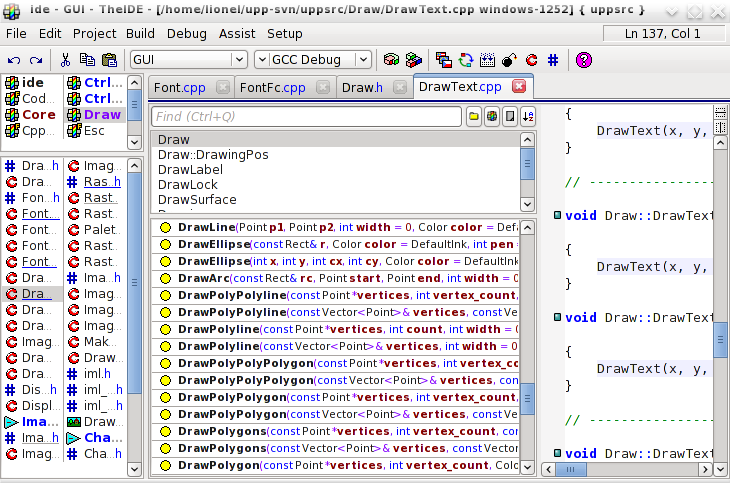
It reminds me some topics where you were talking about the dpi concept problem, and the way it was badly handled by other libraries.
Is that normal that when specifying a wrong dpi (that is configurable so after all, I believe other people do like me), I get thoses issues ? Are there several ways to get proper font hinting size ?
Thanks for your help,
Lionel
[Updated on: Mon, 03 August 2009 14:39] Report message to a moderator |
|
|
|
| Re: Font alignment issues [message #22655 is a reply to message #22654] |
Mon, 03 August 2009 14:47 |
|
mirek
Messages: 14290
Registered: November 2005
|
Ultimate Member |
|
|
| chickenk wrote on Mon, 03 August 2009 08:39 |
Thanks for the hints Mirek.
I tried without subpixel rendering but the problem is the same.
|
Actually, very good news
| Quote: |
In fact, I found where the problem comes from :
for some reason I can't remember, but probably to get harmonized font sizes between gtk apps and other ones, I switched my dpi to 88 (I think it is 96 naturally). I used 96 dpi instead of 88 and all the issues are gone, see by yourself :
|
Nice! I knew there must be something differnt with your system...
| Quote: |
Is that normal that when specifying a wrong dpi (that is configurable so after all, I believe other people do like me), I get thoses issues ? Are there several ways to get proper font hinting size ?
Thanks for your help,
Lionel
|
Going to try & fix....
Mirek
[Updated on: Mon, 03 August 2009 14:49] Report message to a moderator |
|
|
|
|
|
|
|
| Re: Font alignment issues [message #22659 is a reply to message #22658] |
Mon, 03 August 2009 17:13 |
|
mirek
Messages: 14290
Registered: November 2005
|
Ultimate Member |
|
|
| chickenk wrote on Mon, 03 August 2009 10:31 |
OK I recompiled the new sources, the bad news are it does not change anything in my case. As far as I use 88 dpi instead of 96, the display is wrong...
I am not sure it's worth taking so much of your time about that. It may be a rare case coming from my configuration (I'm still wondering what have I done to have such differences, I can't see...).
If you think it's important to fix it because it applies to many people, I'll be glad to help you. But don't waste your time just for my case, I can live with it. 
Lionel
|
Well, I am afraid it might kick us somewhere else... Font metrics is foundation, there is no place for weird behaviour...
Another attempt:
Draw::FontFc.cpp:
FcPattern *CreateFcPattern(Font font)
{
	LTIMING("CreateXftFont");
	double sina, cosa;
	int hg = abs(font.GetHeight());
	if(hg == 0) hg = 10;
	String face = font.GetFaceName();
	FcPattern *p = FcPatternCreate();
	FcPatternAddString(p, FC_FAMILY, (FcChar8*)~face);
	FcPatternAddInteger(p, FC_SLANT, font.IsItalic() ? 110 : 0);
	FcPatternAddInteger(p, FC_PIXEL_SIZE, hg);
	FcPatternAddInteger(p, FC_DPI, 96);
	FcPatternAddInteger(p, FC_WEIGHT, font.IsBold() ? 200 : 100);
	FcPatternAddBool(p, FC_MINSPACE, 1);
	FcResult result;
	FcConfigSubstitute(0, p, FcMatchPattern);
	FcDefaultSubstitute(p);
	FcPattern *m = FcFontMatch(0, p, &result);
	FcPatternDestroy(p);
	return m;
}
CtrlCore/DrawTextX11.cpp:
XftFont *CreateXftFont(Font font, int angle)
{
	LTIMING("CreateXftFont");
	XftFont *xftfont;
	double sina, cosa;
	Std(font);
	int hg = abs(font.GetHeight());
	if(hg == 0) hg = 10;
	int i = font.GetFace();
	if(i < 0 || i >= Font::GetFaceCount())
		i = 0;
	String face = font.GetFaceName();
	FcPattern *p = FcPatternCreate();
	FcPatternAddString(p, FC_FAMILY, (FcChar8*)~face);
	FcPatternAddInteger(p, FC_SLANT, font.IsItalic() ? 110 : 0);
	FcPatternAddInteger(p, FC_PIXEL_SIZE, hg);
	FcPatternAddInteger(p, FC_DPI, 96);
	FcPatternAddInteger(p, FC_WEIGHT, font.IsBold() ? 200 : 100);
	FcPatternAddBool(p, FC_MINSPACE, 1);
	if(angle) {
		FcMatrix mx;
		Draw::SinCos(angle, sina, cosa);
		mx.xx = cosa;
		mx.xy = -sina;
		mx.yx = sina;
		mx.yy = cosa;
		FcPatternAddMatrix(p, FC_MATRIX, &mx);
	}
	FcResult result;
	FcPattern *m = XftFontMatch(Xdisplay, Xscreenno, p, &result);
	if(font.IsNonAntiAliased() || gtk_antialias >= 0) {
		FcPatternDel(m, FC_ANTIALIAS);
		FcPatternAddBool(m, FC_ANTIALIAS,
		                 font.IsNonAntiAliased() ? FcFalse : gtk_antialias ? FcTrue : FcFalse);
	}
	if(gtk_hinting >= 0) {
		FcPatternDel(m, FC_HINTING);
		FcPatternAddBool(m, FC_HINTING, gtk_hinting);
	}
	const char *hs[] = { "hintnone", "hintslight", "hintmedium", "hintfull" };
	for(int i = 0; i < 4; i++)
		if(gtk_hintstyle == hs[i]) {
			FcPatternDel(m, FC_HINT_STYLE);
			FcPatternAddInteger(m, FC_HINT_STYLE, i);
		}
	const char *rgba[] = { "_", "rgb", "bgr", "vrgb", "vbgr" };
	for(int i = 0; i < __countof(rgba); i++)
		if(gtk_rgba == rgba[i]) {
			FcPatternDel(m, FC_RGBA);
			FcPatternAddInteger(m, FC_RGBA, i);
		}
	xftfont = XftFontOpenPattern(Xdisplay, m);
	FcPatternDestroy(p);
	return xftfont;
}
(We try to tell him in both cases to use 96dpi - which is fine, because at the time we have are only using correct pixel size).
Mirek
|
|
|
|
|
|
|
|
|
|
|
|
|
|
|
|
|
|
|
|
|
|
|
|
Goto Forum:
Current Time: Tue Apr 28 13:55:51 GMT+2 2026
Total time taken to generate the page: 0.01228 seconds
|
 U++ framework
 Search
 Help
Help Members
 Register
 Login
Login Home
Home




