Home » U++ Library support » Look and Chameleon Technology » upp-x11-src-1965.tar.gz and compiling under Debian Lenny
| upp-x11-src-1965.tar.gz and compiling under Debian Lenny [message #24714] |
Thu, 28 January 2010 16:10  |
 mr_ped
Messages: 826
Registered: November 2005
Location: Czech Republic - Praha
|
Experienced Contributor |
|
|
I tried to compile sources in fresh install of Debian Lenny (in virtualbox) with KDE 3.5, adding packages 1 by 1 until make finished successfully. (starting with "build-essentials" to have make)
After adding couple of libs it compiled ok, make install did work just as readme predicted, so it's ok.
As some newbie to [C++, compilation with make, linux] I would be maybe in quite a trouble, to recognize that I'm missing dev libraries, and to find the proper library package in Synaptics (default package manager) just from #include error message. For me it was very straightforward and easy, but maybe we should include some list of needed packages for most common distros.
I tried to compile several example/reference/uppsrc packages to see if I will hit default "all static" build method, but it didn't happen anywhere, all the time just "SHARED" (OK).
I found some minor problems with SqlCommander (wrong case in include, and linking asking for libmysql even when NOMYSQL flag is used), adding patch to fix it.
And at last, I'm attaching two open file dialogues, 1st is from U++ DbfView, other from native KWrite app.
I understand why U++ is not using native controls in such cases, but the visual difference is quite big AND the U++ dialog looks quite bad, including some little graphics glitches:
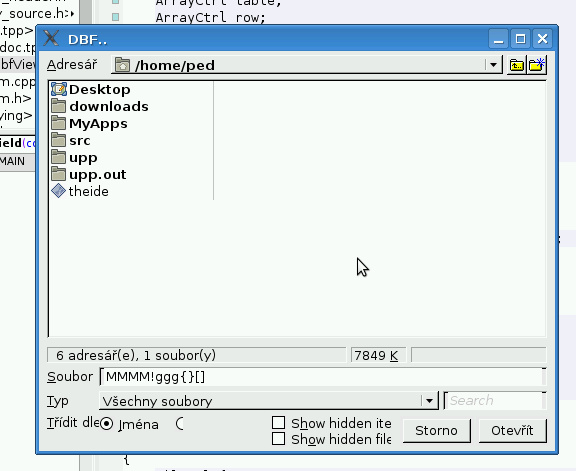
vs
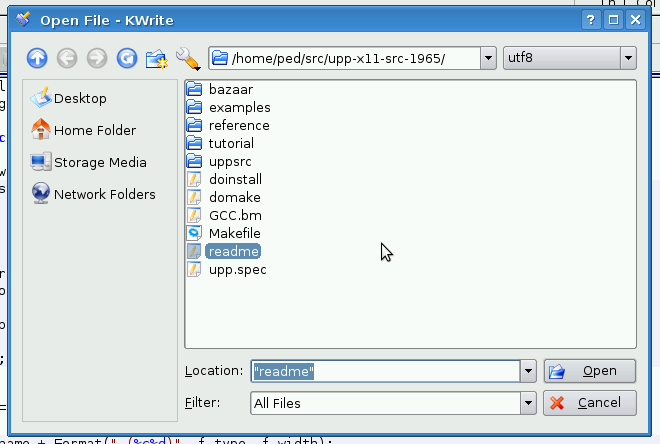
Maybe in such case (the U++ look is far from native widgets) the U++ should instead of bad native mimicking switch to it's best theme (probably some from windows world?) and stick to it.
|
|
|
|
|
|
| Re: upp-x11-src-1965.tar.gz and compiling under Debian Lenny [message #24716 is a reply to message #24715] |
Thu, 28 January 2010 16:30  |
cbpporter
Messages: 1428
Registered: September 2007
|
Ultimate Contributor |
|
|
Wow, that looks indeed quite ugly. Definitely more ugly than with NOGTK. Or is that a NOGTK build (it looks completely different and I never saw NOGTK having such visual glitches)?
Here is mine on a modern NOGTK build:
The Czech is set for some reason in DbfView. We should keep examples in English.
Anyway, as I understand we are trying to get included in Debian, so I'll fire up a virtual machine.
PS: I did upgrade one time the standard FileSel so it looked almost 100% the same as the Windows counterpart. The Buttons on the left should be replaces with non Windows icons though. Never finished it. I'll try to see if I still have sources.
-
 Attachment: open.png
(Size: 43.21KB, Downloaded 1391 times)
[Updated on: Thu, 28 January 2010 16:33] Report message to a moderator |
|
|
|
| Re: upp-x11-src-1965.tar.gz and compiling under Debian Lenny [message #24719 is a reply to message #24714] |
Thu, 28 January 2010 17:14 |
mr_ped
Messages: 826
Registered: November 2005
Location: Czech Republic - Praha
|
Experienced Contributor |
|
|
It's compiled with gtk.
Actually I would expect quite opposite, the NOGTK to look worse, but probably under KDE it's more sane to use NOGTK since start. Your pic looks quite ok, still far from latest KDE3.5 themes, not even mentioning KDE4, but decent enough to present in finished application.
Here is pic from the same executable in Gnome (instead of KDE, I do have both installed, so I can switch easily).
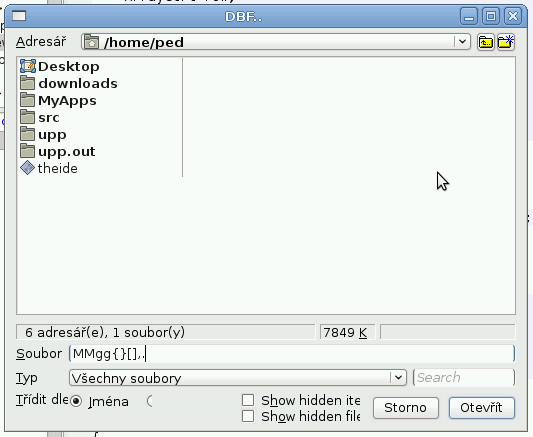
Looks somewhat better, although some nasty cuts happened (left bottom - sort by radio buttons). Text fields looks to miss proper framing, but it's not obvious glitch, can look a bit like a desire.
Well, the whole open dialog layout in DbfView is probably not very standard, because for example TheIDE Ctrl+O does less cutting, although the non-native white background behind text fields doesn't look ok even there in KDE. In Gnome it looks ok, the framing works well and there's very little of original background remaining, so the white background fits there well.
|
|
|
|
|
|
| Re: upp-x11-src-1965.tar.gz and compiling under Debian Lenny [message #24723 is a reply to message #24720] |
Thu, 28 January 2010 19:43 |
|
|
Hi Ped
Nice analysis!
| mr_ped wrote on Thu, 28 January 2010 17:20 |
When I run theide from terminal, I get lot of libpng error messages about broken images, under KDE.
|
I can confirm this issue under XFCE and without any desktop environment (just window manager). I tried to debug theide, found the problematic code, but couldn't get it to trigger breakpoint 
Regards,
Honza
|
|
|
|
|
|
|
|
| Re: upp-x11-src-1965.tar.gz and compiling under Debian Lenny [message #24729 is a reply to message #24719] |
Thu, 28 January 2010 20:33 |
 |
mirek
Messages: 14291
Registered: November 2005
|
Ultimate Member |
|
|
| mr_ped wrote on Thu, 28 January 2010 11:14 |
It's compiled with gtk.
Actually I would expect quite opposite, the NOGTK to look worse, but probably under KDE it's more sane to use NOGTK since start. Your pic looks quite ok, still far from latest KDE3.5 themes, not even mentioning KDE4, but decent enough to present in finished application.
Here is pic from the same executable in Gnome (instead of KDE, I do have both installed, so I can switch easily).
Looks somewhat better, although some nasty cuts happened (left bottom - sort by radio buttons). Text fields looks to miss proper framing, but it's not obvious glitch, can look a bit like a desire.
Well, the whole open dialog layout in DbfView is probably not very standard, because for example TheIDE Ctrl+O does less cutting, although the non-native white background behind text fields doesn't look ok even there in KDE. In Gnome it looks ok, the framing works well and there's very little of original background remaining, so the white background fits there well.
|
Well, more bad by adopting work tools:
....
Ctrl::NoLayoutZoom();
....
I guess after commenting this out, it should be better.
Still, it looks like Chameleon / GTK should perhaps be more conservative. I think there obviously are some facets of appearance that are more prone to artifacts than others.
Maybe, as intermediate step, we could activate such problem-prone parts only in themes that are proven to work fine?
Mirek
|
|
|
|
| Re: upp-x11-src-1965.tar.gz and compiling under Debian Lenny [message #24730 is a reply to message #24724] |
Thu, 28 January 2010 21:20 |
cbpporter
Messages: 1428
Registered: September 2007
|
Ultimate Contributor |
|
|
I only use NOGTK because on the systems where I install the headers are not available or needed (KDE machine). If you have Gnome installed it is pleasant to have U++ look the same as the rest of your applications.
Dependencies for NOGTK Debian 5:
build-essential
libx11-dev
libxft-dev
libpng12-dev
Dependencies for GTK:
libgtk2.0-dev
libnotify-dev
Still I couldn't link. I got a bunch of error like "undefined reference to 'png_write_row'.
EDIT: Using a normal (GTK) build I no longer have link errors. Problem is NOGTK.
I think we should provide two packages for the two modes of operation. And I also think I should create a new skin using traditional Chameleon theming to replace normal NOGTK theme. Current is similar to XP but uglier. I think that we should a theme that looks like something from 2010 and not 2000.
[Updated on: Thu, 28 January 2010 22:09] Report message to a moderator |
|
|
|
| Re: upp-x11-src-1965.tar.gz and compiling under Debian Lenny [message #24731 is a reply to message #24729] |
Thu, 28 January 2010 22:07 |
mr_ped
Messages: 826
Registered: November 2005
Location: Czech Republic - Praha
|
Experienced Contributor |
|
|
Mirek: did you notice the sqlite3.h -> Sqlite3.h patch?
(I hope I didn't hide it by those pics too much)
And I wonder about umk and buildallexamples. Should I try eventually patch them to work in linux? Would be neat, but I have no idea if it's possible in case of umk. (in case of build all examples it's just question of rewriting the app in worst case, but certainly doable even by me)
| Quote: |
Maybe, as intermediate step, we could activate such problem-prone parts only in themes that are proven to work fine?
|
I think yes, it's 2010 and most of the new SW comes in fancy skins breaking all rules of old standardized UI with menu bar under window title (I personally dislike this).
So I think U++ should try to look native only in the most common theme combinations, which either look very good or have very conservative users (WinXP or older).
And let's improve some custom U++ chameleon skin to look very fancy, and use that in other cases, dropping native mimicking totally in such case. I think in the long run it will give better first impression from U++ based SW.
I will try to further dig into the current source releases and ubuntu/debian to see how stable it is, eventually fix something if I will be able to. How about some big "stable" release like 2008.1, including new 4.4 mingw & stuff, i.e. full solution? As I understand, you have finished all big changes, and didn't start any new, so it's maybe good time to let us work out some of those tiny details and release something extra stable for developers who can't upgrade U++ monthly.
|
|
|
|
|
|
| Re: upp-x11-src-1965.tar.gz and compiling under Debian Lenny [message #24736 is a reply to message #24731] |
Fri, 29 January 2010 00:52 |
|
mirek
Messages: 14291
Registered: November 2005
|
Ultimate Member |
|
|
| mr_ped wrote on Thu, 28 January 2010 16:07 |
So I think U++ should try to look native only in the most common theme combinations, which either look very good or have very conservative users (WinXP or older).
|
There can be levels of support. Some parts are quite simple and in fact make for 60% of impression - buttons, check boxes, radio buttons. I am quite confident we can support them everywhere.
Hard parts are e.g. scrollbars.
Extremely hard are editfields, dropdown fields (especially as U++ allows multiple buttons - had to be emulated using various heurestics), TabCtrl (btw, not even Firefox or Openoffice has TabCtrl right in GTK).
Then of course, it is a good idea to follow at least basic color scheme - "dialog face", text color, text font. But that is simple.
Mirek
|
|
|
|
|
|
|
|
|
|
|
|
|
|
|
|
|
|
| Re: upp-x11-src-1965.tar.gz and compiling under Debian Lenny [message #24769 is a reply to message #24765] |
Fri, 29 January 2010 15:09 |
mr_ped
Messages: 826
Registered: November 2005
Location: Czech Republic - Praha
|
Experienced Contributor |
|
|
| luzr wrote on Fri, 29 January 2010 14:45 |
IMO, not bad. The only possible question is how GTK under KDE matches other GTK apps...
Mirek
|
This is the good thing about virtualbox ... *some* things are really easy to try + capture.  (if it does boot, I already had 1 kernel panic very early during boot ... weird) (if it does boot, I already had 1 kernel panic very early during boot ... weird)
Gedit under KDE3.5:
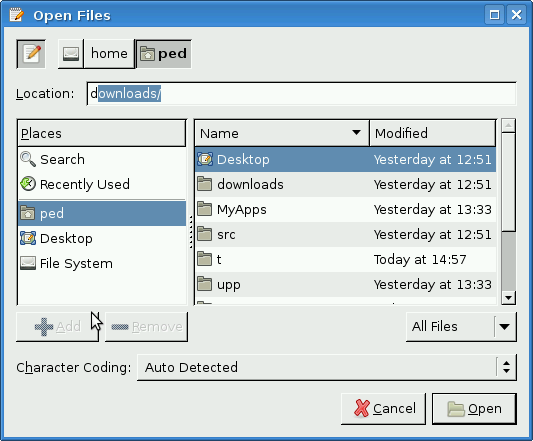
I generally like the NOGTK U++ look much better in this case, this really feels like bad mix of old X11 crossed with old Solaris, this takes me back to 1993 (sitting behind VTxxx graphics terminals with keyboard which had Fkeys up to F20 ), except the icons on buttons. The NOGTK does look somewhere between W2k and WinXP, maybe after some color tweaking it would be as good as XP classic (i.e. it looks like 2001).
Still I think even the NOGTK is not good enough IMHO.
The GTK under Gnome is quite ok, I think that's a presentable look even today.
Now I think maybe I miss some KDE package which helps the GTK apps to mimick KDE better? I will try to check it out.
EDIT: yes, the "gtk-qt-engine" was not installed, I will try it and post another post with it enabled.
Also I noticed my mouse does get sometimes invisible boundary box, so I can't move to some area of screen, if I move the mouse several times here and there, the bbox does change a bit, eventually letting me go anywhere. I think this is absolutely not U++ related, but somewhere in vbox+debian+kde .. and I'm not sure, but I think it happened in gnome too.
| Quote: |
So you managed to get U++ to build with NOGTK? I had no success with that. Or did you only build DbfView with NOGTK?
|
I did build NOGTK TheIDE too, but inside the GTK Ide, so it was just simple matter of switching the main config.
Didn't run into any problems, all required dev libs were already in place since building the GTK one. (this is "installed" IDE from 1965 source tarball, I mean that "make install" local user installation)
Then I did build the NOGTK DbgView in the NOGTK IDE, although judging from how it went there's no difference in GTK/NOGTK IDEs in my Debian, just visual. Both can build other packages in any configuration and execute them.
[Updated on: Fri, 29 January 2010 15:18] Report message to a moderator |
|
|
|
|
|
|
|
|
|
Goto Forum:
Current Time: Thu Sep 24 17:23:32 GMT+2 2026
Total time taken to generate the page: 0.15071 seconds
|
 U++ framework
 Search
 Help
Help Members
 Register
 Login
Login Home
Home




