Home » Community » Newbie corner » How install Upp under Ubuntu Hardy from PPA?
| How install Upp under Ubuntu Hardy from PPA? [message #26147] |
Tue, 06 April 2010 09:19  |
 camphene
Messages: 7
Registered: April 2010
|
Promising Member |
|
|
How i can install Upp under Ubuntu Hardy from PPA?
1. I add to /etc/apt/sources.list
deb [url]http://ppa.launchpad.net/gwibber-daily/ppa/ubuntu[/url] hardy main
deb-src [url]http://ppa.launchpad.net/gwibber-daily/ppa/ubuntu[/url] hardy main
2. $ sudo apt-key adv --keyserver keyserver.ubuntu.com --recv-keys 643469F3
3. $ sudo apt-get update
return all ok,
but
$ apt-cache search ultimate
not find upp or ultimate++ .
Help me, please!
[Updated on: Tue, 06 April 2010 09:21] Report message to a moderator |
|
|
|
| Re: How install Upp under Ubuntu Hardy from PPA? [message #26148 is a reply to message #26147] |
Tue, 06 April 2010 09:40  |
|
|
Hi Campahene!
You got it all correct, just didn't notice that "gwibber-daily" mentioned in launchpads help is just an example  To get ultimate++, the lines in /etc/apt/sources.list should be To get ultimate++, the lines in /etc/apt/sources.list should be deb http://ppa.launchpad.net/dolik-rce/upp/ubuntu hardy main
deb-src http://ppa.launchpad.net/dolik-rce/upp/ubuntu hardy main deb http://ppa.launchpad.net/dolik-rce/upp-nightly/ubuntu hardy main
deb-src http://ppa.launchpad.net/dolik-rce/upp-nightly/ubuntu hardy main
Let me know if you get any more troubles.
Best regards,
Honza
|
|
|
|
|
|
|
|
|
|
|
|
|
|
| Re: How install Upp under Ubuntu Hardy from PPA? [message #26532 is a reply to message #26157] |
Mon, 10 May 2010 08:32 |
nlneilson
Messages: 644
Registered: January 2010
Location: U.S. California. Mojave &...
|
Contributor |
|
|
After installing Ubuntu 10.04 I tried to set up the PPA to download Upp.
Was able to get upp through Synaptics. It shows under Applications->Programming->TheIDE, clicking on that it opened with a blank Assembly, Package, etc., clicking OK just closed it.
After about 4 hours of tinkering I gave up.
Downloaded the ... 2381.tar.gz and did the make, make install.
Something needs to be done as far as instructions for Linux noobs. I clicked on all of the PPA links, read and followed.
Very frustrating. Many would just give up.
Until Ubuntu accepts Upp as an included option under Synaptics I think a package, at least for 10.04 and later, that has theIDE built (no make required) and something to set up the directories and links automatically, even it is only updated every couple of months, would be much better than you have now.
I have found that Upp is very good. The initial download and "install" leaves much that could be improved.
|
|
|
|
| Re: How install Upp under Ubuntu Hardy from PPA? [message #26536 is a reply to message #26532] |
Mon, 10 May 2010 11:07 |
|
|
Hi nlneilson,
What package did you install? There are actually two: upp and theide. Upp contains the sources will also install theide. Theide is only ide - if you install only that you would have to get sources e.g. from svn and setup the assemblies yourself. From your description, it seems like you installed "theide". In Synaptic, if you select "upp" for installation, it should mark "theide" as well. If you did that and it didn't prepare the assemblies, please let me know and I'll try to investigate it deeper. After installation, theide asks you on the first start if you want to copy the sources to your home directory. There is just one caveat: If you already have directory .upp/theide in you home directory, this installation step is skipped to preserve older configuration (so if you want to try again from scratch, you should delete/move it).
I'm sorry for any inconvenience you encountered. I'll try to update the download page and give more detailed info. Debian packages are still under development and there are still some problems to solve.
Best regards,
Honza
|
|
|
|
|
|
| Re: How install Upp under Ubuntu Hardy from PPA? [message #26541 is a reply to message #26540] |
Mon, 10 May 2010 16:04 |
|
|
| nlneilson wrote on Mon, 10 May 2010 13:41 |
First I installed g++ and libnotify-dev through Synaptic.
Then did the PPA stuff.
System->Administration->Software Sources->Other Software->Add
I pasted in these two lines
deb http://ppa.launchpad.net/dolik-rce/upp-nightly/ubuntu lucid main
deb-src http://ppa.launchpad.net/dolik-rce/upp-nightly/ubuntu lucid main
I did nothing with the Signing key or the Fingerprint.
Then checked that it was in /etc/apt/sources.list
http://ppa.launchpad.net/dolik-rce/upp/ubuntu lucid main
http://ppa.launchpad.net/dolik-rce/upp/ubuntu lucid main (Source Code)
http://ppa.launchpad.net/dolik-rce/upp-nightly/ubuntu lucid main
I don't know why three lines were added and only one is "nightly".
There was no upp installed prior to this after installing 10.04
Then in Synaptic selected upp, whatever was automatically marked with that was downloaded.
This was the same with two notebooks, installed 10.04 under Win XP and Vista.
I did not do any make, make install as I read nothing that said this was necessary when using PPA.
I don't do much installing in Linux except follow instructions so it may be my error.
Just a download and run to install like it is done under Win, is that something that would be near impossible under Ubuntu?
|
That all seems correct to me. The only glitch is the content of /etc/apt/sources, which should be the same lines as you added, i.e.
deb http://ppa.launchpad.net/dolik-rce/upp-nightly/ubuntu lucid main
deb-src http://ppa.launchpad.net/dolik-rce/upp-nightly/ubuntu lucid main
But even with those you report it should still work and install the packages correctly. No make & make install is required, theide is already compiled.
It seems like there is some other problem, possibly on my side. I will test it on fresh 10.04 ASAP.
Having "installer" is possible, but using the package managment is - usualy - easier. It is supposed to ensure all the necessary libraries and dependencies are installed, keeps software up-to-date, etc.
Honza
PS: You don't need to install g++ and libnotify, the packages depend on them so they should be installed automatically.
|
|
|
|
| Re: How install Upp under Ubuntu Hardy from PPA? [message #26545 is a reply to message #26540] |
Mon, 10 May 2010 18:59 |
|
|
I tested the installation on fresh installed ubuntu, trying to repeat your steps as close as possible. It all went flawlessly and I gut properly functioning theide with all assemblies etc. in the end. Here is few things I noticed:
Did you paste them both at once or one at a time (pressing Add button twice)? If you paste them both at once, Synaptic treats them as a single line. That would partially explain the wrong lines in sources.list, although it doesn't explain missing "-nightly" and three lines instead of two.
| nlneilson wrote on Mon, 10 May 2010 13:41 |
This was the same with two notebooks, installed 10.04 under Win XP and Vista.
|
What exactly did you mean by this? Using wubi installer? I wonder if that could cause any trouble, but it seems unlikely...
When you first launched TheIDE, did you see the "Ultimate++ user setup" box? 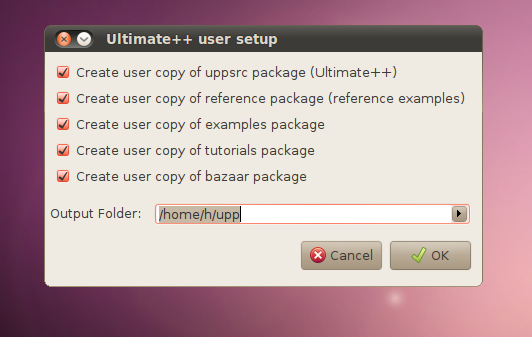
The problems you described above would suggest that it either didn't work as it supposed to, or you accidentally hit Cancel. I guess it could be even done just by pressing enter just a moment before this window shows...
Honza
-
 Attachment: dialog.png
(Size: 70.52KB, Downloaded 1194 times)
|
|
|
|
|
|
|
|
| Re: How install Upp under Ubuntu Hardy from PPA? [message #26552 is a reply to message #26545] |
Tue, 11 May 2010 06:46 |
nlneilson
Messages: 644
Registered: January 2010
Location: U.S. California. Mojave &...
|
Contributor |
|
|
| dolik.rce wrote on Mon, 10 May 2010 18:59 |
What exactly did you mean by this? Using wubi installer? I wonder if that could cause any trouble, but it seems unlikely...
|
This may be the problem when Ubuntu is installed with wubi.
I did a search while in Linux for "theide"
This showed the data for Win also like "theide.exe /host/upp"
Double clicking on that opens theide and shows 2241, the version I have installed under Win. Clicking OK closes theide the same as it does when double clicking on /usr/bin/theide (or Applications->Programming->TheIDE) the Linux version 2381.
Since Ubuntu sees the Win C:\ as /host/... that is where the problem is, I think.
When upp is installed with the .tar.gz, make/make install it runs fine.
[Updated on: Tue, 11 May 2010 07:32] Report message to a moderator |
|
|
|
| Re: How install Upp under Ubuntu Hardy from PPA? [message #26553 is a reply to message #26550] |
Tue, 11 May 2010 07:51 |
|
|
| nlneilson wrote on Tue, 11 May 2010 03:45 |
I will delete the make,make install version and in Synaptic uninstall upp from there. I will also edit /etc/apt/sources.list and remove the three lines re upp.
|
Please can you try once more, this time also removing the configuration directory? Just type this command in terminal. You don't even need to go through the full uninstall&install. Deleting the directory should cause the setup dialog to appear on next start. The mechanism in theide checks for files in this directory to determine if there is some previous configuration and launches the setup only when nothing is found.
Honza
[Updated on: Tue, 11 May 2010 07:52] Report message to a moderator |
|
|
|
|
|
| Re: How install Upp under Ubuntu Hardy from PPA? [message #26560 is a reply to message #26555] |
Tue, 11 May 2010 16:33 |
|
|
| nlneilson wrote on Tue, 11 May 2010 10:28 |
I have done that about 8 times, I even tried the uninstall/install.
I used "rm -r ~/.upp" if the ~ was to be replaced with the path I don't even know that is installed using PPA.
I had a glitch, there was an executable theide in /usr/bin, probably from the make install, I used sudo nautilus to get in and delete it. After a Synaptic install of upp a search for "theide" just shows up on /host/.
|
This is really weird. I almost start to believe that it might be because of wubi... Is there anyone familiar with ubuntu who could test it? I would try myself, but I don't have windows...
About the command: "~" is expanded by the shell to your home directory, which usually /home/<username>. The directory .upp is not created when installing the package, but when theide is run for the first time.
At this moment, I have absolutely no idea what is wrong or how to find out. I attach a shell script, that will try to install install setup everything, install upp, run theide and output some diagnostics, so I can hopefully get at least some idea what could be wrong... I tried to keep it simple and put comments in, you can have a look Please download it somewhere on our machine and run cd /path/to/script
sudo bash -x script.sh &> output.txt 
First, "sudo" will ask you for a password - that is necessary to install packages. Then it will work for a while and at one moment, it will start theide. If the user setup dialog appears, just click OK to copy the sources and OK again when it finishes to start theide. You can close it as soon as it shows the package selection dialog, so the script can continue. After it finishes, please send me the output.txt file.
Honza
-
 Attachment: script.sh
(Size: 0.87KB, Downloaded 312 times)
|
|
|
|
|
|
| Re: How install Upp under Ubuntu Hardy from PPA? [message #26568 is a reply to message #26567] |
Wed, 12 May 2010 04:26 |
nlneilson
Messages: 644
Registered: January 2010
Location: U.S. California. Mojave &...
|
Contributor |
|
|
I had such a problem with this before and Synaptic remove left so much upp stuff in that was spread all over I uninstalled and re installed Ubuntu 10.04. Not fun as my previous iso cd gave errors and had to burn 5 more to get one that worked. Using HashTab the download md5sum was OK.
I downloaded the upp .tar.gz and did the make, worked fine.
Before trying your script I moved the upp to a thumb drive:
MyApps, upp, upp.out and theide
With Eclipse for java a download can be placed anywhere, everything is in one directory, and a link to the executable is all that is required.
With Upp for Win it is the same, everything is in the upp directory except MyApps as a "workspace" Updating, AFAIK, is just replacing the upp directory with the new one.
Why can't this be done for upp in Ubuntu?
Or at least have theide compiled and the new source that could be downloaded and replace the old??
theide and upp is about 24 MB compressed, that is with theide compiled.
Just as an option for those that have problems with or would rather not use PPA.
[Updated on: Wed, 12 May 2010 09:03] Report message to a moderator |
|
|
|
| Re: How install Upp under Ubuntu Hardy from PPA? [message #26573 is a reply to message #26567] |
Wed, 12 May 2010 14:47 |
|
|
| nlneilson wrote on Wed, 12 May 2010 03:13 |
Thanks for looking into this.
Attached is the output.txt
theide never started and no setup box.
|
Hi nlneilson,
I checked the output and I think I'm finally getting the idea... I suspect the problem is with checking the signature. The strange think is that it worked for me. Anyway, I changed the script a bit, could you run it the same way as before please?
| Quote: |
With Eclipse for java a download can be placed anywhere, everything is in one directory, and a link to the executable is all that is required.
With Upp for Win it is the same, everything is in the upp directory except MyApps as a "workspace" Updating, AFAIK, is just replacing the upp directory with the new one.
Why can't this be done for upp in Ubuntu?
|
Technically it can be done. Practically, it is almost impossible. The problem is, that various versions of ubuntu and even same version on different systems might have different libraries installed. The packaging software is one of few sane ways how to ensure that there will be installed everything that is needed for theide to run. We could make theide in single directory, place it /opt but then we would have to distribute also all the shared libs, to make sure it works properly, not even to mention that it would be necessary to set up PATH in such ways that the program find the libs and the user finds the program.
| Quote: |
Just as an option for those that have problems with or would rather not use PPA.
|
The only other viable option is to download upp-src-x11-NNNN.tar.gz and compile it. Releasing compiled software for Linux is generally quite complex task - you have to compile for various architectures, make sure the libs are available as described above, etc. I have never seen opensource project that would go this way, only closed source application are distributed like this, for obvious reasons...
Honza
-
Attachment: script.sh
(Size: 0.83KB, Downloaded 366 times)
|
|
|
|
| Re: How install Upp under Ubuntu Hardy from PPA? [message #26577 is a reply to message #26573] |
Wed, 12 May 2010 20:23 |
nlneilson
Messages: 644
Registered: January 2010
Location: U.S. California. Mojave &...
|
Contributor |
|
|
That worked, THANKS!!
Can this script be used to update rather than use the PPA?
Or will something be changed where the PPA will work with the setup/problem I was having?
Thanks for explaining the problems involved doing it another way.
edit: I see that upp has been added to Synaptic so it will probably work OK from there, is that correct?
Neil
-
 Attachment: output.txt
(Size: 262.47KB, Downloaded 434 times)
[Updated on: Wed, 12 May 2010 20:49] Report message to a moderator |
|
|
|
| Re: How install Upp under Ubuntu Hardy from PPA? [message #26578 is a reply to message #26577] |
Wed, 12 May 2010 21:24 |
|
|
| nlneilson wrote on Wed, 12 May 2010 20:23 |
That worked, THANKS!!
Can this script be used to update rather than use the PPA?
Or will something be changed where the PPA will work with the setup/problem I was having?
Thanks for explaining the problems involved doing it another way.
edit: I see that upp has been added to Synaptic so it will probably work OK from there, is that correct?
Neil
|
Hi Neil,
The script actually just follows the steps listed on the launchpad web to add the repository to your system, it just removes the U++ first (+ the diagnostics). From now on theide will be updated regularly the same way as all other software you have installed.
I know that the instructions on launchpad are not exactly the best ones. I could actually write a script that would add the repository and install upp. Showing user one simple command will be much easier then linking that unclear guide. Your case was a good inspiration, thanks
Anyway, to sum it up, here is my version what was wrong with your installation attempts: I think you mixed the two guides for different versions of ubuntu:
In 9.10 and newer, you just run add-apt-repository ppa:dolik-rce/upp-nightly
In 9.4 and earlier (actually it should work in any version...) you have to add the line to sources.list manually, and then fetch the key with command sudo apt-key adv --keyserver keyserver.ubuntu.com --recv-keys 643469F3
Since you didn't get the key, it probably failed to download some of the packages. However, I'm not even sure how you got a running theide this way - it must have been from your attempts using make...
Best regards and enjoy your new linux theide
Honza
[Updated on: Wed, 12 May 2010 21:24] Report message to a moderator |
|
|
|
|
|
| installation from PPA on "clean" computer [message #27905 is a reply to message #26580] |
Tue, 10 August 2010 09:45 |
camphene
Messages: 7
Registered: April 2010
|
Promising Member |
|
|
Hello!
I have a problem with installation from PPA on "clean" computer.
theide and upp installed, but configuration files did not appear after installation or first start.
No templates, no MyApps/...
If old version installed by "make install", all ok.
If i had no upp/theide earlier, i need run
mkdir ~/upp.out
mkdir ~/MyApps

mkdir ~/.upp
mkdir ~/.upp/theide

cp GCC.bm ~/.upp/theide

echo UPP = \"/usr/share/upp/uppsrc\"\;OUTPUT = \"$HOME/upp.out\"\; > ~/.upp/theide/uppsrc.var
echo UPP = \"/usr/share/upp/examples\;/usr/share/upp/uppsrc\"\;OUTPUT = \"$HOME/upp.out\"\; > ~/.upp/theide/examples.var
echo UPP = \"/usr/share/upp/reference\;/usr/share/upp/uppsrc\"\;OUTPUT = \"$HOME/upp.out\"\; > ~/.upp/theide/reference.var
echo UPP = \"/usr/share/upp/tutorial\;/usr/share/upp/uppsrc\"\;OUTPUT = \"$HOME/upp.out\"\; > ~/.upp/theide/tutorial.var
echo UPP = \"/usr/share/upp/bazaar\;/usr/share/upp/uppsrc\"\;OUTPUT = \"$HOME/upp.out\"\; > ~/.upp/theide/bazaar.var
echo UPP = \"$HOME/MyApps\;/usr/share/upp/uppsrc\"\;OUTPUT = \"$HOME/upp.out\"\; > ~/.upp/theide/MyApps.var
manually for each user...
Can APT create config files automatically,
or can you include necessary steps in manual?
OS: Ubuntu 8.04
[Updated on: Wed, 11 August 2010 08:29] Report message to a moderator |
|
|
|
| Re: installation from PPA on "clean" computer [message #27913 is a reply to message #27905] |
Tue, 10 August 2010 16:22 |
|
|
Hi camphene,
The ppa installation still has some rough edges, as you noticed. I am currently working on smoothing the process and filling in gaps like this.
You already found the solution, but just for completeness: you can create the repositories also when starting the ide. Right clicking on the left pane of the "Select main package" dialog let's you create the repository, just fill in the paths and you are ready to go.
Thank you for for using the PPA
Best regards,
Honza
|
|
|
|
|
|
| Re: installation from PPA on "clean" computer [message #27920 is a reply to message #27916] |
Tue, 10 August 2010 21:26 |
|
|
That is strange. The templates are present in the deb, e.g. /usr/share/upp/uppsrc/Core/core.upt. Theide should find them and offer in the new package dialog automatically.
I will try to reproduce your steps on fresh virtual machine and let you know what found.
As for your question about templates: Yes, you can of course create your own .upt files. The syntax is not documented anywhere, but you can get the idea by reading those included, or the couple of user created templates that were uploaded on the forum in the past.
Honza
|
|
|
|
|
|
| Re: Ìåíÿ ïîäâåëà ìîÿ íåâíèìàòåëüíîñòü [message #27942 is a reply to message #27929] |
Wed, 11 August 2010 15:26 |
|
|
Glad to hear everything is ok now.
I am pretty sure you are aware of this, but for completeness: Using /usr/share/upp provides you with read-only sources. So if you decide to hack on the U++ itself, you will have to move them somewhere where you have a write access as a regular user. The recomended way (not only for this reason) is having a copy of the sources in your home directory.
That said, having a read only nests in /usr/share/ is one of the options planned for the future. So if you encounter some trouble with this setup, I would be glad to hear your experiences with it
Honza
|
|
|
|
| Re: How install Upp under Ubuntu Hardy from PPA? [message #36678 is a reply to message #26147] |
Mon, 25 June 2012 08:14 |
nlneilson
Messages: 644
Registered: January 2010
Location: U.S. California. Mojave &...
|
Contributor |
|
|
I installed Ubuntu 12.04
Tried the PPA
If upp has been installed where is it?
12.04 does not have Synaptic at least by that name.
It does have "Ubuntu Software Center" but searching for "upp" it was not found.
neil@ubuntu:~$ sudo add-apt-repository ppa:dolik-rce/upp-nightly
[sudo] password for neil:
You are about to add the following PPA to your system:
U++ framework is C++ library for cross-platform development with IDE. Please refer to http://ultimatepp.org/ to get more detailed information.
This PPA contains nightly development builds. See https://launchpad.net/~dolik-rce/+archive/upp/ for current release version.
More info: https://launchpad.net/~dolik-rce/+archive/upp-nightly
Press [ENTER] to continue or ctrl-c to cancel adding it
Executing: gpg --ignore-time-conflict --no-options --no-default-keyring --secret-keyring /tmp/tmp.ajPVnVdM87 --trustdb-name /etc/apt/trustdb.gpg --keyring /etc/apt/trusted.gpg --primary-keyring /etc/apt/trusted.gpg --keyserver hkp://keyserver.ubuntu.com:80/ --recv CAD8328D83F73B3CD4C6893776304C1E643469F3
gpg: requesting key 643469F3 from hkp server keyserver.ubuntu.com
gpg: key 643469F3: public key "Launchpad U++" imported
gpg: Total number processed: 1
gpg: imported: 1 (RSA: 1)
neil@ubuntu:~$ sudo apt-get update
Ign http://us.archive.ubuntu.com precise InRelease
Ign http://us.archive.ubuntu.com precise-updates InRelease
Ign http://us.archive.ubuntu.com precise-backports InRelease
Get:1 http://us.archive.ubuntu.com precise Release.gpg [198 B]
Get:2 http://us.archive.ubuntu.com precise-updates Release.gpg [198 B]
Ign http://security.ubuntu.com precise-security InRelease
Ign http://ppa.launchpad.net precise InRelease
Ign http://ppa.launchpad.net precise InRelease
Get:3 http://us.archive.ubuntu.com precise-backports Release.gpg [198 B]
Get:4 http://us.archive.ubuntu.com precise Release [49.6 kB]
Get:5 http://security.ubuntu.com precise-security Release.gpg [198 B]
Get:6 http://ppa.launchpad.net precise Release.gpg [316 B]
Get:7 http://security.ubuntu.com precise-security Release [49.6 kB]
Get:8 http://us.archive.ubuntu.com precise-updates Release [49.6 kB]
Hit http://ppa.launchpad.net precise Release.gpg
Get:9 http://us.archive.ubuntu.com precise-backports Release [49.6 kB]
Get:10 http://ppa.launchpad.net precise Release [11.9 kB]
Get:11 http://us.archive.ubuntu.com precise/main Sources [934 kB]
Hit http://ppa.launchpad.net precise Release
Get:12 http://security.ubuntu.com precise-security/main Sources [20.6 kB]
Get:13 http://ppa.launchpad.net precise/main Sources [756 B]
Get:14 http://ppa.launchpad.net precise/main i386 Packages [2,019 B]
Ign http://ppa.launchpad.net precise/main TranslationIndex
Get:15 http://security.ubuntu.com precise-security/restricted Sources [14 B]
Get:16 http://security.ubuntu.com precise-security/universe Sources [7,120 B]
Get:17 http://security.ubuntu.com precise-security/multiverse Sources [713 B]
Get:18 http://security.ubuntu.com precise-security/main i386 Packages [65.9 kB]
Hit http://ppa.launchpad.net precise/main Sources
Hit http://ppa.launchpad.net precise/main i386 Packages
Ign http://ppa.launchpad.net precise/main TranslationIndex
Get:19 http://security.ubuntu.com precise-security/restricted i386 Packages [14 B]
Get:20 http://security.ubuntu.com precise-security/universe i386 Packages [17.4 kB]
Get:21 http://security.ubuntu.com precise-security/multiverse i386 Packages [1,394 B]
Hit http://security.ubuntu.com precise-security/main TranslationIndex
Hit http://security.ubuntu.com precise-security/multiverse TranslationIndex
Hit http://security.ubuntu.com precise-security/restricted TranslationIndex
Hit http://security.ubuntu.com precise-security/universe TranslationIndex
Hit http://security.ubuntu.com precise-security/main Translation-en
Hit http://security.ubuntu.com precise-security/multiverse Translation-en
Hit http://security.ubuntu.com precise-security/restricted Translation-en
Hit http://security.ubuntu.com precise-security/universe Translation-en
Get:22 http://us.archive.ubuntu.com precise/restricted Sources [5,470 B]
Get:23 http://us.archive.ubuntu.com precise/universe Sources [5,019 kB]
Ign http://ppa.launchpad.net precise/main Translation-en_US
Ign http://ppa.launchpad.net precise/main Translation-en
Ign http://ppa.launchpad.net precise/main Translation-en_US
Ign http://ppa.launchpad.net precise/main Translation-en
Get:24 http://us.archive.ubuntu.com precise/multiverse Sources [155 kB]
Get:25 http://us.archive.ubuntu.com precise/main i386 Packages [1,274 kB]
Get:26 http://us.archive.ubuntu.com precise/restricted i386 Packages [8,431 B]
Get:27 http://us.archive.ubuntu.com precise/universe i386 Packages [4,796 kB]
Get:28 http://us.archive.ubuntu.com precise/multiverse i386 Packages [121 kB]
Hit http://us.archive.ubuntu.com precise/main TranslationIndex
Hit http://us.archive.ubuntu.com precise/multiverse TranslationIndex
Hit http://us.archive.ubuntu.com precise/restricted TranslationIndex
Hit http://us.archive.ubuntu.com precise/universe TranslationIndex
Get:29 http://us.archive.ubuntu.com precise-updates/main Sources [115 kB]
Get:30 http://us.archive.ubuntu.com precise-updates/restricted Sources [1,379 B]
Get:31 http://us.archive.ubuntu.com precise-updates/universe Sources [27.7 kB]
Get:32 http://us.archive.ubuntu.com precise-updates/multiverse Sources [1,058 B]
Get:33 http://us.archive.ubuntu.com precise-updates/main i386 Packages [294 kB]
Get:34 http://us.archive.ubuntu.com precise-updates/restricted i386 Packages [2,439 B]
Get:35 http://us.archive.ubuntu.com precise-updates/universe i386 Packages [80.5 kB]
Get:36 http://us.archive.ubuntu.com precise-updates/multiverse i386 Packages [2,049 B]
Hit http://us.archive.ubuntu.com precise-updates/main TranslationIndex
Hit http://us.archive.ubuntu.com precise-updates/multiverse TranslationIndex
Hit http://us.archive.ubuntu.com precise-updates/restricted TranslationIndex
Hit http://us.archive.ubuntu.com precise-updates/universe TranslationIndex
Get:37 http://us.archive.ubuntu.com precise-backports/main Sources [1,346 B]
Get:38 http://us.archive.ubuntu.com precise-backports/restricted Sources [14 B]
Get:39 http://us.archive.ubuntu.com precise-backports/universe Sources [6,873 B]
Get:40 http://us.archive.ubuntu.com precise-backports/multiverse Sources [1,383 B]
Get:41 http://us.archive.ubuntu.com precise-backports/main i386 Packages [929 B]
Get:42 http://us.archive.ubuntu.com precise-backports/restricted i386 Packages [14 B]
Get:43 http://us.archive.ubuntu.com precise-backports/universe i386 Packages [6,117 B]
Get:44 http://us.archive.ubuntu.com precise-backports/multiverse i386 Packages [999 B]
Hit http://us.archive.ubuntu.com precise-backports/main TranslationIndex
Hit http://us.archive.ubuntu.com precise-backports/multiverse TranslationIndex
Hit http://us.archive.ubuntu.com precise-backports/restricted TranslationIndex
Hit http://us.archive.ubuntu.com precise-backports/universe TranslationIndex
Hit http://us.archive.ubuntu.com precise/main Translation-en
Hit http://us.archive.ubuntu.com precise/multiverse Translation-en
Hit http://us.archive.ubuntu.com precise/restricted Translation-en
Hit http://us.archive.ubuntu.com precise/universe Translation-en
Hit http://us.archive.ubuntu.com precise-updates/main Translation-en
Hit http://us.archive.ubuntu.com precise-updates/multiverse Translation-en
Hit http://us.archive.ubuntu.com precise-updates/restricted Translation-en
Hit http://us.archive.ubuntu.com precise-updates/universe Translation-en
Hit http://us.archive.ubuntu.com precise-backports/main Translation-en
Hit http://us.archive.ubuntu.com precise-backports/multiverse Translation-en
Hit http://us.archive.ubuntu.com precise-backports/restricted Translation-en
Hit http://us.archive.ubuntu.com precise-backports/universe Translation-en
Fetched 13.2 MB in 17s (754 kB/s)
Reading package lists... Done
neil@ubuntu:~$ add-apt-repository ppa:dolik-rce/upp-nightly
Error: must run as root
neil@ubuntu:~$ sudo add-apt-repository ppa:dolik-rce/upp-nightly
[sudo] password for neil:
You are about to add the following PPA to your system:
U++ framework is C++ library for cross-platform development with IDE. Please refer to http://ultimatepp.org/ to get more detailed information.
This PPA contains nightly development builds. See https://launchpad.net/~dolik-rce/+archive/upp/ for current release version.
More info: https://launchpad.net/~dolik-rce/+archive/upp-nightly
Press [ENTER] to continue or ctrl-c to cancel adding it
Executing: gpg --ignore-time-conflict --no-options --no-default-keyring --secret-keyring /tmp/tmp.Nc98QLjmBj --trustdb-name /etc/apt/trustdb.gpg --keyring /etc/apt/trusted.gpg --primary-keyring /etc/apt/trusted.gpg --keyserver hkp://keyserver.ubuntu.com:80/ --recv CAD8328D83F73B3CD4C6893776304C1E643469F3
gpg: requesting key 643469F3 from hkp server keyserver.ubuntu.com
gpg: key 643469F3: "Launchpad U++" not changed
gpg: Total number processed: 1
gpg: unchanged: 1
neil@ubuntu:~$
|
|
|
|
| Re: How install Upp under Ubuntu Hardy from PPA? [message #36679 is a reply to message #36678] |
Mon, 25 June 2012 08:58 |
|
|
| nlneilson wrote on Mon, 25 June 2012 08:14 |
I installed Ubuntu 12.04
Tried the PPA
If upp has been installed where is it?
12.04 does not have Synaptic at least by that name.
It does have "Ubuntu Software Center" but searching for "upp" it was not found.
|
Hi Niel,
Judging by the output you posted you just successfully added the PPA to your sources and ran apt-get update. The last step is to run That will install U++ and TheIDE. To verify this, you can check if the U++ sources appeared in /usr/share/upp and theide binary should be present in /usr/bin. Also, TheIDE icon should appear in your desktop environment menu/application launcher.
I am not very familiar with Ubuntu software center, so I can't really tell why it didn't found upp package. I think it should be there as soon as you update package list.
Best regards,
Honza
|
|
|
|
| Re: How install Upp under Ubuntu Hardy from PPA? [message #36680 is a reply to message #26147] |
Mon, 25 June 2012 09:52 |
nlneilson
Messages: 644
Registered: January 2010
Location: U.S. California. Mojave &...
|
Contributor |
|
|
sudo apt-get install upp
I did not notice that in the instructions.
I used your .sh file later, saved and renamed to upp-install.bash and added one line at the end:
read -p "end"
I got a bunch of these errors:
** (theide:8732): CRITICAL **: os_bar_hide: assertion `OS_IS_BAR (bar)' failed
(theide:8732): Gtk-CRITICAL **: IA__gtk_widget_hide: assertion `GTK_IS_WIDGET (widget)' failed
** (theide:8732): CRITICAL **: os_bar_set_parent: assertion `OS_IS_BAR (bar)' failed
** (theide:8732): CRITICAL **: os_bar_hide: assertion `OS_IS_BAR (bar)' failed
(theide:8732): Gtk-CRITICAL **: IA__gtk_widget_hide: assertion `GTK_IS_WIDGET (widget)' failed
I can run TheIDE.
How do I update the latest build? There was an option in the setup about it checks each time TheIDE is run, I just used the defaults.
Thanks Honza
[Updated on: Mon, 25 June 2012 09:56] Report message to a moderator |
|
|
|
| Re: How install Upp under Ubuntu Hardy from PPA? [message #36681 is a reply to message #36680] |
Mon, 25 June 2012 12:08 |
|
|
| nlneilson wrote on Mon, 25 June 2012 09:52 |
How do I update the latest build? There was an option in the setup about it checks each time TheIDE is run, I just used the defaults.
|
Everytime you update your system (e.g. with sudo apt-get upgrade), new version of U++ sources will be put in /usr/share/upp. TheIDE will notify you about this by shoving an icon with little red exclamation mark on the menu bar (you can also check manually in Setup > Check for updates ...), and if you click on it, you can sync the sources to the local copy in your home directory.
Honza
|
|
|
|
|
|
|
|
| Re: How install Upp under Ubuntu Hardy from PPA? [message #36711 is a reply to message #36709] |
Thu, 28 June 2012 06:46 |
|
|
| nlneilson wrote on Thu, 28 June 2012 04:21 |
neil@ubuntu:~$ sudo add-apt-repository ppa:dolik-rce/upp-nightly
...
neil@ubuntu:~$ sudo apt-get install upp
Reading package lists... Done
Building dependency tree
Reading state information... Done
E: Unable to locate package upp
|
Hi Neil,
This time you forgot to do sudo apt-get update before trying to install add-apt-repository only adds it to sources list, then the package lists must updated and only after that your apt-get will know what packages are in the PPA. It works pretty much the same as with any other repository.
Honza
|
|
|
|
| Re: How install Upp under Ubuntu Hardy from PPA? [message #36713 is a reply to message #36711] |
Thu, 28 June 2012 08:42 |
nlneilson
Messages: 644
Registered: January 2010
Location: U.S. California. Mojave &...
|
Contributor |
|
|
I rebooted the computer otherwise sudo apt-get update just showed a few lines. After reboot then there were a lot of lines apparently checking and updating ubuntu. Then sudo apt-get install upp apparently installed and ended with something like configuration on hold.
No config box was opened.
Tried the update and install again
neil@ubuntu:~$ sudo apt-get install upp
Reading package lists... Done
Building dependency tree
Reading state information... Done
upp is already the newest version.
0 upgraded, 0 newly installed, 0 to remove and 0 not upgraded.
On the other computer there is a upp directory under home.
This computer does not have that.
This computer was much harder to install ubuntu on. Doing a search for "upp" could not find where it was installed.
Under software it shows upp 5082 is installed but I don't know if it installed correctly or where it is at.
[Updated on: Thu, 28 June 2012 08:50] Report message to a moderator |
|
|
|
|
|
| Re: How install Upp under Ubuntu Hardy from PPA? [message #36720 is a reply to message #36718] |
Thu, 28 June 2012 19:46 |
|
|
Hi Neil,
I understand that it might be a little confusing for anyone who is not familiar with the ubuntu package management. I believed that the link provided on Download page pointing to official launchpad step-by-step guide should be enough of documentation... Well, just now I found the address is no longer valid  I will definitely fix that and replace it with hopefully better guide directly on U++ site. I am sorry for the inconvenience the missing documentation might have caused. I will definitely fix that and replace it with hopefully better guide directly on U++ site. I am sorry for the inconvenience the missing documentation might have caused.
However, I don't think your rant is fair. The six hours you spend was completely unnecessary, the whole installation takes few minutes. I spend hundreds of hours of my free time working on the packaging and automatic builds in PPA and I believe it is now as simple as it can be. If you were just a little more patient (complaining about no answer to a question mere 10 hours after posting it on the forum is definitely not a sign of patience) and waited for an answer instead of hastily reinstalling entire OS, or if you clearly stated that you're still a novice to Ubuntu package management, then your problem could be solved without you getting frustrated and scaring other users from even trying by that "warning".
Just for a future reference, until there is a better guide: You only need three commands to install U++:sudo add-apt-repository ppa:dolik-rce/upp-nightly
sudo apt-get update
sudo apt-get install upp
After that you can run TheIDE from application menu or from terminal typing just "theide". It is not that hard... I bet a few minutes of google search would give you enough hints to figure it out.
Concerning the location of the files when installed, I already told you before: /usr/share/upp is the directory with sources and theide executable can be found in /usr/bin directory.
Honza
|
|
|
|
Goto Forum:
Current Time: Wed Jun 10 04:49:17 GMT+2 2026
Total time taken to generate the page: 0.01784 seconds
|
 U++ framework
 Search
 Help
Help Members
 Register
 Login
Login Home
Home




