Home » Developing U++ » UppHub » Very Simple Report Generator (Use QTF format)
|
|
| Re: Very Simple Report Generator (Use QTF format) [message #24425 is a reply to message #24422] |
Sun, 17 January 2010 14:11   |
 Sender Ghost
Messages: 301
Registered: November 2008
|
Senior Member |
|
|
| Didier wrote on Sun, 17 January 2010 10:53 |
- you imported what is inside boost and named your project boost so the paths boost/xxxx remain true. But you lost the boost version information on the way: maybe that's not so important after all.
|
I think you can create a new assemblies for that purpose, e.g. Boost_1_40_0, Boost_1_41_0, etc., while your packages will use boost package as reference.
| Didier wrote on Sun, 17 January 2010 10:53 |
- I think I'm gonna have to revisit my 7z archiver, the best I get is 2.3 Mb for the complete Report Generator while you get 1Mb.
|
The 7zip archiver created solid archive with Ultra compression level and LZMA compression method.
With special command line utility I made Boost 1.41.0 U++ package for include files. Who interested can download it from attachments. But be warned about boost/test/utils directory files which you can remove from package or fix it.
[Updated on: Sun, 17 January 2010 14:31] Report message to a moderator |
|
|
|
|
|
|
|
|
|
|
|
| Re: Very Simple Report Generator (Use QTF format) [message #24431 is a reply to message #24430] |
Sun, 17 January 2010 18:57 |
Novo
Messages: 1431
Registered: December 2006
|
Ultimate Contributor |
|
|
| mdelfede wrote on Sun, 17 January 2010 10:44 |
I wonder too for the reasons Boost is needed.... Didn't look at code yet, anyways.
Which feature of Boost were used ?
Max
|
boost::spirit v. 2 parsing library;
boost::variant;
BOOST_FOREACH macro;
The most important part is boost::spirit. Manual coding of parsers is quite inefficient and error-prone.
Regards,
Novo
|
|
|
|
|
|
|
|
| Re: Very Simple Report Generator (Use QTF format) [message #24438 is a reply to message #24432] |
Sun, 17 January 2010 20:31 |
Didier
Messages: 740
Registered: November 2008
Location: France
|
Contributor |
|
|
Hello all,
The reason why I used boost::spirit is for the parser.
| Quote: |
mhhh... parse vars that are all in form '##sometext' is quite easy and efficient with simple Upp code imho....
|
Although searching text inside a string is quite easy. Making a full featured parser is another thing.
If you want to be able to modify easily you're syntax, for changes or enhancements, boost::spirit is very very handy.
And managing nesting and sequencing was "immediate" while managing header/body/footer was trivial.
| Quote: |
The most important part is boost::spirit. Manual coding of parsers is quite inefficient and error-prone.
|
Thanks Novo 
Maybe for this simple parser it's like using a hammer to kill a bug, but the bug has no way to escape.
I love Upp but I don't think that all the rest is bad work, so why reinvent the wheel especially for such specific task as parsing ?
And besides that, most of the boost work is Upp compliant and could help Upp in many ways.
And finally it's much faster to do a parser, at least for me, using boost::spirit than hardcoding it from scratch.
If someone want's to write an Upp version of the parser: go for it, the boost part is completely isolated from the user view: all a user application needs is the ReportGenerator.h file ... where all is Upp.
| Quote: |
... Didn't look at code yet, anyways.
|
The code is not finished yet and needs some cleaning: file renaming, refactoring, ....
| Quote: |
I am not able to download this package on the external site.
|
Here it is 
But what browser are you using, the boost site works fine as well as the external download site 
I will post an updated version with complete documentation as soon as possible
|
|
|
|
|
|
|
|
|
|
| Re: Very Simple Report Generator (Use QTF format) [message #25830 is a reply to message #24050] |
Sun, 14 March 2010 16:55 |
 |
forlano
Messages: 1221
Registered: March 2006
Location: Italy
|
Senior Contributor |
|
|
| sergeynikitin wrote on Tue, 22 December 2009 23:14 |
I make my 3 cents in the common fund decisions.
For my needs, I made a simple report editor which allows users to easily edit the reporting forms.
Allows:
- Substitute the arbitrary variables and functions (defined at the stage of application programming);
- Generate reports on the database (well, or for any tabular data);
- Insert images, and graphics functions (including data from the database);
|
Hello,
I was trying to put the Sergey's test case package in the form of class. But I'm having problem with the callbacks in the constructor. I want they become member functions of the class but I do not know how to do it. At the moment the compiler complains. Perhaps the fix is very easy. Here is my experiement. I called the class MakeBadge:
Thank you,
Luigi
#include <RepGen/RepGen.h>
using namespace Upp;

class MakeBadge {
	Vector<String> STRINGS;
	int STRINGS_COUNT;
	int STRINGS_I;
	int TOTAL;

	RepGen rep;
	void ClentCallbackReportVar();
	void ClentCallbackReportFinish();
	void ClentCallbackCalcStart();
	void ClentCallbackCalcBody();
	void ClentCallbackCalcFinish();
	MakeBadge();
}

//Client Callbacks
void MakeBadge::ClentCallbackReportVar() {
	rep.SubstVar("##NAMECORRFROM","Кредит-NEW-банк");
	rep.SubstVar("##BANKCORRFROM","НацПроМ1& БАнк банк");
};

void MakeBadge::ClentCallbackReportFinish() {
	rep.SubstVar("##TOTAL",Format("%`",TOTAL));
};


void MakeBadge::ClentCallbackCalcStart() {
	STRINGS_COUNT = STRINGS.GetCount();
	STRINGS_I = 0;
	TOTAL = 0;
};
void MakeBadge::ClentCallbackCalcBody() {
	//LOG("ClentCallbackCalcBody");
	Vector<String> V = Split(STRINGS[STRINGS_I],';',false);
	//DUMPC(V);

	rep.SubstVarInLoopBody("##PROJECTN",TrimBoth(V.At(0)));
	rep.SubstVarInLoopBody("##PROJECTN",TrimBoth(V.At(0)));
	rep.SubstVarInLoopBody("##PROJECT`_NAME",TrimBoth(V.At(1)));
	rep.SubstVarInLoopBody("##DETAILID",TrimBoth(V.At(2)));
	rep.SubstVarInLoopBody("##COMPANY",TrimBoth(V.At(3)));
	rep.SubstVarInLoopBody("##WAREH`_COMP",TrimBoth(V.At(4)));
	rep.SubstVarInLoopBody("##QUANT",TrimBoth(V.At(5)));
	rep.SubstVarInLoopBody("##SIT",TrimBoth(V.At(6)));
	String pictaddr;

	if (V.GetCount()>=8 && !TrimBoth(V.At(7)).IsEmpty()) {
		pictaddr = TrimBoth(V.At(7));
		if (!pictaddr.IsEmpty()) {
#ifdef PLATFORM_X11
			pictaddr = GetHomeDirectory()+"/MyApps/RepGenTest/"+pictaddr;
			DUMP(pictaddr);
#endif
			Image im = StreamRaster::LoadFileAny(pictaddr);
			rep.PlaceImageInLoopBody( "##IMAGE", im, Size(1100,700) );
//			rep.PlaceImageInLoopBody( "##IMAGE", im );
		}
	}
	else {
		rep.SubstVarInLoopBody("##IMAGE","");
	}
	TOTAL += 1;
	if(++STRINGS_I==STRINGS_COUNT) rep.LoopDone();

};

void MakeBadge::ClentCallbackCalcFinish() {
	//LOG("ClentCallbackCalcFinish");

};

MakeBadge::MakeBadge()
{
	STRINGS = Split(LoadFile("DATA.csv"), '\n', true);

	rep.RepGenReportVar       = callback(ClentCallbackReportVar);
	rep.RepGenReportFinish    = callback(ClentCallbackReportFinish);
	rep.RepGenCalculateStart  = callback(ClentCallbackCalcStart);
	rep.RepGenCalculateBody   = callback(ClentCallbackCalcBody);
	rep.RepGenCalculateFinish = callback(ClentCallbackCalcFinish);

	SetLanguage(GetSystemLNG()& 0xfffff);

	rep.SetTemplate(LoadFile("REPORT_TEMPLATE.QTF"));

	rep.Perform();
}
|
|
|
|
| Re: Very Simple Report Generator (Use QTF format) [message #25854 is a reply to message #25830] |
Tue, 16 March 2010 01:59 |
|
|
Hello, Luigi! First of all. Thanks for testing RepGen! I tried my module in simple terms, but when it came to complex applications, I realized that RepGen far from ideal, I almost completely rewrote RepGen - now code complete reenterability, and challenges are organized much easier. Just tomorrow I will try to lay out a new version of SVN with examples. It remains only examples of change under the new method call. Incidentally, I found a few annoying bugs that have already been corrected.
Regarding the code that you gave in your message, I'll see it tomorrow. (sorry, the work flunked)
SergeyNikitin<U++>( linux, wine )
{
under( Ubuntu || Debian || Raspbian );
}
[Updated on: Tue, 16 March 2010 02:01] Report message to a moderator |
|
|
|
| Re: Very Simple Report Generator (Use QTF format) [message #25855 is a reply to message #25854] |
Tue, 16 March 2010 02:21 |
|
|
I've forgot to say. The next version will call nested queries, and will probably easily insert a table into a table or several tables to combine in a single table. Here's an example:
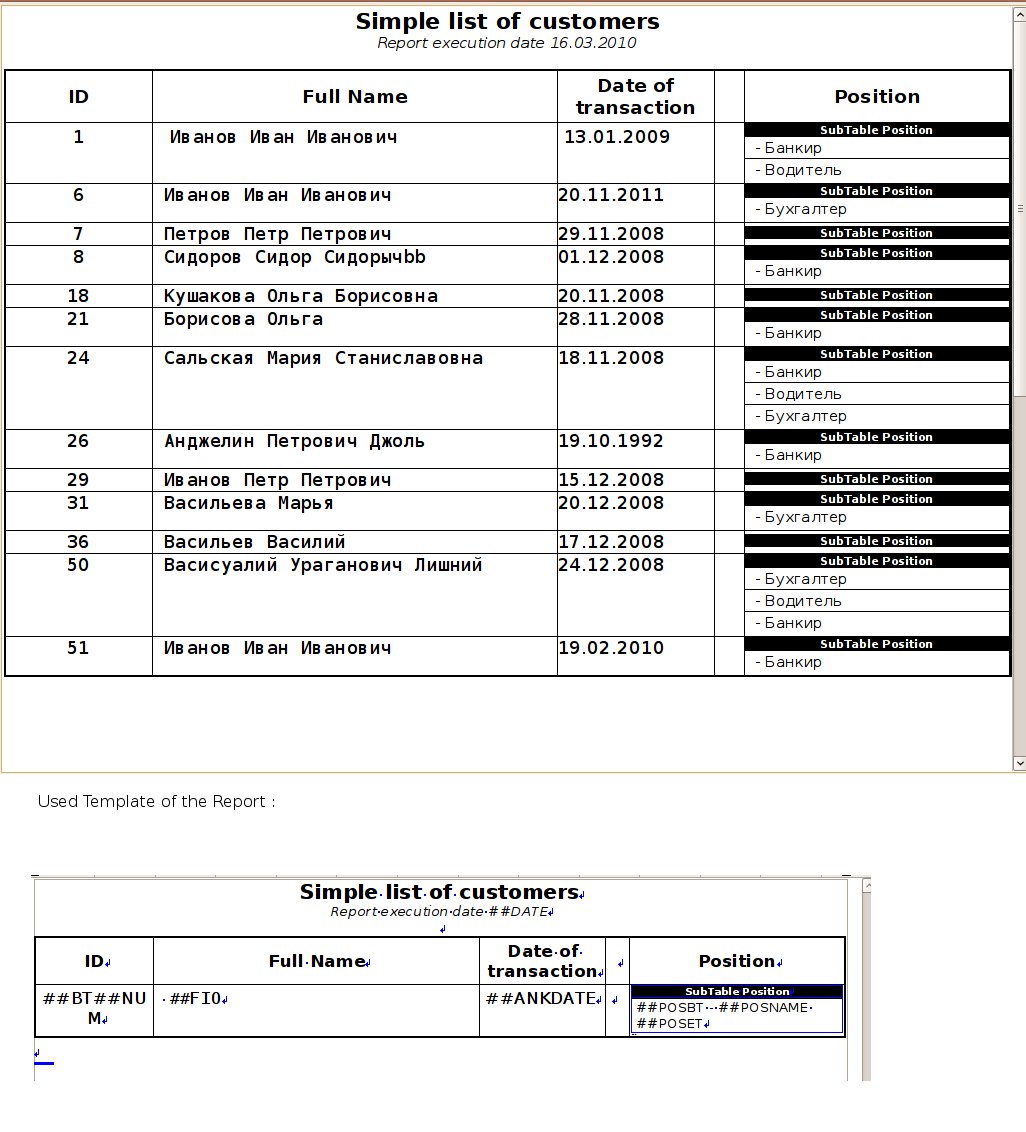
Real Code for Generate Report:
void AnketaListDlg::PrintResumeList_ReportFinish(){
	rep.SubstVar("##DATE",AsString(GetSysDate()));
	rep.SubstVar("##TOTAL",AsString(TOTAL));
}
void AnketaListDlg::PrintResumeList_CalcBody(){
	RepGenSubProc repPositions(rep, "##POSB","##POSE");
	RepGenSubProc repPositions1(rep, "##POSB1","##POSE1",true);
	RepGenSubProc repEducations(rep, "##EDUB","##EDUE");

	repPositions.RepGenSubProcBody = THISBACK(PrintResumeList_CalcPosBody);
	repPositions1.RepGenSubProcBody = THISBACK(PrintResumeList_CalcPosBody);
	repEducations.RepGenSubProcBody = THISBACK(PrintResumeList_CalcEduBody);

	Sql sql;

	TOTAL=0;
	sql * SqlSelect(SqlAll()).From(ANKETA);
	while (sql.Fetch()) {

		rep.RepGenCalculateBodyBeforeSubst();
		TOTAL++;
		gANK_ID = sql[ANK_ID];
		rep.SubstVar("##TOTAL",AsString(TOTAL));
		rep.SubstVar("##FIO",(String)sql[ANK_NAME]);
		rep.SubstVar("##NUM",AsString(sql[ANK_ID]));
		rep.SubstVar("##ANKDATE",AsString(sql[ANK_DATE]));
		rep.SubstVar("##PHONE",AsString(sql[ANK_PHONE]));
		rep.SubstVar("##PHONE1",((String)sql[ANK_PHONE]));
		rep.SubstVar("##BIRTHDAY",AsString((Date)(sql[ANK_BIRTHDAY])));
		rep.SubstVar("##CHILDREN",AsString(sql[ANK_CHILDREN]));
				rep.SubstVar("##OWNCAR",Single<ConvYesNo>().Format(sql[ANK_OWNCAR]));
		rep.SubstVar("##SMOKER",Single<ConvYesNo>().Format(sql[ANK_SMOKER]));
		rep.SubstVar("##CANBLINDTYPE",Single<ConvYesNo>().Format(sql[ANK_CANBLINDTYPE]));
		rep.SubstVar("##SPEEDOFTYPING",AsString(sql[ANK_SPEEDOFTYPING]));
		rep.SubstVar("##SPEEDOFTYPLAT",AsString(sql[ANK_SPEEDOFTYPINGLAT]));
		rep.SubstVar("##FILEMAKING",Single<ConvYesNo>().Format(sql[ANK_FILEMAKING]));
		rep.SubstVar("##SALARY",AsString(sql[ANK_SALARY]));
		rep.SubstVar("##CURRENCY",AsString(sql[ANK_CURRENCYOFSALARY]));
		rep.SubstVar("##HOMEADDRESS",AsString(sql[ANK_HOMEADDRESS]));						//

		if (rep.ExistVar("##PHOTO")) {
			Image im_photo = PNGRaster().LoadString(sql[ANK_PHOTO]);
			rep.PlaceImage("##PHOTOMIN",im_photo,Size(300,300));
			rep.PlaceImage("##PHOTOMID",im_photo,Size(800,800));
			rep.PlaceImage("##PHOTOMAX",im_photo,Size(1200,1200));
			rep.PlaceImage("##PHOTOEXTRA",im_photo,Size(4200,4200));
		}

		repPositions.DoCalc();
		repPositions1.DoCalc();
		repEducations.DoCalc();
		rep.RepGenCalculateBodyAfterSubst();
	}
}

void AnketaListDlg::PrintResumeList_CalcPosBody(){
	Sql sql;
	sql * SqlSelect(SqlAll()).From(ANKETAPOSITION).Where(ANP_ANKETAID == gANK_ID);
	while (sql.Fetch()) {
		rep.RepGenCalculateBodyBeforeSubst();
		rep.SubstVar("##POSNAME",PositionConvert().Format((int)(sql[ANP_POSITIONID])));
		rep.RepGenCalculateBodyAfterSubst();
	}

}
...
...
...
...
And in header file (In Parent window TopWindow class definition):
	int TOTAL;
	RepGen rep;


	void PrintResume_ReportFinish();
	void PrintResume_CalcPosBody();
	void PrintResume_CalcEduBody();
SergeyNikitin<U++>( linux, wine )
{
under( Ubuntu || Debian || Raspbian );
}
[Updated on: Tue, 16 March 2010 02:33] Report message to a moderator |
|
|
|
| Re: Very Simple Report Generator (Use QTF format) [message #25861 is a reply to message #25854] |
Tue, 16 March 2010 11:43 |
|
forlano
Messages: 1221
Registered: March 2006
Location: Italy
|
Senior Contributor |
|
|
| sergeynikitin wrote on Tue, 16 March 2010 01:59 |
Hello, Luigi! First of all. Thanks for testing RepGen! I tried my module in simple terms, but when it came to complex applications, I realized that RepGen far from ideal, I almost completely rewrote RepGen - now code complete reenterability, and challenges are organized much easier. Just tomorrow I will try to lay out a new version of SVN with examples. It remains only examples of change under the new method call. Incidentally, I found a few annoying bugs that have already been corrected.
Regarding the code that you gave in your message, I'll see it tomorrow. (sorry, the work flunked)
|
Thanks for this good news. If you are working on a new release then neglect my cobe above. I will wait the new version that seems to resolve my problem.
Luigi
|
|
|
|
|
|
|
|
|
|
|
|
|
|
|
|
| Re: Very Simple Report Generator (Use QTF format) [message #26142 is a reply to message #26141] |
Mon, 05 April 2010 18:35 |
|
|
Hi Luigi!
It's very strange.
I think, that it some mistakes in client code.
In Report generator all very simple and cannot work wrong.
I propose to send me testcase (if it's close source you may send direct to my mail (mail at svsoft . ru) ).
SergeyNikitin<U++>( linux, wine )
{
under( Ubuntu || Debian || Raspbian );
}
|
|
|
|
| Re: Very Simple Report Generator (Use QTF format) [message #26167 is a reply to message #26142] |
Wed, 07 April 2010 03:42 |
|
|
Hi Luigi!
I looked at the code, code - perfect. The whole thing was in the wrong QTF.
I did the following: just opened two windows - I looked at one window, and drew the same report template in another window.
New QTF file in attachment.
##TOTAL - I added some code for debugging purposes. Here's a modified piece of code.
void ClentCallbackCalcBody() {
	LOG("ClentCallbackCalcBody");
	Vector<String> V = Split(STRINGS[STRINGS_I],';',false);
	DUMPC(V);

	rep.SubstVar("##PLAYERNAME",TrimBoth(V.At(0)));
	rep.SubstVar("##COUNTRY",TrimBoth(V.At(1)));
	rep.SubstVar("##TITLE",TrimBoth(V.At(2)));
	rep.SubstVar("##RTGFIDE",TrimBoth(V.At(3)));
	rep.SubstVar("##RTGNAT",TrimBoth(V.At(4)));
	rep.SubstVar("##TOTAL",AsString(TOTAL)); // <===== I added only this line
	String pictaddr;

/*	if (V.GetCount()>=8 && !TrimBoth(V.At(7)).IsEmpty()) {
		pictaddr = TrimBoth(V.At(7));
		if (!pictaddr.IsEmpty()) {
#ifdef PLATFORM_X11
			pictaddr = GetHomeDirectory()+"/MyApps/RepGenTest/"+pictaddr;
			DUMP(pictaddr);
#endif
			Image im = StreamRaster::LoadFileAny(pictaddr);
			rep.PlaceImage( "##IMAGE", im, Size(1100,700) );
//			rep.PlaceImage( "##IMAGE", im );
		}
	} else {
		rep.SubstVar("##IMAGE","");
	}
*/

	TOTAL += 1;
	if(++STRINGS_I==STRINGS_COUNT) rep.LoopDone();

};
SergeyNikitin<U++>( linux, wine )
{
under( Ubuntu || Debian || Raspbian );
}
[Updated on: Wed, 07 April 2010 03:45] Report message to a moderator |
|
|
|
| Re: Very Simple Report Generator (Use QTF format) [message #26168 is a reply to message #26167] |
Wed, 07 April 2010 08:04 |
|
forlano
Messages: 1221
Registered: March 2006
Location: Italy
|
Senior Contributor |
|
|
| sergeynikitin wrote on Wed, 07 April 2010 03:42 |
Hi Luigi!
I looked at the code, code - perfect. The whole thing was in the wrong QTF.
|
Thank you!
It works now. I am sorry for the false allarm.
Just a little note. Depending on the height of the template table may happen that it is broken over two consecutive pages. Perhaps it would be better to try to keep it on the same page.
Luigi
[Updated on: Wed, 07 April 2010 08:26] Report message to a moderator |
|
|
|
| Re: Very Simple Report Generator (Use QTF format) [message #26169 is a reply to message #26168] |
Wed, 07 April 2010 09:33 |
|
|
Unfortunately, a breakdown of the content on the page controls package Report (RepGen falls to slightly modify the original QTF).
Here's another version of the report template using the Option "Keep table together" in parent table.
SergeyNikitin<U++>( linux, wine )
{
under( Ubuntu || Debian || Raspbian );
}
|
|
|
|
|
|
|
|
|
|
|
|
| Re: Very Simple Report Generator (Use QTF format) [message #30551 is a reply to message #30548] |
Sat, 08 January 2011 10:18 |
|
|
| mubeta wrote on Fri, 07 January 2011 22:26 |
Hi all,
I am looking for RepGen, that is what I am searching to do before to find it.
Only one question: the QTF template file are made by what ? My problem is that I don't found any way to insert an image directly from file (I have to open the image from a different editor and copy/paste to the qtf file...), using UWord that is coming with U++. There is any suggestet tool ?
Yhanks.
|
You can do this without problems.
Array<QtfRichObject> v_qtf_objects;
Image v_image_data = <your image>
v_qtf_objects.Add(CreatePNGObject(v_image_data, 0, 500));
String v_image_str = "";
v_qtf_objects.Add(CreatePNGObject(v_image_data, 0, 500));
v_image_str << v_qtf_objects[v_qtf_objects.GetCount()-1];
v_rep_body = replace_string(v_rep_body, "##ImageData", v_image_str);
The v_rep_body is you template string with image.
OK, I did a costumized template generator, but the idea is same, I think.
Best regards, Ion.
|
|
|
|
| Re: Very Simple Report Generator (Use QTF format) [message #30560 is a reply to message #30551] |
Sat, 08 January 2011 15:21 |
mubeta
Messages: 77
Registered: October 2006
|
Member |
|
|
Thanks for all,
Maybe the RepGen, (downloaded from the repository), have a bug at the lines 42 and 44: where "SubstVar("##IMAGE",s);" must be replaced with: "SubstVar(s_from,s);" for best costumization.
Now I am looking for use repeated parts of the report body. Two questions:
1) In the example "RepGenTest" is not clear (for me), what ##EP, ##ET, ##BP and ##BT tags are used for.
2) In the same example, the template file named: REPORT_TEMPLATE.QTF there is some very small tables, or table cells, (apparently not visible). Are used for something regarding RepGen automation ?
Thanks.
|
|
|
|
|
|
| Re: Very Simple Report Generator (Use QTF format) [message #30776 is a reply to message #30590] |
Fri, 21 January 2011 20:12 |
|
|
RepGen is very old in SVN. I'll upload new version with extremely new technique of loop processing (and very simplest).
If you want, you may use UWord. Usually I add same editor in application and I save templates in database.
Maybe I upload RepGen with GUI template editor?
SergeyNikitin<U++>( linux, wine )
{
under( Ubuntu || Debian || Raspbian );
}
|
|
|
|
| Re: Very Simple Report Generator (Use QTF format) [message #37071 is a reply to message #24050] |
Fri, 17 August 2012 19:04 |
 |
jibe
Messages: 294
Registered: February 2007
Location: France
|
Experienced Member |
|
|
Hi,
Is this working well ? I compiled (rebuilt all) the RepGen_Test, and it doesn't generates a good report (see attached pdf).
I'm using last version (5283) of Upp, the Data.csv file for test seems good as well as QTF report files...
I don't understand what I'm doing wrong... What happens ?
The 2 reports look very similar, just 2 pages and some very little changes for the other, but no data corresponding to data.csv...
PS : could you explain more how to use ##BP, ##BT, ##EP and ##ET, please ? (already asked by mubeta) It could be good that it is mentioned in the doc
[Updated on: Fri, 17 August 2012 19:07] Report message to a moderator |
|
|
|
|
|
|
|
|
|
|
|
Goto Forum:
Current Time: Sun Apr 26 03:26:47 GMT+2 2026
Total time taken to generate the page: 0.01094 seconds
|
 U++ framework
 Search
 Help
Help Members
 Register
 Login
Login Home
Home




 )
) 


