Home » U++ TheIDE » U++ TheIDE: Installation, Compiling and Running of theide » Using SVN from U++
| Re: Using SVN from U++ [message #27647 is a reply to message #27645] |
Tue, 27 July 2010 17:57   |
|
|
| jeremy_c wrote on Tue, 27 July 2010 17:17 |
This is silly but I'm having problems with this again. How do I commit my code from the ide?
Jeremy
|
Hi Jeremy,
The syncing options should be in Edit > SVN submenu. Similar options are present in the context menu that appears when you right click on file or package on the left side of theide:
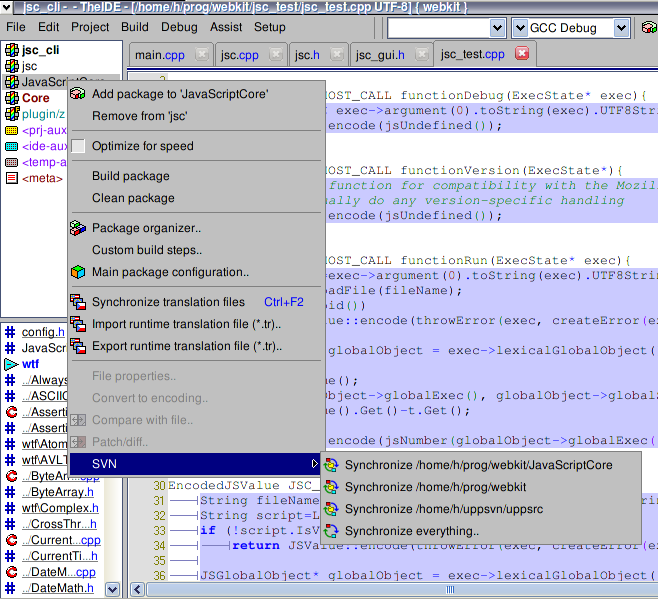
It should open a window with list of changed files and, most importantly, commit button.
If you don't see these options or the window doesn't appear, it is either problem with you svn installation (but then neither the svn history would work, so it is probably not the case) or it might be a bug.
Maybe you could try the standalone usvn client. It is in uppsrc, just compile it and run in your working copy directory. It is the same code as in theide, so if there is some problem in the code, it should be broken too and possibly easier to debug.
Best regards,
Honza
-
 Attachment: svn.png
(Size: 142.94KB, Downloaded 1003 times)
|
|
|
|
Current Time: Tue May 12 19:30:46 GMT+2 2026
Total time taken to generate the page: 0.00674 seconds
|
 U++ framework
 Search
 Help
Help Members
 Register
 Login
Login Home
Home




