Home » Developing U++ » U++ Developers corner » TheIde new look and new features
|
|
|
|
|
|
|
|
| Re: TheIde new look [message #30493 is a reply to message #30490] |
Wed, 05 January 2011 08:31   |
|
|
| mirek wrote on Tue, 04 January 2011 13:22 |
Well, I guess is is about the time to improve looks... 
WRT to icons, I guess we should use some free sets. The question is whether we should aim for configurable? (I mean, allow more sets of icons). I think it would not hurt and is relitevely easy to do.
|
Sure and this should not be only possible for toolbar but also for assist, designer etc.
|
|
|
|
|
|
|
|
|
|
|
|
| Re: TheIde new look [message #30545 is a reply to message #30544] |
Fri, 07 January 2011 20:52 |
|
|
|
That can be useful if project consists of packages with lot of files. But sorting isn't trivial if file list have separators I think the best strategy here would be sorting separators first and then files within particular separator.
|
|
|
|
|
|
| Re: TheIde new look [message #30547 is a reply to message #30525] |
Fri, 07 January 2011 20:56 |
|
|
| mr_ped wrote on Thu, 06 January 2011 09:14 |
you can do it by hand in TheIDE by Ctrl+Alt+arrowsUp/Down (I think).
Or you may open the particular .upp file in OOo Calc (excel?) and use sort on lines (use selection to modify only file names, also take note of separators and sort only inside groups), fix "," ";" at end of file names, save back. Open IDE back.
|
I missed very often here drag and drop support - it's much more convenient than holding key combo or modifying upp file.
|
|
|
|
| Re: TheIde new look [message #30597 is a reply to message #30547] |
Tue, 11 January 2011 14:33 |
 |
 kohait00
Messages: 939
Registered: July 2009
Location: Germany
|
Experienced Contributor |
|
|
[quote title=unodgs wrote on Fri, 07 January 2011 20:56][quote I missed very often here drag and drop support
[/quote]
yeah, me too
considering the filelist ColumnList:
it has a rather weired behavior when scrolling, the content that disappears from one column, will slide in lets say from bottom in the previous column. this makes scrolling less usefull. a la: 'i dont want to see the content again that i moved out of my sight' or 'i expect only unseen things to appear'
i definitely like the slim splitters, lets one focus on really important things.
it'd be great to make the global style persistable / exportable, this means, to simply be able to save all the things even chameleon could read in and later be able to restore / override its settings.
this implys all relevant controls beeing using CH_STYLE, where one can edit and override the StyleDefault i.e.
this also means, that things like size of splitter, not only it's Color is considered style. this is currently not the case.
check out StyleTest, some forst steps on live changing Style infos of some controls / and the colors.
[Updated on: Tue, 11 January 2011 14:41] Report message to a moderator |
|
|
|
|
|
| Re: TheIde new look [message #30612 is a reply to message #30598] |
Wed, 12 January 2011 12:29 |
gprentice
Messages: 260
Registered: November 2005
Location: New Zealand
|
Experienced Member |
|
|
| mirek wrote on Wed, 12 January 2011 02:42 |
| kohait00 wrote on Tue, 11 January 2011 08:33 |
considering the filelist ColumnList:
it has a rather weired behavior when scrolling, the content that disappears from one column, will slide in lets say from bottom in the previous column. this makes scrolling less usefull. a la: 'i dont want to see the content again that i moved out of my sight' or 'i expect only unseen things to appear'
|
Well, but the only alternative is to have items sorted horizontally... Which IMO is much worse.
Or, of course, have only single column.
|
Or, do what Windows explorer does when in "list" mode - it shows multiple columns sorted column-wise with a horizontal scroll-bar. When you move the scroll-bar, the display jumps one column at a time - which is really awful to use.
Another possibility is to allow the top and bottom panes to be side by side instead of vertically aligned - but that would waste some screen space by having two full-height scroll-bars.
P.S. I like it the way it is.
Graeme
[Updated on: Wed, 12 January 2011 12:33] Report message to a moderator |
|
|
|
|
|
|
|
|
|
|
|
|
|
|
|
|
|
|
|
|
|
|
|
|
|
|
|
|
|
|
|
| Re: TheIde new look [message #30752 is a reply to message #30751] |
Thu, 20 January 2011 15:26 |
|
|
| mirek wrote on Thu, 20 January 2011 09:04 |
Another feature I am missing from theide is that while in theory the editor is only limited by available memory, working with files >10MB is painful (but mostly because too long load/save time).
As such files are almost never supposed to be edited, perhaps we should provide view mode for them instead, not loading them into the memory.
The only thing missing here is a good nice widget for such viewer
(See e.g. Total commander for inspiration...)
|
You could allow editing big files only in overwrite mode (no saving problems). From time to time it can be useful.
|
|
|
|
|
|
| Re: TheIde new look [message #30767 is a reply to message #30758] |
Fri, 21 January 2011 14:57 |
|
|
Before I comment all excellent ideas in this thread (especially Mindtraveller's prototype) I would like to ask you what do you think about this change. I removed second tab bar from theide in editor split mode. Instead the second edited file tab has different color (on the screenshot yellow - don't worry about it - this is only for test purposes). I think this is better, especially if there are many tabs. Normally after split you would get two tab bars with long scrollbars what makes navigating cumbersome. What's more important if you would close some tabs from the second editor and quit split mode and enter it again all those tabs would be restored. So there is no real advantage from having second tab bar. Besides one tab bar makes theide code simpler and splitting editors a little bit faster. Screenshot:
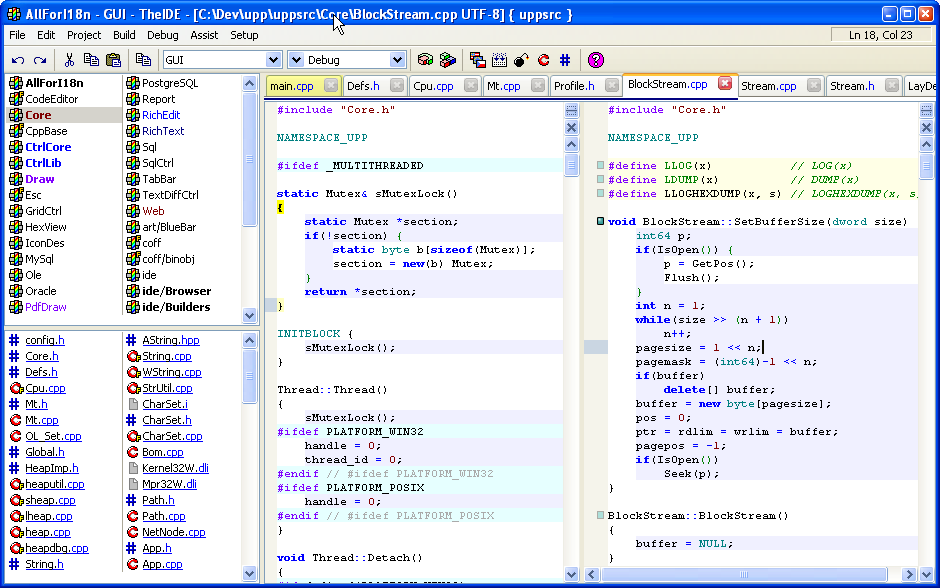
Tell me please what you think about it. If there won't be any objections or complaints I'll commit the change.
-
 Attachment: idetabs.png
(Size: 57.94KB, Downloaded 1051 times)
|
|
|
|
|
|
| Re: TheIde new look and new features [message #30771 is a reply to message #30485] |
Fri, 21 January 2011 15:29 |
mr_ped
Messages: 826
Registered: November 2005
Location: Czech Republic - Praha
|
Experienced Contributor |
|
|
I certainly support single tab bar, looks more usable to me.
Some tiny objections from me (not a showstoppers, just areas to research if it can't be improved even more):
I don't see clearly which pane is active (only hint is cursor).
edit: also the left bar with doc edit rectangles is available only with active tab, still the difference is minor.
That said you have orange line over top of active tab, in my IDE (host theme in WinXP with classic theme) there's no visual clue at all except having red cross for closing tab.
Also what if active tab and secondary tab are too far away from themselves? You can see name of tab by switching to it, so it's probably enough, or may it get annoying? (and we should pin somewhere into edit window the name if tab is gone?)
Can we color the inactive big bar on left (line nums + doc edit + recently modified lines)? Maybe just the base color for unchanged lines. I'm sure it would make identification of panes easy, but I have no idea if it will look good and natural, maybe it will be even more annoying. Something to try out.
Also I think I would LIKE to have active tab colored in same way for example with that light orange. And in the end I would love to see ColorfulTabs in IDE.
[Updated on: Fri, 21 January 2011 15:32] Report message to a moderator |
|
|
|
| Re: TheIde new look and new features [message #30809 is a reply to message #30771] |
Mon, 24 January 2011 00:03 |
Mindtraveller
Messages: 917
Registered: August 2007
Location: Russia, Moscow rgn.
|
Experienced Contributor |

|
|
2nd version of U++ IDE look:
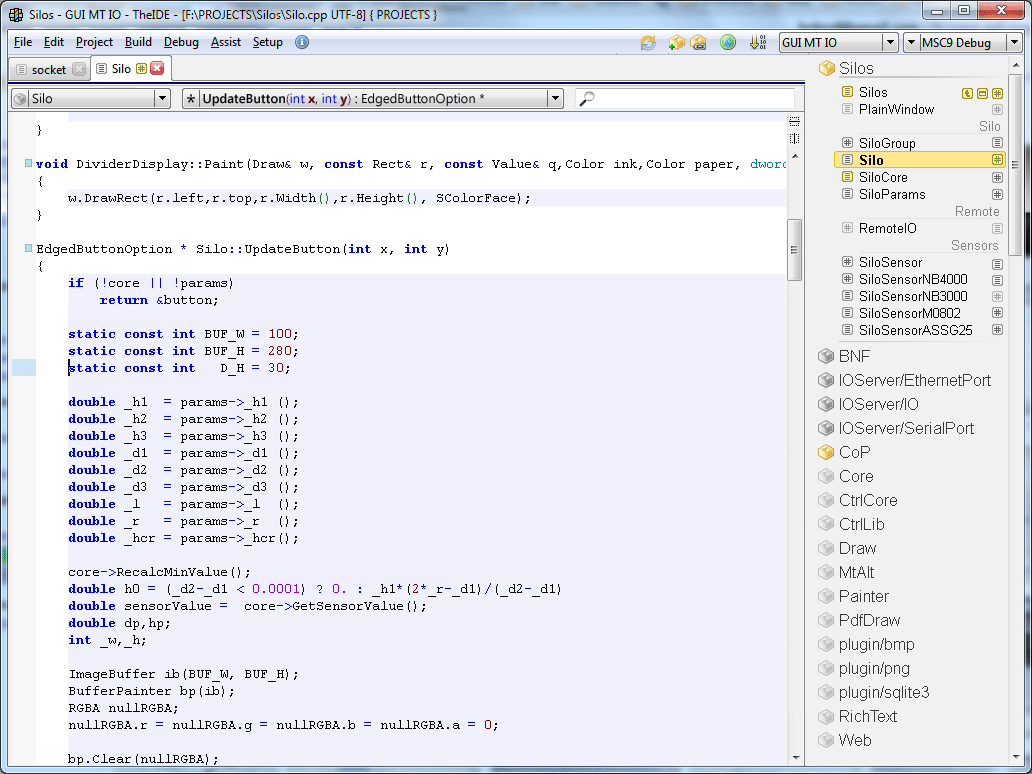
Let's collect what do we have here:
* menu & toolbar in one line which saves precious vertical space
* code navigator fits into much smaller space while doing the same (it is 100% equivalent to current navigator)
* in-code search, which I personally need much: just press Ctrl-I and type search string inside search entry; pressing Ctrl-I will cycle through samples found (should also draw a count of found items inside the "zoom" icon)
* areas for manual text entry now have white color background, while mouse-controlled areas are gray
* packages and files now reside single control. Pros: single scroller, and now you may view a number of packages files' at once. Underlining is substituted with more graphically "nice" (IMO) icon color approach.
Packages are always sorted by the name. Exception is the main package which is on the top.
Files with different extensions are collected into one record. File icon is coloured with the same rule as package icon.
Separators within package file list divide file list without making extra visual noise (IMO one of my best results in this picture).
* it is significantly much space for code. Besides, the left part of the window, which is more intensively caught by the human eye, is purified from any controls, making coding a more convenient process. All the navigators are moved to the top and to the right.
-
Attachment: theide2.png
(Size: 55.68KB, Downloaded 1029 times)
[Updated on: Mon, 24 January 2011 08:59] Report message to a moderator |
|
|
|
|
|
|
|
| Re: TheIde new look and new features [message #30814 is a reply to message #30809] |
Mon, 24 January 2011 09:40 |
Tom1
Messages: 1319
Registered: March 2007
|
Ultimate Contributor |
|
|
Mindtraveller,
I must say you have made an excellent prototype for the new IDE design. The simplicity, clarity and sophisticated style of the interface are really appealing. The improved efficiency in the screen area usage comes in handy especially when on road with the notebook PC.
The only thing I would change is to put the new package/file list on the left side of the source code area -- or maybe just an option to select either left or right side for it. This is to keep the most intensely looked-at window area right at the center of the screen. (That area obviously is about the left half of the source code window.)
When can I get this?? I just can't wait!
Best regards,
Tom
|
|
|
|
| Re: TheIde new look and new features [message #30818 is a reply to message #30812] |
Mon, 24 January 2011 10:03 |
|
|
| mirek wrote on Mon, 24 January 2011 09:32 |
In fact, putting code explorer where it is now was partly motivated by the fact that widescreen LCDs are much more standard then original 4:3 today. With widescreen, you have surplus of horizontal space...
|
You are right about the widescreen spreading everywhere, but the ratio is not everything - the "widescreen" on my primary machine is 1024x600  So I strongly support saving as much space as possible, both in horizontal and vertical direction. So I strongly support saving as much space as possible, both in horizontal and vertical direction.
Also Tom is IMHO right about keeping the package list on the left (or configurable) to keep the code in the center of the screen. And that is especially true on big screens, where the distance from left side to corner can be quite large.
Honza
|
|
|
|
| Re: TheIde new look and new features [message #30820 is a reply to message #30818] |
Mon, 24 January 2011 10:15 |
|
|
|
Don't worry about the side. With docking integrated it can be placed anywhere. Docking has also option to lock the layout that hides every ui element that is related to docking so application can look like docking was not there
|
|
|
|
Goto Forum:
Current Time: Sun Apr 26 13:14:28 GMT+2 2026
Total time taken to generate the page: 0.01089 seconds
|
 U++ framework
 Search
 Help
Help Members
 Register
 Login
Login Home
Home




 .
.


