Home » U++ Library support » U++ Libraries and TheIDE: i18n, Unicode and Internationalization » It's suspected to be an issue with Font.
| It's suspected to be an issue with Font. [message #31658] |
Fri, 18 March 2011 23:50  |
 Lance
Lance
Messages: 656
Registered: March 2007
|
Contributor |
|
|
The programs I used to compare are UWord from the UPP, and MS Word. The platform is Windows 7.
The text I used to test is:
ultimate++是一个性能优良的C++GUI库
The problem with U++ drawed text is that some characters are notably larger than others and some have incorrect horizontal displacement.
Please see attached picture for a visual effect.
I also encountered issue where chinese characters are displayed correctly displayed on Windows but are blank on Ubuntu. And when I copies the same text that was displayed as blank to, say gedit, the text displayed correctly as in Windows. That part I will attach picture in future.
|
|
|
|
| Re: It's suspected to be an issue with Font. [message #31942 is a reply to message #31658] |
Sun, 10 April 2011 14:42  |
 |
mirek
Messages: 14291
Registered: November 2005
|
Ultimate Member |
|
|
| Lance wrote on Fri, 18 March 2011 18:50 |
The programs I used to compare are UWord from the UPP, and MS Word. The platform is Windows 7.
The text I used to test is:
ultimate++是一个性能优良的C++GUI库
The problem with U++ drawed text is that some characters are notably larger than others and some have incorrect horizontal displacement.
|
It works fine on my Windows 7. However, I believe that the problem is caused by font substitution mechanism and perhaps on your system, you have some font that takes precendence for some glyphs, but does not contain other characters.
However, I have noticed that OpenOffice or Wordpad are preferring SimSun font, so I have given it higher priority now. Please check.
The core table for font subsitutions is in Draw/FontCR, table sFontReplacements. If U++ does not find required glyph in the font, it tries to get the glyph by going through fonts in this table and uses first glyph available... Maybe you could play with it a bit to get better results.
| Quote: |
I also encountered issue where chinese characters are displayed correctly displayed on Windows but are blank on Ubuntu. And when I copies the same text that was displayed as blank to, say gedit, the text displayed correctly as in Windows. That part I will attach picture in future.
|
I believe this is basically the same issue - gedit has better knowledge about fonts, so is able to find a better replacement.
Maybe, if openoffice behaves similary in Ubuntu as in Windows, you can try to paste characters into Openoffice and then check what font it has actually used for it. Then we can add this font to replacement table...
Alternatively please post some problematic text here so that I can do this myself.
|
|
|
|
|
|
|
|
|
|
| Re: It's suspected to be an issue with Font. [message #32006 is a reply to message #32005] |
Sat, 16 April 2011 21:02 |
|
mirek
Messages: 14291
Registered: November 2005
|
Ultimate Member |
|
|
#include <CtrlLib/CtrlLib.h>

using namespace Upp;

struct MyApp : TopWindow {
	virtual void Paint(Draw& w) {
		w.DrawRect(GetSize(), White);
		w.DrawText(10, 10, "ultimate++是一个性能优良的C++GUI库");
	}
};

GUI_APP_MAIN
{
	MyApp().Run();
}
And this DDUMP
bool Replace(Font fnt, int chr, Font& rfnt)
{
	static Vector<int> rface;
	static Vector<dword> l, h;
	ONCELOCK {
		for(int i = 0; i < __countof(sFontReplacements) && rface.GetCount() < 20; i++) {
			int q = Font::FindFaceNameIndex(sFontReplacements[i].name);
			if(q > 0) {
				rface.Add(q);
				l.Add(sFontReplacements[i].l);
				h.Add(sFontReplacements[i].h);
			}
		}
	}

	Font f = fnt;
	dword tl = chr < 4096 ? 0x80000000 >> (chr >> 7) : 0;
	dword th = 0x8000000 >> ((dword)chr >> 11);
//	DDUMP(FormatIntHex(chr));
//	DDUMP(FormatIntHex(th));
	for(int i = 0; i < rface.GetCount(); i++) {
//		DDUMP(Font(rface[i], 10));
//		DDUMP(FormatIntHex(h[i]));
//		DDUMP(FormatIntHex(h[i] & th));
		if(((l[i] & tl) || (h[i] & th)) && IsNormal(f.Face(rface[i]), chr)) {
			int a = fnt.GetAscent();
			int d = fnt.GetDescent();
			if(f.GetAscent() > a || f.GetDescent() > d) {
				static sFontMetricsReplacement cache[256];
				int q = CombineHash(fnt, f) & 255;
				if(cache[q].src != fnt || cache[q].dst != f) {
					cache[q].src = fnt;
					cache[q].dst = f;
					while((f.GetAscent() > a || f.GetDescent() > d) && f.GetHeight() > 1) {
						f.Height(max(1, min(f.GetHeight() - 1, f.GetHeight() * 9 / 10)));
					}
					cache[q].mdst = f;
				}
				else
					f = cache[q].mdst;
			}
			rfnt = f;
			DDUMP(rfnt.GetFaceName()); // <<- HERE
			return true;
		}
	}
	return false;
}
[Updated on: Sat, 16 April 2011 21:03] Report message to a moderator |
|
|
|
|
|
|
|
|
|
|
|
|
|
|
|
|
|
|
|
|
|
|
|
| Re: It's suspected to be an issue with Font. [message #32240 is a reply to message #32235] |
Mon, 02 May 2011 20:07 |
|
mirek
Messages: 14291
Registered: November 2005
|
Ultimate Member |
|
|
| Lance wrote on Mon, 02 May 2011 10:11 |
By the way, SimSun should be a safe bet. Any Chinese characters should be representable in SimSun. Say there is a fancy font FancyFont. It only implemented 2000 most common chinese characters, than a character that's not in this set should be displayed in SimSun
|
Well, but problem is that SimSun is already tested and required...
It is all really weird. In Windows, it works for me just fine. In your machine, it seems to choose "Arial Unicode MS" instead.
Hm, one possible explanation: Do not you have the same Arial Unicode MS installed on ubuntu?
It actually seems there is something wrong with that font, the replacement algorithm seems to have detected required glyphs in it...
OK, one more try: try to move SimSun in the list BEFORE Arial Unicode MS.
struct sRFace {
	const char *name;
	dword l, h;
} sFontReplacements[] = {
	{ "sans-serif", 0xffee0008, 0xdc000801 },
	{ "Arial", 0xfffe0000, 0x09c00080 },
	{ "SimSun", 0xfd800000, 0x09ffff00 },
	{ "Arial Unicode MS", 0xfffc3fef, 0xfa7ff7e7 },
	{ "MS UI Gothic", 0xffc01008, 0x0fffff00 },
	{ "MS Mincho", 0xffc01008, 0x0fffff00 },
.....
Let us see, maybe it could help in windows.
Another thing to consider is to list all fonts to find out whether there is something bad with names:
GUI_APP_MAIN
{
	for(int i = 0; i < Font::GetFaceCount(); i++)
		LOG(Font::GetFaceName(i));
}
[Updated on: Mon, 02 May 2011 20:07] Report message to a moderator |
|
|
|
|
|
|
|
|
|
|
|
|
|
| Re: It's suspected to be an issue with Font. [message #32288 is a reply to message #32286] |
Fri, 06 May 2011 10:36 |
|
mirek
Messages: 14291
Registered: November 2005
|
Ultimate Member |
|
|
http://msdn.microsoft.com/en-us/library/dd162620%28v=vs.85%2 9.aspx
"The fonts for many East Asian languages have two typeface names: an English name and a localized name. EnumFonts, EnumFontFamilies, and EnumFontFamiliesEx return the English typeface name if the system locale does not match the language of the font."
Well, well, well, always some surprise waiting to bite us...
I guess the simple fix now is to simply add CJK names to FontCR.cpp, something like:
struct sRFace {
	const char *name;
	dword l, h;
} sFontReplacements[] = {
	{ "sans-serif", 0xffee0008, 0xdc000801 },
	{ "Arial", 0xfffe0000, 0x09c00080 },
	{ "Arial Unicode MS", 0xfffc3fef, 0xfa7ff7e7 },
	{ "SimSun", 0xfd800000, 0x09ffff00 },
	{ "方正舒体", 0xfd800000, 0x09ffff00 },
	{ "MS UI Gothic", 0xffc01008, 0x0fffff00 },
	{ "MS Mincho", 0xffc01008, 0x0fffff00 },
Above CJK glyphs are just example, please replace with CJK name (I cannot read CJK  . Perhaps, if you can, there are more fonts with possibly alternate CHJ name in the table, they would need the same treatment. . Perhaps, if you can, there are more fonts with possibly alternate CHJ name in the table, they would need the same treatment.
|
|
|
|
|
|
|
|
| Re: It's suspected to be an issue with Font. [message #32297 is a reply to message #32296] |
Fri, 06 May 2011 19:18 |
|
mirek
Messages: 14291
Registered: November 2005
|
Ultimate Member |
|
|
| Lance wrote on Fri, 06 May 2011 11:51 |
Hi Mirek:
It works, even though not in the intended way.
I couldn't do it on Windows as the UTF-8 Chinese characters representation will fail MSVC and I don't have MinGW installed yet.
|
Ah, we have met this MSVC issue before...
The thing to do is that you will have to convert <32 >128 characters in string to escapes (octal or hexadecimal).
One way is to use this 'script'
#include <Core/Core.h>

using namespace Upp;

CONSOLE_APP_MAIN
{
	DLOG(AsCString("方正舒体", INT_MAX, NULL, ASCSTRING_OCTALHI));
}
and then paste text from log. Of course, you need to do that in Linux
| Quote: |
Only strange thing is that I use StdFont, and edit the name in sFontReplacements[] for SimSun only, but the Replacement font actually used is WenQuanYi Zen Hei, which is sans serif while SimSum is serif.
|
Sounds weird...
Well, whatever. If I may ask you, please fix that table by adding 'cjk' names and post here, so that it can be fixed in svn...
|
|
|
|
| Re: It's suspected to be an issue with Font. [message #32301 is a reply to message #32297] |
Sat, 07 May 2011 03:42 |
Lance
Messages: 656
Registered: March 2007
|
Contributor |
|
|
Mirek:
Regarding MSVC character set issue, the suggested way doesn't seem to work all the time. For example, the T file for GridCtrl used to cause trouble with MSVC for zhTW; then recent version of the T file apparently change to the the octel escaped version suggested by you, but it still fails MSVC on my computer, while similarly escaped Russian etc translations are just fine. I don't know exactly why.
As for the sFontReplacements array translation part, I will do in the way you suggested. I guess I will need to put 4 fonts entries: two for the typical serif/sans serif fonts on Windows, and 2 for the counterpart fonts on Linux.
Update: I might be wrong. GridCtrl's T file is no longer causing compilation trouble on Windows.
[Updated on: Sun, 15 May 2011 01:26] Report message to a moderator |
|
|
|
|
|
| Re: It's suspected to be an issue with Font. [message #32303 is a reply to message #32302] |
Sat, 07 May 2011 05:19 |
Lance
Messages: 656
Registered: March 2007
|
Contributor |
|
|
	{"\346\226\260\345\256\213\344\275\223", 0xfd800000, 0x09ffff00 },//SimSun (or New Song Ti)
	{"\345\256\213\344\275\223", 0xfd800000, 0x09ffff00 }, // Song Ti
	{"\345\276\256\350\275\257\351\233\205\351\273\221", 0xfd800000, 0x09ffff00 }, //MS Ya Hei
	{"\351\273\221\344\275\223", 0xfd800000, 0x09ffff00 },  // Hei Ti
	{"\346\226\207\346\263\211\351\251\277\346\255\243\351\273\221", 0xfd800000, 0x09ffff00 }, //WenQuanYi Zheng Hi
	{"\346\226\207\346\263\211\351\251\277\347\255\211\345\256\275\345\276\256\347\261\263\351\273\221", 0xfd800000, 0x09ffff00 },//WenQuanYi Wei Hei
	{"\344\273\277\345\256\213", 0xfd800000, 0x09ffff00 }, //Fang Song
	{"\346\245\267\344\275\223", 0xfd800000, 0x09ffff00 }, // Kai Ti
Above entries should covered the most common and acceptible fonts on both MS and Linux(ubuntu, free fonts) platforms. I am not sure if it will work as well for HongKong/Taiwan/Korean/Japanese users. But now we know where to go to fix similar issues.
Thanks for your effort. U++ becomes more frienldy to CJK users because of it!
I will build the TheIDE with the above entries applied and see how well it works on Linux(Ubuntu) and Windows, and will report the results hopefully within the next 24 hours.
|
|
|
|
|
|
|
|
| Re: It's suspected to be an issue with Font. [message #32306 is a reply to message #32305] |
Sat, 07 May 2011 14:59 |
Lance
Messages: 656
Registered: March 2007
|
Contributor |
|
|
Hi Mirek:
Sorry for keeping you waiting.
Here is the adjusted sFontReplacements array
struct sRFace {
	const char *name;
	dword l, h;
} sFontReplacements[] = {
	{ "sans-serif", 0xffee0008, 0xdc000801 },
	{ "Arial", 0xfffe0000, 0x09c00080 },
	{"\346\226\260\345\256\213\344\275\223", 0xfd800000, 0x09ffff00 },//SimSun (or New Song Ti)
	{"\345\256\213\344\275\223", 0xfd800000, 0x09ffff00 }, // Song Ti
	{"\345\276\256\350\275\257\351\233\205\351\273\221", 0xfd800000, 0x09ffff00 }, //MS Ya Hei
	{"\351\273\221\344\275\223", 0xfd800000, 0x09ffff00 },  // Hei Ti
	{"\346\226\207\346\263\211\351\251\277\346\255\243\351\273\221", 0xfd800000, 0x09ffff00 }, //WenQuanYi Zheng Hi
	{"\346\226\207\346\263\211\351\251\277\347\255\211\345\256\275\345\276\256\347\261\263\351\273\221", 0xfd800000, 0x09ffff00 },//WenQuanYi Wei Hei
	{"\346\245\267\344\275\223", 0xfd800000, 0x09ffff00 }, // Kai Ti
	{"\344\273\277\345\256\213", 0xfd800000, 0x09ffff00 }, //Fang Song
	{ "Arial Unicode MS", 0xfffc3fef, 0xfa7ff7e7 },
	{ "MS UI Gothic", 0xffc01008, 0x0fffff00 },
	{ "MS Mincho", 0xffc01008, 0x0fffff00 },
	{ "VL Gothic", 0xfd800000, 0x09a7ff80 },
	{ "VL PGothic", 0xffe00008, 0x0de7ff80 },
	{ "UnDotum", 0xe5800000, 0x0aa7ff7e },
	{ "UnBatang", 0xe5800000, 0x0aa7ff7e },
	{ "DejaVu Sans Mono", 0xffec0004, 0x0fc00080 },
	{ "DejaVu Sans", 0xfffd000c, 0x0fc40080 },
	{ "AlArabiyaFreeSerif", 0xffdc0008, 0xd8000007 },
	{ "Kochi Mincho", 0xffdc0008, 0xd8000007 },
	{ "Kochi Gothic", 0xffdc0008, 0xd8000007 },
	{ "Sazanami Mincho", 0xffdc0008, 0xd8000007 },
	{ "Sazanami Gothic", 0xffdc0008, 0xd8000007 },
	{ "Gulim", 0xf7c00000, 0x0ba7ff7e },
	{ "PMingLiU", 0xff800000, 0x09ffff00 },
	{ "FreeSans", 0xfff23d00, 0x0fc00000 },
	{ "FreeSerif", 0xfffd3938, 0x0fc00080 },
	{ "Symbol", 0xe4000000, 0x88000002 },
};
Turns out "Arial Unicode MS" is the culprit. Some Chinese characters will be intercepted by it.
Not all the entries are strictly necessary. The first two Chinese fonts, Song Ti and SimSun(New Song Ti) are generally available on Windows and Linux platform. They are serif fonts. SongTi(or SimSun) is the most popular/common font. Most Chinese Characters should be implemented in this(these two) font. In the past, I noticed on Linux platform that some supposedly Hei Ti font were actually rendered using Song Ti because those characters are not implemented in Hei Ti. Sorry for my expression but you know what I mean.
So if Upp doesn't actually differentiate between Serif/Sans Serif in font replacement logic, we should be able to keep the SongTi and SimSun entries only and eliminate other Chinese Font entries.
Thank you again for your attention to this issue! It's very important to me.
Edited by Lance, Reason: SimSun is the way to go. Tried Fang Song, looks great, but apparently it has much smaller implemented character set.
[Updated on: Sat, 07 May 2011 15:17] Report message to a moderator |
|
|
|
|
|
| Re: It's suspected to be an issue with Font. [message #32308 is a reply to message #32307] |
Sat, 07 May 2011 17:39 |
Lance
Messages: 656
Registered: March 2007
|
Contributor |
|
|
Sorry but it's getting more complicated than we had expected.
I did test on another Windows XP machine. Here is the font replacement table:
struct sRFace {
	const char *name;
	dword l, h;
} sFontReplacements[] = {
	{ "sans-serif", 0xffee0008, 0xdc000801 },
	{ "Arial", 0xfffe0000, 0x09c00080 },
	{"\346\226\260\345\256\213\344\275\223", 0xfd800000, 0x09ffff00 },//SimSun (or New Song Ti)
	{"\345\256\213\344\275\223", 0xfd800000, 0x09ffff00 }, // Song Ti
	{"\345\276\256\350\275\257\351\233\205\351\273\221", 0xfd800000, 0x09ffff00 }, //MS Ya Hei
	{"\351\273\221\344\275\223", 0xfd800000, 0x09ffff00 },  // Hei Ti

	{ "Arial Unicode MS", 0xfffc3fef, 0xfa7ff7e7 },
	{ "SimSun", 0xfd800000, 0x09ffff00 },
	{ "MS UI Gothic", 0xffc01008, 0x0fffff00 },
	{ "MS Mincho", 0xffc01008, 0x0fffff00 },
	{ "WenQuanYi Zen Hei Mono", 0xfd800000, 0x0ae7ff7e },
	{ "WenQuanYi Zen Hei", 0xfd800000, 0x0ae7ff7e },
	{ "VL Gothic", 0xfd800000, 0x09a7ff80 },
	{ "VL PGothic", 0xffe00008, 0x0de7ff80 },
	{ "UnDotum", 0xe5800000, 0x0aa7ff7e },
	{ "UnBatang", 0xe5800000, 0x0aa7ff7e },
	{ "DejaVu Sans Mono", 0xffec0004, 0x0fc00080 },
	{ "DejaVu Sans", 0xfffd000c, 0x0fc40080 },
	{ "AlArabiyaFreeSerif", 0xffdc0008, 0xd8000007 },
	{ "Kochi Mincho", 0xffdc0008, 0xd8000007 },
	{ "Kochi Gothic", 0xffdc0008, 0xd8000007 },
	{ "Sazanami Mincho", 0xffdc0008, 0xd8000007 },
	{ "Sazanami Gothic", 0xffdc0008, 0xd8000007 },
	{ "Gulim", 0xf7c00000, 0x0ba7ff7e },
	{ "PMingLiU", 0xff800000, 0x09ffff00 },
	{ "FreeSans", 0xfff23d00, 0x0fc00000 },
	{ "FreeSerif", 0xfffd3938, 0x0fc00080 },
	{ "Symbol", 0xe4000000, 0x88000002 },
};
Here is the result of font enumeration on the machine:
STDFONT
Times New Roman
Arial
Courier New
Symbol
Wingdings
Tahoma
System
Terminal
Fixedsys
Roman
Script
Modern
Small Fonts
MS Serif
WST_Czec
WST_Engl
WST_Fren
WST_Germ
WST_Ital
WST_Span
WST_Swed
Courier
MS Sans Serif
Marlett
Lucida Console
Lucida Sans Unicode
Verdana
Arial Black
Comic Sans MS
Impact
Georgia
Franklin Gothic Medium
Palatino Linotype
Trebuchet MS
Webdings
Estrangelo Edessa
Gautami
Latha
Mangal
MV Boli
Raavi
Shruti
Tunga
Sylfaen
Microsoft Sans Serif
Arial Unicode MS
Book Antiqua
Bookman Old Style
Century
Century Gothic
Garamond
MS Outlook
Wingdings 2
Wingdings 3
MS Reference Sans Serif
MS Reference Specialty
方正舒体
方正姚体
华文彩云
华文细黑
华文行楷
华文新魏
华文中宋
隶书
宋体-方正超大字符集
幼圆
Haettenschweiler
Bookshelf Symbol 7
Bitstream Vera Sans
Bitstream Vera Serif
Bitstream Vera Sans Mono
Myriad Web Pro
Myriad Web Pro Condensed
Arial Narrow
Kartika
Vrinda
Lucida Sans
Free 3 of 9 Extended
Free 3 of 9
DejaVu Sans Condensed
DejaVu Serif
DejaVu Serif Condensed
DejaVu Sans Mono
DejaVu Sans
DejaVu Sans Light
OpenSymbol
MS Mincho
MS PMincho
MS Gothic
MS PGothic
MS UI Gothic
Gulim
GulimChe
Dotum
DotumChe
Batang
BatangChe
Gungsuh
GungsuhChe
宋体                              <----- This is Song Ti
新宋体                            <------ This is SimSun
宋体-PUA
黑体
MingLiU
PMingLiU
微软雅黑
f.GetFaceName() = Arial Unicode MS
f.GetFaceName() = Arial Unicode MS
f.GetFaceName() = Arial Unicode MS
f.GetFaceName() = Arial Unicode MS
And here is the font substitution report:
f.GetFaceName() = Arial Unicode MS
f.GetFaceName() = MS UI Gothic
f.GetFaceName() = Arial Unicode MS
f.GetFaceName() = Arial Unicode MS
And the text use to generate the substitution result is 颜色不错.
SimSun and Song Ti are skipped even though the font are present in the system and they are supposed to take precedence over Arial Unicode MS and MS UI Gothic. The more weired thing is it works just fine on Windows Vista and Ubuntu. Will do a test on a Windows 7 Machine.
|
|
|
|
| Re: It's suspected to be an issue with Font. [message #32309 is a reply to message #32308] |
Sat, 07 May 2011 19:47 |
Lance
Messages: 656
Registered: March 2007
|
Contributor |
|
|
In a newly installed machine with Windows 7 Home Premium English version and VC10 Chinese installed, I discovered that chinese font name are in English or Pinyin. And neither Song Ti or SimSun is present, while Microsoft YaHei is the default. I can confirm this is yet another SongTi. On Windows Machine Microsoft YaHei and its Chinese alias ΢ÈíÑÅºÚ should be a safe bet, and it looks decent even in small font size. So the following revised entries and ordering should work on most machine.
struct sRFace {
	const char *name;
	dword l, h;
} sFontReplacements[] = {
	{ "sans-serif", 0xffee0008, 0xdc000801 },
	{ "Arial", 0xfffe0000, 0x09c00080 },
	{"\346\226\260\345\256\213\344\275\223", 0xfd800000, 0x09ffff00 },//SimSun (or New Song Ti)
	{"SimSun", 0xfd800000, 0x09ffff00 },//SimSun (or New Song Ti)
	{"\345\256\213\344\275\223", 0xfd800000, 0x09ffff00 }, // Song Ti
	{"\345\276\256\350\275\257\351\233\205\351\273\221", 0xfd800000, 0x09ffff00 }, //MS Ya Hei
	{"Microsoft YaHei", 0xfd800000, 0x09ffff00 }, //MS Ya Hei
//	{"\351\273\221\344\275\223", 0xfd800000, 0x09ffff00 },  // Hei Ti
//	{"\346\226\207\346\263\211\351\251\277\346\255\243\351\273\221", 0xfd800000, 0x09ffff00 }, //WenQuanYi Zheng Hi
//	{"\346\226\207\346\263\211\351\251\277\347\255\211\345\256\275\345\276\256\347\261\263\351\273\221", 0xfd800000, 0x09ffff00 },//WenQuanYi Wei Hei
//	{"\344\273\277\345\256\213", 0xfd800000, 0x09ffff00 }, //Fang Song
//	{"\346\245\267\344\275\223", 0xfd800000, 0x09ffff00 }, // Kai Ti
	{ "Arial Unicode MS", 0xfffc3fef, 0xfa7ff7e7 },
	{ "MS UI Gothic", 0xffc01008, 0x0fffff00 },
	{ "MS Mincho", 0xffc01008, 0x0fffff00 },
	{ "VL Gothic", 0xfd800000, 0x09a7ff80 },
	{ "VL PGothic", 0xffe00008, 0x0de7ff80 },
	{ "UnDotum", 0xe5800000, 0x0aa7ff7e },
	{ "UnBatang", 0xe5800000, 0x0aa7ff7e },
	{ "DejaVu Sans Mono", 0xffec0004, 0x0fc00080 },
	{ "DejaVu Sans", 0xfffd000c, 0x0fc40080 },
	{ "AlArabiyaFreeSerif", 0xffdc0008, 0xd8000007 },
	{ "Kochi Mincho", 0xffdc0008, 0xd8000007 },
	{ "Kochi Gothic", 0xffdc0008, 0xd8000007 },
	{ "Sazanami Mincho", 0xffdc0008, 0xd8000007 },
	{ "Sazanami Gothic", 0xffdc0008, 0xd8000007 },
	{ "Gulim", 0xf7c00000, 0x0ba7ff7e },
	{ "PMingLiU", 0xff800000, 0x09ffff00 }, // <--- SHOULD MOVE UP
	{ "FreeSans", 0xfff23d00, 0x0fc00000 },
	{ "FreeSerif", 0xfffd3938, 0x0fc00080 },
	{ "Symbol", 0xe4000000, 0x88000002 },
};
I still cannot figure out why it would not work on my Windows XP machine. (it's Win XP Professional English version, but many Chinese software has been installed/uninstalled, so its precise condition cannot be determined and reproduced. One thing is for sure, Chinese character in MS Office or OpenOffice are just fine). I will do further investigation. If you can give me some ideas on how to figure out the exact trouble point, I would appreciate that.
Edit: Promote entry for PMingLiu to above that for Arial Unicode MS solve the problem on the WinXP machine. The reason is still unknown. Even though SimSun, SongTi, MS YaHei all are present and work just fine in MS Office and probably many other programs, and enumeration in U++ also shows them, they will somehow report false information to UPP font substitution logic so that they are eliminate as viable candidates.
[Updated on: Sun, 08 May 2011 00:40] Report message to a moderator |
|
|
|
| Re: It's suspected to be an issue with Font. [message #32311 is a reply to message #32309] |
Sat, 07 May 2011 20:41 |
Lance
Messages: 656
Registered: March 2007
|
Contributor |
|
|
Sorry for throwing too much at you. Here I discovered another issue which I believe is related to Upp way of interpreting UTF-8 characters.
This special Chinese punctuation mark, "£¬"(wide comma,"\357\274\214"), will not display and it will cause otherwise displayable Chinese characters following it disappear.
Here is a test program:
#include <CtrlLib/CtrlLib.h>

using namespace Upp;

struct MyApp : TopWindow {
	virtual void Paint(Draw& w) {
		const char * texts[]={
			"\346\234\213", //PENG
			"\345\217\213",  //YOU
			"\346\234\213\357\274\214\345\217\213",//PENG CHINESECOMMA YOU
			"\346\234\213\345\217\213\357\274\214\346\234\213\345\217\213" // PENG YOU CHINESECOMMA PENG YOU
		};

		w.DrawRect(GetSize(), White);
		for(int i=0; i<4; ++i)
			w.DrawText(10, 10+i*30, texts[i]);
	}
};
GUI_APP_MAIN
{
	MyApp().Run();
}
Output is something like:
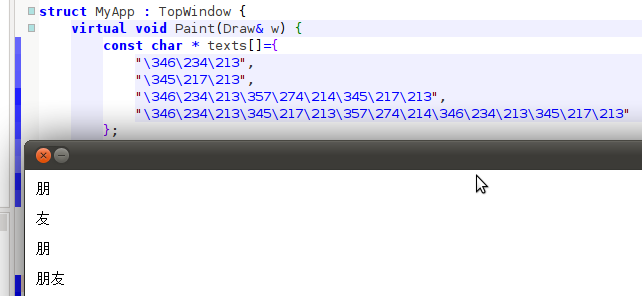
A second issue: On Ubuntu, I applied the above changes to font substitution table and recompiled theide, the Chinese font displays perfect, but this time the input method won't work. Chinese characters entered in the code editor are displayed as narrow blanks, when copy&pasting the blanks to gedit, gedit also display blanks; copy good text from web page or gedit to the code editor works fine.
[Updated on: Sat, 07 May 2011 23:30] Report message to a moderator |
|
|
|
| Re: It's suspected to be an issue with Font. [message #32314 is a reply to message #32311] |
Sat, 07 May 2011 23:10 |
Lance
Messages: 656
Registered: March 2007
|
Contributor |
|
|
| Quote: |
A second issue: On Ubuntu, I applied the above changes to font substitution table and recompiled theide, the Chinese font displays perfect, but this time the input method won't work. Chinese characters entered in the code editor are displayed as narrow blanks, when copy paster the blanks to gedit, gedit also display blanks; copy good text from website or gedit to the code editor works fine.
|
Regarding this issue, here is some results of my further experiments. It has been re-confirmed with the most recent version 3407. The test was done on a Ubuntu. G++ is 64bit. The patch to font replacement table has been applied.
When I compile theide using GCC Debug mode, the ide works beautifully: font is pretty, input method works fine; all is good, well almost, as the chinese wide comma issue remains.
When I compile theide using GCC Optimal mode, the ide display existing chinese fonts as well, but Chinese input method doesn't work. Strange, non-displayable characters are inserted, who are invisible to me but will fail the compiler.
BTW, the ide "version.h" file reads:
#define IDE_VERSION "3274-lucid-i386-nogtk"
As this is a pretty old version, the actually nightly release version may already have this issue fixed. That I wouldn't know.
|
|
|
|
|
|
|
|
|
|
Goto Forum:
Current Time: Wed Jun 03 23:45:06 GMT+2 2026
Total time taken to generate the page: 0.01561 seconds
|
 U++ framework
 Search
 Help
Help Members
 Register
 Login
Login Home
Home




 but I'll definitely give it a try.

