Home » Community » Newbie corner » Upp GUI size in Win and Ubuntu
| Upp GUI size in Win and Ubuntu [message #39866] |
Wed, 08 May 2013 01:18  |
 nlneilson
Messages: 644
Registered: January 2010
Location: U.S. California. Mojave &...
|
Contributor |
|
|
I was not sure what topic to post this in.
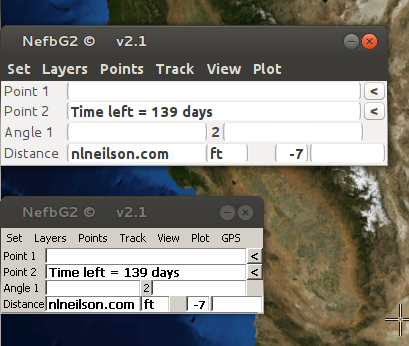
To build/compile a GUI in Win and run in Ubuntu with wine it is much smaller than if it is built with GCC in Ubuntu.
It is the same code for the GUI and the dlg.lay size is (260,83) in both. The lower Upp GUI is from Win.
[Updated on: Wed, 08 May 2013 01:50] Report message to a moderator |
|
|
|
|
|
| Re: Upp GUI size in Win and Ubuntu [message #39873 is a reply to message #39869] |
Wed, 08 May 2013 19:51  |
nlneilson
Messages: 644
Registered: January 2010
Location: U.S. California. Mojave &...
|
Contributor |
|
|
Hi Biobytes
Yes everything seems to be proportionally bigger.
The Upp GUI in Ubuntu is way too big.
With the dlg.lay size of (260,83) it should be no bigger than that whether on Win or some Linux distro, I only have Ubuntu to try it on.
Here is the dlg.lay
LAYOUT(DlgLayout, 260, 83)
	ITEM(EditField, Point1, SetFont(StdFontZ(12).Bold()).WantFocus(false).LeftPosZ(44, 200).TopPosZ(0, 16))
	ITEM(EditField, Point2, SetFont(StdFontZ(12).Bold()).WantFocus(false).LeftPosZ(44, 200).TopPosZ(16, 16))
	ITEM(EditField, Angle1, SetFont(StdFontZ(12).Bold()).WantFocus(false).LeftPosZ(44, 96).TopPosZ(32, 16))
	ITEM(EditField, Angle2, SetFont(StdFontZ(12).Bold()).WantFocus(false).LeftPosZ(149, 96).TopPosZ(32, 16))
	ITEM(EditField, Distance, SetFont(StdFontZ(12).Bold()).WantFocus(false).LeftPosZ(44, 96).TopPosZ(48, 16))
	ITEM(Label, units, SetFont(StdFontZ(12).Bold()).LeftPosZ(138, 30).TopPosZ(48, 16))
	ITEM(Label, dv___6, SetLabel(t_(" Point 1")).SetFont(StdFontZ(11)).LeftPosZ(0, 44).VSizePosZ(0, 67))
	ITEM(Label, dv___7, SetLabel(t_(" Point 2")).SetFont(StdFontZ(11)).LeftPosZ(0, 44).TopPosZ(16, 16))
	ITEM(Label, dv___8, SetLabel(t_(" Angle 1")).SetFont(StdFontZ(11)).LeftPosZ(0, 44).TopPosZ(32, 16))
	ITEM(Label, dv___9, SetLabel(t_("2")).LeftPosZ(142, 8).TopPosZ(32, 16))
	ITEM(Label, dv___10, SetLabel(t_(" Distance")).SetFont(StdFontZ(11)).LeftPosZ(0, 44).TopPosZ(48, 16))
	ITEM(EditField, Data1, WantFocus(false).LeftPosZ(1, 255).TopPosZ(64, 16))
	ITEM(Button, P1, SetLabel(t_("<")).SetFont(StdFont().Bold()).LeftPosZ(244, 16).TopPosZ(0, 16))
	ITEM(Button, P2, SetLabel(t_("<")).SetFont(StdFont().Bold()).LeftPosZ(244, 16).TopPosZ(16, 16))
	ITEM(EditField, count, AlignRight(true).SetFont(StdFont().Bold()).WantFocus(false).LeftPosZ(208, 52).TopPosZ(48, 16))
	ITEM(EditField, timezone, AlignRight(true).SetFont(StdFont().Bold()).WantFocus(false).LeftPosZ(184, 24).TopPosZ(48, 16))
END_LAYOUT
|
|
|
|
|
|
|
|
| Re: Upp GUI size in Win and Ubuntu [message #39879 is a reply to message #39875] |
Thu, 09 May 2013 07:32 |
Sender Ghost
Messages: 301
Registered: November 2008
|
Senior Member |
|
|
Hello.
| Didier wrote on Mon, 22 April 2013 11:17 |
I expect the dialog to STAY 320*240
|
He can't expect this for different user settings, than default (on the same operating system, window manager, etc.), at least for screen shot images. For example, if you change the DPI settings for your screen on Windows XP to some value, bigger than 100% (usually, 96), then you will have proportionally larger window size for GUI applications. Therefore, they might look different to the user with different settings (and to you, if (s)he sent screen shots of the GUI). But internally, the application will behave like it have the same size (320x240, in this case). In conclusion, this is what he could expect: the same (internal to application) window size, which might look proportionally smaller/bigger by user settings.
In case of Neil's screen shot, we have different fonts (The Wine is Tahoma; the Gnome is Liberation Sans) and their heights, but GUI is proportional, which is default behaviour of current U++ GUI applications.
To explicitly change the default font for the GUI, you have SetStdFont(Font font) function:
#include <CtrlLib/CtrlLib.h>

using namespace Upp;

GUI_APP_MAIN
{
	RDUMP(GetStdFont());

	Font fnt;
	fnt.FaceName("Tahoma").Height(15);
	SetStdFont(fnt);

	PromptOK("Hello World!");
}
To disable layout scaling by font size, you have Ctrl::NoLayoutZoom() static method:
#include <CtrlLib/CtrlLib.h>

using namespace Upp;

GUI_APP_MAIN
{
	PromptOK("With layout zoom");
	Ctrl::NoLayoutZoom();
	PromptOK("No layout zoom");
}
There are other static methods of Ctrl, which you might find interesting.
Edit: Changed Draw::SetStdFont(Font font) to SetStdFont(Font font) function.
[Updated on: Sat, 11 May 2013 10:26] Report message to a moderator |
|
|
|
| Re: Upp GUI size in Win and Ubuntu [message #39884 is a reply to message #39879] |
Thu, 09 May 2013 10:16 |
nlneilson
Messages: 644
Registered: January 2010
Location: U.S. California. Mojave &...
|
Contributor |
|
|
Thanks Sender Ghost for the information.
edit: At first it seemed too easy but I was still on Win.
I tried the Ctrl::NoLayoutZoom(); and the size is still different.
I understand the user setting of DPI can make a difference but the above image is one screen shot in Ubuntu with the app running from TheIde and the app from Win running under wine at the same time, one is just moved below the other.
I think when installing or maybe later all the M$ fonts are installed in Ubuntu. They sure look the same except the size but the dot above the i is higher. I didn't try the Draw::SetStdFont(fnt); but maybe that will be necessary.
[Updated on: Thu, 09 May 2013 10:38] Report message to a moderator |
|
|
|
|
|
|
|
| Re: Upp GUI size in Win and Ubuntu [message #39892 is a reply to message #39887] |
Thu, 09 May 2013 14:50 |
Didier
Messages: 740
Registered: November 2008
Location: France
|
Contributor |
|
|
Hi all,
Ctrl::NoLayoutZoom(); did the trick for me, the background image now displays correctly (I didn't want to stretch it since it indicated me if the dialog displayed correctly or not) AND the application displays correctly on the 320*240 screen ( which size is of coarse fixed  ) )
Thank-you Sender-Ghost
[Updated on: Thu, 09 May 2013 15:01] Report message to a moderator |
|
|
|
| Re: Upp GUI size in Win and Ubuntu [message #39901 is a reply to message #39892] |
Fri, 10 May 2013 04:48 |
nlneilson
Messages: 644
Registered: January 2010
Location: U.S. California. Mojave &...
|
Contributor |
|
|
I started tinkering with fonts but decided not to go that route.
| piotr5 wrote on Thu, 09 May 2013 02:34 |
as far as I know in wine 96 is the default dpi no matter where...
|
I have 5 computers near or on a desk. Each has a Win and Ubuntu OS. When the Upp app is run with wine the size is OK. For a user or even myself to change the font for each where necessary is not a viable option. Letting them know Wine needs to be installed is a better option.
Ctrl::NoLayoutZoom(); works good for the GUI size. BUT: Even though each field in the dlg.lay is specified for location and size in pixels that is ignored or over ridden by the font size or whatever.
Is there a way to lock in all the dlg.lay dimensions?
edit: Apparently in Win OS the dimensions are locked in and independent of the font size. I changed one of the EditField size from 12 to SetFont(StdFontZ(60). It still displays the characters as size 12.
I am not that familiar with the Upp GUI code so I may be wrong.
[Updated on: Fri, 10 May 2013 05:32] Report message to a moderator |
|
|
|
| Re: Upp GUI size in Win and Ubuntu [message #39905 is a reply to message #39901] |
Fri, 10 May 2013 10:38 |
Sender Ghost
Messages: 301
Registered: November 2008
|
Senior Member |
|
|
| nlneilson wrote on Fri, 10 May 2013 04:48 |
Is there a way to lock in all the dlg.lay dimensions?
|
I didn't find this function for layouts (and there is no such option for Layout Designer), except static Ctrl::NoLayoutZoom(). But possible to use not zoomed version of placement manually, e.g.:
#include <CtrlLib/CtrlLib.h>

using namespace Upp;

GUI_APP_MAIN
{
	EditString text, zoomedText;
	text.NullText("Normal"); zoomedText.NullText("Zoomed");
	TopWindow window;
	window.SetRect(Size(320, 240));

	window.Add(text.LeftPos(4, 100).TopPos(4, 20)); // Without Z suffix
	window.Add(zoomedText.LeftPosZ(4, 100).TopPosZ(28, 20));

	window.Run();
}
[Updated on: Fri, 10 May 2013 11:31] Report message to a moderator |
|
|
|
|
|
|
|
|
|
|
|
|
|
| Re: Upp GUI size in Win and Ubuntu [message #39966 is a reply to message #39916] |
Sun, 19 May 2013 01:53 |
 |
Klugier
Messages: 1118
Registered: September 2012
Location: Poland, Kraków
|
Senior Contributor |
|
|
Hello nlneilson,
Did you solve the problem?
In meanwhile, I have thought how we can fix this issue. The first alternative is to make conditional layout and make perfect layout on your target os. And don't forget about NOGTK flag. X11 mode is more stable than GTK backend. On the other hand this solution is not efficient, because you need to develop all your layouts together.
I have enclosed sample code:
#ifdef PLATFORM_X11
class MainWindow : public WithMainWindowLayoutX11 {
#else
class MainWindow : public WithMainWindowLayout {
#endif
You can alsow use following function:
This function will transform your current colors and widgets to more similar to that used in "wine".
Sincerely,
Klugier
U++ - one framework to rule them all.
[Updated on: Sun, 19 May 2013 02:54] Report message to a moderator |
|
|
|
|
|
| Re: Upp GUI size in Win and Ubuntu [message #39998 is a reply to message #39967] |
Fri, 24 May 2013 02:38 |
|
Klugier
Messages: 1118
Registered: September 2012
Location: Poland, Kraków
|
Senior Contributor |
|
|
Hello,
What is X11? According to the wikipedia: "X11 is a computer software system and network protocol that provides a basis for graphical user interfaces (GUIs) and rich input device capability for networked computers.". More information you can find here: http://en.wikipedia.org/wiki/X11.
Now, Ultimate++ on unix like operating systems use two different redner method. The first is GTK Backend (Default). The second is X11. What is the difference between these two methods? Let's look at the following diagram:
Ultimate++ -> GTK+ -> X11 (GTK backend)
Ultimate++ -> X11 (NOGTK)
-> - means invoking
X11 mode is more stable, because the way to X server is shorter. Moreover, X11 mode on all posix systems looks exactly the same. It dosen't metter whether you are using GNOME or KDE.
-----------------------------------
GTK backend and X11 don't depend on Windows, so it doesn't matter which of these modes is turned on.
-----------------------------------
When I was writing about the efficiently I thought that you need to use conditional compilation to achieve better multiplatform code.
Sincerely,
Klugier
U++ - one framework to rule them all.
[Updated on: Sat, 25 May 2013 13:38] Report message to a moderator |
|
|
|
|
|
| Re: Upp GUI size in Win and Ubuntu [message #40052 is a reply to message #40050] |
Wed, 29 May 2013 11:45 |
Sender Ghost
Messages: 301
Registered: November 2008
|
Senior Member |
|
|
| nlneilson wrote on Tue, 28 May 2013 20:54 |
I filed a bug as each time the package is opened up it adds the 'Z's back in.
|
I think, this is not a bug. This is how it works by default - layout zooming:
| Logical positions |
Another issue that is related to positions is layout zooming. The problem here is that application can use font of different size or type than standard one used in layout designer when designing layout. That is why layout logical position need to be zoomed. Zoom factor is determined by ratio of text "OK Cancel Exit Retry" in runtime standard font size to Size(99, 13) - size of this text using standard font.
Zooming layout positions is done using placement methods with Z suffix (like LeftPosZ etc...).
|
Therefore, if you want to use layouts from layout designer, you have about two methods (for your specialized case):
1. Ctrl::NoLayoutZoom();
2. SetStdFont(Font font), where font must be the same (even DPI settings (for screen shots)) on different platforms to achieve the same sizes of layout widgets.
If you want to use placement methods without Z suffix, you could use them manually (as I already said):
Toggle Spoiler
#include <CtrlLib/CtrlLib.h>

using namespace Upp;

class CustomDlg : public TopWindow {
public:
	typedef CustomDlg CLASSNAME;
	CustomDlg();

	EditField Point1, Point2, Angle1, Angle2, Distance,
		Data1, count, timezone;

	Label units, l1, l2, l3, l4, l5;

	Button P1, P2;
};

CustomDlg::CustomDlg()
{
	Title("Custom Dialog");
	SetRect(Size(260, 80));
	MinimizeBox();

	Add(Point1.WantFocus(false).LeftPos(44, 200).TopPos(0, 16));
	Point1.SetFont(StdFont(12).Bold());
	Add(Point2.WantFocus(false).LeftPos(44, 200).TopPos(16, 16));
	Point2.SetFont(StdFont(12).Bold());
	Add(Angle1.WantFocus(false).LeftPos(44, 96).TopPos(32, 16));
	Angle1.SetFont(StdFont(12).Bold());
	Add(Angle2.WantFocus(false).LeftPos(149, 96).TopPos(32, 16));
	Angle2.SetFont(StdFont(12).Bold());
	Add(Distance.WantFocus(false).LeftPos(44, 96).TopPos(48, 16));
	Distance.SetFont(StdFont(12).Bold());
	Add(units.LeftPos(138, 30).TopPos(48, 16));
	Add(l1.LeftPos(0, 44).VSizePos(0, 67));
	l1.SetLabel(t_(" Point 1")).SetFont(StdFont(11));
	Add(l2.LeftPos(0, 44).TopPos(16, 16));
	l2.SetLabel(t_(" Point 2")).SetFont(StdFont(11));
	Add(l3.LeftPos(0, 44).TopPos(32, 16));
	l3.SetLabel(t_(" Angle 1")).SetFont(StdFont(11));
	Add(l4.LeftPos(142, 8).TopPos(32, 16));
	l4.SetLabel("2").SetFont(StdFont(11));
	Add(l5.LeftPos(0, 44).TopPos(48, 16));
	l5.SetLabel(t_(" Distance")).SetFont(StdFont(11));
	Add(Data1.WantFocus(false).LeftPos(1, 259).TopPos(64, 16));
	Add(P1.LeftPos(244, 16).TopPos(0, 16));
	P1.SetLabel("<").SetFont(StdFont().Bold());
	Add(P2.LeftPos(244, 16).TopPos(16, 16));
	P2.SetLabel("<").SetFont(StdFont().Bold());
	Add(count.AlignRight(true).LeftPos(208, 52).TopPos(48, 16));
	count.SetFont(StdFont().Bold());
	Add(timezone.AlignRight(true).WantFocus(false).LeftPos(184, 24).TopPos(48, 16));
	timezone.SetFont(StdFont().Bold());
}

GUI_APP_MAIN
{
	CustomDlg dlg;
	dlg.Run();
}
In conclusion, what you wanted is feature, which is not implemented. This feature, like "the possibility to use zoomed and not zoomed versions of placement inside the same layout", might have own consequences.
Edit:
The feature added to Redmine: "Ide (LayDes): Zoomable and not zoomable layout items".
[Updated on: Fri, 31 May 2013 09:32] Report message to a moderator |
|
|
|
|
|
| Re: Upp GUI size in Win and Ubuntu [message #40150 is a reply to message #40052] |
Sat, 22 June 2013 22:24 |
nlneilson
Messages: 644
Registered: January 2010
Location: U.S. California. Mojave &...
|
Contributor |
|
|
Thanks Sender Ghost for the code as the first time you mentioned this I was lost.
This question is not concerning size but whether the text in a label can be changed. Label 11 is originally " Point 1" with:
l1.SetLabel(t_(" Point 1")).SetFont(StdFont(11));
Could the text be changed to " Something" in an if block with:
l1.SetLabel(t_(" Something")).SetFont(StdFont(11));
without changing the Label to EditField?
| Sender Ghost wrote on Wed, 29 May 2013 02:45 |
If you want to use placement methods without Z suffix, you could use them manually (as I already said):
	Label units, l1, l2, l3, l4, l5;

	Add(l1.LeftPos(0, 44).VSizePos(0, 67));
	l1.SetLabel(t_(" Point 1")).SetFont(StdFont(11));
	Add(l2.LeftPos(0, 44).TopPos(16, 16));
	l2.SetLabel(t_(" Point 2")).SetFont(StdFont(11));
|
|
|
|
|
|
|
|
|
| Re: Upp GUI size in Win and Ubuntu [message #40155 is a reply to message #40153] |
Mon, 24 June 2013 02:33 |
Sender Ghost
Messages: 301
Registered: November 2008
|
Senior Member |
|
|
| nlneilson wrote on Sun, 23 June 2013 22:34 |
The link you had to the 'U++ framework' or API can that be downloaded or is there plans to have it so it can be downloaded for offline use?
|
Actually, possible to access the same topics from U++ TheIDE:
1. Assist -> Help Topics (or F1) menu bar.
2. Used packages -> CtrlLib -> Reference -> Static widgets (or just use "SetLabel" text for Search).
Also there is uppbox/uppweb package to generate html documentation.
Sorry for offtopic.
|
|
|
|
Goto Forum:
Current Time: Sun Jul 26 10:45:16 GMT+2 2026
Total time taken to generate the page: 0.00965 seconds
|
 U++ framework
 Search
 Help
Help Members
 Register
 Login
Login Home
Home




