Home » Community » Newbie corner » Problem in example code (Tried SplitterFrame yet minor problem.)
|
|
| Re: Problem in example code [message #45721 is a reply to message #45720] |
Tue, 29 December 2015 16:06   |
 |
 Klugier
Messages: 1117
Registered: September 2012
Location: Poland, Kraków
|
Senior Contributor |
|
|
Hello one more time  , ,
From the last stable version (9251 and up) we introduce new buttons that change the file view/edit mode. You can find them on TheIDE menu bar (Edit as text, Edit using designer, View as hex). Probably more information you will find on screen-shot posted below:
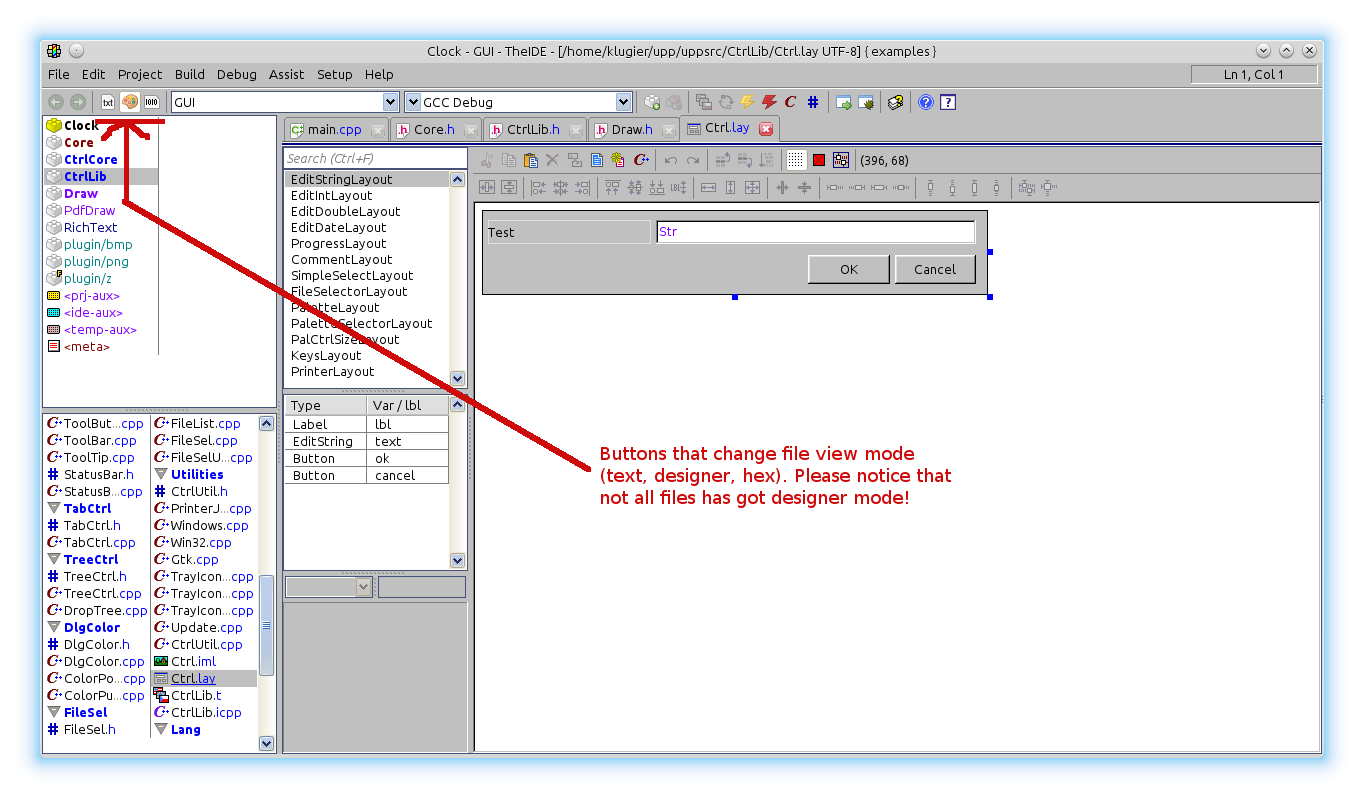
I strongly believe that we need to describe menu bar functionality in our documentation.
Sincerely,
Klugier
U++ - one framework to rule them all.
[Updated on: Tue, 29 December 2015 16:08] Report message to a moderator |
|
|
|
| Re: Problem in example code [message #45722 is a reply to message #45721] |
Tue, 29 December 2015 16:13 |
|
|
|
Also, there is Ctrl+T shortcut. But the idea is that you shouldn't really need this. You can either compose your GUI using the editor (with *.lay file), or do it in your code (in *.cpp). But you should never edit *.lay files "manualy" in their text form.
|
|
|
|
| Re: Problem in example code [message #45724 is a reply to message #45722] |
Tue, 29 December 2015 17:25 |
|
|
@Klugier
Hi!
Thanks a lot for the prompt and perfect help. Now I can see layout text.
@dolik.rce
Hi!
Thanks for the remark. However, I am confused with your statement. If I can edit .lay file why can't I edit it in their text form?
For example I want to put a StaticText or label specifying foreground and background color. GUI editor shows only foreground color or INK COLOR.
How can I do this?
Wish all of you Happy New Year
Best,
Abhijit
|
|
|
|
| Re: Problem in example code [message #45726 is a reply to message #45724] |
Tue, 29 December 2015 19:31 |
|
|
vegaonline wrote on Tue, 29 December 2015 17:25Thanks for the remark. However, I am confused with your statement. If I can edit .lay file why can't I edit it in their text form?
Well, that you can do something doesn't really mean you should If you modify the file in such a way that the editor in TheIDE will not understand it anymore, you might loose some information. I never actually tried that, so maybe the editor is clever enough to prevent this, but I wouldn't rely on it... The only reasonable situation where I would consider editing .lay file in its text form is when I wanted to do some Find&Replace to rename a bunch of widgets or some similar task that would be too tedious to do in the editor.
vegaonline wrote on Tue, 29 December 2015 17:25
For example I want to put a StaticText or label specifying foreground and background color. GUI editor shows only foreground color or INK COLOR.
How can I do this?
Things that can't be done in GUI editor are usually done in code. It is actually quite simple, e.g. to change the text of StaticText programatically:#include <CtrlLib/CtrlLib.h>
using namespace Upp;
#define LAYOUTFILE <MyApp/MyApp.lay>
#include <CtrlCore/lay.h>
class MyWindow : public WithMyLayout<TopWindow> {
typedef MyWindow CLASSNAME;
public:
MyWindow(){
CtrlLayout(*this, "");
MyStaticText.SetText("MyText");
}
};
The exact case you ask for, changing background color, is actually kind of tricky There is nothing like SetBackgroundColor method, but it is possible to change the background of the text itself. StaticText and many other widgets support QTF. It might look scary, but there is a nice editor in TheIDE (press Alt+Q). So to set The background of your text to blue, you'd do this:MyStaticText.SetText(t_("\1[$(0.0.255) Test]")
Honza
|
|
|
|
| Re: Problem in example code [message #45734 is a reply to message #45726] |
Thu, 31 December 2015 07:14 |
|
|
Thanks for the explanation.
I am sorry asking too many and silly questions. Please consider me as a learner who likes to clear confusion. Although the concept and implement of U++ is superb, "theide" is also great! I am surprised to see why I did not find this tool before!
1. I find that upp.out directory contains all the upp related staff and ~/MyApps/Testing contains all .cpp, .lay and .h files. If I want to build an application and like to run on some other machine not having Upp or other staffs installed, how can I do it? I found that in my machine, I can run executable file Testing built at ~/upp.out/MyApps/GCC.Debug.Debug_Full.Gui.Shared/.
2. Can I plot mathematical graphs etc.? Can I use codes with matplotlib in python or U++ has own widgets?
I am making a GUI for my App which is a small scientific application for my experimental device which needs a menu while one menu item shall open a small panel in same window to input text and data, while the other panel in the same window shall erase earlier panel and may plot some files in 2D, 3D, contour etc.
Best,
Abhijit
|
|
|
|
| Re: Problem in example code [message #45736 is a reply to message #45734] |
Thu, 31 December 2015 13:58 |
|
|
vegaonline wrote on Thu, 31 December 2015 07:14Thanks for the explanation.
I am sorry asking too many and silly questions. Please consider me as a learner who likes to clear confusion. Although the concept and implement of U++ is superb, "theide" is also great! I am surprised to see why I did not find this tool before!
You are welcome. Everyone on this forum knows that U++ has pretty steep learning curve and that the documentation doesn't always make everything clear. So the newbies are expected to ask many questions, and there is also many people willing to answer.
vegaonline wrote on Thu, 31 December 2015 07:141. I find that upp.out directory contains all the upp related staff and ~/MyApps/Testing contains all .cpp, .lay and .h files. If I want to build an application and like to run on some other machine not having Upp or other staffs installed, how can I do it? I found that in my machine, I can run executable file Testing built at ~/upp.out/MyApps/GCC.Debug.Debug_Full.Gui.Shared/. Yes, all the intermediate files (object files and libraries) are stored in upp.out (or whatever path you configure). The resulting binary is by default stored there to, but this can be easily changed. Just go to Build -> Output mode and there is a field labeled "Target file override" (actually there is two of them, one for debug mode and for release). If you check the checkbox there, TheIDE will create the binary with the path and name specified in the corresponding input field.
All you need to do to run any U++ program on other machine is to copy this single binary. Often it works out of the box, but sometimes there might be some libraries that are not installed on the other machine, but that is usually pretty easy to figure out and fix just by installing them using distribution packages. It might also happen that the other machine contains some of those libraries in version incompatible with those on the machine used to build your app, in which case it is bit harder to fix and it might be actually easier to just install theide and compile your package from source
vegaonline wrote on Thu, 31 December 2015 07:142. Can I plot mathematical graphs etc.? Can I use codes with matplotlib in python or U++ has own widgets? Check ScatterCtrl package.
vegaonline wrote on Thu, 31 December 2015 07:14I am making a GUI for my App which is a small scientific application for my experimental device which needs a menu while one menu item shall open a small panel in same window to input text and data, while the other panel in the same window shall erase earlier panel and may plot some files in 2D, 3D, contour etc. That should be a piece of cake in U++ For multiple windows at once, see part 6 of GUI tutorial. For 2D plots, there is already mentioned Scatter package and for 3D, there is GlCtrl. Together, you should be able to do what you need.
Honza
|
|
|
|
|
|
| Re: Problem in example code [message #45749 is a reply to message #45743] |
Fri, 01 January 2016 20:07 |
|
|
vegaonline wrote on Thu, 31 December 2015 18:31I have seen GU Tut 6. I want a menu at the top. Depending on the menu item, panels need to be opened in the same window in stead of separate windows erasing contents of earlier items.
Oh, ok. That is actually even simpler You can represent each panel using ParentCtrl (or WithMyLayout<ParentCtrl>, when using .lay file). This way you can Add and Remove multiple widgets (that is your 'panel') at once easily. For more customizable interface, you can also use Splitter 
Honza
|
|
|
|
| Re: Problem in example code [message #45760 is a reply to message #45749] |
Sat, 02 January 2016 22:39 |
|
|
@HONZA,
Thanks for kindly guiding me.
I am trying to use ParentCtrl, while I am facing problem.
I am attaching required files. The initial screen is OK. When I press "Configure", I want "CardLayout1" is to be shown which is not coming.
By the by, please ignore many commented lines as I am learner.
Please guide me.
-
 Attachment: Abhijit.tgz
(Size: 2.67KB, Downloaded 343 times)
[Updated on: Sat, 02 January 2016 22:40] Report message to a moderator |
|
|
|
| Re: Problem in example code [message #45769 is a reply to message #45760] |
Sun, 03 January 2016 12:57 |
|
|
vegaonline wrote on Sat, 02 January 2016 22:39@HONZA,
Thanks for kindly guiding me.
I am trying to use ParentCtrl, while I am facing problem.
I am attaching required files. The initial screen is OK. When I press "Configure", I want "CardLayout1" is to be shown which is not coming.
By the by, please ignore many commented lines as I am learner.
Please guide me.
Hi Abhijit,
The only part you were missing is adding and removing the ParentCtrl as necessary. The two functions called from menu should do something like this:
void Testing::doConfig() {
	doPlot.Remove();
	Add(doCard);
}

void Testing::doGeom() {
	doCard.Remove();
	Add(doPlot);
}
Also, the menu should be added using AddFrame, which you probably already tried, I've seen it in one of the comments It makes things much easier when switching the layouts, sinco you don't have to care about it's position. I have modified the sources and attach them for your reference.
|
|
|
|
| Re: Problem in example code [message #45773 is a reply to message #45769] |
Sun, 03 January 2016 14:41 |
|
|
Great ! I understand. Thanks a lot.
However, I may reach Plot menu from any other menu item having separate layout except card menu. Should I use ".Remove() for all other different layout or there is any single Remove command to remove all other layout which may be present there?
Best,
Abhijit
|
|
|
|
| Re: Problem in example code [message #45780 is a reply to message #45773] |
Sun, 03 January 2016 21:08 |
|
|
vegaonline wrote on Sun, 03 January 2016 14:41
However, I may reach Plot menu from any other menu item having separate layout except card menu. Should I use ".Remove() for all other different layout or there is any single Remove command to remove all other layout which may be present there?
There are ways to access the all the children of given Ctrls and to iterate through them. See GetFirstChild(), GetNext(), GetChildIndex(), GetIndexChild(), GetChildCount() and related functions in Ctrl documentation. In your particular case it would probably be ok just to call GetLasChild()->Remove(). But I never actually needed to use such a low level approach in my apps and it feels kind of error prone to me.
There is actually much simpler way: You can just remember your last state For example, you can add Ctrl* active to your class (don't forget to initialize it to NULL in constructor, otherwise you'll get crashes ), and then use a method like this for the switching:void Testing::SetLayout(Ctrl* ctrl) {
if (active)
active->Remove();
Add(*ctrl);
active = ctrl;
} menu.Add("Configure", THISBACK1(SetLayout, &doCard)).Help("Edit Simulation Setup");
menu.Add("Geometry", THISBACK1(SetLayout, &doPlot)).Help("Edit Experimental Geometry");
Honza
|
|
|
|
| Re: Problem in example code [message #45782 is a reply to message #45780] |
Mon, 04 January 2016 13:59 |
|
|
[quote title=dolik.rce wrote on Mon, 04 January 2016 01:38]vegaonline wrote on Sun, 03 January 2016 14:41
		menu.Add("Configure", THISBACK1(SetLayout, &doCard)).Help("Edit Simulation Setup");
		menu.Add("Geometry", THISBACK1(SetLayout, &doPlot)).Help("Edit Experimental Geometry");
Honza
Hi the idea is superb. However, I am getting the following error for the above code:
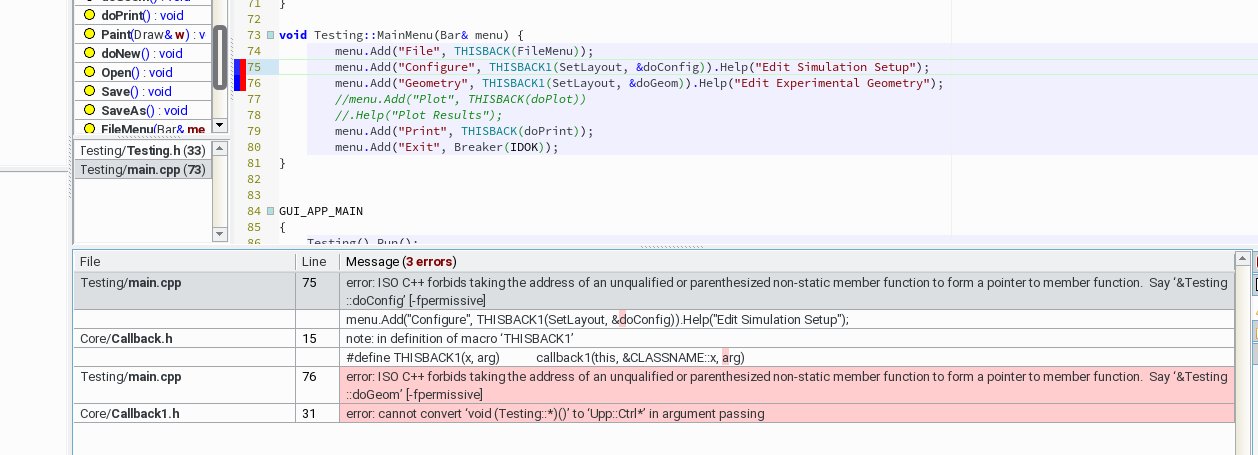
Pl. advise.
Thanks and Regards
Abhijit
-
 Attachment: ABHI_Err.jpg
(Size: 106.75KB, Downloaded 1259 times)
|
|
|
|
|
|
| Re: Problem in example code [message #45786 is a reply to message #45784] |
Mon, 04 January 2016 17:21 |
|
|
dolik.rce wrote on Mon, 04 January 2016 19:17You are passing the functions (doConfig, doGeom) instead of the ParentCtrls (doCard, doPlot)
Honza
You are Great! Thanks a lot. Sorry for the silly mistake.
|
|
|
|
| Re: Problem in example code [message #45787 is a reply to message #45786] |
Mon, 04 January 2016 21:10 |
|
|
HI!
I have another very peculiar problem. I wanted to make a simple layout like before by adding a new layout. While build is performed, I get an error
 In file included from /home/vega/MyApps/honza/Testing/main.cpp:1:0:
/home/vega/MyApps/honza/Testing/Testing.h:15:2: error: 'WithPltLayout1' does
     not name a type
  WithPltLayout1<ParentCtrl>doGeo;
  ^
I cleaned and tried to re-build, while getting the same error.
Thanks and Regards
Abhiit
|
|
|
|
| Re: Problem in example code [message #45789 is a reply to message #45787] |
Mon, 04 January 2016 21:23 |
|
|
vegaonline wrote on Mon, 04 January 2016 21:10I wanted to make a simple layout like before by adding a new layout. While build is performed, I get an error
 In file included from /home/vega/MyApps/honza/Testing/main.cpp:1:0:
/home/vega/MyApps/honza/Testing/Testing.h:15:2: error: 'WithPltLayout1' does
     not name a type
  WithPltLayout1<ParentCtrl>doGeo;
  ^
Hard to say without seeing the actual code. Few thigns to check:
- Is there really layout called PltLayout1? Check for typos...
- Is it in the .lay file that is properly included in Testing.h (using #define LAYOUTFILE <Testing/xyz.ly> with #include CtrlCore/lay.h following)?
- Is there some syntax error preceding this line, that would make your compiler report this as an error, while it is actually correct?
Honza
|
|
|
|
| Re: Problem in example code [message #45840 is a reply to message #45789] |
Tue, 12 January 2016 12:04 |
|
|
Hi!
I have two very silly problems which I could not fix as per my satisfaction.
In my code I have menus and one of them is plot. In this plot menu I have a layout in which there is a droplist entry with name "pltType". I tried many ways yet I could not put any option there.
Next, how can I read a data file and use for plotting using scatterCtrl? I find that LoadFromFile reads in string. How can I put Serialize?
Thanks and Regards
Abhijit
-
Attachment: Testing.tgz
(Size: 3.93KB, Downloaded 316 times)
|
|
|
|
| Re: Problem in example code [message #45844 is a reply to message #45840] |
Tue, 12 January 2016 13:57 |
 |
koldo
Messages: 3458
Registered: August 2008
|
Senior Veteran |
|
|
Hello Abhijit
For the ScatterCtrl the best for you would be to open ScatterCtrl_demo and reading for example tab1_Basic.cpp.
For example you can declare a Vector<Pointf> data in a safe place (as a class member, for example), fill it with the data from your file and do this:
void Tab1_Basic::Init()
{
	CtrlLayout(*this);
	SizePos();

	data << Pointf(10, 26) << Pointf(20, 37) << Pointf(30, 31) << Pointf(40, 33) << Pointf(50, 28);
	scatter.AddSeries(data).Legend("Series 1").Fill().MarkBorderColor();

	scatter.SetRange(60, 50).SetMajorUnits(10, 10);
	scatter.ShowInfo().ShowContextMenu().ShowPropertiesDlg().SetPopText("h", "v", "v2").SetMouseHandling(true, true);
	scatter.SetLegendPos(Point(20, 20));
}
Best regards
Iñaki
|
|
|
|
| Re: Problem in example code [message #45846 is a reply to message #45844] |
Tue, 12 January 2016 17:00 |
|
|
koldo wrote on Tue, 12 January 2016 18:27Hello Abhijit
For the ScatterCtrl the best for you would be to open ScatterCtrl_demo and reading for example tab1_Basic.cpp.
For example you can declare a Vector<Pointf> data in a safe place (as a class member, for example), fill it with the data from your file and do this:
void Tab1_Basic::Init()
{
	CtrlLayout(*this);
	SizePos();

	data << Pointf(10, 26) << Pointf(20, 37) << Pointf(30, 31) << Pointf(40, 33) << Pointf(50, 28);
	scatter.AddSeries(data).Legend("Series 1").Fill().MarkBorderColor();

	scatter.SetRange(60, 50).SetMajorUnits(10, 10);
	scatter.ShowInfo().ShowContextMenu().ShowPropertiesDlg().SetPopText("h", "v", "v2").SetMouseHandling(true, true);
	scatter.SetLegendPos(Point(20, 20));
}
Dear Koldo,
Thanks a lot for the reply. I have already seen the scattercontrol example. However, my problem is that if filename="......" known then how can I load data and place in Pointf vector? I did not see cin type of function. At the same time, if I use LoadFromFile(filename) then string will be loaded.
Actually I am confused and can't formulate exact code.
Best regards,
Abhijit
|
|
|
|
| Re: Problem in example code [message #45848 is a reply to message #45846] |
Wed, 13 January 2016 09:17 |
|
|
|
Beside this I find that I am unable to put items in the droplist or in the array (arrayCtrl). I tried to refer by doPlot.array which did not report any error while nothing was printed in the droplist.
|
|
|
|
|
|
|
|
| Re: Problem in example code [message #45881 is a reply to message #45880] |
Tue, 19 January 2016 10:27 |
|
|
koldo wrote on Tue, 19 January 2016 14:49Hello vegaonline
I understand that your issue is that you do not know how to get data from a text file, lets say a .csv file, and fill with it a C++ vector or an U++ Vector, isn't it?
Two points.
(i) I want to read a csv data file and take into U++ vector. Can I do like C++ vectors which is easy?
(ii) When I try to put items in droplist associated to a layout, I see nothing. Pl. see last attachment.
|
|
|
|
| Re: Problem in example code [message #45882 is a reply to message #45881] |
Tue, 19 January 2016 15:44 |
|
koldo
Messages: 3458
Registered: August 2008
|
Senior Veteran |
|
|
Hello Vegaonline
You can load text files in many ways. In Bazaar/Functions4U there are two functions:
- ReadCSVFile(): Simpler to use
- ReadCSVFileByLine(): It can read huge text files
For example:
Vector<Vector <Value> > ReadCSVFile(
	const String fileName,		// File name
	char separator = ',', 		// Separator between data
	bool bycols = true, 		// Data is in columns, not in rows
	bool removeRepeated = true, 	// Remove repeated rows
	char decimalSign = '.', 	// Decimal sign (it may be ',' instead
	bool onlyStrings = false	// if false, it tries to use the appropriate number type, if not it consider everything as strings
);
Best regards
Iñaki
|
|
|
|
| Re: Problem in example code [message #45884 is a reply to message #45881] |
Tue, 19 January 2016 21:16 |
|
|
vegaonline wrote on Tue, 19 January 2016 10:27(i) I want to read a csv data file and take into U++ vector. Can I do like C++ vectors which is easy?
As Koldo already said, there is many ways. I like this one:
FileIn f("/path/to/my.file");
String ln = f.GetLine();
String val1, val2;
Vector<double> x, y;
while( !f.IsEof()) {
	SplitTo(ln, '\t', val1, val2);  // for tab delimited values, change delimiter as needed
	x.Add(StrDbl(TrimBoth(val1)));
	y << StrDbl(TrimBoth(val2));    // this is same as y.Add, just bit easier to read in some cases
	ln = f.GetLine();
}
vegaonline wrote on Tue, 19 January 2016 10:27(ii) When I try to put items in droplist associated to a layout, I see nothing. Pl. see last attachment.
You are actually doing it right in your code: doPlot.pltType.Add(0,"2D");
doPlot.pltType.Add(1,"3D");
doPlot.pltType.Add(2,"Contour");
The problem is, that this pice of code is in function doPlt, that is never called, so all the initialization it should perform never happens. move the DropList initialization to the constructor of your class and it will work as expected.
Best regards,
Honza
PS: I'm sorry it took me so long to answer. Those two questions required me to look in to the code and test it, so it took longer than simple questions that I can answer from top of my head.
|
|
|
|
| Re: Problem in example code [message #45886 is a reply to message #45720] |
Wed, 20 January 2016 10:12 |
|
|
Dear Kolbo and Honza,
Thanks a lot for the reply and kind help.
@Honza I am grateful to you for illustrating so lucidly in spite of your busy schedule.
Adding initialization in constructor solved DropList problem.
However, for plotting say scatter plot, one needs Vector<Pointf> V type of data. Here I am reading Vector<double> x, y;
I tried :
Vector<double> x, y;
VectorMap<double, double> P1;
while (!inF.IsEof()) {
		SplitTo(ln, ',', val1, val2);  // for tab delimited values, change delimiter as needed
		x.Add(StrDbl(TrimBoth(val1)));
		y << StrDbl(TrimBoth(val2));    // this is same as y.Add, just bit easier to read in some cases
		P1<<(x,y);           //<--------------------------------- CHECK
		ln = inF.GetLine();
		doPlot.array.Add(val1);
		doPlot.array.Add(val2);
	}
Here, I wanted to put val1 and val2 to P1 as (val1, val2) so that I may take P1 to scatter. However, it is not successfull. Also
I am unable to show data in arrayCtrl array.
Best Regards
Abhijit
[Updated on: Wed, 20 January 2016 10:15] Report message to a moderator |
|
|
|
| Re: Problem in example code [message #45887 is a reply to message #45886] |
Wed, 20 January 2016 10:57 |
|
|
Hi,
You can simply construct Pointf from two doubles: Pointf(x, y). So the code would be:
Vector<Pointf> data;
while (!inF.IsEof()) {
		SplitTo(ln, ',', val1, val2);
		double x = StrDbl(TrimBoth(val1));
		double y = StrDbl(TrimBoth(val2));
		data.Add(Pointf(x,y));
		ln = inF.GetLine();
	}
Honza
|
|
|
|
| Re: Problem in example code [message #45888 is a reply to message #45887] |
Wed, 20 January 2016 11:24 |
|
|
dolik.rce wrote on Wed, 20 January 2016 15:27Hi,
You can simply construct Pointf from two doubles: Pointf(x, y). So the code would be:
Vector<Pointf> data;
while (!inF.IsEof()) {
		SplitTo(ln, ',', val1, val2);
		double x = StrDbl(TrimBoth(val1));
		double y = StrDbl(TrimBoth(val2));
		data.Add(Pointf(x,y));
		ln = inF.GetLine();
	}
Honza
Thanks a lot. What would happen for 3D data having (x, y, z) for contour plot?
Best,
Abhijit
|
|
|
|
|
|
| Re: Problem in example code [message #45890 is a reply to message #45889] |
Wed, 20 January 2016 16:56 |
|
|
koldo wrote on Wed, 20 January 2016 18:20As far as I know we cannot plot 3D data yet.
Hi Koldo,
Thanks for the insight. However, then can I use Python here like embedding?
The reason is that I need to plot 2D and 3D with contour plotting and I used matplotlib.pyplot for 3D plotting using Anaconda.
Best Regards
Abhijit
|
|
|
|
|
|
| Re: Problem in example code [message #45897 is a reply to message #45896] |
Fri, 22 January 2016 10:39 |
|
|
Dear Koldo,
Thanks.
I have a confusion. Suppose I have a class Testing which is declared as TopWindow. Now let there be another class Plotting
as ParentCtrl. I can declare "Plotting plt" in the construction of class Testing so that I may access methods of Plotting
from Testing by using "plt.funcInPlotting".
Is there any way by which I can also refer a variable/methods of Testing from a function of Plotting?
Best Regards
Abhijit
|
|
|
|
| Re: Problem in example code [message #45898 is a reply to message #45897] |
Fri, 22 January 2016 14:06 |
|
|
vegaonline wrote on Fri, 22 January 2016 10:39I have a confusion. Suppose I have a class Testing which is declared as TopWindow. Now let there be another class Plotting
as ParentCtrl. I can declare "Plotting plt" in the construction of class Testing so that I may access methods of Plotting
from Testing by using "plt.funcInPlotting".
Is there any way by which I can also refer a variable/methods of Testing from a function of Plotting?
Short answer: You can pass reference or pointer to Testing when constructing the Plotting instance, or when calling its function.
Slightly longer answer: There is many ways to do that, some better and some worse. But all of them are actually not connected to U++ in any way. This is a matter of general C++ application design. If you want to write complex applications in C++ you should already know this.
Honza
|
|
|
|
| Re: Problem in example code [message #45941 is a reply to message #45898] |
Fri, 29 January 2016 13:05 |
|
|
Thanks a lot.
I have another problem. I have a layout containing lots of EditField and DropList etc. I want to store in a file. I though to save in JSON file. I am using the following snippets.
filename1 = "";
	PWDir="/home/vega/MyApps/Flasher/DAT/";
	fs1.PreSelect(PWDir);
	fs1.Types("*.inp");
	if (fs1.ExecuteSaveAs(NULL))
		filename1 = ~fs1;

	for (Ctrl *q = GetFirstChild(); q; q=q->GetNext())
		if (dynamic_cast<EditField *> (q)) {
			String id = q->GetLayoutId();
			PromptOK(id);
			if (id.GetCount())
				json(id, ~*q);
		}
	SaveFile(ConfigFile(filename1), json);
I find that SaveAs window comes and after entering filename to store, the file is not stored.
How can I solve the issue?
Best Regards
Abhijit
[Updated on: Fri, 29 January 2016 13:06] Report message to a moderator |
|
|
|
| Re: Problem in example code [message #45942 is a reply to message #45720] |
Fri, 29 January 2016 20:43 |
|
|
Hi Abhijit,
I don't immediately see any problem with your code, without actually running it...
If I were you, I'd try to add some logging into key places of the code, to figure out where exactly is the problem. Use LOG and DUMP macros, which produce a log when the application is compiled in debug mode. To see the log, just press Alt+L or go to Debug > View the logfile. I'd start with adding DUMP(json) after the loop. Also, I guess you already tried inspecting the values of id, by adding PromptOK. Does it show the names of fields you are expecting?
Also, the code seems little over-complicated. Have a look at examples in reference/Jsonize. It displays exactly what you want, saving large structures into json file (just not as dynamically as you try to do it). Also reference/SelectFile might be of some help.
Best regards,
Honza
|
|
|
|
| Re: Problem in example code [message #45944 is a reply to message #45942] |
Sat, 30 January 2016 06:37 |
|
|
dolik.rce wrote on Sat, 30 January 2016 01:13Hi Abhijit,
I don't immediately see any problem with your code, without actually running it...
If I were you, I'd try to add some logging into key places of the code, to figure out where exactly is the problem. Use LOG and DUMP macros, which produce a log when the application is compiled in debug mode. To see the log, just press Alt+L or go to Debug > View the logfile. I'd start with adding DUMP(json) after the loop. Also, I guess you already tried inspecting the values of id, by adding PromptOK. Does it show the names of fields you are expecting?
Also, the code seems little over-complicated. Have a look at examples in reference/Jsonize. It displays exactly what you want, saving large structures into json file (just not as dynamically as you try to do it). Also reference/SelectFile might be of some help.
Best regards,
Honza
Hi Honza,
Thanks. Earlier I tried to see the DUMP file and now again I checked. It reports " json = {}". Also PromptOK did not show as the code did not go through that "IF" loop " if (dynamic_cast<EditField *> (q)) ".
Best,
Abhi
|
|
|
|
| Re: Problem in example code [message #45946 is a reply to message #45944] |
Sat, 30 January 2016 09:33 |
|
|
Hi,
I'm still not sure it is really good idea to this dynamically, but here is a working method: void StoreToJson() {
Json json;
for (Ctrl *q = GetFirstChild(); q; q=q->GetNext()) {
if (dynamic_cast<EditField *> (q)) {
String id = q->GetLayoutId();
if (id.GetCount())
json(id, ~*q);
}
}
SelectFileOut out("*.*");
if (out.IsOpen())
out << json << "\n";
}
It is actually almost the same as the code you posted. Full code is in the attached archive. Just click anywhere in the window to trigger the save as dialog. I'm not sure why it didn't work for you. Only thing I can think of is that you didn't assign names to the editfields in the layout.
Honza
|
|
|
|
| Re: Problem in example code [message #45950 is a reply to message #45946] |
Sat, 30 January 2016 16:37 |
|
|
dolik.rce wrote on Sat, 30 January 2016 14:03Hi,
I'm still not sure it is really good idea to this dynamically, but here is a working method: void StoreToJson() {
Json json;
for (Ctrl *q = GetFirstChild(); q; q=q->GetNext()) {
if (dynamic_cast<EditField *> (q)) {
String id = q->GetLayoutId();
if (id.GetCount())
json(id, ~*q);
}
}
SelectFileOut out("*.*");
if (out.IsOpen())
out << json << "\n";
}
It is actually almost the same as the code you posted. Full code is in the attached archive. Just click anywhere in the window to trigger the save as dialog. I'm not sure why it didn't work for you. Only thing I can think of is that you didn't assign names to the editfields in the layout.
Honza
Dear Honza,
Thanks a lot. Your technique for SelectFileOut is working and one file is created while the content is "{}". It means json content was not made. Probably you are right that dynamic_cast is not working. EditFields have dedicated names. Here "if (dynamic_cast<EditField *> (q)) { " is not true.
Is there any other way to bypass dynamic_cast?
best
Abhi
|
|
|
|
Goto Forum:
Current Time: Sun May 03 04:04:29 GMT+2 2026
Total time taken to generate the page: 0.01183 seconds
|
 U++ framework
 Search
 Help
Help Members
 Register
 Login
Login Home
Home




