Home » Developing U++ » UppHub » A terminal emulator widget for U++
| A terminal emulator widget for U++ [message #51415] |
Sat, 23 March 2019 22:31  |
 Oblivion
Messages: 1266
Registered: August 2007
|
Senior Contributor |
|
|
Hello,
tl;dr: I am going to publish a terminal emulator widget for U++, in the following month (April).
From the user POV, it is a very simple Ctrl that can be embedded in any U++ applications via traditional U++ way: (E.g. Add(terminal.SizePos())
And it has a very "thin" public api.
Also its page and parser components are completely decoupled, and documented, and can be used seperately in any project (Read: You can write your own terminal emulator that suits your need with ease).
Before I publish it, I'd like to know what features you would like to see in it.
Currently it is more capable than Win10's new ANSI console.
At the moment it supports:
- VT52/ANSI/1xxx/2xx and -partially- 4xx/5xx emulation and Xterm extension.
- Both 7-Bit and 8-Bit modes.
- UTF8
- OCS and DCS
- ANSI colors
- Alternate screen buffer.
- Resize
Planned:
- Copy-paste support
- Scrollback buffer
- Mouse support
- And various optimizations.
I will also publish two reference examples with it: a simple terminal emulator constructed with Terminal widget, and a remote terminal to demonstrate SSH integration.
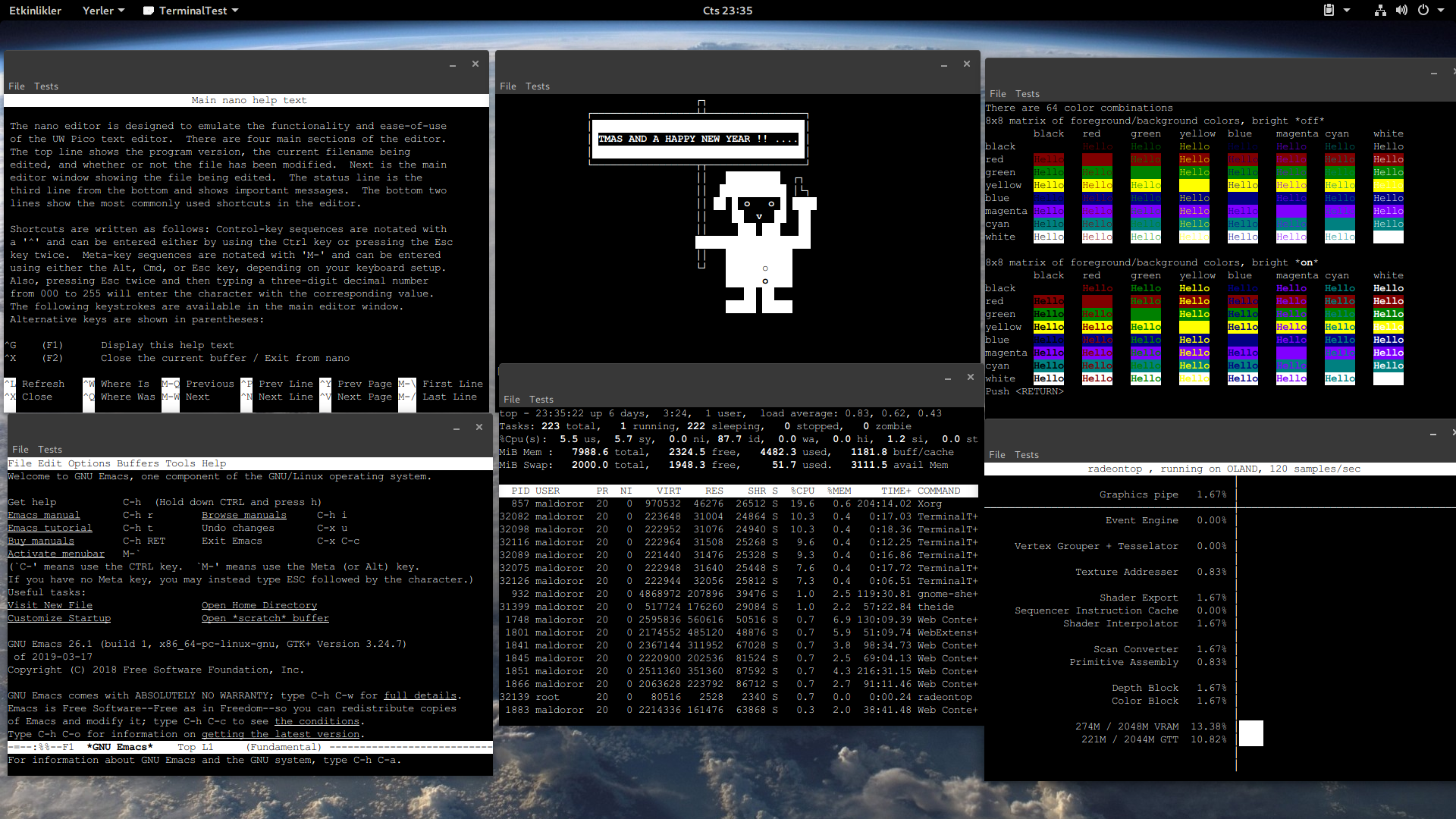
A screenshot is much more meaningful than words.
(On a humble test setup (Linux 5.0/Gnone/relatively old test AMD machine. Top row: Nano editor, AnsiArt, Vttest. Bottom row: Emacs, Top, RadeonTop).
Best regards.
Oblivion
Github page: https://github.com/ismail-yilmaz
Bobcat the terminal emulator: https://github.com/ismail-yilmaz/Bobcat
[Updated on: Sat, 23 March 2019 22:35] Report message to a moderator |
|
|
|
|
|
| Re: A terminal emulator widget for U++ [message #51444 is a reply to message #51422] |
Tue, 26 March 2019 10:02  |
Oblivion
Messages: 1266
Registered: August 2007
|
Senior Contributor |
|
|
Hello Koldo,
Quote:Maybe a sample of it could be a kind of new Putty.
Putty is so basic that with any feature you would add, yours would be better. And in U++
Sure. Currently a barebone SSH terminal example (with the upconing Terminal ctrl), and TERM variable set to "xterm") in U++ is 52 lines of code. (Single file, password authentication).
What I have also in my mind is VirtualGui integration. 
Think about accessing to your server or machine via a terminal running on web browser with SSL, on-demand.
This would be a very cool and (somewhat unique?) feature. And it's high on my TODO list.
Best regars,
Oblivion
Github page: https://github.com/ismail-yilmaz
Bobcat the terminal emulator: https://github.com/ismail-yilmaz/Bobcat
[Updated on: Tue, 26 March 2019 10:06] Report message to a moderator |
|
|
|
|
|
|
|
|
|
|
|
| Re: A terminal emulator widget for U++ [message #51465 is a reply to message #51463] |
Thu, 28 March 2019 16:57 |
Novo
Messages: 1431
Registered: December 2006
|
Ultimate Contributor |
|
|
Oblivion wrote on Thu, 28 March 2019 03:01
Setting the Ctrl::host to localhost was sufficient.
Thanks a lot!
I didn't realize that Ctrl::host is used to connect back from JavaScript to a server.
I still have several problems like I cannot create more than one connection, although Release configuration is forking. And WebWord is using 100% of CPU because it is spinning in a connection loop which doesn't have any timeouts.
Are you experiencing the same problems or is it something related to my web-server setup?
Regards,
Novo
|
|
|
|
| Re: A terminal emulator widget for U++ [message #51468 is a reply to message #51465] |
Thu, 28 March 2019 19:21 |
Oblivion
Messages: 1266
Registered: August 2007
|
Senior Contributor |
|
|
Quote:
Are you experiencing the same problems or is it something related to my web-server setup?
Yes, after you've pointed out, I've checked the behaviour and it is indeed eating a lot of CPU cylcles (On Linux 5.0, GCC, release mode, AMD ryzen) I get 16% cpu usage in idle state).
Good news is I found a possible candidate and a workaround (or fix maybe?) but Mirek should see it first.
İn Turtle/Server.cpp, method StartSession(), the for loop in between ln 75-123 (where the server is waiting for connections) seems to be the problem:
A simple workaround or a possible fix is to call Sleep(10) in ln: 75.
E.g.
for(;;) {
	if(quit)
		return false;
	Sleep(10);	// Let's eat less CPU cycle while waiting for connections.
//...
OTOH, there are also bad news:
1) It ssems impossible to open multiple clients at once (at leasy on Firefox (latest).
Symptom: When trying to open a second connection to turtle server, tab immediately closes (yet a second webword process runs in the background!).
2) I've noticed a potential security flaw: Closing the client using the client's "close window" button does not clear the browser tab (or canvas). It should. Or else sensitive data may be visible.
Best regards.
Oblivion
Github page: https://github.com/ismail-yilmaz
Bobcat the terminal emulator: https://github.com/ismail-yilmaz/Bobcat
|
|
|
|
| Re: A terminal emulator widget for U++ [message #51517 is a reply to message #51415] |
Mon, 08 April 2019 11:45 |
Oblivion
Messages: 1266
Registered: August 2007
|
Senior Contributor |
|
|
As the day that I'll publish the code on my github repo draws closer, final bits for the first version of TerminalCtrl are coming together well.
- Scrollback buffer is implemented.
- Chameleon (theme) support is implemented.
- VT52/1xx/2xx keyboard (with function keys) support is implemented.
- Conformance levels support is added (i.e. it is now possible to restrict the operation level to e.g. VT52, VT102, or VT220 etc.)
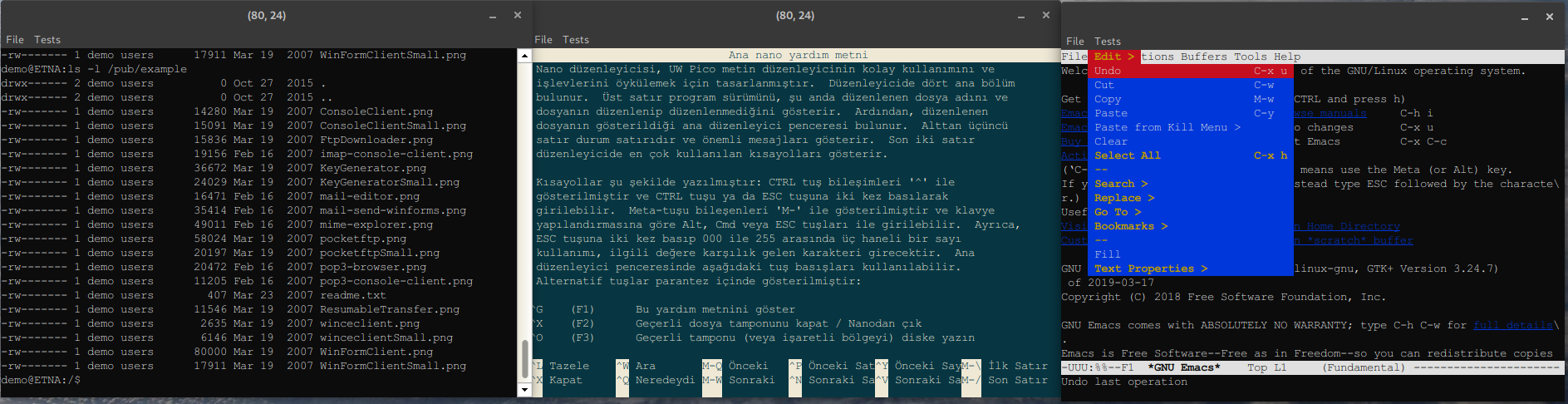
Here is a screenshot.
On the left is our SSH package/SshShell (running in console mode) running on TerminalCTrl, with scrollback buffer enabled.
In the middle is TerminalCtrl running with the widely used "Solarized theme"
On the right is the mighty emacs, with dropdown menus and function keys on default theme.
Suggestions are welcome.
Best regards,
Oblivion
Github page: https://github.com/ismail-yilmaz
Bobcat the terminal emulator: https://github.com/ismail-yilmaz/Bobcat
[Updated on: Mon, 08 April 2019 12:24] Report message to a moderator |
|
|
|
|
|
| Re: A terminal emulator widget for U++ [message #51752 is a reply to message #51748] |
Tue, 14 May 2019 09:57 |
Oblivion
Messages: 1266
Registered: August 2007
|
Senior Contributor |
|
|
Hello Xemuth,
Xemuth wrote on Mon, 13 May 2019 14:47Hello Oblivion,
Very good job, it seems to be awesome.
I will try it on my Raspberry with TURTLE !
When do you think you'll publish it ? 
Thanks in advance,
Best Regard
Terminal packaga is already delayed (initially I'd planned to publish it in April).
Good news is that the first version of the package is basiaclly complete. So it will be published at the end of this month.
Currently I am making some profiling and optimizations (which led to 37% performance gain and 30% less memory consumption on average.
Also, now the parser is a complete vt parser, i.e. it can handle every single VT instruction (not every command is implemented though) correctly from VT52 to Vt520)
I am testing it with vttest, xterm's and ncurses's test tools. And fixing some "paper-cuts" that I have noticed.
Best regards,
Oblivion
Github page: https://github.com/ismail-yilmaz
Bobcat the terminal emulator: https://github.com/ismail-yilmaz/Bobcat
[Updated on: Tue, 14 May 2019 09:58] Report message to a moderator |
|
|
|
| Re: A terminal emulator widget for U++ [message #51823 is a reply to message #51415] |
Sat, 08 June 2019 16:48 |
Oblivion
Messages: 1266
Registered: August 2007
|
Senior Contributor |
|
|
Hello,
A small but "big" update.
Terminal ctrl for U++ is on its way, and here is a short video preview:
https://vimeo.com/341085501
It is now mostly compatible with xterm.
-- Mouse tracking support added. Terminal can now handle mouse events if they are supported by the applications (See above video for example)
-- Bracketed paste mode added.
-- "G-sets" upport added. It now supports legacy applications that rely on font shifting (g0, g1, g2, g3, gl, gr).
-- DEC Technical charset is added.
Now I feel it is eligible for first release. (Probably next friday...)
P.s.: Terminal may seem sluggish in the video. (It is not.)
That's because I encoded it on my good old test machine, and I limited the framerate to 15.
Best regards,
Oblivion.
Github page: https://github.com/ismail-yilmaz
Bobcat the terminal emulator: https://github.com/ismail-yilmaz/Bobcat
[Updated on: Sat, 08 June 2019 16:52] Report message to a moderator |
|
|
|
| Re: A terminal emulator widget for U++ [message #52065 is a reply to message #51415] |
Sat, 13 July 2019 17:35 |
Oblivion
Messages: 1266
Registered: August 2007
|
Senior Contributor |
|
|
Hello,
It's been a while since I posted any news about the Terminal package. I had to focus on my other works fo a while.
The good news is last week I implemented the final missing pieces for the 0.1 release:
- 256 colors support added.
- ANSI colors support added.
- XTerm dynamic colors suppport added.
- VT 4xx rectangular area operations are added (copy, invert, move, fill, in both selective and normal modes)
- UDK (DEC's user-defined function keys support) added.
- Lazy resize option is added (to reduce flickers on network terminals uch as SSH-based ones)
- Size hint added.
- A .usc file is added to the Terminal package. (The most common options (font, ink, paper, cursor, sizehint etc.) can be set using TheIDE's layout editor. Also it shows a size hint (in calculated cell size) to simplfy positiong the widget in the layout ediyor.
- It is also tested on Windows, and it works well. :)  (currently as SSH terminal, in the near future as a frontend for Windows power shell too)
Two notes on the upcoming initial release:
1) Terminal package currently does not contain any external code/libaray. It uses U++, and it's plugins.
2) Although a virtual terminal requires a pty device, and Terminal pacjage contains one, they are completely decoupled.
Terminal ctrl can be used and compiled without PtyProcess. This gives it a huge flexibility
In this regard I will provide 4 basic examples with the package:
- TerminalExample | Uses ptyprocess (currently ptyprocess requires POSIX-compliant operationg systems (or possibly cygwin on Windows.)
- TerminalExampleWithLayout | The same as above.
--------------------------------
- SShTerminalExample | Does not use PtyProcess. IT uses Core/SSH package isntead
- SshTerminalExampleWithLayout | The same as above.
Here is the actual code of TerminalExample (36 LOCs total):
#include <Core/Core.h>
#include <Terminal/Terminal.h>

using namespace Upp;

const char *nixshell = "/bin/bash";

struct TerminalExample : TopWindow {
	Terminal	term;
	PtyProcess	pty;

	TerminalExample()
	{
		term.WhenBell	=   [=]()		{ BeepExclamation(); };
		term.WhenTitle	=   [=](String s)	{ Title(s); };
		term.WhenResize	=   [=]()		{ pty.SetSize(term.GetPageSize()); };
		term.WhenOutput	=   [=](String s)	{ PutGet(s); };
		SetRect(term.GetStdSize());	// 80 x 24 cells (scaled).
		Sizeable().Zoomable().CenterScreen().Add(term.SizePos());
		SetTimeCallback(-1, [=]()		{ PutGet(); });
		pty.Start(nixshell, Environment(), GetHomeDirectory());
	}

	void PutGet(String out = Null)
	{
		term.Write(pty.Get());
		pty.Write(out);
		if(!pty.IsRunning())
			Break();
	}
};

GUI_APP_MAIN
{
	TerminalExample().Run();
}
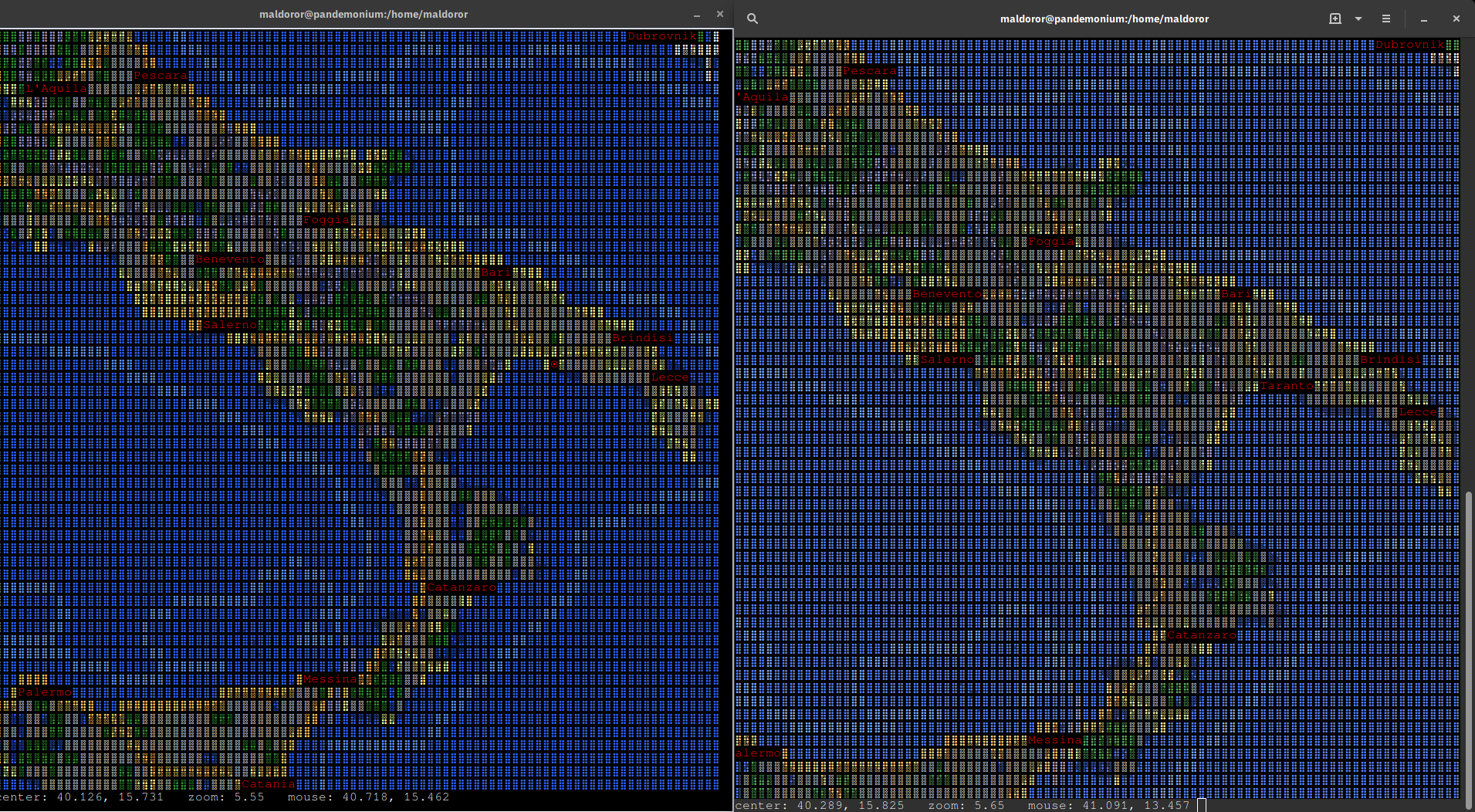
Below was a sort of "final boss" for the first release. It shows the mapscii, an OpenStreetMap implementation for terminal devices, running on the above code and on Gnome-terminal.
On the left is TerminalExample, running mapscii.
On the right is gnome terminal running mapscii
Both are running on 256 colors mode + mouse tracking support.
As a final note: Terminal package will be availabe within this weeek.
Best regards,
Oblivion
-
 Attachment: Terminal.png
(Size: 513.88KB, Downloaded 1847 times)
Github page: https://github.com/ismail-yilmaz
Bobcat the terminal emulator: https://github.com/ismail-yilmaz/Bobcat
[Updated on: Sat, 13 July 2019 17:39] Report message to a moderator |
|
|
|
|
|
| Re: A terminal emulator widget for U++ [message #52116 is a reply to message #51415] |
Sat, 20 July 2019 15:33 |
Oblivion
Messages: 1266
Registered: August 2007
|
Senior Contributor |
|
|
Hello,
It is time to unleash the beast
The initial version of Terminal package is finally released.
I suggest you read the ReadMe.md on GitHub or the "Overview" doc (qtf) inluded in the package. It'll give you a better idea of what it is.
Github address of Terminal package: https://github.com/ismail-yilmaz/upp-components/tree/master/ CtrlLib/Terminal
Examples are included in the Examples section of my git repo.
Yes, but what is it?
Excerpt form the ReadMe.md on github:
Terminal package is a flexible, easy-to-use yet powerful cross-platform virtual terminal emulation library written in C/C++ for Ultimate++.

It is designed from the ground up with modularity and maintainability in mind.
In this respect the package consists of several re-usable classes, only one being the Terminal widget.

## Requirements

- Ultimate++ (ver. >= 2019.1)
- POSIX, Windows (and probably MacOS, though not tested.)
- A decent enough C/C++ compiler that supports at least C++11. (GCC/CLANG/MinGW/Msc)
- Snacks & beer.

## Features

*Note that below list is only a summary of the currently supported features. Technical specifications and documentation will be available soon.

- Supports whatever platform Ultimate++ supports. (Linux, Windows, MacOS).
- Supports VT52/VT1xx/VT2xx, partial VT4XX/5XX, and xterm emulation modes.
- Supports user configurable device conformance levels (1, 2, 3, 4, and 0 as VT52 emulation).
- Supports both 7-bits and 8-bits I/O.
- Supports Unicode/UTF8.
- Supports user configurable, legacy "g-set" (G0/G1/G2/G3), and related shifting functions (LS0/LS1/LS1R/LS2/LS2R/LS3/LS3R).
- Supports ANSI conformance levels.
- Supports various terminal state, device, and mode reports.
- Supports DEC VT52 graphics charset, VT1xx line-drawing charset, VT2xx multinational charset, and VT3xx technical charset.
- Supports VT52/VT1xx/VT2xx keyboard emulation with function keys.
- Supports UDK (DEC's user-defined function keys feature).
- Supports user configurable blinking text and blink interval.
- Supports ANSI colors (16 colors palette).
- Supports ISO colors (256 colors palette).
- Supports xterm dynamic colors (dynamic ink/paper/selection colors).
- Supports bright colors.
- Supports background color erase (BCE).
- Supports transparency (i.e. allows background images).
- Supports VT4xx rectangular area operations: copy, invert, fill. erase.
- Supports VT4xx rectangular area checksum calculation and reporting.
- Supports both DEC and ANSI style selective erases.
- Supports alternate screen buffer.
- Supports history/scrollback buffer.
- Has a user switchable scrollbar.
- Supports xterm style alternate scroll.
- Supports resize (and optional lazy resize to reduce flicker on network terminals such as SSH-based ones).
- Supports both immediate display refresh and delayed (buffered) display refresh.
- Supports xterm style mouse tracking: button, wheel, motion, focus in/out events.
- Supports user configurable cursor styles (block, beam, underscore, blinking/steady).
- Supports cursor locking.
- Supports clipboard operations (copy/paste/select all - including history buffer) and basic drag-and-drop ops.
- Supports bracketed paste mode.
- Has a predefined yet programmable context menu (left mouse button menu).
- Supports window titles.
- Supports bell notifications.
- Supports VT1xx LEDs.
- Supports size hint.
- Supports Ultimate++ style data serialization.
- Supports per-widget customization (i.e no global variables or properties are used).
- Includes a Terminal.usc file for TheIDE's layout editor.
Reviews, bug reports, patches, suggestions are welcome.
Best regards,
Oblivion
Github page: https://github.com/ismail-yilmaz
Bobcat the terminal emulator: https://github.com/ismail-yilmaz/Bobcat
[Updated on: Sat, 20 July 2019 15:35] Report message to a moderator |
|
|
|
|
|
| Re: A terminal emulator widget for U++ [message #52126 is a reply to message #51415] |
Mon, 22 July 2019 15:56 |
Oblivion
Messages: 1266
Registered: August 2007
|
Senior Contributor |
|
|
Hello,
More updates:
A terminal multiplexing example is added to the package.
This example demonstrates how a terminal multiplexing can be achieved simply by using a splitter widget. Splitter is a container ctrl that can be used to split any parent ctrl into resizeable horizontal and/or vertical panes. It also demonstrates the usage of NTL containers with Terminal widget:
Also a mouse capture issue is hopefully fixed.
Best regards,
Oblivon
Github page: https://github.com/ismail-yilmaz
Bobcat the terminal emulator: https://github.com/ismail-yilmaz/Bobcat
|
|
|
|
|
|
|
|
|
|
|
|
|
|
| Re: A terminal emulator widget for U++ [message #52195 is a reply to message #51415] |
Wed, 07 August 2019 21:24 |
Oblivion
Messages: 1266
Registered: August 2007
|
Senior Contributor |
|
|
Hello,
Terminal package is updated.
Initial support for a rare but much requested feature in the world of terminal emulators has landed:
- Sixel graphics support is added to the Terminal package. It is now possible to view sixel images, using the Terminal package.  However, the initial support is only for external viewing. Embedded images are a TODO.

- A basic terminal example with sixel viewer is also added to the package.

- SixelRenderer class and a convenience function: RenderSixelImage is also added to the package. This class and the function can also be used as a stand-alone sixel renderer.

- Alt-key handling is improved.
A screenshot:
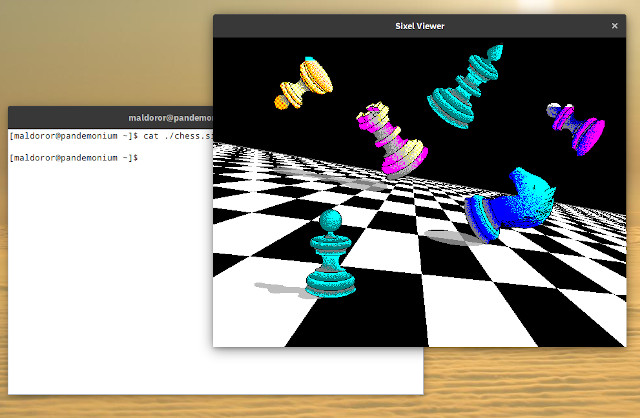
The git repo address of upp-components: https://github.com/ismail-yilmaz/upp-components
Reviews, criticism, patches, bug reports, etc., are always welcome.
Best regards,
Oblivion
Github page: https://github.com/ismail-yilmaz
Bobcat the terminal emulator: https://github.com/ismail-yilmaz/Bobcat
[Updated on: Wed, 07 August 2019 21:44] Report message to a moderator |
|
|
|
|
|
|
|
| Re: A terminal emulator widget for U++ [message #52415 is a reply to message #51415] |
Sun, 22 September 2019 12:01 |
Oblivion
Messages: 1266
Registered: August 2007
|
Senior Contributor |
|
|
Hello,
Terminal package is finally updated to v0.2.
Image rendering and handling mechanism is vastly improved.
- Terminal: SixelRenderer class is rewritten;
- Terminal: SixelRaster class, a StreamRaster interface for sixel images, is added to the package.
- Terminal: A subset of xterm's window-op reports are implemented.
- Terminal: An I/O synchronization issue with the PtyProcess class that led to artifacts on screen on some setups is fixed.
- Terminal: Inline image support is improved.
- Terminal: Room is made for other inline image protocols.
- Terminal: WhenSixel event is removed in favor of a generic WhenImage event.
- Terminal: Image rendering strategy is changed to cell-level rendering for further flexibility.
- Terminal: An LRU-type shared image data cache is implemented.
- Terminal: Support for Jexer, a modern text user interface (TUI) and windowing system for terminal emulators, is added.
- Terminal: A general purpose data variable is added to the cell structure.
- Terminal: SGR image flag is added to the cell structure.
- Examples: Examples are further simplified.
- Various optimizations and fixes.
- Image gallery is updated.
The "final boss" for this release was the jexer support. Jexer is a modern text user interface and window manager that runs inside terminal emulators. (It is an advanced terminal multiplexer.)
There were only four high-end terminal emulators (xterm, mlterm, rlogin and jexer itself) fully supporting the jexer, Now they are five
I've made short videos of Terminal ctrl.
The ssh terminal example on windows also demonstrates the power of Core/SSH package. (It connects to a Linux device over 300 km distance, and runs jexer with inline images support, which is very demanding). 
On Linux
- A basic terminal example with sixel graphics, and mouse tracking support.
- Used apps and tools: Jexer text user interface (TUI), GNUPlot, Emacs, Nano, htop, ncurses demos.
- Link: https://vimeo.com/359241367
On Windows
- A basic SSH2 terminal example with sixel graphics, and mouse tracking support.
- Used apps and tools: Jexer text user interface.
- Link: https://vimeo.com/361556973
On Turtle HTML-5 backend (in a web browser)
- A basic terminal example with sixel graphics, and mouse tracking support.
- Used apps and tools: Jexer text user interface.
- Link: https://vimeo.com/361558519
Screenshot (Windows, ssh terminal example):
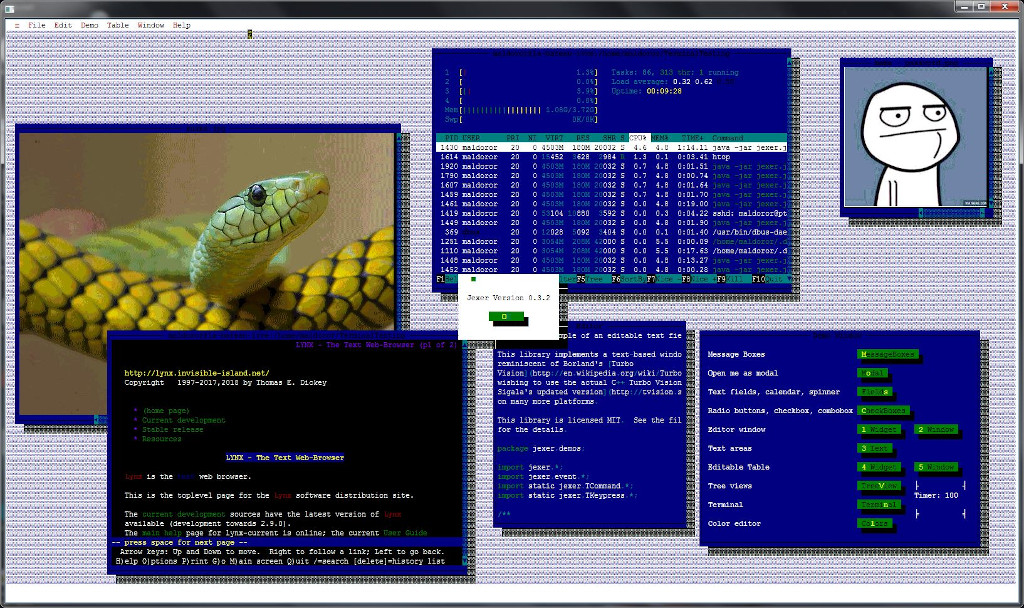
Terminal@: https://github.com/ismail-yilmaz/upp-components/tree/master/ CtrlLib/Terminal
Best regards,
Oblivion
Github page: https://github.com/ismail-yilmaz
Bobcat the terminal emulator: https://github.com/ismail-yilmaz/Bobcat
[Updated on: Sun, 22 September 2019 12:46] Report message to a moderator |
|
|
|
|
|
| Re: A terminal emulator widget for U++ [message #52644 is a reply to message #51415] |
Sun, 03 November 2019 15:03 |
Oblivion
Messages: 1266
Registered: August 2007
|
Senior Contributor |
|
|
Hello,
Terminal package and Terminal ctrl is updated.
There are fixes and clean-ups here and there, but most notably a new feature is added:
Terminal ctrl is now able to display 24-bit jpeg, gif, bmp, etc. raster formats, using the Jexer Image Protocol and Upp's own StreamRaster interface.
This means that if the raster images you are working with have registered decoders in upp/plugins, or somewhere else, Terminal ctrl will be able to display it.
Four main benefits of this inline images protocol is:
1) It is "8-bit clean". It can be safely deliver images over the network, and with Utf-8.
2) Popular image formats can be decoded much faster than sixels. (Up to 8 to 10 times faster on bigger image files), and usually have a lower bandwidth requirements.
3) Allows 24 bit (true color) images.
4) The wire protocol is very simple.
Screenshot with 24 bit images:
(Taken from the pre-alpha version of Toad, a cross-platform, multithreaded SSH2 client with tabs and splitter support, that will be available in -hopefully- January 2020):
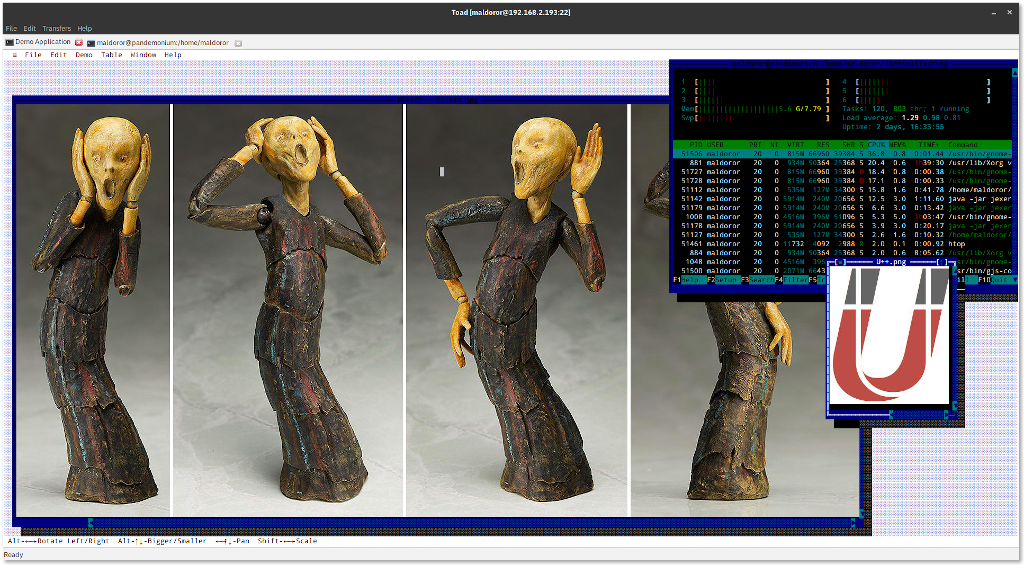
Best regards,
Oblivion
Github page: https://github.com/ismail-yilmaz
Bobcat the terminal emulator: https://github.com/ismail-yilmaz/Bobcat
|
|
|
|
| Re: A terminal emulator widget for U++ [message #52684 is a reply to message #51415] |
Sun, 10 November 2019 21:49 |
Oblivion
Messages: 1266
Registered: August 2007
|
Senior Contributor |
|
|
Hello,
A new week, and another update with new features.
- Explicit hyperlinks support is added.
- Standard menu  improved and modularized.
- Cell tracking methods are implemented.
- Various fixes and cosmetics.
- Docs are updated accordingly.
Explicit hyperlinks are currently supported by GCC, ls, systemd, and a number of other high profile products.
One advantage of this hyperlinks protocol is that it is relatively well-defined and cheap.
To test it on linux, compile the TerminalExample, and run an updated version of the "ls" command:
Gif:
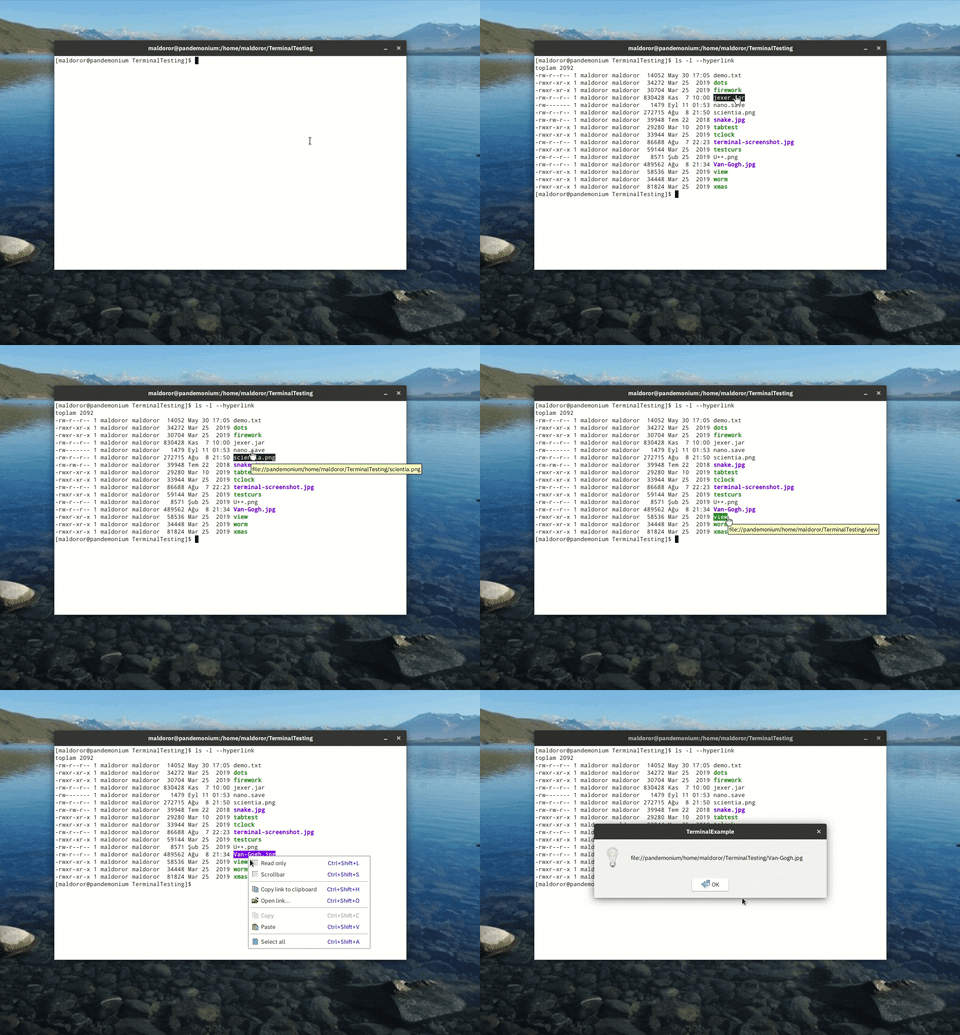
Best regards,
Oblivion
Github page: https://github.com/ismail-yilmaz
Bobcat the terminal emulator: https://github.com/ismail-yilmaz/Bobcat
[Updated on: Sun, 10 November 2019 23:23] Report message to a moderator |
|
|
|
|
|
|
|
| Re: A terminal emulator widget for U++ [message #53262 is a reply to message #51415] |
Wed, 25 March 2020 14:20 |
Oblivion
Messages: 1266
Registered: August 2007
|
Senior Contributor |
|
|
Hello,
Three months of silence is finally broken.
Terminal package is scheduled to be updated to v0.3 on April 6, 2020.
Meanwhile the package has seen tons of improvements. (Note that the changes are not pushed to git yet).
Some highlights of the upcoming version:
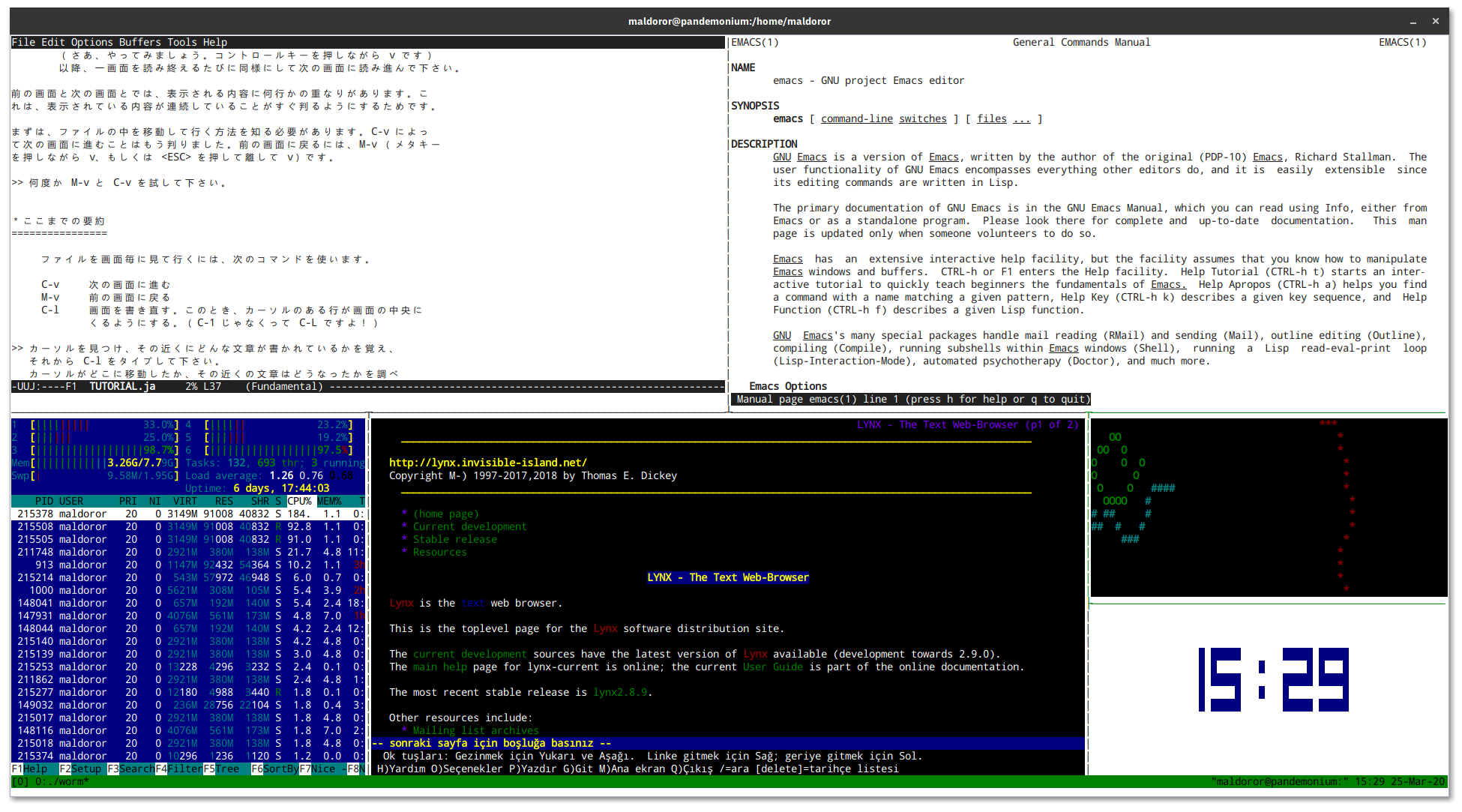
- Initial steps for scripting support (using the Esc language).
- A proper double-width (Eastern-Asian/CJK) characters support.
- A proper tmux/screen support.
- A proper support for ISO 8613-6 true/indexed color formats.
- A much faster renderer. (In some torture tests (such as ncurses/dots on fulscreen mode) the performance gain can be up to %80.
And much more... (full list will be available with the release).
I am currently testing the package for regressions.
To whet yout appetite (tmux/screen, on Linux):
Best regards,
Oblivion
Github page: https://github.com/ismail-yilmaz
Bobcat the terminal emulator: https://github.com/ismail-yilmaz/Bobcat
[Updated on: Wed, 25 March 2020 14:34] Report message to a moderator |
|
|
|
|
|
| Re: A terminal emulator widget for U++ [message #53290 is a reply to message #53277] |
Thu, 26 March 2020 16:54 |
Oblivion
Messages: 1266
Registered: August 2007
|
Senior Contributor |
|
|
Hello Deepak,
Quote:Will it support Indic scripts?
This is my intention, with other scripts (Arabic, etc.) and Bi-directional rendering.
But unfortunately it will not happen in the upcoming v0.3 release.
At the moment what I can provide is double witdth support for CJK ideographs and other double width Asian characters.
As for the harfbuzz, currently I am using what U++ uses on GTK and/or X11.
And AFAIK, GTK 3.x uses harfbuzz by default.
Best regards,
Oblivion
Github page: https://github.com/ismail-yilmaz
Bobcat the terminal emulator: https://github.com/ismail-yilmaz/Bobcat
|
|
|
|
| Re: A terminal emulator widget for U++ [message #53542 is a reply to message #51415] |
Fri, 10 April 2020 02:17 |
Oblivion
Messages: 1266
Registered: August 2007
|
Senior Contributor |
|
|
Hello,
The day has come. Terminal package is upgraded to v0.3.
This is a huge release, with lots of changes, fixes, additions and improvements.
I am not going to list every change but some highlights here. If you want to see the full list, please check out the git history.
- Source code is restructured.
- Console class is ditched for the sake of simplicity. There is now only Terminal, deriving from Upp:CTrl.
- Eastern-Asian/CJK double width characters support is added.
- Text overline attribute is now supported.
- APCs (application programming commands) are now supported. This is the first step towards terminal scripting feature. APCs can be also be used by client code for private purposes.
- TRUECOLOR flag is removed. Terminal ctrl is now fully and officially a true color terminal emulator.
- Accordingly, CMY and CMYK color spaces are now supported too!
- Support for color text specifications (rgb, hash3, hash6, hash9, hash12) are added.
- xterm window actions are reports are implemented. It is now possible for host apps to move, resize, minimize, maximize, fullscreen the terminal.
- Renderer has seen a significat performance boost (up to 80% on some torture tests).
- tmux/screen is fully supported.
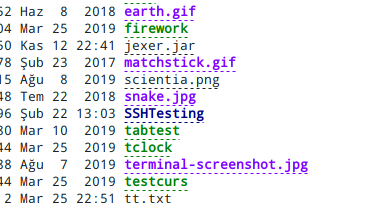
- Hyperlinks now show nice dots under their texts when they are "inactive" (i.e. no mouse hovering over them)
- API docs and specifications docs are significantly improved.
But how compliant is it?
Using George Nachmann's (iTerm2's developer) excellent and comprehensive test suite (it is analogous to the browser standard compliance tests), esctest, the results are as follows:
expected-terminal=xterm
max-vt-level=4

Terminal ctrl: v0.3, passed 407 tests, failed on 101 tests,

Terminal ctrl: v0.2 passed only 160 of the same tests.
Let us now look at the latest stable version of Gnome terminal and Kitty, with same settings:
expected-terminal=xterm
max-vt-level=4

Gnome Terminal (v.3.36.1.1): passed 163 tests and failed on 345 tests.

Kitty: passed 122 tests, and failed on 386 tests.

xterm: Fassed all tests. (not suprisingly)
Keep in mind that I am not even implying that Terminal ctrl is better. (It isn't. Gnome Terminal is a very high quality product with excellent features).
I am simply pointing out where our VT engine stands on the xterm compliance front (since xterm is the defacto standard), and the progress made with the nev version.
Hyperlinks with dots:
You can find the new version on my git repo.
If you have any questions, suggestions, bug reports, patches, feature requests, etc. please feel free to contact me via my github address or this forum topic.
Enjoy!
Best regards,
Oblivion
Github page: https://github.com/ismail-yilmaz
Bobcat the terminal emulator: https://github.com/ismail-yilmaz/Bobcat
[Updated on: Fri, 10 April 2020 11:40] Report message to a moderator |
|
|
|
|
|
|
|
|
|
| Re: A terminal emulator widget for U++ [message #53704 is a reply to message #51415] |
Wed, 22 April 2020 18:51 |
Oblivion
Messages: 1266
Registered: August 2007
|
Senior Contributor |
|
|
A small but important news is that I've found a bottleneck in the Terminal ctrl's code that was puzzling me for some time.
It was in the display update and scrolling mechanism. Hopefully I have fixed it.
However, I won't push the change to github before I test it thoroughly and be sure it doesn't break anything.
It appears that, after the fix, Terminal ctrl will be one of the most fastest out there.
Below statistics are the average results of a test automatically run 100 times:
All terminal emulators use the same font/page size settings, and run on Gnome 3.36
Results of command: time find /usr/share

Terminal Emulator                  real         user        sys
-----------------                 ----------   ----------   ----------
Terminal Ctrl (Current):          0m23,104s    0m1,297s     0m2,879s
Terminal Ctrl (with fix):       **0m4,002s     0m0,774s     0m1,622s**
xterm                             0m15,059s    0m0,991s     0m2,527s
Gnome Terminal                    0m4,217s     0m0,778s     0m1,773s
Kitty                             0m4,907s     0m0,887s     0m2,325s
If everything goes well, I will push this change next week.
Best regards,
Oblivion
Github page: https://github.com/ismail-yilmaz
Bobcat the terminal emulator: https://github.com/ismail-yilmaz/Bobcat
[Updated on: Wed, 22 April 2020 18:55] Report message to a moderator |
|
|
|
Goto Forum:
Current Time: Thu Apr 30 16:09:25 GMT+2 2026
Total time taken to generate the page: 0.01665 seconds
|
 U++ framework
 Search
 Help
Help Members
 Register
 Login
Login Home
Home