Home » Developing U++ » UppHub » GraphDraw/GraphCtrl
| GraphDraw/GraphCtrl [message #53791] |
Fri, 01 May 2020 12:20  |
 Didier
Messages: 740
Registered: November 2008
Location: France
|
Contributor |
|
|
Pradip wrote on Fri, 01 May 2020 12:02Hello Didier,
Thanks for replying! Yes exactly, I need date/time on x-axis. I'm trying to make something like this:
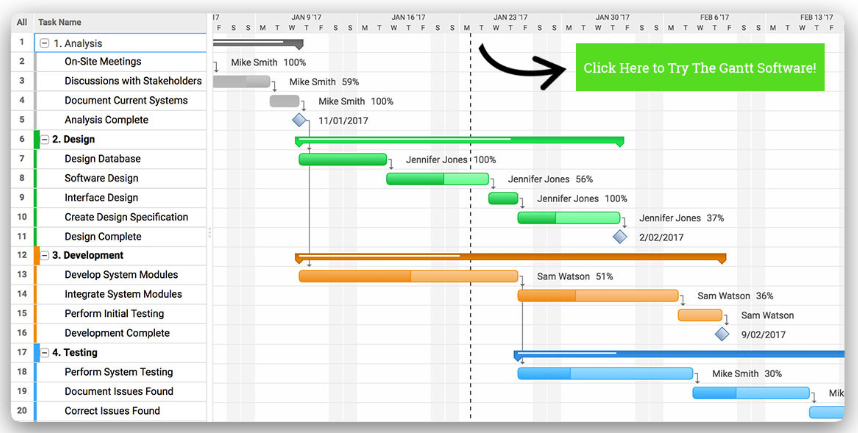
I already have a tree and an array (synced) showing the activities, I will need to sync them with the graph. Also zooming is important, it should be able to zoom in to days (S, M, T, W...) as in the image, and while zooming out it could show weeks, then months, quarter and finally year.
I won't really need layout designer, in any case I'll have to manipulate it with code.
Thanks a lot, I'll try it once you upload it 
Well you can definitly display the days/weeks/wonths as you wan't but you will have to :
- make you're own GridAxisDraw child class with own grid style drawing (or maybe I could push further into Chameleon capacities)
- Add time custom display format method (The exact same format is not available out of the box)
For all the zoom/scroll, verything you need is available.
There is also a Linking feature that allows to sync axis between graphs (when one zooms or scrolls, the other ones follow) : maybe you could use this to link to you're grid to the graph Y axis
|
|
|
|
|
|
|
|
| Re: GraphDraw/GraphCtrl [message #53796 is a reply to message #53795] |
Fri, 01 May 2020 13:37  |
Didier
Messages: 740
Registered: November 2008
Location: France
|
Contributor |
|
|
Here is the sencond part.
I packaged my demo app GraphCtrl_demo_GUI (which doesn't look how it should since Layout Designer properties are no more taken into account (for the moment))
Take a look at : GraphCtrl_Demo/CustomDataSource_WF.h
This is the cutom data class used to display the bars you saw on my screenshot
Everything compiles fine with lattest Upp/trunk on windows and linux
[Updated on: Sun, 03 May 2020 16:09] Report message to a moderator |
|
|
|
|
|
|
|
|
|
|
|
|
|
|
|
|
|
|
|
| Re: GraphDraw/GraphCtrl [message #53876 is a reply to message #53838] |
Sun, 10 May 2020 14:53 |
Didier
Messages: 740
Registered: November 2008
Location: France
|
Contributor |
|
|
Hello Pradip,
I made some refactoring, simplifications, cleaning, namespace/include management, one two bug corrections and a compilation issue with latest Upp svn version
Please use this last version
EDIT : removed attachement (see further)
[Updated on: Mon, 18 May 2020 00:01] Report message to a moderator |
|
|
|
| Re: GraphDraw/GraphCtrl [message #53895 is a reply to message #53876] |
Wed, 13 May 2020 17:42 |
 |
Pradip
Messages: 109
Registered: February 2019
Location: India
|
Experienced Member |
|
|
Hello Didier,
I've downloaded it. I'm using MSVS17 compiler. GanttCtrl_Test compiles fine (except conversion and possible loss of data warnings) and I'm getting the same graph.
However, GraphCtrl_Demo is giving some errors, perhaps all in Chameleon, see the image.
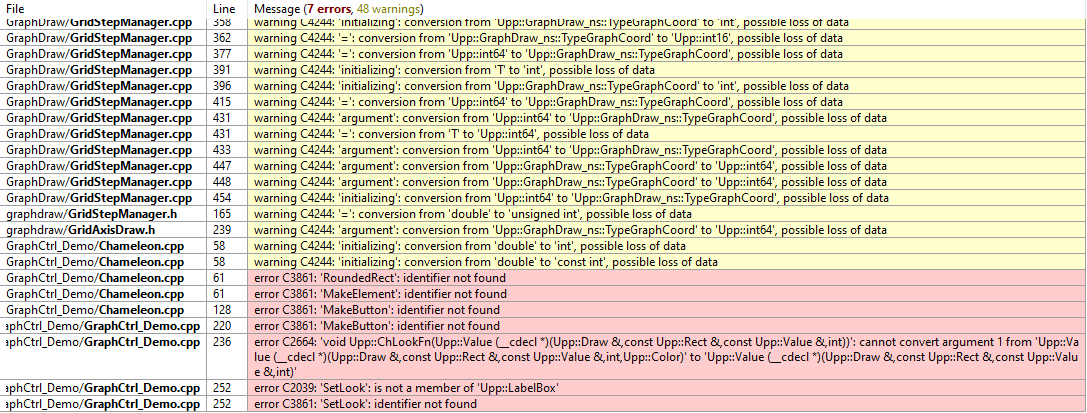
Though I could do without any Chameleon capability for now, to understand the working of GraphCtrl, running the demo would be useful.
I'll study more (please bear with my limited coding knowledge) and revert.
Regards,
Pradip
[Updated on: Thu, 14 May 2020 06:37] Report message to a moderator |
|
|
|
|
|
|
|
|
|
|
|
|
|
|
|
| Re: GraphDraw/GraphCtrl [message #53903 is a reply to message #53901] |
Thu, 14 May 2020 10:01 |
|
Pradip
Messages: 109
Registered: February 2019
Location: India
|
Experienced Member |
|
|
Mirek 
Truly these antiviruses make so much trouble at times. First time theide.exe ran, it was the clang.exe that was blocked first, and next time onwards theide.exe was also blocked.
14-05-2020 11:47:34   mfeatp(7744.8772) <SYSTEM> Orchestrator.RepChangeListener.Activity: Real Protect cloud scanner trace complete for process id 3572 , file E:\upp-win-14429\upp\theide.exe with reason id 1
14-05-2020 11:51:22   mfeatp(7744.7476) <SYSTEM> Orchestrator.Action.Activity: Action Taken on File E:\upp-win-14429\upp\bin\clang\bin\clang.exe with reputation 1 is: Block
14-05-2020 11:51:22   mfeatp(7744.7476) <SYSTEM> Orchestrator.Action.Activity: Action Details::  File: clang.exe , Mode: Enforce , Scanner: On-Execute Scan , Detection Name: ATP/Suspect!bcea0d393d11 , Reputation: 1  [Known Malicious] , ActionTaken: Block  Rule id: 0 , Content Version: Not Available
14-05-2020 11:52:58   mfeatp(7744.3840) <SYSTEM> Orchestrator.Action.Activity: Action Taken on File E:\upp-win-14429\upp\theide.exe with reputation 1 is: Block
14-05-2020 11:52:58   mfeatp(7744.3840) <SYSTEM> Orchestrator.Action.Activity: Action Details::  File: theide.exe , Mode: Enforce , Scanner: On-Execute Scan , Detection Name: ATP/Suspect!8b4fa2a4e3c1 , Reputation: 1  [Known Malicious] , ActionTaken: Block  Rule id: 0 , Content Version: Not Available
I think it's all about some 'reputation', saw it happening before too. And this is the reason I don't get the latest stable release immediately on release. Probably after some usage it gains on reputation with those AVs, shouldn't worry about it much.
Regards,
Pradip
|
|
|
|
|
|
|
|
| Re: GraphDraw/GraphCtrl [message #53906 is a reply to message #53905] |
Thu, 14 May 2020 13:47 |
 |
mirek
Messages: 14291
Registered: November 2005
|
Ultimate Member |
|
|
Pradip wrote on Thu, 14 May 2020 12:18Hello Didier,
That's a nice trick, using old ide.exe with new uppsrc  ! McAfee is still blocking clang.exe, gcc.exe, c++.exe, but I can use MSVS17 compiler. ! McAfee is still blocking clang.exe, gcc.exe, c++.exe, but I can use MSVS17 compiler.
GraphCtrl_Demo_GUI is running this way now, so I have enough to study, thanks a lot.
Well, I would offer you even better trick: Uninstall McAfee...
|
|
|
|
|
|
|
|
|
|
| Re: GraphDraw/GraphCtrl [message #53939 is a reply to message #53929] |
Sat, 16 May 2020 10:06 |
|
Pradip
Messages: 109
Registered: February 2019
Location: India
|
Experienced Member |
|
|
Hello Didier,
You may consider explicit conversions to avoid these warnings by MS compilers. Anyways this is of low priority, I think other compilers don't complain about it.
e:\upp_projects\graphdraw\GridStepManager.h (165): warning C4244: '=': conversion from 'double' to 'unsigned int', possible loss of data
e:\upp_projects\graphdraw\GridAxisDraw.h (239): warning C4244: 'argument': conversion from 'Upp::GraphDraw_ns::TypeGraphCoord' to 'Upp::int64', possible loss of data
e:\upp_projects\ganttctrl\GanttGridAxisDraw.h (81): warning C4244: 'argument': conversion from 'Upp::GraphDraw_ns::TypeGraphCoord' to 'int', possible loss of data
e:\upp_projects\ganttctrl\GanttGridAxisDraw.h (82): warning C4244: 'argument': conversion from 'Upp::GraphDraw_ns::TypeGraphCoord' to 'int', possible loss of data
e:\upp_projects\graphdraw\GraphDrawBase.h (841): warning C4244: '=': conversion from 'Upp::int64' to 'unsigned int', possible loss of data
e:\upp_projects\graphdraw\GraphDrawBase.h (857): warning C4244: '=': conversion from 'Upp::int64' to 'int', possible loss of data
e:\upp_projects\graphdraw\GraphDrawBase.h (863): warning C4244: '=': conversion from 'Upp::int64' to 'int', possible loss of data
e:\upp_projects\graphdraw\GraphDrawBase.h (997): warning C4244: '=': conversion from 'Upp::int64' to 'unsigned int', possible loss of data
e:\upp_projects\graphdraw\GraphDrawBase.h (1024): warning C4244: '=': conversion from 'double' to 'unsigned int', possible loss of data
e:\upp_projects\graphdraw\GraphFunctions.h (82): warning C4244: 'return': conversion from 'Upp::int64' to 'int', possible loss of data
e:\upp_projects\graphdraw\GraphFunctions.h (56): warning C4244: 'initializing': conversion from 'T' to 'float', possible loss of data
e:\upp_projects\graphdraw\GraphFunctions.h (57): warning C4244: 'initializing': conversion from 'T' to 'float', possible loss of data
e:\upp_projects\graphdraw\GraphFunctions.h (58): warning C4244: 'initializing': conversion from 'T' to 'float', possible loss of data
e:\upp_projects\graphdraw\GraphFunctions.h (33): warning C4244: 'initializing': conversion from 'T' to 'float', possible loss of data
e:\upp_projects\graphdraw\GraphFunctions.h (34): warning C4244: 'initializing': conversion from 'T' to 'float', possible loss of data
e:\upp_projects\graphdraw\GraphFunctions.h (35): warning C4244: 'initializing': conversion from 'T' to 'float', possible loss of data
e:\upp_projects\graphdraw\GridStepManager.h (165): warning C4244: '=': conversion from 'double' to 'unsigned int', possible loss of data
e:\upp_projects\graphdraw\GridAxisDraw.h (239): warning C4244: 'argument': conversion from 'Upp::GraphDraw_ns::TypeGraphCoord' to 'Upp::int64', possible loss of data
E:\UPP_Projects\GraphDraw\GridStepManager.cpp (126): warning C4244: 'initializing': conversion from 'Upp::GraphDraw_ns::TypeGraphCoord' to 'int', possible loss of data
E:\UPP_Projects\GraphDraw\GridStepManager.cpp (131): warning C4244: 'initializing': conversion from 'double' to 'unsigned int', possible loss of data
E:\UPP_Projects\GraphDraw\GridStepManager.cpp (237): warning C4244: 'argument': conversion from 'Upp::GraphDraw_ns::TypeGraphCoord' to 'int', possible loss of data
E:\UPP_Projects\GraphDraw\GridStepManager.cpp (238): warning C4244: 'argument': conversion from 'Upp::GraphDraw_ns::TypeGraphCoord' to 'int', possible loss of data
E:\UPP_Projects\GraphDraw\GridStepManager.cpp (240): warning C4244: 'argument': conversion from 'Upp::GraphDraw_ns::TypeGraphCoord' to 'int', possible loss of data
E:\UPP_Projects\GraphDraw\GridStepManager.cpp (246): warning C4244: 'initializing': conversion from 'Upp::GraphDraw_ns::TypeGraphCoord' to 'int', possible loss of data
E:\UPP_Projects\GraphDraw\GridStepManager.cpp (250): warning C4244: '=': conversion from 'Upp::GraphDraw_ns::TypeGraphCoord' to 'Upp::int16', possible loss of data
E:\UPP_Projects\GraphDraw\GridStepManager.cpp (266): warning C4244: '=': conversion from 'Upp::int64' to 'Upp::GraphDraw_ns::TypeGraphCoord', possible loss of data
E:\UPP_Projects\GraphDraw\GridStepManager.cpp (278): warning C4244: 'initializing': conversion from 'T' to 'int', possible loss of data
E:\UPP_Projects\GraphDraw\GridStepManager.cpp (283): warning C4244: 'initializing': conversion from 'Upp::GraphDraw_ns::TypeGraphCoord' to 'int', possible loss of data
E:\UPP_Projects\GraphDraw\GridStepManager.cpp (302): warning C4244: '=': conversion from 'Upp::int64' to 'Upp::GraphDraw_ns::TypeGraphCoord', possible loss of data
E:\UPP_Projects\GraphDraw\GridStepManager.cpp (315): warning C4244: '=': conversion from 'T' to 'Upp::int64', possible loss of data
E:\UPP_Projects\GraphDraw\GridStepManager.cpp (317): warning C4244: 'argument': conversion from 'Upp::int64' to 'Upp::GraphDraw_ns::TypeGraphCoord', possible loss of data
E:\UPP_Projects\GraphDraw\GridStepManager.cpp (345): warning C4244: 'argument': conversion from 'Upp::GraphDraw_ns::TypeGraphCoord' to 'Upp::int64', possible loss of data
E:\UPP_Projects\GraphDraw\GridStepManager.cpp (346): warning C4244: 'argument': conversion from 'Upp::GraphDraw_ns::TypeGraphCoord' to 'Upp::int64', possible loss of data
E:\UPP_Projects\GraphDraw\GridStepManager.cpp (347): warning C4244: 'argument': conversion from 'Upp::GraphDraw_ns::TypeGraphCoord' to 'Upp::int64', possible loss of data
E:\UPP_Projects\GraphDraw\GridStepManager.cpp (358): warning C4244: 'initializing': conversion from 'Upp::GraphDraw_ns::TypeGraphCoord' to 'int', possible loss of data
E:\UPP_Projects\GraphDraw\GridStepManager.cpp (362): warning C4244: '=': conversion from 'Upp::GraphDraw_ns::TypeGraphCoord' to 'Upp::int16', possible loss of data
E:\UPP_Projects\GraphDraw\GridStepManager.cpp (377): warning C4244: '=': conversion from 'Upp::int64' to 'Upp::GraphDraw_ns::TypeGraphCoord', possible loss of data
E:\UPP_Projects\GraphDraw\GridStepManager.cpp (391): warning C4244: 'initializing': conversion from 'T' to 'int', possible loss of data
E:\UPP_Projects\GraphDraw\GridStepManager.cpp (396): warning C4244: 'initializing': conversion from 'Upp::GraphDraw_ns::TypeGraphCoord' to 'int', possible loss of data
E:\UPP_Projects\GraphDraw\GridStepManager.cpp (415): warning C4244: '=': conversion from 'Upp::int64' to 'Upp::GraphDraw_ns::TypeGraphCoord', possible loss of data
E:\UPP_Projects\GraphDraw\GridStepManager.cpp (431): warning C4244: 'argument': conversion from 'Upp::int64' to 'Upp::GraphDraw_ns::TypeGraphCoord', possible loss of data
E:\UPP_Projects\GraphDraw\GridStepManager.cpp (431): warning C4244: '=': conversion from 'T' to 'Upp::int64', possible loss of data
E:\UPP_Projects\GraphDraw\GridStepManager.cpp (433): warning C4244: 'argument': conversion from 'Upp::int64' to 'Upp::GraphDraw_ns::TypeGraphCoord', possible loss of data
E:\UPP_Projects\GraphDraw\GridStepManager.cpp (447): warning C4244: 'argument': conversion from 'Upp::GraphDraw_ns::TypeGraphCoord' to 'Upp::int64', possible loss of data
E:\UPP_Projects\GraphDraw\GridStepManager.cpp (448): warning C4244: 'argument': conversion from 'Upp::GraphDraw_ns::TypeGraphCoord' to 'Upp::int64', possible loss of data
E:\UPP_Projects\GraphDraw\GridStepManager.cpp (454): warning C4244: 'initializing': conversion from 'Upp::int64' to 'Upp::GraphDraw_ns::TypeGraphCoord', possible loss of data
e:\upp_projects\graphdraw\GraphDrawBase.h (841): warning C4244: '=': conversion from 'Upp::int64' to 'unsigned int', possible loss of data
e:\upp_projects\graphdraw\GraphDrawBase.h (857): warning C4244: '=': conversion from 'Upp::int64' to 'int', possible loss of data
e:\upp_projects\graphdraw\GraphDrawBase.h (863): warning C4244: '=': conversion from 'Upp::int64' to 'int', possible loss of data
e:\upp_projects\graphdraw\GraphDrawBase.h (997): warning C4244: '=': conversion from 'Upp::int64' to 'unsigned int', possible loss of data
e:\upp_projects\graphdraw\GraphDrawBase.h (1024): warning C4244: '=': conversion from 'double' to 'unsigned int', possible loss of data
e:\upp_projects\graphdraw\GraphFunctions.h (82): warning C4244: 'return': conversion from 'Upp::int64' to 'int', possible loss of data
e:\upp_projects\graphdraw\GraphFunctions.h (56): warning C4244: 'initializing': conversion from 'T' to 'float', possible loss of data
e:\upp_projects\graphdraw\GraphFunctions.h (57): warning C4244: 'initializing': conversion from 'T' to 'float', possible loss of data
e:\upp_projects\graphdraw\GraphFunctions.h (58): warning C4244: 'initializing': conversion from 'T' to 'float', possible loss of data
e:\upp_projects\graphdraw\GraphFunctions.h (33): warning C4244: 'initializing': conversion from 'T' to 'float', possible loss of data
e:\upp_projects\graphdraw\GraphFunctions.h (34): warning C4244: 'initializing': conversion from 'T' to 'float', possible loss of data
e:\upp_projects\graphdraw\GraphFunctions.h (35): warning C4244: 'initializing': conversion from 'T' to 'float', possible loss of data
e:\upp_projects\graphdraw\GridStepManager.h (165): warning C4244: '=': conversion from 'double' to 'unsigned int', possible loss of data
e:\upp_projects\graphdraw\GridAxisDraw.h (239): warning C4244: 'argument': conversion from 'Upp::GraphDraw_ns::TypeGraphCoord' to 'Upp::int64', possible loss of data
e:\upp_projects\graphdraw\GridStepManager.h (165): warning C4244: '=': conversion from 'double' to 'unsigned int', possible loss of data
e:\upp_projects\graphdraw\GridAxisDraw.h (239): warning C4244: 'argument': conversion from 'Upp::GraphDraw_ns::TypeGraphCoord' to 'Upp::int64', possible loss of data
e:\upp_projects\ganttctrl\GanttGridAxisDraw.h (81): warning C4244: 'argument': conversion from 'Upp::GraphDraw_ns::TypeGraphCoord' to 'int', possible loss of data
e:\upp_projects\ganttctrl\GanttGridAxisDraw.h (82): warning C4244: 'argument': conversion from 'Upp::GraphDraw_ns::TypeGraphCoord' to 'int', possible loss of data
e:\upp_projects\graphdraw\GraphDrawBase.h (841): warning C4244: '=': conversion from 'Upp::int64' to 'unsigned int', possible loss of data
e:\upp_projects\graphdraw\GraphDrawBase.h (857): warning C4244: '=': conversion from 'Upp::int64' to 'int', possible loss of data
e:\upp_projects\graphdraw\GraphDrawBase.h (863): warning C4244: '=': conversion from 'Upp::int64' to 'int', possible loss of data
e:\upp_projects\graphdraw\GraphDrawBase.h (997): warning C4244: '=': conversion from 'Upp::int64' to 'unsigned int', possible loss of data
e:\upp_projects\graphdraw\GraphDrawBase.h (1024): warning C4244: '=': conversion from 'double' to 'unsigned int', possible loss of data
e:\upp_projects\graphdraw\GraphFunctions.h (82): warning C4244: 'return': conversion from 'Upp::int64' to 'int', possible loss of data
e:\upp_projects\graphdraw\GraphFunctions.h (56): warning C4244: 'initializing': conversion from 'T' to 'float', possible loss of data
e:\upp_projects\graphdraw\GraphFunctions.h (57): warning C4244: 'initializing': conversion from 'T' to 'float', possible loss of data
e:\upp_projects\graphdraw\GraphFunctions.h (58): warning C4244: 'initializing': conversion from 'T' to 'float', possible loss of data
e:\upp_projects\graphdraw\GraphFunctions.h (33): warning C4244: 'initializing': conversion from 'T' to 'float', possible loss of data
e:\upp_projects\graphdraw\GraphFunctions.h (34): warning C4244: 'initializing': conversion from 'T' to 'float', possible loss of data
e:\upp_projects\graphdraw\GraphFunctions.h (35): warning C4244: 'initializing': conversion from 'T' to 'float', possible loss of data
Regards,
Pradip
|
|
|
|
|
|
| Re: GraphDraw/GraphCtrl [message #53958 is a reply to message #53945] |
Sun, 17 May 2020 23:59 |
Didier
Messages: 740
Registered: November 2008
Location: France
|
Contributor |
|
|
Hello Pradip,
I removed all the warnings I see on MSC15 + some others that don't appear (sign conversions)
I used the following compile flags on CLANG/linux :
-std=c++14 -Wno-logical-op-parentheses -Wimplicit-float-conversion -Wshorten-64-to-32 -Wfloat-conversion -Wconditional-uninitialized
But there are still some warnings that only appear on MSC 
[Updated on: Mon, 18 May 2020 00:03] Report message to a moderator |
|
|
|
|
|
| Re: GraphDraw/GraphCtrl [message #54051 is a reply to message #53959] |
Sun, 24 May 2020 13:07 |
|
Pradip
Messages: 109
Registered: February 2019
Location: India
|
Experienced Member |
|
|
Hello Didier,
Need some help. Please see my implementation of CustomData and CustomDataSource, similar to your demo:
namespace Upp {
namespace GraphDraw_ns {

class GanttBar : public CustomData {
private:
	int row_num;
	const S_ACTIVITIES* act;
	RectGraph bar;
//	TypeScreenCoord bar_thk = 5;

public:
	GanttBar(int row, const S_ACTIVITIES* ac) : row_num(row), act(ac) {
		bar.left = act->START_DATE_PL.Get();
		bar.right = act->END_DATE_PL.Get();
		bar.top = row_num + 0.25;
		bar.bottom = row_num + 0.75;
	};

	virtual ~GanttBar() {};

	virtual bool Intersects(const RectGraph& graphView) const {
		return graphView.Intersects(bar);
	};

	virtual bool Contains(const PointGraph& pt) const {
		return bar.Contains(pt);
	};

	virtual void PaintDataPoint(BufferPainter& dw, int scale,
		const CoordinateConverter* xCoordConv, const CoordinateConverter* yCoordConv) {

		const TypeScreenCoord left = xCoordConv->toScreen(bar.left);
		const TypeScreenCoord right = xCoordConv->toScreen(bar.right);
		const TypeScreenCoord bottom = yCoordConv->toScreen(bar.top);
		const TypeScreenCoord top = yCoordConv->toScreen(bar.bottom);
		Rect r(left,top, right, bottom);

		ChPaint(dw, r, Yellow());
	};

	String ToString() const {
		return Format("Row num=%i\tActivity ID=%i\tBar=%s", row_num, act->ACT_ID, bar.ToString());
	};
};

class GanttBarSeries : public CustomDataSource {
private:
	const ArrayCtrl* array;
	Array<GanttBar> gantt_bars;

public:
	GanttBarSeries() {};

	void Link(const ArrayCtrl* ar) {
		array = ar;
	};

	void RefreshBars() {
		if(!gantt_bars.IsEmpty()) gantt_bars.Clear();
		int n = array->GetCount();
		for(int i = 0; i < n; i++) {
			GanttBar gb(i, &ActById(array->Get(i, ACT_ID)));
			gantt_bars.Add(gb);
		}
		DUMP(gantt_bars);
	};

	virtual ~GanttBarSeries() {};
	virtual unsigned int GetCount() const {return gantt_bars.GetCount();};
	virtual const CustomData& Get(unsigned int dataIndex) const {return gantt_bars[dataIndex];};
	virtual CustomData& Get(unsigned int dataIndex) {return gantt_bars[dataIndex];};
};


};
};
You will see that I'm trying to link the Gantt with an ArrayCtrl. The DUMP is showing this:
gantt_bars = [Row num=0 Activity ID=10 Bar=[737830, 0.25] - [737947, 0.75] : (117, 0.5), Row num=1 Activity ID=28 Bar=[737832, 1.25] - [737854, 1.75] : (22, 0.5), Row num=2 Activity ID=29 Bar=[737854, 2.25] - [737856, 2.75] : (2, 0.5), Row num=3 Activity ID=118 Bar=[737856, 3.25] - [737898, 3.75] : (42, 0.5), Row num=4 Activity ID=126 Bar=[737856, 4.25] - [737859, 4.75] : (3, 0.5), Row num=5 Activity ID=127 Bar=[737859, 5.25] - [737862, 5.75] : (3, 0.5), Row num=6 Activity ID=128 Bar=[737862, 6.25] - [737867, 6.75] : (5, 0.5), Row num=7 Activity ID=129 Bar=[737867, 7.25] - [737870, 7.75] : (3, 0.5), Row num=8 Activity ID=130 Bar=[737870, 8.25] - [737881, 8.75] : (11, 0.5), Row num=9 Activity ID=131 Bar=[737870, 9.25] - [737873, 9.75] : (3, 0.5), Row num=10 Activity ID=133 Bar=[737873, 10.25] - [737875, 10.75] : (2, 0.5), Row num=11 Activity ID=134 Bar=[737875, 11.25] - [737879, 11.75] : (4, 0.5), Row num=12 Activity ID=388 Bar=[737879, 12.25] - [737881, 12.75] : (2, 0.5), Row num=13 Activity ID=136 Bar=[737881, 13.25] - [737886, 13.75] : (5, 0.5), Row num=14 Activity ID=137 Bar=[737881, 14.25] - [737883, 14.75] : (2, 0.5), Row num=15 Activity ID=138 Bar=[737883, 15.25] - [737884, 15.75] : (1, 0.5), Row num=16 Activity ID=139 Bar=[737883, 16.25] - [737890, 16.75] : (7, 0.5), Row num=17 Activity ID=140 Bar=[737890, 17.25] - [737895, 17.75] : (5, 0.5), Row num=18 Activity ID=141 Bar=[737895, 18.25] - [737898, 18.75] : (3, 0.5), Row num=19 Activity ID=121 Bar=[737898, 19.25] - [737931, 19.75] : (33, 0.5), Row num=20 Activity ID=143 Bar=[737898, 20.25] - [737901, 20.75] : (3, 0.5), Row num=21 Activity ID=144 Bar=[737901, 21.25] - [737909, 21.75] : (8, 0.5), Row num=22 Activity ID=145 Bar=[737909, 22.25] - [737916, 22.75] : (7, 0.5), Row num=23 Activity ID=148 Bar=[737916, 23.25] - [737924, 23.75] : (8, 0.5), Row num=24 Activity ID=149 Bar=[737924, 24.25] - [737926, 24.75] : (2, 0.5), Row num=25 Activity ID=150 Bar=[737926, 25.25] - [737931, 25.75] : (5, 0.5), Row num=26 Activity ID=123 Bar=[737931, 26.25] - [737939, 26.75] : (8, 0.5), Row num=27 Activity ID=124 Bar=[737939, 27.25] - [737946, 27.75] : (7, 0.5), Row num=28 Activity ID=125 Bar=[737946, 28.25] - [737947, 28.75] : (1, 0.5)]
So the bars are being made alright. In my application (TopWindow) header:
	GraphDraw_ns::GanttCtrl gantt;
	Upp::GraphDraw_ns::GanttBarSeries ganttBarSeries;
In TopWindow constructor:
	ganttBarSeries.Link(&array);
	gantt.AddCustomSeries(ganttBarSeries);
And in a callback which refreshes the linked array:
	ganttBarSeries.RefreshBars();
	gantt.Refresh();
However the gantt chart is always empty, doing FitToData() is also not showing any bar. What am I missing here?
Regards,
Pradip
|
|
|
|
|
|
|
|
|
|
| Re: GraphDraw/GraphCtrl [message #54065 is a reply to message #54063] |
Fri, 29 May 2020 00:00 |
Didier
Messages: 740
Registered: November 2008
Location: France
|
Contributor |
|
|
Hello Pradip,
Pradip wrote on Thu, 28 May 2020 18:52Hello Didier,
Really amazing work with the GraphCtrl!
Is there a way to allow only X axis zooming but prevent Y axis zooming?
Thank you and yes there is
Several restriction methods are available for zoom / scroll (these are also available directly through the layout designer as options)
DisableGraphZoom
DisableGraphScroll
DisableAxisZoom
DisableXZoom
DisableYZoom
DisableAxisScroll
DisableXScroll
DisableYScroll
Quote:Please tell me, is there an easy way to flip the Y axis? Currently the origin is in bottom-left, how to make it in top-left?
Well I never needed this so it isn't available out of the box, but it should be quite easy to do.
I'll see if I can add a ' void InvertAxis()' method : this may come handy one day
[Updated on: Fri, 29 May 2020 00:03] Report message to a moderator |
|
|
|
|
|
|
|
|
|
|
|
Goto Forum:
Current Time: Fri Oct 16 06:47:50 GMT+2 2026
Total time taken to generate the page: 0.01836 seconds
|
 U++ framework
 Search
 Help
Help Members
 Register
 Login
Login Home
Home




 ( and CLANG doesn't work du to path problems and I can't change them: I don't have admin rights to change paths)