Home » Developing U++ » UppHub » GraphDraw/GraphCtrl
|
|
|
|
|
|
| Re: GraphDraw/GraphCtrl [message #54198 is a reply to message #54196] |
Sun, 07 June 2020 14:07   |
 |
 Pradip
Messages: 109
Registered: February 2019
Location: India
|
Experienced Member |
|
|
Hello Didier!
Yay! You are just awesome!
gantt.GetY1GridAxisDraw().setAxisInverted(); this does the job! Yaay!
Plus the bug with zoom/scroll is also fixed now! Thank you so much! See a screenshot of my app, you really made it possible!
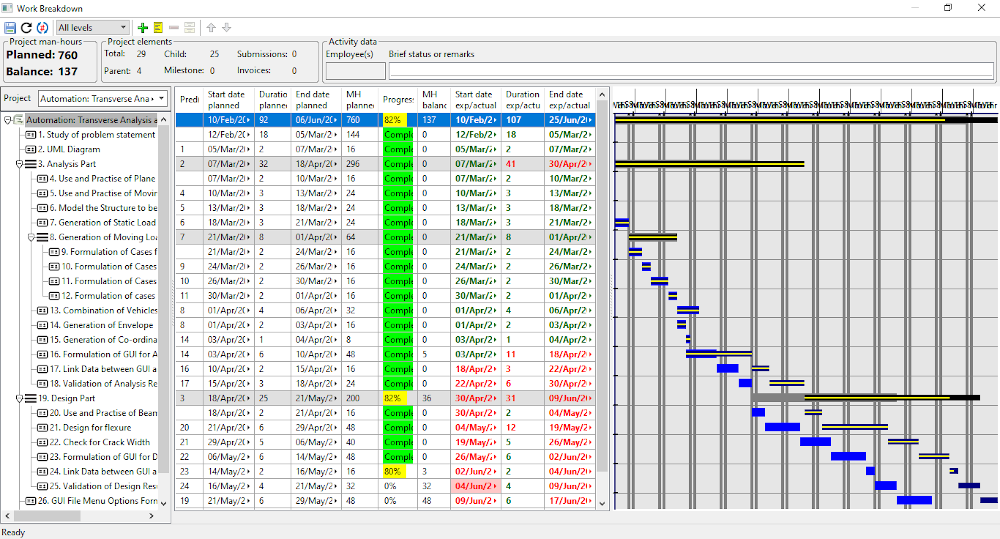
Next I need to have dynamic grid, changing the granularity and type of display with zoom in and out, and need to find a way to scroll the gantt along with tree/array. I'll show you some sample of the dynamic grids that I'm talking about. Also I need to have a vertical line showing today, and the gray vertical bands should appear for declared holidays also. I'll study class GanttGridAxisDraw bit more. I'll write you about it soon.
Thanks a lot 
Regards,
Pradip
[Updated on: Mon, 08 June 2020 06:55] Report message to a moderator |
|
|
|
|
|
| Re: GraphDraw/GraphCtrl [message #54213 is a reply to message #54204] |
Thu, 11 June 2020 10:44 |
|
Pradip
Messages: 109
Registered: February 2019
Location: India
|
Experienced Member |
|
|
Hello Didier,
Please suggest an easy way to set the grid step to a specific value, bypassing NormalizedStep. For Y axis I need to have the grid steps interval as 1, that's why.
Regards,
Pradip
[Updated on: Thu, 11 June 2020 12:35] Report message to a moderator |
|
|
|
|
|
| Re: GraphDraw/GraphCtrl [message #54217 is a reply to message #54215] |
Thu, 11 June 2020 15:53 |
|
Pradip
Messages: 109
Registered: February 2019
Location: India
|
Experienced Member |
|
|
Hello Didier,
Hope you don't mind me asking random questions 
Please check this code in GraphDraw.cpp
	void DrawSmartText(Draw& draw, int x, int y, int cx, const char *text, const Font scaledFont, Color ink, int scale) {
		if(*text == '\1') {
			RichText txt = ParseQTF(text + 1, 0);
			txt.ApplyZoom(GetRichTextStdScreenZoom());
			txt.Paint(Zoom(scale, 1), draw, x, y, cx);
			return;
		}
		DrawTLText(draw, x, y, cx, ToUnicode(text, CHARSET_DEFAULT), scaledFont, ink, 0);
	}
QTF is activated if the first byte is '\1', is this different behavior from standard QTF, where '\1' escapes all following characters?
Regards,
Pradip
|
|
|
|
| Re: GraphDraw/GraphCtrl [message #54219 is a reply to message #54217] |
Fri, 12 June 2020 10:31 |
 |
deep
Messages: 281
Registered: July 2011
Location: Bangalore
|
Experienced Member |
|
|
void DrawSmartText(Draw& draw, ...)
This is defined in LabelBase h/cpp
Where ever it is derived from LabelBase you can use QTF.
e.g. Labels, Button, Tooltip, OK/Cancel prompts etc.
Warm Regards
Deepak
[Updated on: Fri, 12 June 2020 10:32] Report message to a moderator |
|
|
|
|
|
| Re: GraphDraw/GraphCtrl [message #54239 is a reply to message #54225] |
Sat, 13 June 2020 23:49 |
Didier
Messages: 740
Registered: November 2008
Location: France
|
Contributor |
|
|
Hello Pradip,
Quote:void DrawSmartText(Draw& draw, ...)
In fact I have a modified copy of the original method : 'scale' parameter is added
'\1' is a QTF trick of original method : if first caracter == '\1' then texte is QTF otherwise it not the case
Quote:gantt.SetYGridColor(Yellow());
gantt.SetXGridColor(Yellow());
These methods do not work anymore since I added Chameleon support : work is not finished
And to be honest, the simple solution would be to suppress these methods.
But on the other hand, these methods allow access through the layout-designer
which was my first objective... so suppressing them doesn't satisfy me.
I have to find an elegant way to mix both (I have some ideas but didn't start coding yet)
Quote:gantt.setYNbGridSteps(array.GetCount());
This one shoudn't be present: it uses GridStepManager::SetNbSteps() which is for internal use
Quote:Please suggest an easy way to set the grid step to a specific value, bypassing NormalizedStep. For Y axis I need to have the grid steps interval as 1, that's why
I will post you solution in next message
[Updated on: Sat, 13 June 2020 23:51] Report message to a moderator |
|
|
|
| Re: GraphDraw/GraphCtrl [message #54240 is a reply to message #54239] |
Sun, 14 June 2020 00:09 |
Didier
Messages: 740
Registered: November 2008
Location: France
|
Contributor |
|
|
Here the code you need,
A dedicated function to calculate the steps (with a fixed grid step off 1)
static void GanttCtrl::step1_GridStepCalcCbk(GridStepManager& gridStepManager, CoordinateConverter& coordConv) {
	const unsigned int nbMaxSteps = GridStepManager::NB_MAX_STEPS; //gridStepManager.GetNbMaxSteps();
	GridStepData* gridStepData = gridStepManager.GetGridStepData();
	TypeGraphCoord gridStepValue = 1;
	TypeGraphCoord gridStartValue = GridStepManager::GetGridStartValue( gridStepValue, coordConv.getGraphMin() );

	unsigned int nbSteps = (unsigned int)tabs((coordConv.getGraphMax() - gridStartValue) / gridStepValue);

	if (nbSteps > nbMaxSteps) {
		nbSteps = nbMaxSteps;
	}
	gridStepManager.SetNbSteps(nbSteps);

	// fill step values ==> used by gridStepIterator
	for (unsigned int c=0; c<nbSteps+1; ++c) {
		gridStepData[c].stepGraphValue = gridStartValue + gridStepValue*c;
		gridStepData[c].drawTickText = 0;// ==> draw tick text not needed (from you're screen shot)
	}
}
In GanttCtrl constructor, add:
GetY1GridAxisDraw().GetGridStepManager().setCustomGridSteps(STDBACK(step1_GridStepCalcCbk));
And the trick is done 
[Updated on: Sun, 14 June 2020 00:14] Report message to a moderator |
|
|
|
| Re: GraphDraw/GraphCtrl [message #54242 is a reply to message #54240] |
Sun, 14 June 2020 00:44 |
Didier
Messages: 740
Registered: November 2008
Location: France
|
Contributor |
|
|
To set the colors using Chameleon, use the following code:
In you're application header (in GanttCtrl_Test class) declare the following variable:
Upp::GraphDraw_ns::GanttCtrl::Style ganttStyle;
In application init (GanttCtrl_Test constructor) add the following code:
(Not sure it is axisColor you wanted to change, probably gridColor)
	ganttStyle = graph.StyleDefault();
//	ganttStyle.x1AxisStyle.axisWidth     = 2;
	ganttStyle.x1AxisStyle.axisColor     = Yellow();
//	ganttStyle.x1AxisStyle.axisTextFont  = StdFont();
//	ganttStyle.x1AxisStyle.axisTextColor = SRed();
//	ganttStyle.x1AxisStyle.axisTickColor = SRed();
//	ganttStyle.x1AxisStyle.gridColor     = Yellow();
//	ganttStyle.x1AxisStyle.primaryTickFactory    << []() ->TickMark* { TickMark* t = new LineTickMark();  t->SetTickLength(3); return t; };
//	ganttStyle.x1AxisStyle.secondaryTickFactory  << []() ->TickMark* { TickMark* t = new LineTickMark();  t->SetTickLength(1); return t; };
//	ganttStyle.x1AxisStyle.lmntBackgnd = Null;
//
//	ganttStyle.y1AxisStyle.axisWidth     = 2;
	ganttStyle.y1AxisStyle.axisColor     = Yellow();
//	ganttStyle.y1AxisStyle.axisTextFont  = StdFont();
//	ganttStyle.y1AxisStyle.axisTextColor = SRed();
//	ganttStyle.y1AxisStyle.axisTickColor = SRed();
//	ganttStyle.y1AxisStyle.gridColor     = Yellow();
//	ganttStyle.y1AxisStyle.primaryTickFactory    << []() ->TickMark* { TickMark* t = new LineTickMark();  t->SetTickLength(3); return t; };
//	ganttStyle.y1AxisStyle.secondaryTickFactory  << []() ->TickMark* { TickMark* t = new LineTickMark();  t->SetTickLength(1); return t; };
//	ganttStyle.y1AxisStyle.lmntBackgnd = Null;

	graph.SetStyle( ganttStyle );
[Updated on: Sun, 14 June 2020 00:45] Report message to a moderator |
|
|
|
| Re: GraphDraw/GraphCtrl [message #54287 is a reply to message #54242] |
Sun, 21 June 2020 12:48 |
|
Pradip
Messages: 109
Registered: February 2019
Location: India
|
Experienced Member |
|
|
Hello Didier,
GraphCtrl's sheer brilliance amazes me indeed! I could do all these without much difficulty:
- Learned to use Chameleon, bit tricky though, need to dig through a lot of typedefs
- Dynamic grid; virtually anything can be done with the grids with your framework! uploaded few screenshots
- Sync scroll with another ctrl, by using SetGraphMin and SetGraphMax; noted that Link syncs with another CoordinateConverter
2 questions:
- How to alter the default margin of 3 px? The following line doesn't work:
// gantt.SetTopMargin(1).SetLeftMargin(1).SetBottomMargin(1).Se tRightMargin(1);
some text seems to spill into the margin, see in one of the uploaded images - What can be done with CustomDataSource::PaintOne? How does style work?
I must say again, thanks a lot for GraphCtrl! It makes life so easy!
-
 Attachment: Images.rar
(Size: 281.89KB, Downloaded 316 times)
Regards,
Pradip
[Updated on: Sun, 21 June 2020 12:57] Report message to a moderator |
|
|
|
|
|
|
|
|
|
| Re: GraphDraw/GraphCtrl [message #54296 is a reply to message #54290] |
Mon, 22 June 2020 00:28 |
Didier
Messages: 740
Registered: November 2008
Location: France
|
Contributor |
|
|
Hello Pradip,
I see you're are making good progress on you're app : looking good 
I suppose you used two CustomDataSource classes in you're Gantt:
- one for the jobs
- one for the links ?
I have made some cleaning up and plugged back-in all the SetXxxx methods (colors, fonts, ...) so the layout designer is parameters are working again
I mixed Chameleon and Layout params the following way:
- At création Chameleon is used in standard way and stays unmodified until a SetXxxx() method is called
- After modifying a parameter with SetXxxx() the a local copy of the style is made and the copy is modified
==> so you get Chameleon settings + local settings together
There still is a bug : a small heap leak is there (the delete of local copy makes the app crash and I didn't find why for the moment)
I also did some more cleaning and did some methods renaming:
- All the GetXxxx GraphElement() are now named GetElementXxxxx()
- All the SetXTttt() are now named SetX1Ttttt() (so that the you have X1, X2, Y1, Y2, ... (and not X, X1 which was not homogenous)
X (not X1 or X2) now applies only to methods that apply to all X1, X2, ....
Its clearer this way
One good side effect of all this (I was hopping this would come around sooner or latter) : Completion works fine now on GraphCtrl
|
|
|
|
| Re: GraphDraw/GraphCtrl [message #54297 is a reply to message #54296] |
Mon, 22 June 2020 00:41 |
Didier
Messages: 740
Registered: November 2008
Location: France
|
Contributor |
|
|
Quote:How to alter the default margin of 3 px? The following line doesn't work:
// gantt.SetTopMargin(1).SetLeftMargin(1).SetBottomMargin(1).Se tRightMargin(1);
some text seems to spill into the margin, see in one of the uploaded images
This works (at least when modifying it thriugh the layout designer) : maybe a Refresh() is missing somewhere
Normaly the updateSizes() method recalculates all the internal sizes taking into account the margins but it is for internal use and is called by Refresh()
Question : When you resize you're app, all is recalculated so the new margin values should be taken into account : does this work for you ?
Quote:What can be done with CustomDataSource::PaintOne? How does style work?
This work in progress, it is mearly at start point : I intend to use it to enable things like selection (draw the point with a different style : highlight for example)
[Updated on: Mon, 22 June 2020 00:44] Report message to a moderator |
|
|
|
|
|
|
|
| Re: GraphDraw/GraphCtrl [message #54300 is a reply to message #54298] |
Mon, 22 June 2020 12:54 |
|
Pradip
Messages: 109
Registered: February 2019
Location: India
|
Experienced Member |
|
|
Hello Didier,
Sorry I panicked a bit. I missed to add the GD_ macros in GanttCtrl declaration, after adding them that error is gone. Also I needed to change the first line in the macro to make it run:
CH_STYLE(GanttCtrl, Style, StyleDefault) {
	gdStyle        = GanttCtrl::CH_EmptyGraphDraw::StyleGDDefault();
Plus I made other method name changes as described by you in your message.
However, the result is this:
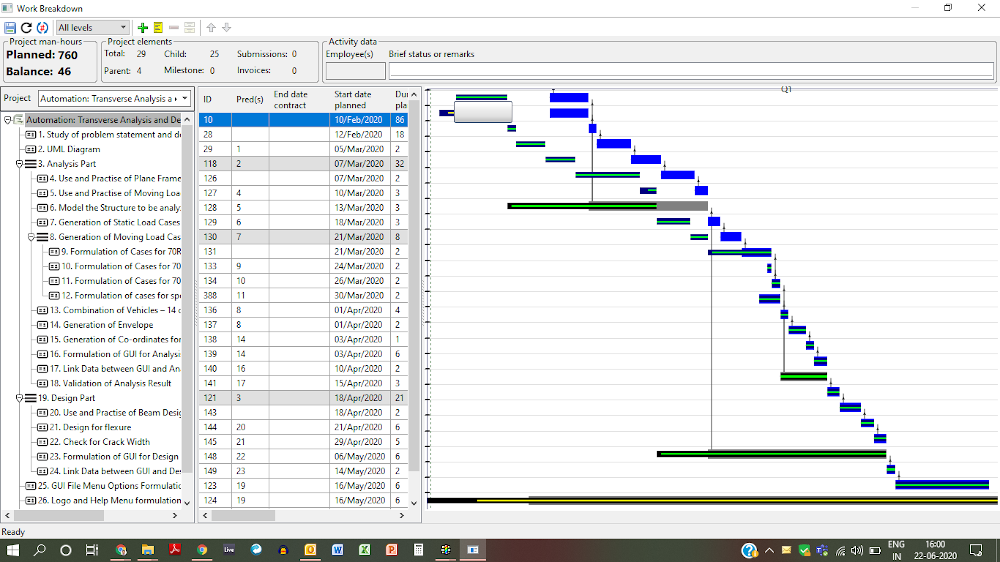
Both axes are inverted; custom grids are not drawn as before, and a floating element has appeared.
I'll continue with the previous version and wait for you have a look at these and advise.
Regards,
Pradip
[Updated on: Tue, 23 June 2020 07:26] Report message to a moderator |
|
|
|
|
|
|
|
| Re: GraphDraw/GraphCtrl [message #54304 is a reply to message #54297] |
Mon, 22 June 2020 14:28 |
|
Pradip
Messages: 109
Registered: February 2019
Location: India
|
Experienced Member |
|
|
Hello Didier,
Didier wrote on Mon, 22 June 2020 04:11
This works (at least when modifying it thriugh the layout designer) : maybe a Refresh() is missing somewhere
Normaly the updateSizes() method recalculates all the internal sizes taking into account the margins but it is for internal use and is called by Refresh()
Question : When you resize you're app, all is recalculated so the new margin values should be taken into account : does this work for you ?
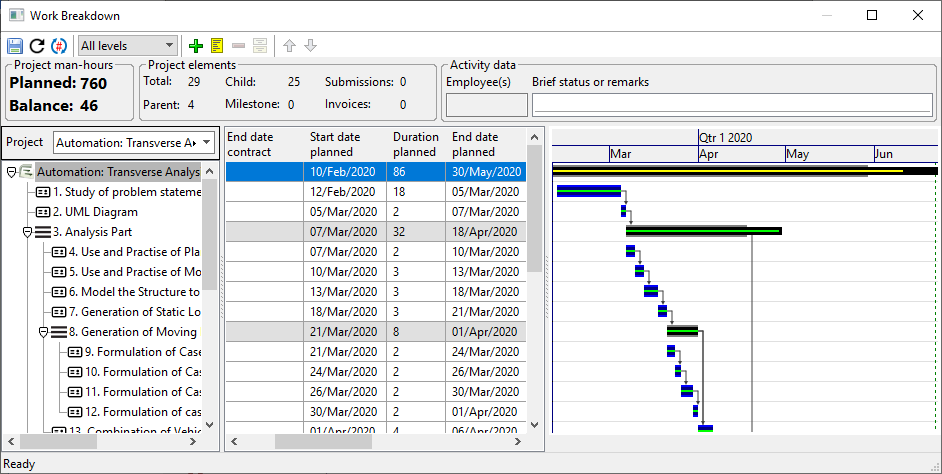
No this is not working, see the image, even after resizing, the margins are 3px. This line is in the constructor of that TopWindow.
gantt.SetTopMargin(1).SetLeftMargin(1).SetBottomMargin(1).SetRightMargin(1);
Didier wrote on Mon, 22 June 2020 04:11
This work in progress, it is mearly at start point : I intend to use it to enable things like selection (draw the point with a different style : highlight for example)
Good god! Are you reading my mind? lol! I want exactly that to happen when the selection in tree/array changes! so thoughtful
Regards,
Pradip
|
|
|
|
| Re: GraphDraw/GraphCtrl [message #54305 is a reply to message #54301] |
Mon, 22 June 2020 14:35 |
|
Pradip
Messages: 109
Registered: February 2019
Location: India
|
Experienced Member |
|
|
Hello Didier,
Didier wrote on Mon, 22 June 2020 16:52Hello Pradip,
This is either upp version that needs update or a memory corruption du to my latest modifications...
If it doesn't disapear with an upp update, don't bother, it's probably the same problem I'm tracking with my delete bug.
Sorry for this I published it to soon
It's just fine, I'm going ahead with the previous package you gave, that is working fine. I still can't run 14429 thanks to McAfee, we'll see if we can make it work in future. Right now it's good, just need to find out how to adjust the margins.
Regards,
Pradip
|
|
|
|
|
|
| Re: GraphDraw/GraphCtrl [message #54315 is a reply to message #54305] |
Mon, 22 June 2020 20:52 |
Didier
Messages: 740
Registered: November 2008
Location: France
|
Contributor |
|
|
Pradip,
Quote:just need to find out how to adjust the margins
I found what is wrong : at L21 of GraphDraw/StdGraphElements.h
	class BlankAreaElement : public GraphElement
	{
	public:
		typedef BlankAreaElement CLASSNAME;
		typedef GraphElement _B;

		BlankAreaElement() {}

		virtual ~BlankAreaElement() {}
		virtual void PaintElement(Draw& dw, int scale) { /* do noting */}
		virtual void SetElementWidth(int v) { _width = Upp::max(v, 3); }       // --- REMOVE THIS lINE ---

	private:
		BlankAreaElement( BlankAreaElement& p)  {}
	};
I have no idea why this was here and it is useless ( just checked, it's been around for years 6.5 years LOL ), I am removing it from the code base
For the rest, if you send me the code of you're GanttCtrl (and only that) it would be easier
[Updated on: Mon, 22 June 2020 22:43] Report message to a moderator |
|
|
|
|
|
| Re: GraphDraw/GraphCtrl [message #54322 is a reply to message #54315] |
Tue, 23 June 2020 09:22 |
|
Pradip
Messages: 109
Registered: February 2019
Location: India
|
Experienced Member |
|
|
Didier wrote on Tue, 23 June 2020 00:22
I have no idea why this was here and it is useless ( just checked, it's been around for years 6.5 years LOL ), I am removing it from the code base
Ah that works, too wasy LOL! And somewhere in your code I've even seen a date in 2012! Codes never age isn't it, they are evergreen
Quote:
For the rest, if you send me the code of you're GanttCtrl (and only that) it would be easier
Uploading my code. I have CustomData and CustomDataSource in the same file. You will see there are some dependencies.
this determines if that date is holiday or not (2nd or 4th Sat and Sun and declared holidays). you may plan to replace this with a callback maybe.
Other dependencies I'll explain if you need.
One suggestion:
CustomData::Intersects and CustomData::Contains deal with bounding box of the data point. In some situations the bounding box depends on screen coordinates, please consider this.
Regards,
Pradip
[Updated on: Tue, 23 June 2020 09:25] Report message to a moderator |
|
|
|
|
|
| Re: GraphDraw/GraphCtrl [message #54334 is a reply to message #54326] |
Thu, 25 June 2020 00:10 |
Didier
Messages: 740
Registered: November 2008
Location: France
|
Contributor |
|
|
Hello Pradip,
I did a quick check on you're code, and after only renaming what needed to be renamed and commented the code for which I didn't have the data types, all compiled and works fine:
grid and axis are draw as you wan't and only Y axis is inverted.
I uploaded the modyfied code
So maybe it's the app code that modifys the configuration ?
Quote:One suggestion:
CustomData::Intersects and CustomData::Contains deal with bounding box of the data point. In some situations the bounding box depends on screen coordinates, please consider this.
In fact this was done on purpose: to avoid manipulating Graph and Screen coordinates.
At first I used screen coordinates in API but it revealed to be un-adapted and error prone du to all the clipping and/or offsets applied
EDIT : file removed (newer dowload available)
[Updated on: Sat, 11 July 2020 23:33] Report message to a moderator |
|
|
|
|
|
|
|
|
|
|
|
|
|
|
|
|
|
| Re: GraphDraw/GraphCtrl [message #54398 is a reply to message #54397] |
Sun, 12 July 2020 12:11 |
Didier
Messages: 740
Registered: November 2008
Location: France
|
Contributor |
|
|
After checking, memhash() was introduced with hash_t ... so you don't have it (you need at least svn 14534)
Here is the current default code (svn 14673) which should work for you (until you can update to latest version )
hash_t memhash(const void *ptr, size_t count)
{
	unsigned hash = 1234567890U;

	const byte *s = (byte *)ptr;
	const byte *e = s + count;
	while(s < e)
		hash = ((hash << 5) - hash) ^ *s++;

	return hash;
}
[Updated on: Sun, 12 July 2020 12:12] Report message to a moderator |
|
|
|
Goto Forum:
Current Time: Wed Apr 29 00:33:06 GMT+2 2026
Total time taken to generate the page: 0.01587 seconds
|
 U++ framework
 Search
 Help
Help Members
 Register
 Login
Login Home
Home




