Home » Developing U++ » U++ Developers corner » Using Pen with U++
|
|
| Re: Using Pen with U++ [message #56597 is a reply to message #56595] |
Sat, 27 March 2021 09:11   |
 |
 mirek
mirek
Messages: 14291
Registered: November 2005
|
Ultimate Member |
|
|
Tom1 wrote on Fri, 26 March 2021 18:52
However, e.g. RectTracker does not work as is with my Wacom tablet. The specific pen support (I just posted) is simply required for it to work. (I'm now under impression that RectTracker works with your tablet perfectly without these changes... ?? Perhaps XP-PEN drivers can avoids Windows Ink and work more mouse-like through the stack.)
Sorry, I might get lost in the code that we exchange here a lot...
Do you mean that my variant where Pen returns false and RectTracker is called in normal LeftDown does not work with Wacom? (My impression so far was that you are only testing RectTracker in Pen virtual method).
If so, does it mean RectTracker does not work even in pre-Pen U++? (With Wacom in "mouse mode")
Mirek
[Updated on: Sat, 27 March 2021 09:12] Report message to a moderator |
|
|
|
| Re: Using Pen with U++ [message #56600 is a reply to message #56597] |
Sat, 27 March 2021 12:20 |
Tom1
Messages: 1319
Registered: March 2007
|
Ultimate Contributor |
|
|
mirek wrote on Sat, 27 March 2021 10:11Tom1 wrote on Fri, 26 March 2021 18:52
However, e.g. RectTracker does not work as is with my Wacom tablet. The specific pen support (I just posted) is simply required for it to work. (I'm now under impression that RectTracker works with your tablet perfectly without these changes... ?? Perhaps XP-PEN drivers can avoids Windows Ink and work more mouse-like through the stack.)
Sorry, I might get lost in the code that we exchange here a lot...
Do you mean that my variant where Pen returns false and RectTracker is called in normal LeftDown does not work with Wacom? (My impression so far was that you are only testing RectTracker in Pen virtual method).
If so, does it mean RectTracker does not work even in pre-Pen U++? (With Wacom in "mouse mode")
Mirek
Hi,
With original pre-Pen U++, RectTracker worked with Wacom at correct coordinates. (It only suffered from the Windows Ink induced 2 cm starting delay, but the rectangle followed pen thereafter.)
With current trunk code and testing with:
bool Pen(Point p, const PenInfo& pn, dword keyflags) override {
		if(keyflags & K_SHIFT)
			return false;
		if(pn.pressure) {
			if((!!pn.pressure == !!pen.pressure) && drawing.GetCount())
				drawing.Top().Add(MakeTuple(pn.pressure, p));
			else
				drawing.Add().Add(MakeTuple(pn.pressure, p));
		}
		pen = pn;
		Refresh();
		return true;
	}

	void LeftDown(Point p, dword keyflags) override {
		if(keyflags & K_SHIFT) {
			RectTracker tracker(*this);
			tracker.MinSize(Size(-100000,-100000));
			tracker.Track(Rect(p,p));
		}
	}
the tracking rect still of course has the 2 cm starting delay. However, now the rect dragged corner lags behind with a 2 cm constant dx,dy offset. Please see below a photo of a live 'while dragging' situation. So, actually, RectTracker is now worse than before introducing pen support:
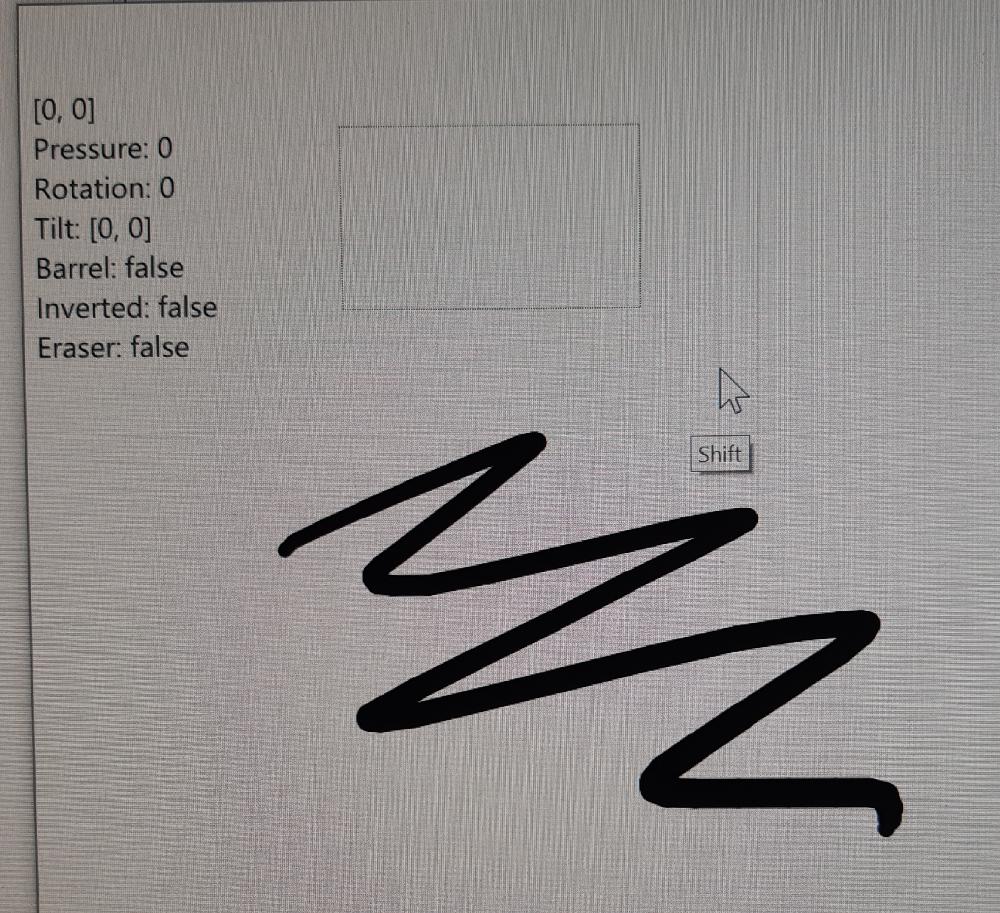
Further on, what I really need with RectTracker, is that there is no 2 cm reaction delay. The tracking must start immediately from PEN_DOWN event. My RectTracker inherited sketching code requires immediate reaction for even a single pixel pen drags. This is why I need specific Pen() support in RectTracker.
Best regards,
Tom
|
|
|
|
| Re: Using Pen with U++ [message #56604 is a reply to message #56600] |
Sat, 27 March 2021 20:23 |
|
mirek
Messages: 14291
Registered: November 2005
|
Ultimate Member |
|
|
Tom1 wrote on Sat, 27 March 2021 12:20mirek wrote on Sat, 27 March 2021 10:11Tom1 wrote on Fri, 26 March 2021 18:52
However, e.g. RectTracker does not work as is with my Wacom tablet. The specific pen support (I just posted) is simply required for it to work. (I'm now under impression that RectTracker works with your tablet perfectly without these changes... ?? Perhaps XP-PEN drivers can avoids Windows Ink and work more mouse-like through the stack.)
Sorry, I might get lost in the code that we exchange here a lot...
Do you mean that my variant where Pen returns false and RectTracker is called in normal LeftDown does not work with Wacom? (My impression so far was that you are only testing RectTracker in Pen virtual method).
If so, does it mean RectTracker does not work even in pre-Pen U++? (With Wacom in "mouse mode")
Mirek
Hi,
With original pre-Pen U++, RectTracker worked with Wacom at correct coordinates. (It only suffered from the Windows Ink induced 2 cm starting delay, but the rectangle followed pen thereafter.)
With current trunk code and testing with:
bool Pen(Point p, const PenInfo& pn, dword keyflags) override {
		if(keyflags & K_SHIFT)
			return false;
		if(pn.pressure) {
			if((!!pn.pressure == !!pen.pressure) && drawing.GetCount())
				drawing.Top().Add(MakeTuple(pn.pressure, p));
			else
				drawing.Add().Add(MakeTuple(pn.pressure, p));
		}
		pen = pn;
		Refresh();
		return true;
	}

	void LeftDown(Point p, dword keyflags) override {
		if(keyflags & K_SHIFT) {
			RectTracker tracker(*this);
			tracker.MinSize(Size(-100000,-100000));
			tracker.Track(Rect(p,p));
		}
	}
the tracking rect still of course has the 2 cm starting delay. However, now the rect dragged corner lags behind with a 2 cm constant dx,dy offset. Please see below a photo of a live 'while dragging' situation. So, actually, RectTracker is now worse than before introducing pen support:
Further on, what I really need with RectTracker, is that there is no 2 cm reaction delay. The tracking must start immediately from PEN_DOWN event. My RectTracker inherited sketching code requires immediate reaction for even a single pixel pen drags. This is why I need specific Pen() support in RectTracker.
Best regards,
Tom
OK, this works just fine with xp-pen...
Widgets in general do work? (Because if it is this way, I would just expect the offset to be everywhere...)
What happens if you remove return 0L in pen processing?
Mirek
|
|
|
|
| Re: Using Pen with U++ [message #56605 is a reply to message #56604] |
Sat, 27 March 2021 20:45 |
Tom1
Messages: 1319
Registered: March 2007
|
Ultimate Contributor |
|
|
Yes. Widgets mostly work. Some flickering with e.g. Menu, but I think nothing is severely broken. I can do a more thorough check later.
Breaking out from WM_POINTER* instead of return 0L; does not have any effect on this test with RectTracker. Offset remains.
The core problem in my opinion is ::GetCursorPos which does not work with pen. This comes evident with drags.
Best regards,
Tom
|
|
|
|
|
|
| Re: Using Pen with U++ [message #56611 is a reply to message #56607] |
Sun, 28 March 2021 18:11 |
Tom1
Messages: 1319
Registered: March 2007
|
Ultimate Contributor |
|
|
Quote:OK. In the new commit I treat GetCursorPos as "not reliable", overriding it with position got from lParam.
Hi Mirek,
That was a correct move. Now RectTracker works correctly after 2 cm Windows Ink threshold is crossed. This is via "Pen() return false; to LeftDown()".
In Pen(), RectTracker does not work at all yet.
I also tested with UWord to see how different widgets work. I could not immediately find anything that does not. Only dragging a top menu item to open a drop down menu causes flickering of the selected item on the drop down menu. If the drop down menu is opened by a pen click, hovering on top of the sub menu works correctly without any flickering.
Best regards,
Tom
|
|
|
|
|
|
| Re: Using Pen with U++ [message #56613 is a reply to message #56612] |
Mon, 29 March 2021 12:33 |
Tom1
Messages: 1319
Registered: March 2007
|
Ultimate Contributor |
|
|
Mirek,
I did a video clip portraying the menu highlight flickering issue. Sent a PM on that.
There is no such anomaly on pre-pen U++.
Best regards,
Tom
|
|
|
|
|
|
| Re: Using Pen with U++ [message #56615 is a reply to message #56614] |
Mon, 29 March 2021 14:36 |
Tom1
Messages: 1319
Registered: March 2007
|
Ultimate Contributor |
|
|
The click animations are never present with mouse.
When using Windows Ink -mode for Wacom, I get those click animations for pen.
When I disable Windows Ink -mode for Wacom, the thing starts to work exactly like mouse:
+ no click animations
+ immediate response with drags (i.e. no annoying 2 cm delay)
- NO Pen() event. Everything comes in as MouseMove, LeftDown, LeftUp... (This likely means there is no WM_POINTER* messages and everything is already translated to WM_MOUSEMOVE, WM_LBUTTONDOWN,... etc.)
- NO pressure detection either due to missing WM_POINTER* -messages.
So, using Windows Ink -mode is a must.
Best regards,
Tom
|
|
|
|
|
|
| Re: Using Pen with U++ [message #56617 is a reply to message #56616] |
Mon, 29 March 2021 15:50 |
Tom1
Messages: 1319
Registered: March 2007
|
Ultimate Contributor |
|
|
mirek wrote on Mon, 29 March 2021 16:35Well, that means that in the movie, you have used pen to open the menu, right?
Does this disbehave with mouse too? (Without animation?)
What happens if you comment out CtrlCore/Win32Proc.cpp:74?
Mirek
1. Yes, I used pen throughout the video.
2. With mouse it works perfectly OK. There is no click animation with mouse.
3. Commenting out:
//	POINT p;
//	if(::GetCursorPos(&p))
		//CurrentMousePos = p;
Best regards,
Tom
|
|
|
|
|
|
| Re: Using Pen with U++ [message #56619 is a reply to message #56618] |
Mon, 29 March 2021 16:20 |
Tom1
Messages: 1319
Registered: March 2007
|
Ultimate Contributor |
|
|
Logging the changes shows that it's HasFocus() and especially HasMouse() that oscillates:
[+     0 ms] HasMouse() = false
[+     0 ms] HasFocus() = true
[+     0 ms] HasMouse() = true
[+     0 ms] HasFocus() = false
[+     0 ms] HasMouse() = false
[+     0 ms] HasFocus() = true
[+     0 ms] HasMouse() = true
[+    32 ms] HasFocus() = false
[+     0 ms] HasMouse() = false
[+     0 ms] HasMouse() = true
[+     0 ms] HasMouse() = false
[+     0 ms] HasMouse() = true
[+     0 ms] HasMouse() = false
[+     0 ms] HasFocus() = true
[+     0 ms] HasMouse() = true
[+     0 ms] HasFocus() = false
[+     0 ms] HasMouse() = false
[+     0 ms] HasFocus() = true
[+     0 ms] HasMouse() = true
[+    31 ms] HasFocus() = false
[+     0 ms] HasMouse() = false
[+     0 ms] HasMouse() = true
[+     0 ms] HasMouse() = false
[+     0 ms] HasMouse() = true
[+     0 ms] HasMouse() = false
[+     0 ms] HasFocus() = true
[+     0 ms] HasMouse() = true
[+     0 ms] HasFocus() = false
[+     0 ms] HasMouse() = false
[+     0 ms] HasFocus() = true
[+     0 ms] HasMouse() = true
[+    31 ms] HasFocus() = false
[+     0 ms] HasMouse() = false
[+     0 ms] HasMouse() = true
[+     0 ms] HasMouse() = false
[+     0 ms] HasMouse() = true
[+     0 ms] HasMouse() = false
[+     0 ms] HasFocus() = true
[+     0 ms] HasMouse() = true
[+     0 ms] HasFocus() = false
[+     0 ms] HasMouse() = false
[+     0 ms] HasFocus() = true
[+     0 ms] HasMouse() = true
[+    31 ms] HasFocus() = false
[+     0 ms] HasMouse() = false
[+     0 ms] HasMouse() = true
[+     0 ms] HasMouse() = false
[+     0 ms] HasMouse() = true
[+     0 ms] HasMouse() = false
[+     0 ms] HasFocus() = true
[+     0 ms] HasMouse() = true
[+     0 ms] HasFocus() = false
[+     0 ms] HasMouse() = false
[+     0 ms] HasFocus() = true
[+     0 ms] HasMouse() = true
[+    32 ms] HasFocus() = false
[+     0 ms] HasMouse() = false
[+     0 ms] HasMouse() = true
[+     0 ms] HasMouse() = false
[+     0 ms] HasMouse() = true
[+     0 ms] HasMouse() = false
[+     0 ms] HasFocus() = true
[+     0 ms] HasMouse() = true
[+     0 ms] HasFocus() = false
[+     0 ms] HasMouse() = false
[+     0 ms] HasFocus() = true
[+     0 ms] HasMouse() = true
[+    31 ms] HasFocus() = false
[+     0 ms] HasMouse() = false
[+     0 ms] HasMouse() = true
[+     0 ms] HasMouse() = false
[+     0 ms] HasMouse() = true
[+     0 ms] HasMouse() = false
[+     0 ms] HasFocus() = true
[+     0 ms] HasMouse() = true
[+     0 ms] HasFocus() = false
[+     0 ms] HasMouse() = false
[+     0 ms] HasFocus() = true
[+     0 ms] HasMouse() = true
[+    31 ms] HasFocus() = false
[+     0 ms] HasMouse() = false
[+     0 ms] HasMouse() = true
[+     0 ms] HasMouse() = false
[+     0 ms] HasMouse() = true
[+     0 ms] HasMouse() = false
[+     0 ms] HasFocus() = true
[+     0 ms] HasMouse() = true
[+     0 ms] HasFocus() = false
[+     0 ms] HasMouse() = false
[+     0 ms] HasFocus() = true
[+     0 ms] HasMouse() = true
[+    31 ms] HasFocus() = false
[+     0 ms] HasMouse() = false
[+     0 ms] HasMouse() = true
[+     0 ms] HasMouse() = false
[+     0 ms] HasMouse() = true
[+     0 ms] HasMouse() = false
[+     0 ms] HasFocus() = true
Best regards,
Tom
|
|
|
|
|
|
| Re: Using Pen with U++ [message #56621 is a reply to message #56620] |
Mon, 29 March 2021 17:04 |
Tom1
Messages: 1319
Registered: March 2007
|
Ultimate Contributor |
|
|
Do you have Windows Ink enabled with your XP-PEN? If not, please do. You might then see the click animations and experience the drag lag. Maybe the menu issue shows itself then...(?)
BR,
Tom
|
|
|
|
| Re: Using Pen with U++ [message #56622 is a reply to message #56621] |
Mon, 29 March 2021 17:18 |
Tom1
Messages: 1319
Registered: March 2007
|
Ultimate Contributor |
|
|
Thinking about it, as hovering with pen has no trouble, it must be an issue with 'pendown' not comparable to left mouse button being down. It might be partly identified as left mouse button being pressed and partly not, giving mixed messages about the state.
This is something that partially prevents RectTracker from being used with/from Pen() interface. (Which is still a main concern for me...)
Best regards,
Tom
|
|
|
|
| Re: Using Pen with U++ [message #56623 is a reply to message #56622] |
Mon, 29 March 2021 17:29 |
Tom1
Messages: 1319
Registered: March 2007
|
Ultimate Contributor |
|
|
OK, I logged some MEvent0 coordinates and tracked for mouseCtrl changes. It seems this is flipping mouseCtrl a lot:
[+     0 ms] WM_POINTERUPDATE
[+     0 ms] MEvent0 [141, 199]
[+     0 ms] WM_POINTERUPDATE
[+     0 ms] MEvent0 [141, 199]
[+     0 ms] WM_POINTERUPDATE
[+     0 ms] MEvent0 [141, 199]
[+     0 ms] HasMouse() = false
[+     0 ms] MEvent0 [141, 199]
[+     0 ms] WM_POINTERUPDATE
[+     0 ms] MEvent0 [141, 199]
[+     0 ms] WM_POINTERUPDATE
[+     0 ms] MEvent0 [142, 199]
[+     0 ms] MEvent0 [142, 199]
[+     0 ms] MEvent0 [142, 199]
[+     0 ms] WM_MOUSEMOVE
[+     0 ms] MEvent0 [139, 21]
[+     0 ms] mouseCtrl != this
[+     0 ms] HasFocus() = true
[+     0 ms] HasMouse() = true
[+     0 ms] HasFocus() = false
[+     0 ms] HasMouse() = false
[+     0 ms] HasFocus() = true
[+     0 ms] HasMouse() = true
[+     0 ms] MEvent0 [139, 21]
[+    31 ms] WM_POINTERUPDATE
[+     0 ms] MEvent0 [142, 199]
[+     0 ms] mouseCtrl != this
[+     0 ms] HasFocus() = false
[+     0 ms] HasMouse() = false
[+     0 ms] HasMouse() = true
[+     0 ms] HasMouse() = false
[+     0 ms] HasMouse() = true
[+     0 ms] WM_POINTERUPDATE
[+     0 ms] MEvent0 [142, 199]
[+     0 ms] WM_POINTERUPDATE
[+     0 ms] MEvent0 [142, 199]
[+     0 ms] HasMouse() = false
[+     0 ms] MEvent0 [142, 199]
[+    16 ms] WM_POINTERUPDATE
[+     0 ms] MEvent0 [143, 199]
[+     0 ms] MEvent0 [143, 199]
[+     0 ms] MEvent0 [143, 199]
[+     0 ms] WM_MOUSEMOVE
[+     0 ms] MEvent0 [140, 21]
[+     0 ms] mouseCtrl != this
[+     0 ms] HasFocus() = true
[+     0 ms] HasMouse() = true
[+     0 ms] HasFocus() = false
[+     0 ms] HasMouse() = false
[+     0 ms] HasFocus() = true
[+     0 ms] HasMouse() = true
[+     0 ms] MEvent0 [140, 21]
[+    16 ms] WM_POINTERUPDATE
[+     0 ms] MEvent0 [143, 199]
[+     0 ms] mouseCtrl != this
[+     0 ms] HasFocus() = false
[+     0 ms] HasMouse() = false
[+     0 ms] HasMouse() = true
[+     0 ms] HasMouse() = false
[+     0 ms] HasMouse() = true
[+     0 ms] WM_POINTERUPDATE
[+     0 ms] MEvent0 [143, 199]
Please note that pen is nearly stationary during this.
Best regards,
Tom
EDIT: Added WM_POINTERUPDATE and WM_MOUSEMOVE markers to the log, so that we can identify that the incompatible coordinates are coming from respective sources.
[Updated on: Mon, 29 March 2021 17:35] Report message to a moderator |
|
|
|
|
|
| Re: Using Pen with U++ [message #56626 is a reply to message #56624] |
Mon, 29 March 2021 20:41 |
Tom1
Messages: 1319
Registered: March 2007
|
Ultimate Contributor |
|
|
Mirek,
I'm almost sure this problem is about CtrlCore not entirely knowing about pen down condition. In a way, this resembles the ::GetCursorPos() issue you just fixed, where ::GetCursorPos() was not entirely aware of pen position, but only knew it after default processing. In this case GetMouseLeft() asks Windows for the left button state, but pen down is not the same as left mouse button in this case and is not detected. E.g. mouseCtrl and captureCtrl may be affected by this fact.
Again, I'm not familiar enough with the CtrlCore to make it properly aware about pen down condition. Can you improve the 'pen down awareness' of CtrlCore?
I tried:
static bool pendown=false;
bool GetMouseLeft()   { return pendown || (!!(GetKeyStateSafe(VK_LBUTTON) & 0x8000)); }
and updating the flag with WM_POINTERDOWN/WM_POINTERDOWN, but this was not enough.
Best regards,
Tom
|
|
|
|
| Re: Using Pen with U++ [message #56629 is a reply to message #56626] |
Mon, 29 March 2021 22:02 |
Tom1
Messages: 1319
Registered: March 2007
|
Ultimate Contributor |
|
|
Hi Mirek,
See the switching Ctrls/hwnds for WM_POINTER and WM_MOUSEMOVE messages while on top of menu:
[+     0 ms] WM_MOUSEMOVE  N3Upp7MenuBarE  : 0x6a82880 (hwnd 0xd3009a)
[+     0 ms] Ctrl::DoMouse() [141, 302]
[+     0 ms] MEvent0 [138, 19]
[+     0 ms] mouseCtrl != this
[+     0 ms] HasMouse() = false
[+     0 ms] HasFocus() = true
[+     0 ms] HasMouse() = true
[+     0 ms] HasFocus() = false
[+     0 ms] HasMouse() = false
[+     0 ms] HasFocus() = true
[+     0 ms] HasMouse() = true
[+     0 ms] MEvent0 [138, 19]
[+    15 ms] WM_POINTERUPDATE 5UWord  : 0x6b88070 (hwnd 0x7c02b4)
[+     0 ms] Ctrl::DoMouse() [141, 343]
[+     0 ms] MEvent0 [141, 197]
[+     0 ms] mouseCtrl != this
[+     0 ms] HasFocus() = false
[+     0 ms] HasMouse() = false
[+     0 ms] HasMouse() = true
[+     0 ms] HasMouse() = false
[+     0 ms] HasMouse() = true
[+     0 ms] WM_POINTERUPDATE 5UWord  : 0x6b88070 (hwnd 0x7c02b4)
[+     0 ms] Ctrl::DoMouse() [142, 343]
[+     0 ms] MEvent0 [142, 197]
[+     0 ms] MEvent0 [142, 197]
[+    16 ms] MEvent0 [142, 197]
[+     0 ms] WM_MOUSEMOVE  N3Upp7MenuBarE  : 0x6a82880 (hwnd 0xd3009a)
[+     0 ms] Ctrl::DoMouse() [142, 302]
[+     0 ms] MEvent0 [139, 19]
[+     0 ms] mouseCtrl != this
[+     0 ms] HasMouse() = false
[+     0 ms] HasFocus() = true
Although not shown here, the screen coordinates come in right for both events, but the translation differs in DoMouse() because the events end up in different Ctrls/hwnds. Therefore, also local coordinates mismatch. As you can see, WM_POINTERUPDATE lands in main window, whereas WM_MOUSEMOVE goes to drop down menu just as it should.
Hope this helps...
Best regards,
Tom
EDIT: Plain hovering on an open drop down menu makes both WM_POINTERUPDATE and WM_MOUSEMOVE land in the drop down menu:
[+     0 ms] WM_POINTERUPDATE N3Upp7MenuBarE  : 0x6a82880 (hwnd 0xb10064)
[+     0 ms] Ctrl::DoMouse() [124, 302]
[+     0 ms] MEvent0 [121, 19]
[+     0 ms] MEvent0 [121, 19]
[+     0 ms] MEvent0 [121, 19]
[+     0 ms] WM_MOUSEMOVE  N3Upp7MenuBarE  : 0x6a82880 (hwnd 0xb10064)
[+     0 ms] Ctrl::DoMouse() [124, 302]
[+     0 ms] MEvent0 [121, 19]
[+     0 ms] MEvent0 [121, 19]
[+    16 ms] MEvent0 [121, 19]
[+     0 ms] MEvent0 [121, 19]
[+     0 ms] WM_POINTERUPDATE N3Upp7MenuBarE  : 0x6a82880 (hwnd 0xb10064)
[+     0 ms] Ctrl::DoMouse() [124, 302]
[+     0 ms] MEvent0 [121, 19]
[+     0 ms] MEvent0 [121, 19]
[+     0 ms] WM_POINTERUPDATE N3Upp7MenuBarE  : 0x6a82880 (hwnd 0xb10064)
[+     0 ms] Ctrl::DoMouse() [123, 302]
[+     0 ms] MEvent0 [120, 19]
[+     0 ms] MEvent0 [120, 19]
[+     0 ms] MEvent0 [120, 19]
[+     0 ms] WM_MOUSEMOVE  N3Upp7MenuBarE  : 0x6a82880 (hwnd 0xb10064)
[+     0 ms] Ctrl::DoMouse() [123, 302]
[+     0 ms] MEvent0 [120, 19]
[+     0 ms] MEvent0 [120, 19]
[+    16 ms] MEvent0 [120, 19]
[+     0 ms] MEvent0 [120, 19]
[+     0 ms] WM_POINTERUPDATE N3Upp7MenuBarE  : 0x6a82880 (hwnd 0xb10064)
[+     0 ms] Ctrl::DoMouse() [123, 301]
Drag is the difference...
[Updated on: Mon, 29 March 2021 22:08] Report message to a moderator |
|
|
|
| Re: Using Pen with U++ [message #56630 is a reply to message #56629] |
Tue, 30 March 2021 11:21 |
|
mirek
Messages: 14291
Registered: November 2005
|
Ultimate Member |
|
|
Tom1 wrote on Mon, 29 March 2021 22:02Hi Mirek,
See the switching Ctrls/hwnds for WM_POINTER and WM_MOUSEMOVE messages while on top of menu:
Looks like Wacom sends WM_POINTER to the window that has keyboard focus...
Can you add something like DDUMP(Name(GetFocusCtrl()) before WM_MOUSEMOVE / WM_POINT... ?
That said, the true reason is perhaps that Pen is altering mouseCtrl. That should be fixable...
Mirek
[+     0 ms] WM_MOUSEMOVE  N3Upp7MenuBarE  : 0x6a82880 (hwnd 0xd3009a)
[+     0 ms] Ctrl::DoMouse() [141, 302]
[+     0 ms] MEvent0 [138, 19]
[+     0 ms] mouseCtrl != this
[+     0 ms] HasMouse() = false
[+     0 ms] HasFocus() = true
[+     0 ms] HasMouse() = true
[+     0 ms] HasFocus() = false
[+     0 ms] HasMouse() = false
[+     0 ms] HasFocus() = true
[+     0 ms] HasMouse() = true
[+     0 ms] MEvent0 [138, 19]
[+    15 ms] WM_POINTERUPDATE 5UWord  : 0x6b88070 (hwnd 0x7c02b4)
[+     0 ms] Ctrl::DoMouse() [141, 343]
[+     0 ms] MEvent0 [141, 197]
[+     0 ms] mouseCtrl != this
[+     0 ms] HasFocus() = false
[+     0 ms] HasMouse() = false
[+     0 ms] HasMouse() = true
[+     0 ms] HasMouse() = false
[+     0 ms] HasMouse() = true
[+     0 ms] WM_POINTERUPDATE 5UWord  : 0x6b88070 (hwnd 0x7c02b4)
[+     0 ms] Ctrl::DoMouse() [142, 343]
[+     0 ms] MEvent0 [142, 197]
[+     0 ms] MEvent0 [142, 197]
[+    16 ms] MEvent0 [142, 197]
[+     0 ms] WM_MOUSEMOVE  N3Upp7MenuBarE  : 0x6a82880 (hwnd 0xd3009a)
[+     0 ms] Ctrl::DoMouse() [142, 302]
[+     0 ms] MEvent0 [139, 19]
[+     0 ms] mouseCtrl != this
[+     0 ms] HasMouse() = false
[+     0 ms] HasFocus() = true
Although not shown here, the screen coordinates come in right for both events, but the translation differs in DoMouse() because the events end up in different Ctrls/hwnds. Therefore, also local coordinates mismatch. As you can see, WM_POINTERUPDATE lands in main window, whereas WM_MOUSEMOVE goes to drop down menu just as it should.
Hope this helps...
Best regards,
Tom
EDIT: Plain hovering on an open drop down menu makes both WM_POINTERUPDATE and WM_MOUSEMOVE land in the drop down menu:
[+     0 ms] WM_POINTERUPDATE N3Upp7MenuBarE  : 0x6a82880 (hwnd 0xb10064)
[+     0 ms] Ctrl::DoMouse() [124, 302]
[+     0 ms] MEvent0 [121, 19]
[+     0 ms] MEvent0 [121, 19]
[+     0 ms] MEvent0 [121, 19]
[+     0 ms] WM_MOUSEMOVE  N3Upp7MenuBarE  : 0x6a82880 (hwnd 0xb10064)
[+     0 ms] Ctrl::DoMouse() [124, 302]
[+     0 ms] MEvent0 [121, 19]
[+     0 ms] MEvent0 [121, 19]
[+    16 ms] MEvent0 [121, 19]
[+     0 ms] MEvent0 [121, 19]
[+     0 ms] WM_POINTERUPDATE N3Upp7MenuBarE  : 0x6a82880 (hwnd 0xb10064)
[+     0 ms] Ctrl::DoMouse() [124, 302]
[+     0 ms] MEvent0 [121, 19]
[+     0 ms] MEvent0 [121, 19]
[+     0 ms] WM_POINTERUPDATE N3Upp7MenuBarE  : 0x6a82880 (hwnd 0xb10064)
[+     0 ms] Ctrl::DoMouse() [123, 302]
[+     0 ms] MEvent0 [120, 19]
[+     0 ms] MEvent0 [120, 19]
[+     0 ms] MEvent0 [120, 19]
[+     0 ms] WM_MOUSEMOVE  N3Upp7MenuBarE  : 0x6a82880 (hwnd 0xb10064)
[+     0 ms] Ctrl::DoMouse() [123, 302]
[+     0 ms] MEvent0 [120, 19]
[+     0 ms] MEvent0 [120, 19]
[+    16 ms] MEvent0 [120, 19]
[+     0 ms] MEvent0 [120, 19]
[+     0 ms] WM_POINTERUPDATE N3Upp7MenuBarE  : 0x6a82880 (hwnd 0xb10064)
[+     0 ms] Ctrl::DoMouse() [123, 301]
Drag is the difference...[/quote]
|
|
|
|
|
|
| Re: Using Pen with U++ [message #56632 is a reply to message #56631] |
Tue, 30 March 2021 11:36 |
Tom1
Messages: 1319
Registered: March 2007
|
Ultimate Contributor |
|
|
mirek wrote on Tue, 30 March 2021 12:26Try CtrlCore/CtrlMouse.cpp:320:
if(e != PEN && mouseCtrl != this) {
The focusCtrl is switching between the menubar and the menuitem regardless the above change. The logs are taken just before DoMouse call in WM_MOUSEMOVE and WM_POINTERUPDATE:
[+     0 ms] WM_MOUSEMOVE N3Upp7BarPaneE  : 0x6bc2978 (parent N3Upp7MenuBarE)
[+    16 ms] WM_POINTERUPDATE N3Upp8MenuItemE  : 0x6c60c60 (parent N3Upp7BarPaneE)
[+     0 ms] WM_POINTERUPDATE N3Upp7BarPaneE  : 0x6bc2978 (parent N3Upp7MenuBarE)
[+     0 ms] WM_POINTERUPDATE N3Upp7BarPaneE  : 0x6bc2978 (parent N3Upp7MenuBarE)
[+    15 ms] WM_POINTERUPDATE N3Upp7BarPaneE  : 0x6bc2978 (parent N3Upp7MenuBarE)
[+     0 ms] WM_POINTERUPDATE N3Upp7BarPaneE  : 0x6bc2978 (parent N3Upp7MenuBarE)
[+    16 ms] WM_POINTERUPDATE N3Upp7BarPaneE  : 0x6bc2978 (parent N3Upp7MenuBarE)
[+     0 ms] WM_POINTERUPDATE N3Upp7BarPaneE  : 0x6bc2978 (parent N3Upp7MenuBarE)
[+    15 ms] WM_POINTERUPDATE N3Upp7BarPaneE  : 0x6bc2978 (parent N3Upp7MenuBarE)
[+     0 ms] WM_POINTERUPDATE N3Upp7BarPaneE  : 0x6bc2978 (parent N3Upp7MenuBarE)
[+     0 ms] WM_MOUSEMOVE N3Upp7BarPaneE  : 0x6bc2978 (parent N3Upp7MenuBarE)
[+    16 ms] WM_POINTERUPDATE N3Upp8MenuItemE  : 0x6c60c60 (parent N3Upp7BarPaneE)
[+     0 ms] WM_POINTERUPDATE N3Upp8MenuItemE  : 0x6c60c60 (parent N3Upp7BarPaneE)
[+    16 ms] WM_POINTERUPDATE N3Upp7BarPaneE  : 0x6bc2978 (parent N3Upp7MenuBarE)
[+     0 ms] WM_POINTERUPDATE N3Upp7BarPaneE  : 0x6bc2978 (parent N3Upp7MenuBarE)
[+     0 ms] WM_MOUSEMOVE N3Upp7BarPaneE  : 0x6bc2978 (parent N3Upp7MenuBarE)
[+    15 ms] WM_POINTERUPDATE N3Upp8MenuItemE  : 0x6c60c60 (parent N3Upp7BarPaneE)
[+     0 ms] WM_POINTERUPDATE N3Upp8MenuItemE  : 0x6c60c60 (parent N3Upp7BarPaneE)
[+    16 ms] WM_POINTERUPDATE N3Upp7BarPaneE  : 0x6bc2978 (parent N3Upp7MenuBarE)
[+     0 ms] WM_POINTERUPDATE N3Upp7BarPaneE  : 0x6bc2978 (parent N3Upp7MenuBarE)
[+     0 ms] WM_MOUSEMOVE N3Upp7BarPaneE  : 0x6bc2978 (parent N3Upp7MenuBarE)
[+    16 ms] WM_POINTERUPDATE N3Upp8MenuItemE  : 0x6c60c60 (parent N3Upp7BarPaneE)
[+     0 ms] WM_POINTERUPDATE N3Upp8MenuItemE  : 0x6c60c60 (parent N3Upp7BarPaneE)
[+    15 ms] WM_POINTERUPDATE N3Upp7BarPaneE  : 0x6bc2978 (parent N3Upp7MenuBarE)
[+     0 ms] WM_POINTERUPDATE N3Upp7BarPaneE  : 0x6bc2978 (parent N3Upp7MenuBarE)
[+     0 ms] WM_MOUSEMOVE N3Upp7BarPaneE  : 0x6bc2978 (parent N3Upp7MenuBarE)
[+    16 ms] WM_POINTERUPDATE N3Upp8MenuItemE  : 0x6c60c60 (parent N3Upp7BarPaneE)
[+     0 ms] WM_POINTERUPDATE N3Upp8MenuItemE  : 0x6c60c60 (parent N3Upp7BarPaneE)
[+    15 ms] WM_POINTERUPDATE N3Upp8MenuItemE  : 0x6c60c60 (parent N3Upp7BarPaneE)
[+     0 ms] WM_POINTERUPDATE N3Upp7BarPaneE  : 0x6bc2978 (parent N3Upp7MenuBarE)
[+     0 ms] WM_MOUSEMOVE N3Upp7BarPaneE  : 0x6bc2978 (parent N3Upp7MenuBarE)
[+    16 ms] WM_POINTERUPDATE N3Upp8MenuItemE  : 0x6c60c60 (parent N3Upp7BarPaneE)
[+     0 ms] WM_POINTERUPDATE N3Upp7BarPaneE  : 0x6bc2978 (parent N3Upp7MenuBarE)
[+     0 ms] WM_POINTERUPDATE N3Upp7BarPaneE  : 0x6bc2978 (parent N3Upp7MenuBarE)
[+     0 ms] WM_MOUSEMOVE N3Upp7BarPaneE  : 0x6bc2978 (parent N3Upp7MenuBarE)
[+    16 ms] WM_POINTERUPDATE N3Upp8MenuItemE  : 0x6c60c60 (parent N3Upp7BarPaneE)
[+    15 ms] WM_POINTERUPDATE N3Upp8MenuItemE  : 0x6c60c60 (parent N3Upp7BarPaneE)
[+     0 ms] WM_POINTERUPDATE N3Upp7BarPaneE  : 0x6bc2978 (parent N3Upp7MenuBarE)
[+     0 ms] WM_MOUSEMOVE N3Upp7BarPaneE  : 0x6bc2978 (parent N3Upp7MenuBarE)
Best regards,
Tom
EDIT: Fixed content.
[Updated on: Tue, 30 March 2021 11:41] Report message to a moderator |
|
|
|
|
|
|
|
| Re: Using Pen with U++ [message #56637 is a reply to message #56635] |
Tue, 30 March 2021 15:26 |
Tom1
Messages: 1319
Registered: March 2007
|
Ultimate Contributor |
|
|
Hi Mirek,
The following changes would add Pen support to RectTracker (and the inherited Sketcher).
Add to RectTracker in CtrlCore.h:
public:
	virtual bool  Pen(Point p, const PenInfo &pn, dword keyflags);
	virtual void  DoMouseMove(Point p, dword);

protected:
	int				pointer;
Changes in LocalLoop.cpp:
RectTracker::RectTracker(Ctrl& master)
{
	pointer=Null; // << ADD THIS IN CONSTRUCTOR

...

bool  RectTracker::Pen(Point p, const PenInfo &pn, dword keyflags){ // ADD Pen() here
	if(IsNull(pointer)) pointer=1;
	if(pointer!=1) return false;

	switch(pn.action){
		case 0:
			DoMouseMove(p, keyflags);
			break;
		case PEN_DOWN:
			LeftDown(p, keyflags);
			break;
		case PEN_UP:
			LeftUp(p, keyflags);
			break;
	}
	return true;
}

void RectTracker::MouseMove(Point mp, dword){ // ADD NEW MouseMove here
	if(IsNull(pointer)) pointer=2;
	if(pointer!=2) return;
	DoMouseMove(mp,0);
}

void RectTracker::DoMouseMove(Point mp, dword) // RENAMED ORIGINAL MouseMove to DoMouseMove
{

... THIS IS THE ORIGINAL MouseMove() code here ...
Changes in Win32Proc.cpp:
static bool pendown=false; // ADD
bool GetMouseLeft()   { return pendown || !!(GetKeyStateSafe(VK_LBUTTON) & 0x8000); } // ADD 'pendown ||' here

...

				if(message == WM_POINTERUPDATE && GetPointerPenInfoHistory(pointerId, &hc, ppit)) {
					bool processed = false;
					for(int i = hc - 1; i >= 0; i--) {
						ProcessPenInfo(ppit[i]);
						POINT hp = ppit[i].pointerInfo.ptPixelLocation;
						CurrentMousePos =  hp; // << ADD UPDATING HERE
						ScreenToClient(hwnd, &hp);
						pen.history = (bool)i;
						processed = DoPen(hp);
					}

...

				switch(message) {
				case WM_POINTERDOWN:
					pendown=true; // << ADD set pendown here
					pen.action = PEN_DOWN;
					ClickActivateWnd();
					break;
				case WM_POINTERUP:
					pendown=false; // << ADD set pendown here
					pen.action = PEN_UP;
					break;
				}
The updated testcase including modified Sketcher is attached in main2.cpp.
Would this be acceptable, or do you have a more elegant solution?
Best regards,
Tom
-
 Attachment: main2.cpp
(Size: 5.27KB, Downloaded 222 times)
|
|
|
|
| Re: Using Pen with U++ [message #56644 is a reply to message #56637] |
Tue, 30 March 2021 23:34 |
Novo
Messages: 1432
Registered: December 2006
|
Ultimate Contributor |
|
|
Upp build has been broken again. Most likely, this is not related to Pen stuff, but still ...
./umk reference SuggestCtrl CLANG -bus
/home/buildbot/worker/l-upp/build/reference/SuggestCtrl/main.cpp:54:21: error: address of overloaded function 'CharFilterToUpperAscii' is ambiguous
        ctrl.CompareFilter(CharFilterToUpperAscii);
                           ^~~~~~~~~~~~~~~~~~~~~~
/home/buildbot/worker/l-upp/build/reference/SuggestCtrl/main.cpp:5:12: note: candidate function
inline int CharFilterToUpperAscii(int c)
           ^
/home/buildbot/worker/l-upp/build/uppsrc/Core/String.h:954:5: note: candidate function
int CharFilterToUpperAscii(int c);
    ^
/home/buildbot/worker/l-upp/build/uppsrc/CtrlLib/SuggestCtrl.h:39:35: note: passing argument to parameter 'filter' here
        SuggestCtrl& CompareFilter(int (*filter)(int c))  { compare_filter = filter; return *this; }
                                         ^
1 error generated.
Regards,
Novo
|
|
|
|
| Re: Using Pen with U++ [message #56647 is a reply to message #56637] |
Wed, 31 March 2021 10:37 |
Tom1
Messages: 1319
Registered: March 2007
|
Ultimate Contributor |
|
|
Mirek,
Something is preventing delivery of Pen() call to widgets inside a Splitter. Here's a testcase:
#include <CtrlLib/CtrlLib.h>

using namespace Upp;

struct Canvas: Ctrl {
	Point pos;

	Vector<Vector<Tuple<double, Pointf>>> drawing;

	PenInfo	pen;

	Canvas(){
		pos=Null;
		Zero(pen);
	}

	virtual bool Pen(Point p, const PenInfo& pn, dword keyflags) override {
		pen=pn;

		switch(pn.action){
			case PEN_DOWN:
				drawing.Add().Add(MakeTuple(pn.pressure, p));
				break;
			case 0: // Move
				if(!!pn.pressure && !drawing.IsEmpty()) drawing.Top().Add(MakeTuple(pn.pressure, p));
			case PEN_UP: // Finish
				Refresh();
				break;
		}
		return true;
	}

	virtual void Paint(Draw& w0) override {
		DrawPainter w(w0, GetSize());
		w.Co();
		w.Clear(SColorPaper());

		w.LineCap(LINECAP_ROUND);
		for(const auto& stroke : drawing)
			if(stroke.GetCount())
				for(int i = 0; i < stroke.GetCount() - 1; i++) {
					w.Move(stroke[i].b);
					w.Line(stroke[i + 1].b);
					w.Stroke(DPI(20) * stroke[i].a, Black());
				}

		int fcy = GetStdFontCy();
		int y = 10;
		auto Text = [&] (const String& text) {
			w.DrawText(10, y, text);
			y += fcy;
		};
		Text(AsString(pos));
		Text(String() << "Pressure: " << pen.pressure);
		Text(String() << "Rotation: " << pen.rotation);
		Text(String() << "Tilt: " << pen.tilt);
		Text(String() << "Barrel: " << pen.barrel);
		Text(String() << "Inverted: " << pen.inverted);
		Text(String() << "Eraser: " << pen.eraser);
	}
};

struct MyApp : TopWindow {
	Canvas c1;
	Canvas c2;
	Splitter s;

	MyApp(){
		Add(s.Horz(c1,c2));
	}
};

GUI_APP_MAIN { MyApp().Run(); }
Best regards,
Tom
EDIT: Fixed testcase crash when drawing across the splitter wall.
[Updated on: Wed, 31 March 2021 13:43] Report message to a moderator |
|
|
|
| Re: Using Pen with U++ [message #56648 is a reply to message #56647] |
Wed, 31 March 2021 13:14 |
Tom1
Messages: 1319
Registered: March 2007
|
Ultimate Contributor |
|
|
Mirek,
How about this change in Ctrl::WindowProc() in Win32Proc.cpp?:
			auto DoPen = [&](Point p) {
				GuiLock __;
				eventCtrl = this;
				Ctrl *q = this;
				for(Ctrl *t = q; t; t=q->ChildFromPoint(p)) q = t;
				bool b = q->Pen(p, pen, GetMouseFlags());
				SyncCaret();
				return b;
			};
Now the for loop propagates the Pen to last child, and the Pen works in the above testcase.
Best regards,
Tom
|
|
|
|
| Re: Using Pen with U++ [message #56649 is a reply to message #56648] |
Wed, 31 March 2021 13:46 |
Tom1
Messages: 1319
Registered: March 2007
|
Ultimate Contributor |
|
|
Hi,
Another issue: The mouse cursor in the above testcase does not get updated when using pen. If the cursor crosses the splitter wall, the wall -specific cursor will remain even when pen hovers on top of the drawing canvas. The cursor updating code must be absent in the DoPen function...
EDIT: How about this?
			auto DoPen = [&](Point p) {
				GuiLock __;
				eventCtrl = this;
				Ctrl *q = this;
				for(Ctrl *t = q; t; t=q->ChildFromPoint(p)) q = t;
				bool b = q->Pen(p, pen, GetMouseFlags());
				SyncCaret();
				Image m = CursorOverride();
				if(IsNull(m)) SetMouseCursor(q->CursorImage(p,GetMouseFlags()));
				else SetMouseCursor(m);
				return b;
			};
Best regards,
Tom
[Updated on: Wed, 31 March 2021 14:17] Report message to a moderator |
|
|
|
| Re: Using Pen with U++ [message #56650 is a reply to message #56649] |
Wed, 31 March 2021 15:03 |
Tom1
Messages: 1319
Registered: March 2007
|
Ultimate Contributor |
|
|
And one more issue shown with the testcase:
The Splitter wall cannot be moved with the pen. Again, the Splitter does not get capture until the pen has moved 2 cm, but unfortunately at that time the pen is no longer on top of the wall, but rather 2 cm away from it. If I drag back and cross the Splitter wall 2 or more centimeters away from the original starting point, it gets captured and the wall starts moving.
Best regards,
Tom
|
|
|
|
| Re: Using Pen with U++ [message #56656 is a reply to message #56650] |
Thu, 01 April 2021 13:53 |
Tom1
Messages: 1319
Registered: March 2007
|
Ultimate Contributor |
|
|
Hi Mirek,
Just noticed that SetCapture()/ReleaseCapture() was not working with Pen. Here's a fix for that:
			auto DoPen = [&](Point p) {
				GuiLock __;
				eventCtrl = this;
				Ctrl *q = this;
				if(captureCtrl){
					q=captureCtrl;
					p+=GetScreenRect().TopLeft()-captureCtrl->GetScreenRect().TopLeft();
				}
				else for(Ctrl *t = q; t; t=q->ChildFromPoint(p)) q = t;

				bool b = q->Pen(p, pen, GetMouseFlags());
				SyncCaret();
				Image m = CursorOverride();
				if(IsNull(m)) SetMouseCursor(q->CursorImage(p,GetMouseFlags()));
				else SetMouseCursor(m);
				return b;
			};
Best regards,
Tom
EDIT: Fixed coordinate offset in captureCtrl...
[Updated on: Thu, 01 April 2021 15:41] Report message to a moderator |
|
|
|
| Re: Using Pen with U++ [message #56657 is a reply to message #56656] |
Thu, 01 April 2021 16:22 |
Tom1
Messages: 1319
Registered: March 2007
|
Ultimate Contributor |
|
|
Mirek,
OK, it seems the following (along with the previous changes) fixes Splitter behavior with pen.
Splitter.h:
class Splitter : public Ctrl {
	int            pointer;
public:
	virtual void   Layout();
	virtual void   Paint(Draw& draw);
	virtual void   DoMouseMove(Point p, dword keyflags);
	virtual void   MouseMove(Point p, dword keyflags);
	virtual bool   Pen(Point p, const PenInfo &pn, dword keyflags);
	virtual void   LeftDown(Point p, dword keyflags);
	virtual void   LeftUp(Point p, dword keyflags);
...
Splitter.cpp:
...
void   Splitter::MouseMove(Point p, dword) {
	if(pointer==2) DoMouseMove(p,0);
}

void   Splitter::DoMouseMove(Point p, dword) {
	if(HasCapture() && mouseindex >= 0 && mouseindex < pos.GetCount()) {
		SetPos(ClientToPos(p), mouseindex);
		Refresh();
		WhenAction();
	}
}

bool   Splitter::Pen(Point p, const PenInfo &pn, dword keyflags){
	switch(pn.action){
		case 0:
			if(pointer==1 && !pn.history) DoMouseMove(p, keyflags);
			break;
		case PEN_DOWN:
			if(IsNull(pointer)) pointer=1;
			LeftDown(p, keyflags);
			break;
		case PEN_UP:
			LeftUp(p, keyflags);
			break;
	}
	return true;
}

void   Splitter::LeftDown(Point p, dword) {
	if(IsNull(pointer)) pointer=2;
	SetCapture();
	Refresh();
	mouseindex = FindIndex(p);
}

int Splitter::FindIndex(Point client) const {
	int best = -1;
	int maxdist = chstyle->width;
	for(int i = 0; i < pos.GetCount(); i++) {
		int dist = abs((vert ? client.y : client.x) - PosToClient(pos[i]));
		if(dist <= maxdist) {
			best = i;
			maxdist = abs(dist);
		}
	}
	return best;
}

void   Splitter::LeftUp(Point p, dword keyflags) {
	pointer=Null;
	if(HasCapture())
		WhenSplitFinish();
	ReleaseCapture();
	Refresh();
}
...
Splitter::Splitter() {
	pointer = Null; // << Initialize here
	chstyle = NULL;
...
Best regards,
Tom
|
|
|
|
| Re: Using Pen with U++ [message #56659 is a reply to message #56657] |
Thu, 01 April 2021 17:29 |
|
mirek
Messages: 14291
Registered: November 2005
|
Ultimate Member |
|
|
Tom1 wrote on Thu, 01 April 2021 16:22Mirek,
OK, it seems the following (along with the previous changes) fixes Splitter behavior with pen.
Splitter.h:
class Splitter : public Ctrl {
	int            pointer;
public:
	virtual void   Layout();
	virtual void   Paint(Draw& draw);
	virtual void   DoMouseMove(Point p, dword keyflags);
	virtual void   MouseMove(Point p, dword keyflags);
	virtual bool   Pen(Point p, const PenInfo &pn, dword keyflags);
	virtual void   LeftDown(Point p, dword keyflags);
	virtual void   LeftUp(Point p, dword keyflags);
...
Splitter.cpp:
...
void   Splitter::MouseMove(Point p, dword) {
	if(pointer==2) DoMouseMove(p,0);
}

void   Splitter::DoMouseMove(Point p, dword) {
	if(HasCapture() && mouseindex >= 0 && mouseindex < pos.GetCount()) {
		SetPos(ClientToPos(p), mouseindex);
		Refresh();
		WhenAction();
	}
}

bool   Splitter::Pen(Point p, const PenInfo &pn, dword keyflags){
	switch(pn.action){
		case 0:
			if(pointer==1 && !pn.history) DoMouseMove(p, keyflags);
			break;
		case PEN_DOWN:
			if(IsNull(pointer)) pointer=1;
			LeftDown(p, keyflags);
			break;
		case PEN_UP:
			LeftUp(p, keyflags);
			break;
	}
	return true;
}

void   Splitter::LeftDown(Point p, dword) {
	if(IsNull(pointer)) pointer=2;
	SetCapture();
	Refresh();
	mouseindex = FindIndex(p);
}

int Splitter::FindIndex(Point client) const {
	int best = -1;
	int maxdist = chstyle->width;
	for(int i = 0; i < pos.GetCount(); i++) {
		int dist = abs((vert ? client.y : client.x) - PosToClient(pos[i]));
		if(dist <= maxdist) {
			best = i;
			maxdist = abs(dist);
		}
	}
	return best;
}

void   Splitter::LeftUp(Point p, dword keyflags) {
	pointer=Null;
	if(HasCapture())
		WhenSplitFinish();
	ReleaseCapture();
	Refresh();
}
...
Splitter::Splitter() {
	pointer = Null; // << Initialize here
	chstyle = NULL;
...
Best regards,
Tom
In other words, have we failed again?  (The very moment you start fixing code in CtrlLib, it is failure...) (The very moment you start fixing code in CtrlLib, it is failure...)
Mirek
|
|
|
|
| Re: Using Pen with U++ [message #56660 is a reply to message #56659] |
Thu, 01 April 2021 18:01 |
Tom1
Messages: 1319
Registered: March 2007
|
Ultimate Contributor |
|
|
Well, I do not know... When using default (non-pen) processing, pen must be dragged 2 cm before WM_LBUTTONDOWN is first sent. 
I do not know if this is the reason why the Splitter wall does not get captured with SetCapture().
So, I'm not sure at all, if this is our/my failure or if it is Wacom or Microsoft issue... After all, a mouse drag effectively begins only few pixels away from the starting point while for wacom it takes 2 cm.
Best regards,
Tom
EDIT: More specifically: When I put the pen down on standard splitter and start dragging, the splitter first gets nothing. As pen proceeds on top of the adjacent Canvas, the Canvas receives Pen() move actions with pressure on. When pen has moved 2 cm, I would expect the splitter to finally react, but in fact it requires pen passing over the splitter wall at a range greater than 2 cm from the starting point in order for the capture to realize.
EDIT2: The reason for not getting the WM_LBUTTONDOWN is obviously the lack of default processing when all the WM_POINTER* are in fact processed in Canvas and end with return 0L; instead. However, if we let it do default processing, we will start getting some WM_MOUSEMOVEs too from pen even when WM_POINTERUPDATEs have actually been processed already.
Maybe this must be fixed on the application side then: If Pen() returns false for such moves when pen is not actively being used in the Canvas i.e. a pendown condition therein, then Splitter can work almost normally despite the 2 cm start-up threshold. Obviously, the MouseMove()s must be processed accordingly.
[Updated on: Thu, 01 April 2021 21:55] Report message to a moderator |
|
|
|
|
|
|
|
| Re: Using Pen with U++ [message #56666 is a reply to message #56664] |
Fri, 02 April 2021 08:26 |
Tom1
Messages: 1319
Registered: March 2007
|
Ultimate Contributor |
|
|
mirek wrote on Thu, 01 April 2021 23:49Are you 100% sure this does not work with Wacom:
https://stackoverflow.com/questions/29857587/detect-if-wm-mo usemove-is-caused-by-touch-pen
?
Last time I tried it did not work. It was zero all the time. Since then, I have reinstalled the Wacom drivers.
Now I get: "GetMessageExtraInfo() = 4283520772" for pen and "GetMessageExtraInfo() = 0" for mouse. These are present for e.g. WM_MOUSEMOVE and WM_LBUTTONDOWN.
So, I may have made some stupid mistake last time or the driver re-installation may have had an effect.
Best regards,
Tom
|
|
|
|
Goto Forum:
Current Time: Sun Jun 28 03:18:36 GMT+2 2026
Total time taken to generate the page: 0.01811 seconds
|
 U++ framework
 Search
 Help
Help Members
 Register
 Login
Login Home
Home




