U++ framework
Do not panic. Ask here before giving up.

Home » Community » U++ community news and announcements » 32 bit wchar merged
32 bit wchar merged [message #57726] Thu, 02 December 2021 12:09 Go to next message
mirek is currently offline  mirek
Messages: 14291
Registered: November 2005
Ultimate Member
sizeof(wchar) is changed to 4 (32 bits) to support non BMP unicode characters

This might bring some incompatibilities in the code that expects wchar to be 16 bit, which
escpecially involves dealing with Win32 (and to lesser extend MacOS) APIs, so if your application
is doing that, please check all instances of WCHAR (UniChar on MacOS) or even wchar
especially type casts.

To support host APIs, char16 is introduced (but there is no 16-bit String varian).

Use ToSystemCharsetW, FromSystemCharsetW to convert texts to Win32 API.

- Support of drawing non-BMP characters in GUI
- Vastly improved character font replacement code (when drawing characters missing with requested font, replacement font is used)
- Last instances of Win32 ANSI calls (those ending with A) are removed
- UTF handling routines are refactored and their's naming is unified
- RTF is now being able to handle non-BMP characters (RTF is used as clipboard format for RichText)

Other minor changes:

- fixed TryRealloc issue
- improved MemoryCheck
- Removed MemoryAlloc48/MemoryFree48
- In theide Background parsing should less often cause delays in the main thread
Re: 32 bit wchar merged [message #57727 is a reply to message #57726] Thu, 02 December 2021 12:47 Go to previous messageGo to next message
Tom1
Messages: 1319
Registered: March 2007
Ultimate Contributor
Mirek,

Thanks for your great effort!

Best regards,

Tom
Re: 32 bit wchar merged [message #57728 is a reply to message #57727] Thu, 02 December 2021 14:49 Go to previous messageGo to next message
mirek is currently offline  mirek
Messages: 14291
Registered: November 2005
Ultimate Member
Tom1 wrote on Thu, 02 December 2021 12:47
Mirek,

Thanks for your great effort!

Best regards,

Tom


Thanks for testing it!
Re: 32 bit wchar merged [message #57732 is a reply to message #57728] Thu, 02 December 2021 19:44 Go to previous messageGo to next message
Novo is currently offline  Novo
Messages: 1431
Registered: December 2006
Ultimate Contributor
Linux.
./umk reference GLDrawDemo CLANG -bus
/home/buildbot/worker/l-upp/build/uppsrc/GLDraw/Text.cpp:72:7: error: use of undeclared identifier 'wstrlen'; did you mean 'strlen'?
                n = wstrlen(text);
                    ^~~~~~~
                    strlen

Broken in rev. 34ff69130826ac72f1481f82ef7f0fda0cce0a3e
Windows is fine. Actually, I didn't test this demo on Windows ...


Regards,
Novo

[Updated on: Fri, 03 December 2021 20:43]

Report message to a moderator

Re: 32 bit wchar merged [message #57734 is a reply to message #57732] Sat, 04 December 2021 19:49 Go to previous messageGo to next message
Klugier is currently offline  Klugier
Messages: 1118
Registered: September 2012
Location: Poland, Kraków
Senior Contributor
Hello Mirek,

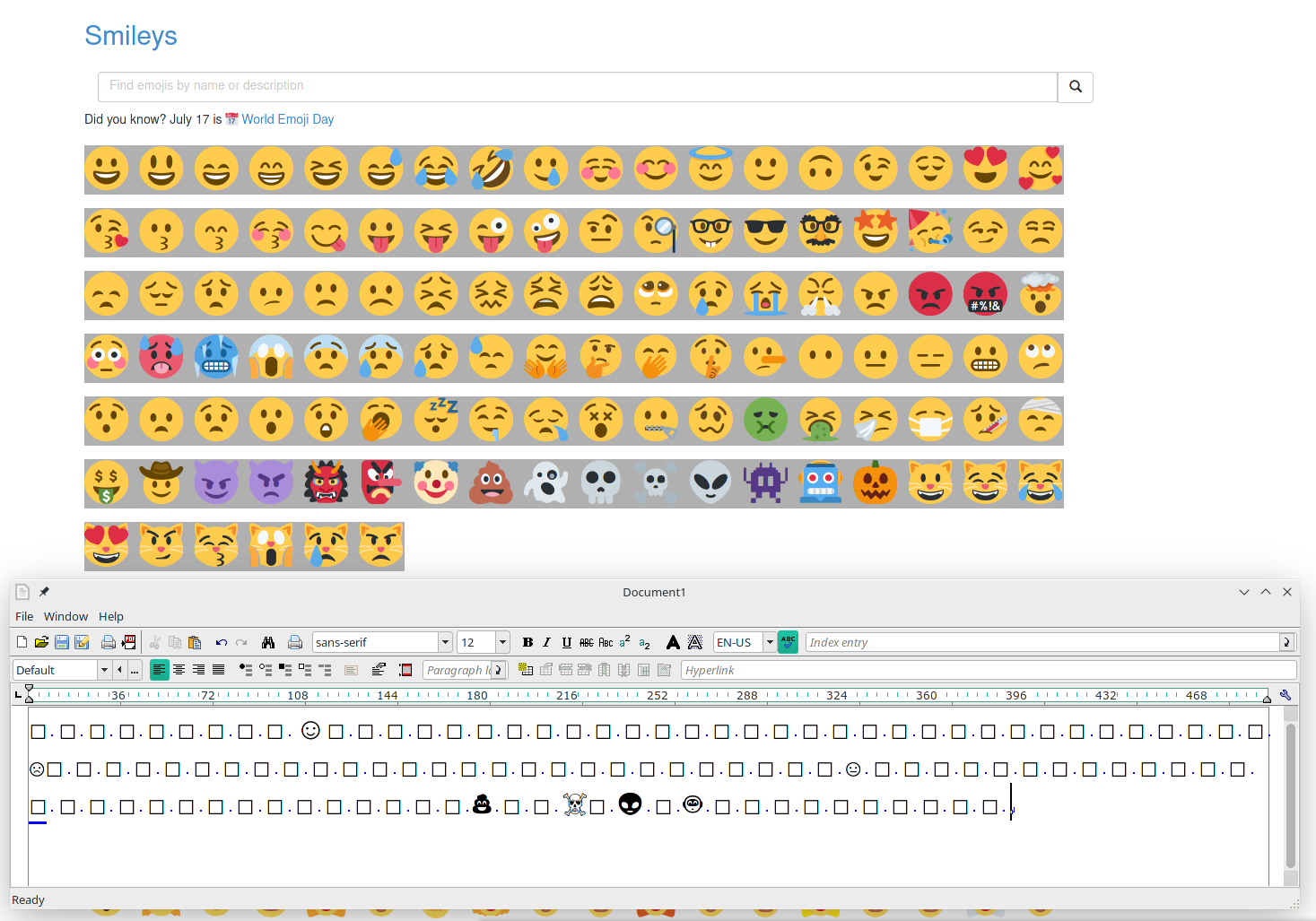
I just did quick test with Emojies. It seems that most of it 90% are not rendered. Should it work like this at the moment? Example:
index.php?t=getfile&id=6527&private=0

Platform: Linux/Manjaro - GTK. We could use https://openmoji.org/ emojies library.

Klugier
  • Attachment: Emojies.png
    (Size: 264.22KB, Downloaded 896 times)


U++ - one framework to rule them all.

[Updated on: Sat, 04 December 2021 19:55]

Report message to a moderator

Re: 32 bit wchar merged [message #57735 is a reply to message #57734] Sat, 04 December 2021 20:16 Go to previous messageGo to next message
mirek is currently offline  mirek
Messages: 14291
Registered: November 2005
Ultimate Member
Klugier wrote on Sat, 04 December 2021 19:49
Hello Mirek,

I just did quick test with Emojies. It seems that most of it 90% are not rendered. Should it work like this at the moment? Example:
index.php?t=getfile&id=6527&private=0

Platform: Linux/Manjaro - GTK. We could use https://openmoji.org/ emojies library.

Klugier


Worth investigating. Simple explanation is that you do not have proper emoji font on your system.

Please try same emojis with OpenOffice, then we will investigate further.

Mirek
Re: 32 bit wchar merged [message #57737 is a reply to message #57735] Sat, 04 December 2021 20:45 Go to previous messageGo to next message
Tom1
Messages: 1319
Registered: March 2007
Ultimate Contributor
Hi,

I seem to have similar results on Linux Mint, but on Windows I can see quite a selection of emojis in UWord. (In black'n'white in Windows though.)

Libre Office in the same Linux Mint installation can show a whole lot of emojis for the same set.

Best regards,

Tom
Re: 32 bit wchar merged [message #57738 is a reply to message #57737] Sat, 04 December 2021 22:09 Go to previous messageGo to next message
Klugier is currently offline  Klugier
Messages: 1118
Registered: September 2012
Location: Poland, Kraków
Senior Contributor
Hello,

I could confirm what Tom said. Emojies works within LibreOffice:
index.php?t=getfile&id=6528&private=0

For some reason basic Smile emoij is displayed differently.

Klugier


U++ - one framework to rule them all.
Re: 32 bit wchar merged [message #57739 is a reply to message #57726] Sat, 04 December 2021 22:30 Go to previous messageGo to next message
Oblivion is currently offline  Oblivion
Messages: 1266
Registered: August 2007
Senior Contributor
Hi,

Emojis work on Linux/Gnome 41 (Arch Linux, up-to-date)

I've tried TerminalCtrl with Noto Color Emoji Font (For some reason, the fallback list didn't work so I've passed the aforementioned font as the main font for TerminalCtrl):

Test file: https://unicode.org/Public/emoji/5.0/emoji-test.txt

index.php?t=getfile&id=6529&private=0


As you can see, the font/line height seems incorrectly calculated - too high (it should be consistent with 12 pt). This is also a problem with TheIDE (and TheIDE's code-editor too displays the emojis if I directly pass Noto Color Emoji Font)

I'll do some more testing..

Best regards,
Oblivion


[Updated on: Sat, 04 December 2021 22:39]

Report message to a moderator

Re: 32 bit wchar merged [message #57741 is a reply to message #57739] Sun, 05 December 2021 11:55 Go to previous messageGo to next message
Tom1
Messages: 1319
Registered: March 2007
Ultimate Contributor
Hi,

I tried with the test file Oblivion pointed to:

https://unicode.org/Public/emoji/5.0/emoji-test.txt

UWord on Linux Mint could show some of the emojis, but most of them were not rendered. I guess the font used just lacks the missing emojis. (?)

Best regards,

Tom
Re: 32 bit wchar merged [message #57742 is a reply to message #57741] Sun, 05 December 2021 13:01 Go to previous messageGo to next message
mirek is currently offline  mirek
Messages: 14291
Registered: November 2005
Ultimate Member
Can you try Draw/FontCR.cpp:429

				if(rface[1].Find(i) < 0 && !(fi & Font::SPECIAL) && (fi & Font::SCALEABLE)) {


to

				if(rface[1].Find(i) < 0 && (fi & Font::SCALEABLE)) {


?

Explanation: By the time I was doing Linux code, I decided to exlude color fonts (I have reverted this decision for MacOS as there are no normal glyphs on MacOS, but never ported this decision back).
Re: 32 bit wchar merged [message #57743 is a reply to message #57742] Sun, 05 December 2021 15:11 Go to previous messageGo to next message
Tom1
Messages: 1319
Registered: March 2007
Ultimate Contributor
Hi Mirek,

The change (in Draw/FontCR.cpp) does not seem to change anything on UWord + Linux Mint for the test file.

Best regards,

Tom
Re: 32 bit wchar merged [message #57744 is a reply to message #57742] Sun, 05 December 2021 16:05 Go to previous messageGo to next message
Oblivion is currently offline  Oblivion
Messages: 1266
Registered: August 2007
Senior Contributor
I've changed the line, and unfortunately nothing has changed.


It seems that the fallback list and the new font rendering routines have some issues. Because upp wchar32 update can definitely render emojis on Linux, as it can be seen from the screenshot in my previous message.
In my test case, it displays all the emojis correctly. The problem is I have to pass the emoji font as the active font. (in TheIDE's code editor, for example)

P.s I have recreated the fallback font list, using the FontMap2. Noto Color Emoji is correctly listed in it, but It doesn't take it into account (or maybe it does bot not scaling correctly, because I am getting a single pixel instead of a emoji. (This may also have to do the incorrect line height issue I have mentioned in my previous post.)


Best regards,
Obilvion


[Updated on: Sun, 05 December 2021 16:06]

Report message to a moderator

Re: 32 bit wchar merged [message #57745 is a reply to message #57744] Sun, 05 December 2021 16:24 Go to previous messageGo to next message
mirek is currently offline  mirek
Messages: 14291
Registered: November 2005
Ultimate Member
Oblivion wrote on Sun, 05 December 2021 16:05
I've changed the line, and unfortunately nothing has changed.


It seems that the fallback list and the new font rendering routines have some issues. Because upp wchar32 update can definitely render emojis on Linux, as it can be seen from the screenshot in my previous message.
In my test case, it displays all the emojis correctly. The problem is I have to pass the emoji font as the active font. (in TheIDE's code editor, for example)

P.s I have recreated the fallback font list, using the FontMap2. Noto Color Emoji is correctly listed in it, but It doesn't take it into account (or maybe it does bot not scaling correctly, because I am getting a single pixel instead of a emoji. (This may also have to do the incorrect line height issue I have mentioned in my previous post.)


Best regards,
Obilvion


Well, if the font is not found in the fixed list, all remaining fonts are loaded and tested (this takes time, the purpose of fixed list is to speedup the process in "normal" cases).

I think this is more likely related to color font rendering / handling.

Mirek
Re: 32 bit wchar merged [message #57749 is a reply to message #57745] Wed, 08 December 2021 00:46 Go to previous messageGo to next message
mirek is currently offline  mirek
Messages: 14291
Registered: November 2005
Ultimate Member
mirek wrote on Sun, 05 December 2021 16:24

I think this is more likely related to color font rendering / handling.

Mirek


Confirmed, problem seems to be that cairo is unable to scale color font bitmaps. I will need to figure out a way how to extract the color bitmap from the font, then scale manually... (use completely different path for these glyphs).
Re: 32 bit wchar merged [message #57775 is a reply to message #57749] Sun, 12 December 2021 16:41 Go to previous messageGo to next message
mirek is currently offline  mirek
Messages: 14291
Registered: November 2005
Ultimate Member
After wrestling a bit with FreeType, colored emoji are now hopefully supported in Linux. (Please test).

The question now remains: When doing replacement, often some replacement font with black&white emoji glyph is closer in appearance than Color Emoji font. That results in mixing colored and B&W emojis. While technically probably more correct, should in case I am looking for emoji glyph always prioritize Noto Color Emoji (or maybe any color emoji font) over matching appearance of font?

Mirek
Re: 32 bit wchar merged [message #57776 is a reply to message #57775] Sun, 12 December 2021 17:55 Go to previous messageGo to next message
Oblivion is currently offline  Oblivion
Messages: 1266
Registered: August 2007
Senior Contributor
Hello Mirek,

Thanks!
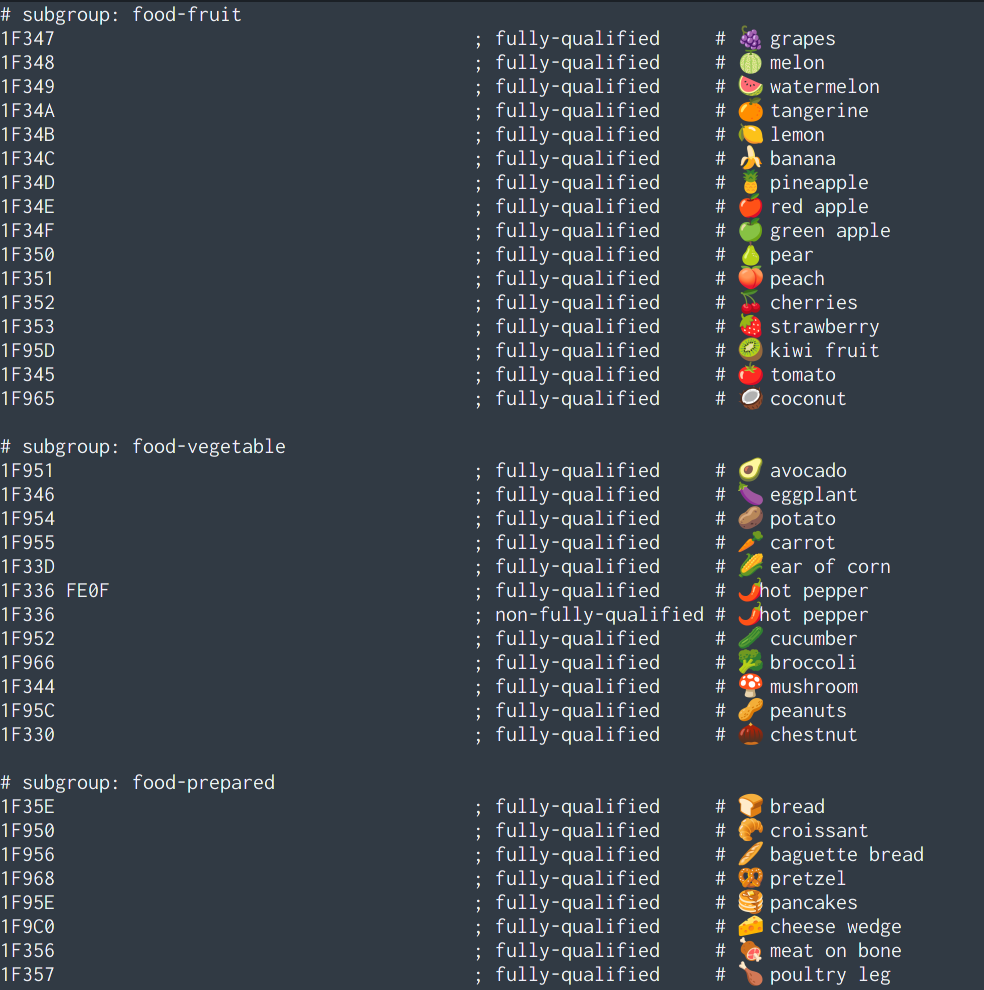
Initial test: it works, and rather looks nice! (taken fron TerminalCtrl, test code):
index.php?t=getfile&id=6535&private=0


As for your other question: In my experience, the general preference and rule seems to be mixing a set of consistent color emoji with font, where possible, though it is not set in stone.


Best regards,
Oblivion
  • Attachment: emojis.png
    (Size: 245.36KB, Downloaded 760 times)


[Updated on: Sun, 12 December 2021 18:08]

Report message to a moderator

Re: 32 bit wchar merged [message #57778 is a reply to message #57726] Mon, 13 December 2021 12:42 Go to previous messageGo to next message
pvictor is currently offline  pvictor
Messages: 75
Registered: December 2015
Member
Hello!

I've found an error in displaying Cyrillic characters in latest U++ releases.
Here's a testcase:
#include <CtrlLib/CtrlLib.h>

using namespace Upp;

struct MyApp : TopWindow {
	void Paint(Draw& w) {
		ImagePainter ip(GetSize());
		ip.DrawRect(GetSize(), White());

		String s = "Абвгдежз";				// some cyrillic text
		ip.DrawText(10, 10, s);				// OK

		String s2 = ToCharset(CHARSET_WIN1251, s);
		ip.DrawText(10, 50, s2, CHARSET_WIN1251);	// draws rectangles instead of letters

		Image im = ip;
		w.DrawImage(0, 0, im);
	}
};

GUI_APP_MAIN
{
	MyApp().Run();
}

It works fine under U++ 15947.
Platform: Linux Mint.

Best regards.
Victor
Re: 32 bit wchar merged [message #57783 is a reply to message #57778] Mon, 13 December 2021 23:06 Go to previous messageGo to next message
mirek is currently offline  mirek
Messages: 14291
Registered: November 2005
Ultimate Member
pvictor wrote on Mon, 13 December 2021 12:42
Hello!

I've found an error in displaying Cyrillic characters in latest U++ releases.
Here's a testcase:
#include <CtrlLib/CtrlLib.h>

using namespace Upp;

struct MyApp : TopWindow {
	void Paint(Draw& w) {
		ImagePainter ip(GetSize());
		ip.DrawRect(GetSize(), White());

		String s = "Абвгдежз";				// some cyrillic text
		ip.DrawText(10, 10, s);				// OK

		String s2 = ToCharset(CHARSET_WIN1251, s);
		ip.DrawText(10, 50, s2, CHARSET_WIN1251);	// draws rectangles instead of letters

		Image im = ip;
		w.DrawImage(0, 0, im);
	}
};

GUI_APP_MAIN
{
	MyApp().Run();
}

It works fine under U++ 15947.
Platform: Linux Mint.

Best regards.
Victor


Well, I was planning to remove that DrawText variant with charset, looks like I will just deprecate it then. Fixed.
Re: 32 bit wchar merged [message #57785 is a reply to message #57775] Wed, 15 December 2021 08:29 Go to previous messageGo to next message
Tom1
Messages: 1319
Registered: March 2007
Ultimate Contributor
mirek wrote on Sun, 12 December 2021 17:41
The question now remains: When doing replacement, often some replacement font with black&white emoji glyph is closer in appearance than Color Emoji font. That results in mixing colored and B&W emojis. While technically probably more correct, should in case I am looking for emoji glyph always prioritize Noto Color Emoji (or maybe any color emoji font) over matching appearance of font?

Mirek


Hi,

Prioritizing color emoji would give the most consistent user experience on any desktop environment.

Best regards,

Tom
Re: 32 bit wchar merged [message #57786 is a reply to message #57785] Wed, 15 December 2021 10:53 Go to previous messageGo to next message
mirek is currently offline  mirek
Messages: 14291
Registered: November 2005
Ultimate Member
Tom1 wrote on Wed, 15 December 2021 08:29
mirek wrote on Sun, 12 December 2021 17:41
The question now remains: When doing replacement, often some replacement font with black&white emoji glyph is closer in appearance than Color Emoji font. That results in mixing colored and B&W emojis. While technically probably more correct, should in case I am looking for emoji glyph always prioritize Noto Color Emoji (or maybe any color emoji font) over matching appearance of font?

Mirek


Hi,

Prioritizing color emoji would give the most consistent user experience on any desktop environment.

Best regards,

Tom


A bit of issue is that Win32 does not support color emoji in GDI as of now. We would need to go Direct2D or something to do that. At least use Direct2D to extract those pictures.

(And yes, in general, I think it might be the time to move from GDI, but I do not want to do that now.)
Re: 32 bit wchar merged [message #57787 is a reply to message #57786] Wed, 15 December 2021 11:12 Go to previous messageGo to next message
Tom1
Messages: 1319
Registered: March 2007
Ultimate Contributor
Mirek,

OK, I understand. But please keep me posted if you decide to go ahead with Direct2D or any other GDI replacement option. The 2D graphics functionality and performance on Windows is critically important for me -- and has always been -- so I wish to participate already in early stages to ensure a smooth transition.

Best regards,

Tom
Re: 32 bit wchar merged [message #57883 is a reply to message #57785] Sun, 26 December 2021 20:12 Go to previous messageGo to next message
mirek is currently offline  mirek
Messages: 14291
Registered: November 2005
Ultimate Member
Tom1 wrote on Wed, 15 December 2021 08:29
mirek wrote on Sun, 12 December 2021 17:41
The question now remains: When doing replacement, often some replacement font with black&white emoji glyph is closer in appearance than Color Emoji font. That results in mixing colored and B&W emojis. While technically probably more correct, should in case I am looking for emoji glyph always prioritize Noto Color Emoji (or maybe any color emoji font) over matching appearance of font?

Mirek


Hi,

Prioritizing color emoji would give the most consistent user experience on any desktop environment.

Best regards,

Tom


I made U++ prioritize color emoji in Linux for now. Or most of them, it is not easy to decide which codepoints should prefer color; e.g. copyright sign is considered emoji, but I do not think it would be a good idea to prefer color font for it.
Re: 32 bit wchar merged [message #57884 is a reply to message #57883] Sun, 26 December 2021 22:09 Go to previous messageGo to next message
Tom1
Messages: 1319
Registered: March 2007
Ultimate Contributor
mirek wrote on Sun, 26 December 2021 21:12
Tom1 wrote on Wed, 15 December 2021 08:29
mirek wrote on Sun, 12 December 2021 17:41
The question now remains: When doing replacement, often some replacement font with black&white emoji glyph is closer in appearance than Color Emoji font. That results in mixing colored and B&W emojis. While technically probably more correct, should in case I am looking for emoji glyph always prioritize Noto Color Emoji (or maybe any color emoji font) over matching appearance of font?

Mirek


Hi,

Prioritizing color emoji would give the most consistent user experience on any desktop environment.

Best regards,

Tom


I made U++ prioritize color emoji in Linux for now. Or most of them, it is not easy to decide which codepoints should prefer color; e.g. copyright sign is considered emoji, but I do not think it would be a good idea to prefer color font for it.

Yes, I see your point. It is indeed difficult to decide which way to go with each of them, but certainly (R) and (C) must be b/w.

This is not a perfectly clear pattern, but it seems that Firefox prioritizes b/w emojis for 16-bit codes and color emojis for higher codes. Also, please note that in Firefox there is a combined gender+skintone+profession in one image, whereas UWord shows a sequence of emojis to identify each property separately. Please open emoji-test.txt (https://unicode.org/Public/emoji/14.0/emoji-test.txt) in Firefox (and maybe Chromium too) to see how they render it. Then compare with UWord.

Best regards,

Tom

Edit: Added link to latest emoji-test.txt.

[Updated on: Sun, 26 December 2021 22:23]

Report message to a moderator

Re: 32 bit wchar merged [message #57890 is a reply to message #57884] Mon, 27 December 2021 08:33 Go to previous messageGo to next message
mirek is currently offline  mirek
Messages: 14291
Registered: November 2005
Ultimate Member
[quote title=Tom1 wrote on Sun, 26 December 2021 22:09]mirek wrote on Sun, 26 December 2021 21:12
Also, please note that in Firefox there is a combined gender+skintone+profession in one image, whereas UWord shows a sequence of emojis to identify each property separately.


I am well aware of that, but it (unicode combining characters) is a task for another day....

Mirek
Re: 32 bit wchar merged [message #57930 is a reply to message #57890] Tue, 28 December 2021 15:48 Go to previous messageGo to next message
Tom1
Messages: 1319
Registered: March 2007
Ultimate Contributor
mirek wrote on Mon, 27 December 2021 09:33

I am well aware of that, but it (unicode combining characters) is a task for another day....

Mirek

Hi Mirek,

No worries. Another year is equally acceptable. (Just mentioned it as I came across it while testing.)

Another thing I found while testing is that on Linux Mint exporting a PDF from UWord using emoji-test.txt results in an empty file. Without emojis the PDF export works OK.

On Windows, exporting a PDF from UWord using emoji-test.txt results in a file with mostly weird symbols instead of the expected emojis shown on UWord.

(Just let me know if you wish me to stop testing here... Smile )

Best regards,

Tom
Re: 32 bit wchar merged [message #57959 is a reply to message #57930] Wed, 05 January 2022 09:33 Go to previous messageGo to next message
mirek is currently offline  mirek
Messages: 14291
Registered: November 2005
Ultimate Member
Tom1 wrote on Tue, 28 December 2021 15:48
mirek wrote on Mon, 27 December 2021 09:33

I am well aware of that, but it (unicode combining characters) is a task for another day....

Mirek

Hi Mirek,

No worries. Another year is equally acceptable. (Just mentioned it as I came across it while testing.)

Another thing I found while testing is that on Linux Mint exporting a PDF from UWord using emoji-test.txt results in an empty file. Without emojis the PDF export works OK.

On Windows, exporting a PDF from UWord using emoji-test.txt results in a file with mostly weird symbols instead of the expected emojis shown on UWord.

(Just let me know if you wish me to stop testing here... Smile )

Best regards,

Tom


Windows situation should be now fixed (with black emojis).

Outputing color emoji in Linux needs some more work...

Mirek
Re: 32 bit wchar merged [message #57964 is a reply to message #57959] Wed, 05 January 2022 11:42 Go to previous messageGo to next message
Tom1
Messages: 1319
Registered: March 2007
Ultimate Contributor
Hi Mirek,

Thanks! I see the PDF from Windows is OK now.

It seems that the multi character issue is different in Windows compared to Linux:
263A FE0F                                              ; fully-qualified     # ☺️ E0.6 smiling face
263A                                                   ; unqualified         # ☺ E0.6 smiling face

On Windows I see an empty character (space) following a small BW smiling face for the fully-qualified version above. This is possibly caused by the FE0F -code, as similar behavior can be found in many places of the file (emoji-test.txt). However, on Linux there is just the smiling face without any additional spaces for both variants. Another place where this causes issues is the subgroup keycap:
# subgroup: keycap
0023 FE0F 20E3                                         ; fully-qualified     # #️⃣ E0.6 keycap: #
0023 20E3                                              ; unqualified         # #⃣ E0.6 keycap: #
002A FE0F 20E3                                         ; fully-qualified     # *️⃣ E2.0 keycap: *
002A 20E3                                              ; unqualified         # *⃣ E2.0 keycap: *
0030 FE0F 20E3                                         ; fully-qualified     # 0️⃣ E0.6 keycap: 0
0030 20E3                                              ; unqualified         # 0⃣ E0.6 keycap: 0
0031 FE0F 20E3                                         ; fully-qualified     # 1️⃣ E0.6 keycap: 1
0031 20E3                                              ; unqualified         # 1⃣ E0.6 keycap: 1
0032 FE0F 20E3                                         ; fully-qualified     # 2️⃣ E0.6 keycap: 2
0032 20E3                                              ; unqualified         # 2⃣ E0.6 keycap: 2

On Linux Mint all of the characters fall into their correct places pretty well. However, on Windows there are slight alignment issues with unqualified variants and fully-qualified variants are completely off having a space between the character and the keycap box.

BTW: Just noticed that you can actually copy and paste the above unicode sequences directly to the UWord for testing. Smile

Best regards,

Tom
Re: 32 bit wchar merged [message #57965 is a reply to message #57964] Wed, 05 January 2022 12:09 Go to previous messageGo to next message
mirek is currently offline  mirek
Messages: 14291
Registered: November 2005
Ultimate Member
Tom1 wrote on Wed, 05 January 2022 11:42
Hi Mirek,

Thanks! I see the PDF from Windows is OK now.

It seems that the multi character issue is different in Windows compared to Linux:
263A FE0F                                              ; fully-qualified     # ☺️ E0.6 smiling face
263A                                                   ; unqualified         # ☺ E0.6 smiling face

On Windows I see an empty character (space) following a small BW smiling face for the fully-qualified version above. This is possibly caused by the FE0F -code, as similar behavior can be found in many places of the file (emoji-test.txt). However, on Linux there is just the smiling face without any additional spaces for both variants. Another place where this causes issues is the subgroup keycap:
# subgroup: keycap
0023 FE0F 20E3                                         ; fully-qualified     # #️⃣ E0.6 keycap: #
0023 20E3                                              ; unqualified         # #⃣ E0.6 keycap: #
002A FE0F 20E3                                         ; fully-qualified     # *️⃣ E2.0 keycap: *
002A 20E3                                              ; unqualified         # *⃣ E2.0 keycap: *
0030 FE0F 20E3                                         ; fully-qualified     # 0️⃣ E0.6 keycap: 0
0030 20E3                                              ; unqualified         # 0⃣ E0.6 keycap: 0
0031 FE0F 20E3                                         ; fully-qualified     # 1️⃣ E0.6 keycap: 1
0031 20E3                                              ; unqualified         # 1⃣ E0.6 keycap: 1
0032 FE0F 20E3                                         ; fully-qualified     # 2️⃣ E0.6 keycap: 2
0032 20E3                                              ; unqualified         # 2⃣ E0.6 keycap: 2

On Linux Mint all of the characters fall into their correct places pretty well. However, on Windows there are slight alignment issues with unqualified variants and fully-qualified variants are completely off having a space between the character and the keycap box.

BTW: Just noticed that you can actually copy and paste the above unicode sequences directly to the UWord for testing. Smile

Best regards,

Tom


Frankly, this is at the moment way beyond what I plan to implement. I think combining characters for normal texts and RTL handling has much higher priority.

(I am at crossroads there - sensible approach would be to embed harfbuzz but it seems quite heavyweight and possibly breaking too much of current CtrlLib).
Re: 32 bit wchar merged [message #58000 is a reply to message #57965] Wed, 12 January 2022 10:23 Go to previous messageGo to next message
coolman is currently offline  coolman
Messages: 119
Registered: April 2006
Location: Czech Republic
Experienced Member
Hi,

Have you checked this 32 bit wchar changes together with the sqlite plugin? I have some problems with that. It seems, that only one letter is read / inserted instead of string.

BR, Radek
Re: 32 bit wchar merged [message #58001 is a reply to message #58000] Wed, 12 January 2022 14:24 Go to previous messageGo to next message
mirek is currently offline  mirek
Messages: 14291
Registered: November 2005
Ultimate Member
Thanks, should be now fixed.

If you could test other engines, would be great.
Re: 32 bit wchar merged [message #58002 is a reply to message #58001] Wed, 12 January 2022 16:25 Go to previous messageGo to next message
coolman is currently offline  coolman
Messages: 119
Registered: April 2006
Location: Czech Republic
Experienced Member
Sqlite plugin now works (at least my problem disappeared). Thank you
Re: 32 bit wchar merged [message #58003 is a reply to message #57930] Thu, 13 January 2022 00:20 Go to previous messageGo to next message
mirek is currently offline  mirek
Messages: 14291
Registered: November 2005
Ultimate Member
Tom1 wrote on Tue, 28 December 2021 15:48


Another thing I found while testing is that on Linux Mint exporting a PDF from UWord using emoji-test.txt results in an empty file. Without emojis the PDF export works OK.


Hopefully finally fixed.

Mirek
Re: 32 bit wchar merged [message #58005 is a reply to message #58003] Thu, 13 January 2022 08:37 Go to previous message
Tom1
Messages: 1319
Registered: March 2007
Ultimate Contributor
Hi Mirek,

Thanks! It looks good now.

Best regards,

Tom
Previous Topic: Linux GlCtrl leaks problem fixed, new leaks related functions
Next Topic: Minor ide improvement when opening 'unknown' file
Goto Forum:


Current Time: Wed May 27 13:27:21 GMT+2 2026

Total time taken to generate the page: 0.01453 seconds


