Home » Community » U++ community news and announcements » New Assist features
| New Assist features [message #59001] |
Mon, 10 October 2022 14:43  |
 |
 mirek
mirek
Messages: 14291
Registered: November 2005
|
Ultimate Member |
|
|
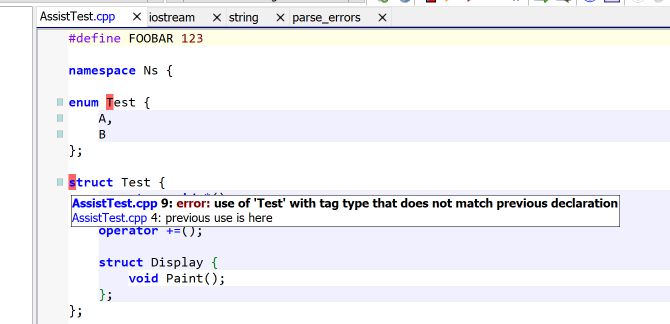
(now showing errors as you type...)
Also I have added Alt+Shift+U - similar to Alt+U (show all references), but shows all references for symbol at cursor instead of current function.
Mirek
[Updated on: Mon, 10 October 2022 15:54] Report message to a moderator |
|
|
|
|
|
|
|
|
|
| Re: New Assist features [message #59026 is a reply to message #59001] |
Mon, 17 October 2022 09:51  |
Tom1
Messages: 1319
Registered: March 2007
|
Ultimate Contributor |
|
|
Hi Mirek,
While 'now showing errors as you type...' feature first appears great, I have noticed that my focus gets distracted by this feature especially when slowly writing and intensely thinking about some more complex programming challenges. So, could you make this feature optional in Assist Settings?
Thanks and best regards,
Tom
|
|
|
|
|
|
| Re: New Assist features [message #59030 is a reply to message #59026] |
Mon, 17 October 2022 11:15 |
|
mirek
Messages: 14291
Registered: November 2005
|
Ultimate Member |
|
|
Tom1 wrote on Mon, 17 October 2022 09:51Hi Mirek,
While 'now showing errors as you type...' feature first appears great, I have noticed that my focus gets distracted by this feature especially when slowly writing and intensely thinking about some more complex programming challenges. So, could you make this feature optional in Assist Settings?
Thanks and best regards,
Tom
Yes, in TODO already.
That said, theide was showing red behind wrong parenthesis for ages now...
Also, yesterday I have changed "error at the end of line" (usually missing semicolon) to show just as single character.
Mirek
[Updated on: Mon, 17 October 2022 11:16] Report message to a moderator |
|
|
|
|
|
| Re: New Assist features [message #59032 is a reply to message #59031] |
Mon, 17 October 2022 14:12 |
Tom1
Messages: 1319
Registered: March 2007
|
Ultimate Contributor |
|
|
mirek wrote on Mon, 17 October 2022 13:04So
- you can now switch it off in settings
- you can setup the color
- it might be now be little less invasive as I have removed some 'false' moments to do the check
- some related bugs (like error at the end of some includes) fixed
- there is now status icon "OK" / "Errors" in the left corner; it can be switched off as well
Mirek
Thanks, Mirek!
BR, Tom
|
|
|
|
|
|
| Re: New Assist features [message #59055 is a reply to message #59033] |
Sat, 22 October 2022 16:47 |
 |
Klugier
Messages: 1119
Registered: September 2012
Location: Poland, Kraków
|
Senior Contributor |
|
|
Hello,
I discussed this already with Mirek, but I am not happy how the new OK state is presented within TheIDE. I know that I can turn it off, but it is a default option, so all users will be affected by this change and I do not want to read that our UI feels like 90s. For me it is too invasive, it is colliding with line numbers, breakpoints and documentation annotation. TheIDE should be more minimal and less visually heavy. Screenshot with the new OK state below (top left corner of CodeEditor):
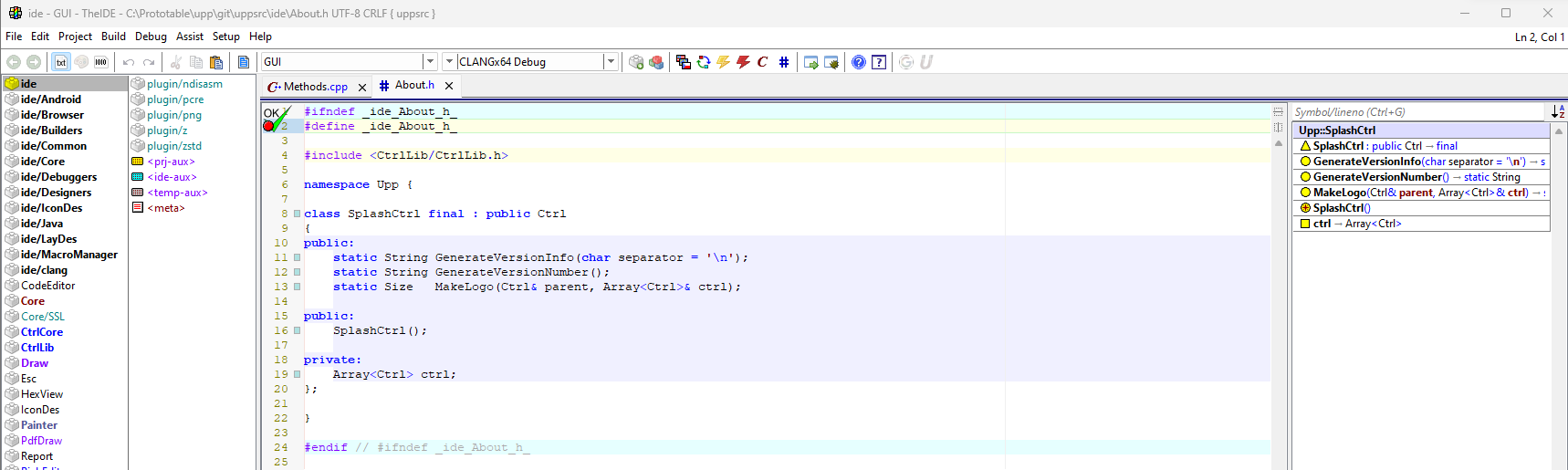
Can we just do not show nothing and display only errors only in scrollbar? I know that Mirek might be affraid that the check doesn't run, but it means that we have a bug that needs to be eliminated. We can show this OK/Errors state in verbose mode for debug purpose. Also, most of IDE's doesn't display this state, so precedence in this case is risky and unnecessary. The final option is to do not show this icon by default and make it optional.
Moreover, the default Navigator position was bring back from right to left. I understand that it is harder to read expanded symbols, but the overall default layout of TheIDE suffers from it. It is much easier to navigate with the mouse from CodeEditor to list of files when Navigator is not between Files/Packages and CodeEditor. Also, right now you can not just do not use Navigator, it is integrated part of expirience, because it shows the progression of parsing. Maybe we can move information about parsing somwhere else for example to status bar, which is hidden by default?
Klugier
-
 Attachment: OKState.png
(Size: 97.94KB, Downloaded 1311 times)
U++ - one framework to rule them all.
[Updated on: Sat, 22 October 2022 17:57] Report message to a moderator |
|
|
|
| Re: New Assist features [message #59074 is a reply to message #59055] |
Thu, 27 October 2022 11:59 |
Tom1
Messages: 1319
Registered: March 2007
|
Ultimate Contributor |
|
|
Hi Mirek,
I have noticed, that Assist autocomplete does not show all methods for e.g. String. If I type "String::" I would expect to see a whole bunch of methods (including e.g. 'StartsWith'), but for some reason I only get about 20 results or so. Is this issue depending on the way String inherits from other classes? Pre-libclang versions of TheIDE returned quite a lot of options for String:: .
Further on, if I may add to the wish list...
typedef struct{
	int a;
	int b;
	union{
		int i;
		dword u;
		float f;
	};
}tt;
In addition to a and b, would it be possible to see also i, u and f in the assist autocomplete listing for the type tt above?
Thanks and best regards,
Tom
|
|
|
|
|
|
| Re: New Assist features [message #59078 is a reply to message #59077] |
Thu, 27 October 2022 12:46 |
Tom1
Messages: 1319
Registered: March 2007
|
Ultimate Contributor |
|
|
Sorry, stupid of me: Today, I'm on Windows. Just upgraded TheIDE and the problem still persists.
Best regards,
Tom
UPDATE: Just looked on the Linux size, and there assist shows all the bells and whistles for String:: ! So this seems to be on the Windows side only.
[Updated on: Thu, 27 October 2022 13:00] Report message to a moderator |
|
|
|
| Re: New Assist features [message #59079 is a reply to message #59078] |
Thu, 27 October 2022 13:04 |
|
mirek
Messages: 14291
Registered: November 2005
|
Ultimate Member |
|
|
Tom1 wrote on Thu, 27 October 2022 12:46Sorry, stupid of me: Today, I'm on Windows. Just upgraded TheIDE and the problem still persists.
Best regards,
Tom
UPDATE: Just looked on the Linux size, and there assist shows all the bells and whistles for String:: ! So this seems to be on the Windows side only.
Weird, probably somehow related to something, I just did quick test
#include <Core/Core.h>

using namespace Upp;

CONSOLE_APP_MAIN
{
	String h;
	h.
}
and I can see StartsWith.
That said, I have noticed there are yet problems when build method is MSVC (I have it in my TODO list). Can that be the problem? (if that is the case, test by switching to CLANGx64).
Mirek
|
|
|
|
| Re: New Assist features [message #59080 is a reply to message #59079] |
Thu, 27 October 2022 13:12 |
Tom1
Messages: 1319
Registered: March 2007
|
Ultimate Contributor |
|
|
Now this is interesting!
With CLANG/CLANGx64 and also with MSVS22/MSVS22x64 it works fine! (No need to compile, just switching the build method is enough.) However, with MSBT19/MSBT19x64/MSBT22/MSBT22x64 it fails with only a short list of items.
BR, Tom
UPDATE: To be more accurate, I'm on "Windows 11 Pro, Version 21H2, OS build 22000.1098"
[Updated on: Thu, 27 October 2022 13:15] Report message to a moderator |
|
|
|
|
|
|
|
| Re: New Assist features [message #59107 is a reply to message #59001] |
Thu, 03 November 2022 10:29 |
Wermann33
Messages: 12
Registered: October 2022
Location: Vienna
|
Promising Member |
|
|
Hi!
I realized some weird behavior of the new error-detection, like in this example. In some files errors are detected, that definitly arent.
Another issue is, that a file i see without errors, a collegue of me, has errors shown, while i havent, using CLANG both on Windows.
In all these cases, compilation shows no problem.
[Updated on: Thu, 03 November 2022 10:35] Report message to a moderator |
|
|
|
| Re: New Assist features [message #59109 is a reply to message #59107] |
Thu, 03 November 2022 18:54 |
|
Klugier
Messages: 1119
Registered: September 2012
Location: Poland, Kraków
|
Senior Contributor |
|
|
Hello Wermann33,
Could you attached the problematic code with the error. From your screenshot I see that commented include was detected as an error, but nothing more. To fix this issue we need to have broader context.
I know that your code might be secret. If it is, please rework it to not be. We need only reproduction scenario, everything else is not needed.
Klugier
U++ - one framework to rule them all.
[Updated on: Thu, 03 November 2022 18:55] Report message to a moderator |
|
|
|
|
|
|
|
|
|
|
|
| Re: New Assist features [message #59116 is a reply to message #59115] |
Fri, 04 November 2022 18:38 |
|
mirek
Messages: 14291
Registered: November 2005
|
Ultimate Member |
|
|
Wermann33 wrote on Fri, 04 November 2022 08:33Most of the time, there are no informations.
But there are some rare occurencies, information is present.
I attached a screen-example.
Code compiles anyway.
I believe that I have found the reason (those errors were in included headers; there was missing test that the error is from the current file). Hopefully fixed in master.
[Updated on: Fri, 04 November 2022 18:52] Report message to a moderator |
|
|
|
|
|
|
|
|
|
|
|
|
|
|
|
|
|
|
|
|
|
|
|
|
|
|
|
| Re: New Assist features [message #59181 is a reply to message #59180] |
Tue, 15 November 2022 17:19 |
|
mirek
Messages: 14291
Registered: November 2005
|
Ultimate Member |
|
|
coolman wrote on Tue, 15 November 2022 16:53Hi,
I tried new U++ assist and I found a problem with external headers. When Alt+J is executed on a function from an external header, the header is opened for the first time correctly. But then Alt+J doesn't work on this function or other functions from this external header file anymore.
BR, Radek
Well, I am doing that all the time with libclang.h (I mean, during development of theide, I am often jumping into libclang.h, which is from this point of view 'external header').
So maybe can you be more specific?
Also, when I read "first time" - to me often happens that I edit the file, which introduces some compile errors, which is causing alt-j not working any more. Probably not your situation, but worth mentioning.
|
|
|
|
| Re: New Assist features [message #59182 is a reply to message #59181] |
Tue, 15 November 2022 18:00 |
coolman
Messages: 119
Registered: April 2006
Location: Czech Republic
|
Experienced Member |
|
|
mirek wrote on Tue, 15 November 2022 17:19coolman wrote on Tue, 15 November 2022 16:53Hi,
I tried new U++ assist and I found a problem with external headers. When Alt+J is executed on a function from an external header, the header is opened for the first time correctly. But then Alt+J doesn't work on this function or other functions from this external header file anymore.
BR, Radek
Well, I am doing that all the time with libclang.h (I mean, during development of theide, I am often jumping into libclang.h, which is from this point of view 'external header').
So maybe can you be more specific?
Also, when I read "first time" - to me often happens that I edit the file, which introduces some compile errors, which is causing alt-j not working any more. Probably not your situation, but worth mentioning.
OK,
E.g. at this code: Alt+J on X509_time_adj() open the x509.h header file at function in this header file. I switched back to the source, moved to the function X509_time_adj() (at different position using mouse) and Alt+J did not work. When I moved out of the U++ window and back in, Alt+J worked again until I did the previous steps.
ASN1_TIME *ans1Time = X509_time_adj(X509_getm_notBefore(crt.Get()), static_cast<long>(0), &time);
Edit:
I found that the symbols in the external file disappear after a while and then Alt+J doesn't work. And OK in the upper left corner is still visible.
[Updated on: Tue, 15 November 2022 18:06] Report message to a moderator |
|
|
|
| Re: New Assist features [message #59338 is a reply to message #59182] |
Sat, 17 December 2022 16:31 |
coolman
Messages: 119
Registered: April 2006
Location: Czech Republic
|
Experienced Member |
|
|
coolman wrote on Tue, 15 November 2022 18:00mirek wrote on Tue, 15 November 2022 17:19coolman wrote on Tue, 15 November 2022 16:53Hi,
I tried new U++ assist and I found a problem with external headers. When Alt+J is executed on a function from an external header, the header is opened for the first time correctly. But then Alt+J doesn't work on this function or other functions from this external header file anymore.
BR, Radek
Well, I am doing that all the time with libclang.h (I mean, during development of theide, I am often jumping into libclang.h, which is from this point of view 'external header').
So maybe can you be more specific?
Also, when I read "first time" - to me often happens that I edit the file, which introduces some compile errors, which is causing alt-j not working any more. Probably not your situation, but worth mentioning.
OK,
E.g. at this code: Alt+J on X509_time_adj() open the x509.h header file at function in this header file. I switched back to the source, moved to the function X509_time_adj() (at different position using mouse) and Alt+J did not work. When I moved out of the U++ window and back in, Alt+J worked again until I did the previous steps.
ASN1_TIME *ans1Time = X509_time_adj(X509_getm_notBefore(crt.Get()), static_cast<long>(0), &time);
Edit:
I found that the symbols in the external file disappear after a while and then Alt+J doesn't work. And OK in the upper left corner is still visible.
Hi, problem with Alt+J is fixed by commit 588529a7524b3d7e432438d53995edd8d2c783ff
|
|
|
|
Goto Forum:
Current Time: Thu Oct 08 16:21:43 GMT+2 2026
Total time taken to generate the page: 0.21615 seconds
|
 U++ framework
 Search
 Help
Help Members
 Register
 Login
Login Home
Home




