Home » Community » U++ community news and announcements » 2023.1rc1
|
|
|
|
|
|
| Re: 2023.1rc1 [message #59890 is a reply to message #59875] |
Sun, 21 May 2023 10:53   |
 |
 Klugier
Messages: 1117
Registered: September 2012
Location: Poland, Kraków
|
Senior Contributor |
|
|
Hello Mirek,
I found two issues
1) the first one is related to next/back stack for TheIDE build in help. It means that when you click on some entry for example "Assist++" you can not back to initial help menu. There are also problems with table of contents, it doesn't work in that view.
Also, when you open help for the first time after launching TheIDE it has back entry. It shouldn't be there and the stack should be empty.
Please test you, I believe you should find all mentioned issues pretty quickly.
2) The light breeze-gtk theme on Manjaro for menu bar is broken. It means that top menu bar works correctly, but nested are not. I attached screenshot to show this issue. Left is upp, right is LibreOffice that handles it correctly.
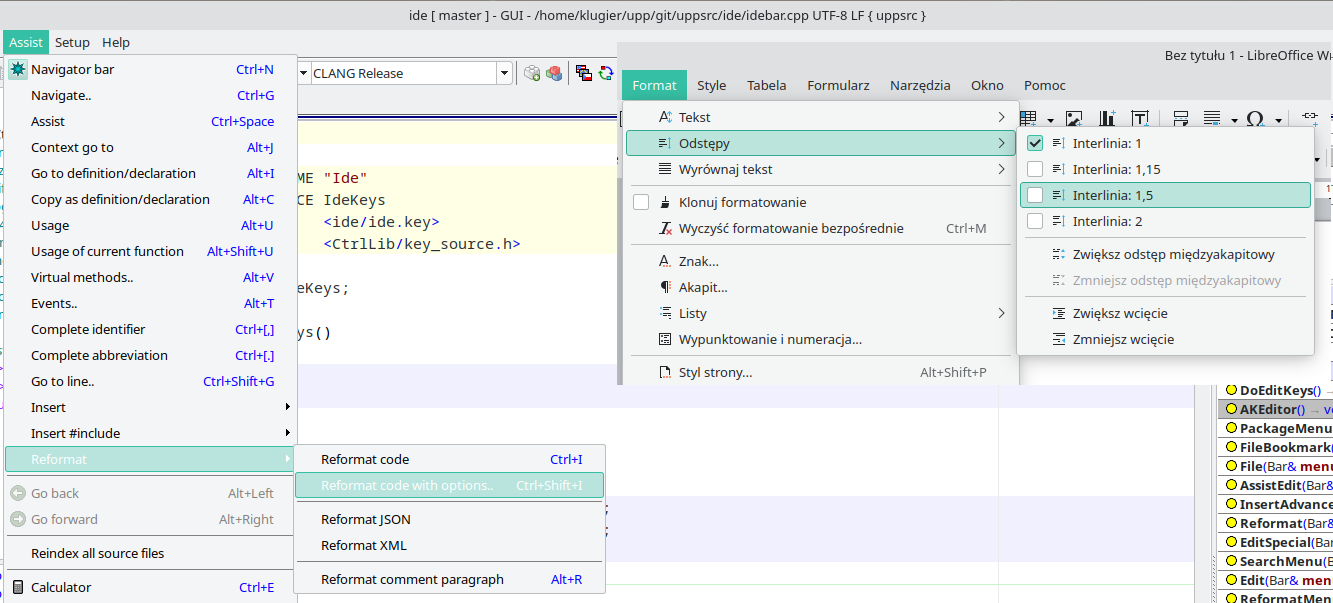
In above text the menu item text should be black not white. Also, the new/updated styling algorith should do not break topiteam text. This might requires bigger reworked.
Klugier
U++ - one framework to rule them all.
[Updated on: Sun, 21 May 2023 10:55] Report message to a moderator |
|
|
|
|
|
| Re: 2023.1rc1 [message #59892 is a reply to message #59891] |
Sun, 21 May 2023 11:32 |
|
Klugier
Messages: 1117
Registered: September 2012
Location: Poland, Kraków
|
Senior Contributor |
|
|
Hello Mirek,
I dumped these values as you suggested:
Begin
Before if
Diff(c, s.menutext) = 14
c = Color(241, 242, 243)
s.menutext = Color(255, 255, 255)
After if
Diff(c, s.menutext) = 243
c = Color(241, 242, 243)
s.menutext = Color(0, 0, 0)
End
Also, I increased if value even to 200, 250 without any effect. I think the issue here is more complicated that simple changing the shift value. There is a difference between menubar and single menus. The menubar is rendered correctly, but the menu is not. We might need to support this additional state.
Klugier
U++ - one framework to rule them all.
[Updated on: Sun, 21 May 2023 11:35] Report message to a moderator |
|
|
|
|
|
|
|
|
|
| Re: 2023.1rc1 [message #59896 is a reply to message #59894] |
Sun, 21 May 2023 14:45 |
 |
mirek
Messages: 14291
Registered: November 2005
|
Ultimate Member |
|
|
Klugier wrote on Sun, 21 May 2023 13:53Hello Mirek,
The issue has been fixed for Breeze Light and Dark. Thank you for that! You also forget to remove debug code in production (line 513 - ChGtk4.cpp):
PNGEncoder().SaveFile("/home/cxl/item.png", item);
For other themes, I noticed that there is a issue for Adwaita (KDE Gtk Theme). The bar text should be white instead of black. I attached U++ (left) comparison with Chrom (right).
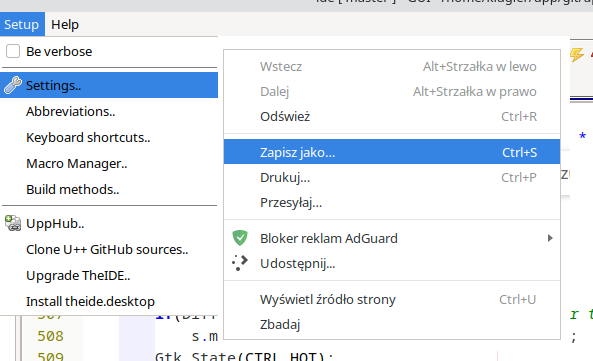
Klugier
Thanks, can you put some DDUMPs there?
DDUMP(c);
DDUMP(s.itemtext);
DDUMP(Diff(c, s.itemtext));
Alternatively, we can try to improve Diff:
int Diff(RGBA a, RGBA b)
{
	return max(abs(a.a - b.a), max(abs(a.r - b.r) / 2, max(abs(a.b - b.b) / 5, abs(a.g - b.g))));
}
(This accounts for even maxed blue color being dark)
Mirek
|
|
|
|
| Re: 2023.1rc1 [message #59897 is a reply to message #59896] |
Sun, 21 May 2023 18:58 |
|
Klugier
Messages: 1117
Registered: September 2012
Location: Poland, Kraków
|
Senior Contributor |
|
|
Hello Mirek,
Alternative diff method doesn't help in this case. For the log in ChGtk3.cpp file:
"Start" = Start
"Before if" = Before if
c = Color(241, 246, 253)
s.itemtext = Color(255, 255, 255)
Diff(c, s.itemtext) = 9
"After if" = After if
c = Color(241, 246, 253)
s.itemtext = Color(0, 0, 0)
Diff(c, s.itemtext) = 246
"End" = End
Klugier
U++ - one framework to rule them all.
|
|
|
|
| Re: 2023.1rc1 [message #59898 is a reply to message #59897] |
Sun, 21 May 2023 20:07 |
|
mirek
Messages: 14291
Registered: November 2005
|
Ultimate Member |
|
|
Klugier wrote on Sun, 21 May 2023 18:58Hello Mirek,
Alternative diff method doesn't help in this case. For the log in ChGtk3.cpp file:
"Start" = Start
"Before if" = Before if
c = Color(241, 246, 253)
s.itemtext = Color(255, 255, 255)
Diff(c, s.itemtext) = 9
"After if" = After if
c = Color(241, 246, 253)
s.itemtext = Color(0, 0, 0)
Diff(c, s.itemtext) = 246
"End" = End
Klugier
I think I found it, can you recheck the master?
|
|
|
|
| Re: 2023.1rc1 [message #59899 is a reply to message #59871] |
Sun, 21 May 2023 20:32 |
Oblivion
Messages: 1266
Registered: August 2007
|
Senior Contributor |
|
|
Hi Mirek,
There is also a small problem with configurable keys.
CtrlLib/AKeys.cpp:255
	if(p.IsNumber()) {
		uint32 q = p.ReadNumber(16); // <- The number key combinations (e.g. CTRL+SHIFT+1) can't be used, apparently due to the number base (16).
		if(q <= 9)
			return f | (K_0 + q);
		return f | q;
	}
Edit:
This is what I get in reference/AK (log)
s = - "Setup";
ENGLISH                   Ctrl+1;
CZECH                     Ctrl+3;
KEYS                      Ctrl+4;

- "AK";
FN1                       Ctrl+ń;
FN2                       Ctrl+W;
EXIT                      Ctrl+D;


p.PeekChar() = 1
q = 20
p.PeekChar() = 4
q = 68
Best regards,
Oblivion
Github page: https://github.com/ismail-yilmaz
Bobcat the terminal emulator: https://github.com/ismail-yilmaz/Bobcat
[Updated on: Sun, 21 May 2023 20:44] Report message to a moderator |
|
|
|
| Re: 2023.1rc1 [message #59900 is a reply to message #59898] |
Sun, 21 May 2023 20:53 |
|
Klugier
Messages: 1117
Registered: September 2012
Location: Poland, Kraków
|
Senior Contributor |
|
|
Hello Mirek,
After your last commit everything works as expected. I also tested other themes for regression, but they behave as expected. Thank you! Now, TheIDE help stabilization is waiting 
Klugier
U++ - one framework to rule them all.
[Updated on: Sun, 21 May 2023 20:54] Report message to a moderator |
|
|
|
| Re: 2023.1rc1 [message #59901 is a reply to message #59871] |
Sun, 21 May 2023 21:17 |
Oblivion
Messages: 1266
Registered: August 2007
|
Senior Contributor |
|
|
Another test code for failing configurable key parser:
	String s1 = "1;\n";
	String s2 = "1;";
	String s3 = "1";

	uint32 i = CParser(s1).ReadNumber(16);
	RLOG("1) Base 16: " << i);
	uint32 j = CParser(s1).ReadNumber(10);
	RLOG("1) Base 10: " << j);

	RLOG("-----");

	uint32 k = CParser(s2).ReadNumber(16);
	RLOG("2) Base 16: " << k);
	uint32 l = CParser(s2).ReadNumber(10);
	RLOG("2) Base 10: " << l);

	RLOG("-----");

	uint32 m = CParser(s3).ReadNumber(16);
	RLOG("3) Base 16: " << m);
	uint32 n = CParser(s3).ReadNumber(10);
	RLOG("3) Base 10: " << n);
Results:
1) Base 16: 20
1) Base 10: 1
-----
2) Base 16: 20
2) Base 10: 1
-----
3) Base 16: 1
3) Base 10: 1
Seems that CParser.GetNumber(16) is not reading the number correctly.
Best regards,
Oblivion
Github page: https://github.com/ismail-yilmaz
Bobcat the terminal emulator: https://github.com/ismail-yilmaz/Bobcat
[Updated on: Sun, 21 May 2023 21:23] Report message to a moderator |
|
|
|
|
|
|
|
| Re: 2023.1rc1 [message #59904 is a reply to message #59903] |
Mon, 22 May 2023 14:32 |
|
Klugier
Messages: 1117
Registered: September 2012
Location: Poland, Kraków
|
Senior Contributor |
|
|
mirek wrote on Mon, 22 May 2023 09:42Klugier wrote on Sun, 21 May 2023 20:53Hello Mirek,
After your last commit everything works as expected. I also tested other themes for regression, but they behave as expected. Thank you! Now, TheIDE help stabilization is waiting
Klugier
I have commited the fix yesterday, perhaps you missed it, or is is still in need of "stabilisation"?
Hello Mirek,
Everything works fine. I wrote my message after using your last commit from yesterday. We can assume for now that GTK menubar styling works as expected.
Klugier
U++ - one framework to rule them all.
|
|
|
|
| Re: 2023.1rc1 [message #59905 is a reply to message #59904] |
Mon, 22 May 2023 15:20 |
|
mirek
Messages: 14291
Registered: November 2005
|
Ultimate Member |
|
|
Klugier wrote on Mon, 22 May 2023 14:32mirek wrote on Mon, 22 May 2023 09:42Klugier wrote on Sun, 21 May 2023 20:53Hello Mirek,
After your last commit everything works as expected. I also tested other themes for regression, but they behave as expected. Thank you! Now, TheIDE help stabilization is waiting
Klugier
I have commited the fix yesterday, perhaps you missed it, or is is still in need of "stabilisation"?
Hello Mirek,
Everything works fine. I wrote my message after using your last commit from yesterday. We can assume for now that GTK menubar styling works as expected.
Klugier
That is one confusing reply...
(The question was about help fw/bk)
Mirek
|
|
|
|
|
|
| Re: 2023.1rc1 [message #59907 is a reply to message #59906] |
Tue, 23 May 2023 07:52 |
Tom1
Messages: 1319
Registered: March 2007
|
Ultimate Contributor |
|
|
Hi,
I found that in Linux Mint Cinnamon dark theme (Mint Y Dark Aqua), the drop down menu selection coloring was fixed to use white text with dark gray selection bar, but the main menu still uses black text with dark gray selection bar. Can this be fixed to use white text too?
Best regards,
Tom
UPDATE: More: For some reason, with light themes, U++ is using the 'colorization' color for main menu selection bar, whereas all the other applications tend to use the same colors as the drop down menu. I think setting the main menu to use all the same colors as the drop down menu would be the best choice here.
[Updated on: Tue, 23 May 2023 08:02] Report message to a moderator |
|
|
|
| Re: 2023.1rc1 [message #59908 is a reply to message #59907] |
Tue, 23 May 2023 09:52 |
|
mirek
Messages: 14291
Registered: November 2005
|
Ultimate Member |
|
|
Tom1 wrote on Tue, 23 May 2023 07:52Hi,
I found that in Linux Mint Cinnamon dark theme (Mint Y Dark Aqua), the drop down menu selection coloring was fixed to use white text with dark gray selection bar, but the main menu still uses black text with dark gray selection bar. Can this be fixed to use white text too?
I can you add some DDUMPS so that I know what is going on? (Installing Mint Cinnamon would take a lot of time, sorry)
Basically everything from CtrlLib/ChGtk3.cpp:525 till the end of block }.
Also, is this inactive state or when you press mouse button over it (like open the menu)?
Quote:
UPDATE: More: For some reason, with light themes, U++ is using the 'colorization' color for main menu selection bar, whereas all the other applications tend to use the same colors as the drop down menu. I think setting the main menu to use all the same colors as the drop down menu would be the best choice here.
If that was so easy... Some themes are using white text on black for top menu items and black on light for drop down...
|
|
|
|
| Re: 2023.1rc1 [message #59909 is a reply to message #59908] |
Tue, 23 May 2023 11:02 |
Tom1
Messages: 1319
Registered: March 2007
|
Ultimate Contributor |
|
|
Hi Mirek,
Hope this helps...
With default light theme:
s.look = Image (32, 16)
dk = Color(48, 48, 48)
wh = Color(255, 255, 255)
After IsDark(wh):
dk = Color(48, 48, 48)
wh = Color(255, 255, 255)
s.topitemtext[0] = Color(48, 48, 48)
s.topitemtext[1] = Color(48, 48, 48)
s.topitemtext[2] = Color(33, 33, 33)
s.topitem[0] =
s.topitem[1] =
s.topitem[2] = Image (32, 16)
After Diff():
s.topitemtext[0] = Color(48, 48, 48)
s.topitemtext[1] = Color(48, 48, 48)
s.topitemtext[2] = Color(255, 255, 255)
s.topitem[0] =
s.topitem[1] =
s.topitem[2] = Color(53, 168, 84)
And dark theme:
s.look = Image (32, 16)
dk = Color(218, 218, 218)
wh = Color(64, 64, 64)
After IsDark(wh):
dk = Color(64, 64, 64)
wh = Color(218, 218, 218)
s.topitemtext[0] = Color(218, 218, 218)
s.topitemtext[1] = Color(218, 218, 218)
s.topitemtext[2] = Color(7, 7, 7)
s.topitem[0] =
s.topitem[1] =
s.topitem[2] = Image (32, 16)
After Diff():
s.topitemtext[0] = Color(218, 218, 218)
s.topitemtext[1] = Color(218, 218, 218)
s.topitemtext[2] = Color(7, 7, 7)
s.topitem[0] =
s.topitem[1] =
s.topitem[2] = Image (32, 16)
Best regards,
Tom
UPDATE: This is when I click the main menu to open a drop down. When just hovering over the top menu without clicking anything, it does not react in any way.
[Updated on: Tue, 23 May 2023 11:05] Report message to a moderator |
|
|
|
| Re: 2023.1rc1 [message #59910 is a reply to message #59909] |
Tue, 23 May 2023 11:06 |
|
mirek
Messages: 14291
Registered: November 2005
|
Ultimate Member |
|
|
Tom1 wrote on Tue, 23 May 2023 11:02Hi Mirek,
Hope this helps...
With default light theme:
s.look = Image (32, 16)
dk = Color(48, 48, 48)
wh = Color(255, 255, 255)
After IsDark(wh):
dk = Color(48, 48, 48)
wh = Color(255, 255, 255)
s.topitemtext[0] = Color(48, 48, 48)
s.topitemtext[1] = Color(48, 48, 48)
s.topitemtext[2] = Color(33, 33, 33)
s.topitem[0] =
s.topitem[1] =
s.topitem[2] = Image (32, 16)
After Diff():
s.topitemtext[0] = Color(48, 48, 48)
s.topitemtext[1] = Color(48, 48, 48)
s.topitemtext[2] = Color(255, 255, 255)
s.topitem[0] =
s.topitem[1] =
s.topitem[2] = Color(53, 168, 84)
And dark theme:
s.look = Image (32, 16)
dk = Color(218, 218, 218)
wh = Color(64, 64, 64)
After IsDark(wh):
dk = Color(64, 64, 64)
wh = Color(218, 218, 218)
s.topitemtext[0] = Color(218, 218, 218)
s.topitemtext[1] = Color(218, 218, 218)
s.topitemtext[2] = Color(7, 7, 7)
s.topitem[0] =
s.topitem[1] =
s.topitem[2] = Image (32, 16)
After Diff():
s.topitemtext[0] = Color(218, 218, 218)
s.topitemtext[1] = Color(218, 218, 218)
s.topitemtext[2] = Color(7, 7, 7)
s.topitem[0] =
s.topitem[1] =
s.topitem[2] = Image (32, 16)
Best regards,
Tom
More!
I need
DDUMP(AvgColor(s.topitem[2], SColorFace(), 0))
DDUMP(Diff(AvgColor(s.topitem[2], SColorFace(), 0), s.topitemtext[2]))
DDUMP(SColorHighlight())
DDUMP(SColorHighlightText())
(before })
|
|
|
|
| Re: 2023.1rc1 [message #59911 is a reply to message #59910] |
Tue, 23 May 2023 12:04 |
Tom1
Messages: 1319
Registered: March 2007
|
Ultimate Contributor |
|
|
Hi,
For light theme:
AvgColor(s.topitem[2], SColorFace(), 0) = Color(0, 0, 0)
Diff(AvgColor(s.topitem[2], SColorFace(), 0), s.topitemtext[2]) = 33
SColorHighlight() = Color(53, 168, 84)
SColorHighlightText() = Color(255, 255, 255)
For dark theme:
AvgColor(s.topitem[2], SColorFace(), 0) = Color(245, 245, 245)
Diff(AvgColor(s.topitem[2], SColorFace(), 0), s.topitemtext[2]) = 238
SColorHighlight() = Color(31, 158, 222)
SColorHighlightText() = Color(255, 255, 255)
UPDATE: These are dumped just before if(Diff(...
Best regards,
Tom
[Updated on: Tue, 23 May 2023 12:06] Report message to a moderator |
|
|
|
| Re: 2023.1rc1 [message #59912 is a reply to message #59911] |
Tue, 23 May 2023 12:23 |
|
mirek
Messages: 14291
Registered: November 2005
|
Ultimate Member |
|
|
Tom1 wrote on Tue, 23 May 2023 12:04Hi,
For light theme:
AvgColor(s.topitem[2], SColorFace(), 0) = Color(0, 0, 0)
Diff(AvgColor(s.topitem[2], SColorFace(), 0), s.topitemtext[2]) = 33
SColorHighlight() = Color(53, 168, 84)
SColorHighlightText() = Color(255, 255, 255)
For dark theme:
AvgColor(s.topitem[2], SColorFace(), 0) = Color(245, 245, 245)
Diff(AvgColor(s.topitem[2], SColorFace(), 0), s.topitemtext[2]) = 238
SColorHighlight() = Color(31, 158, 222)
SColorHighlightText() = Color(255, 255, 255)
UPDATE: These are dumped just before if(Diff(...
Best regards,
Tom
Weird. Can you also send screenshot (of "bad" situation)?
|
|
|
|
| Re: 2023.1rc1 [message #59913 is a reply to message #59912] |
Tue, 23 May 2023 12:43 |
Tom1
Messages: 1319
Registered: March 2007
|
Ultimate Contributor |
|
|
Hi,
Here is a crappy shrinked photo attached... cannot take screenshot of the menu as it disappears! Anyway, you will get the picture.
BR, Tom
|
|
|
|
|
|
|
|
|
|
| Re: 2023.1rc1 [message #59917 is a reply to message #59916] |
Tue, 23 May 2023 14:05 |
Tom1
Messages: 1319
Registered: March 2007
|
Ultimate Contributor |
|
|
Hi,
This works here for both light and dark themes:
		s.topitemtext[2] = GetInkColor();
		Over(m, topitem);
		if(Diff(AvgColor(m), s.topitemtext[2]) < 100) {
			//s.topitem[2] = SColorHighlight(); // <<< Commenting this out helps!
			s.topitemtext[2] = SColorHighlightText();
		}
	}
Best regards,
Tom
|
|
|
|
|
|
|
|
|
|
|
|
Goto Forum:
Current Time: Wed May 06 15:11:09 GMT+2 2026
Total time taken to generate the page: 0.01287 seconds
|
 U++ framework
 Search
 Help
Help Members
 Register
 Login
Login Home
Home




