Home » Extra libraries, Code snippets, applications etc. » Applications created with U++ » Bobcat, a cross-platform terminal emulator (A modern terminal emulator based on TerminalCtrl and U++)
|
|
|
|
| Re: Bobcat, a cross-platform terminal emulator [message #60357 is a reply to message #60348] |
Thu, 21 December 2023 13:19   |
 Oblivion
Messages: 1275
Registered: August 2007
|
Senior Contributor |
|
|
Hello Iñaki,
For one, the underlying vte(TerminalCtrl) is much more powerful (in terms of vt compatibility and recognized escape sequences, including mouse i/o). This is especially important if you are using WSL or working on a remote connection to linux machines, where many console applications expoit the VT sequences. Bobcat is basically like having a modernized xterm on Windows (as you might already know, TerminalCtrl has a very high score on that -xterm & DEC/ANSI- compatibility scale.)
Unlike Windows Terminal (AFAIK), it can also run on Windows 7 & 8, if the latest U++ still can (didn't try to run it on Win < 10 since the end of 2022).
It has a much smaller memory footprint.
But let's change the question a little bit: What would you like to see implemented?
I am open to suggestions and feature requests.
In the meantime, I am going to add an Upp::Esc (not to be confused wiht ESC sequences) based macro system (for automation) and a "lite" plugin system for expansion.
Also when I finalize the first release of Bobcat, I am going to publish its sibling: Tomcat (a dedicated SSH terminal, which will have a virtually identical UI & interchangeable profiles etc.).
Best regards,
Github page: https://github.com/ismail-yilmaz
Bobcat the terminal emulator: https://github.com/ismail-yilmaz/Bobcat
TerminalCtrl package https://github.com/ismail-yilmaz/Terminal
[Updated on: Thu, 21 December 2023 14:39] Report message to a moderator |
|
|
|
|
|
|
|
| Re: Bobcat, a cross-platform terminal emulator [message #60403 is a reply to message #60347] |
Mon, 01 January 2024 11:21 |
Oblivion
Messages: 1275
Registered: August 2007
|
Senior Contributor |
|
|
Happy new year to everyone!
Another round of updates for Bobcat is here.
1) Navigator is refactored & improved.
2) Command line handling is improved and options are expanded, as follows:
Usage:
   bobcat [OPTIONS] -- [COMMAND...]

General options:
   -h, --help                     Show help.
   -l, --list                     List available profiles.
   -p, --profile PROFILE          Run with the given PROFILE (Names are case-sensitive).
   -s, --settings                 Open settings window.
   -b, --show-bars                Show the menu and title bar.
   -B, --hide-bars                Hide the menu and title bar.
       --show-menubar             Show the menu bar.
       --hide-menubar             Hide the menu bar.
       --show-titlebar            Show the title bar.
       --hide-titlebar            Hide the title bar.

Environment options:
   -k, --keep                     Don't close the terminal on exit.
   -K, --dont-keep                Close the terminal on exit.
   -n, --no-environment           Don't inherit the environment.
   -d, --working-dir PATH         Set the working directory to PATH.
   -f, --fullscreen               Full screen mode.
   -m, --maximize                 Maximize the window.
   -g, --geometry GEOMETRY        Set the initial window geometry. (E.g. 80x24, 132x24)

Emulation options:
   -q, --vt-style-fkeys           Use VT-style function keys.
   -Q, --pc-style-fkeys           Use PC-style function keys.
   -w, --window-reports           Enable window reports.
   -W, --no-window-reports        Disable window reports.
   -a, --window-actions           Enable window actions.
   -A, --no-window-actions        Disable window actions.
       --hyperlinks               Enable hyperlink detection (OSC 52).
       --no-hyperlinks            Disable hyperlink detection.
       --inline-images            Enable inline images support (sixel, iterm2, jexer).
       --no-inline-images         Disable inline images support.
Best regards,
Oblivion
Github page: https://github.com/ismail-yilmaz
Bobcat the terminal emulator: https://github.com/ismail-yilmaz/Bobcat
TerminalCtrl package https://github.com/ismail-yilmaz/Terminal
|
|
|
|
|
|
|
|
|
|
| Re: Bobcat, a cross-platform terminal emulator [message #60433 is a reply to message #60432] |
Fri, 12 January 2024 07:14 |
|
|
Hi Oblivion,
I finally convinced myself to try Bobcat, after you added the makefile, which made it super simple for me (I don't have U++ installed, what a shame) 
I have to say that it look and feels great! I've been thinking about using different terminal for quite a long time, but couldn't find any I'd really like, but Bobcat might be what I was waiting for.
While experimenting with it, I've found a couple small bugs and typos. Is it OK to just drop them in github issues? Or do you prefer some other communication (forum, PM, ...)?
Oh, and one more question: What is the file browser in the screenshot? It looks a little like nnn, which I sometimes use, but I've never seen it showing images.
Best regards,
Honza
|
|
|
|
| Re: Bobcat, a cross-platform terminal emulator [message #60434 is a reply to message #60433] |
Fri, 12 January 2024 08:20 |
Oblivion
Messages: 1275
Registered: August 2007
|
Senior Contributor |
|
|
Hello Honza,
Thank you very much for trying Bobcat and giving feedback! 
It is a work in progress and I'd like to shape it according to our users' need, as it is intended to be both a standalone app and a tech demo for U++.
I'd highly appreciate feedback, bug reports, suggestions, and your opinion.
Please feel free to use github to submit any bug reports, enhancement request and further suggestions. I'll reply/look into them ASAP.
As for the browser: Ranger. It supports inline images via iterm2's protocol, which TerminalCtrl also supports.
Best regards,
İsmail
Github page: https://github.com/ismail-yilmaz
Bobcat the terminal emulator: https://github.com/ismail-yilmaz/Bobcat
TerminalCtrl package https://github.com/ismail-yilmaz/Terminal
[Updated on: Fri, 12 January 2024 08:24] Report message to a moderator |
|
|
|
| Re: Bobcat, a cross-platform terminal emulator [message #60438 is a reply to message #60347] |
Thu, 18 January 2024 17:32 |
Oblivion
Messages: 1275
Registered: August 2007
|
Senior Contributor |
|
|
Hi,
Another round of updates.
Many bugs have been fixed in both Bobcat and TerminalCtrl (Thanks Honza (dolik-rce)!)
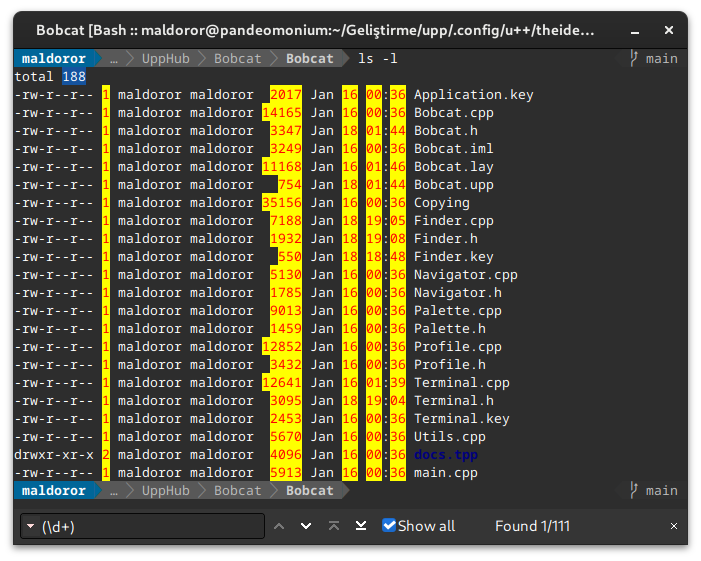
Also Finder, the search bar of Bobcat, has received some significant upgrades:
- Finder is now a frame instead of a dialog. This way, each terminal can have its own search bar and settings.
- Three search modes are implemented:
  1) Case sensitive search mode.
  2) Case insensitive search mode.
  3) Regex-based (PCRE) search mode.
- All search modes have the ability to move among the found strings.
- Finder has its own keyboard shortcuts group in the shortcuts manager and each shortcut can be configured by the user.
- And lot more...
A screenshot of Finder, running on regex mode:
Best regards,
Oblivion
Github page: https://github.com/ismail-yilmaz
Bobcat the terminal emulator: https://github.com/ismail-yilmaz/Bobcat
TerminalCtrl package https://github.com/ismail-yilmaz/Terminal
[Updated on: Thu, 18 January 2024 17:32] Report message to a moderator |
|
|
|
| Re: Bobcat, a cross-platform terminal emulator [message #60447 is a reply to message #60347] |
Sun, 04 February 2024 16:28 |
Oblivion
Messages: 1275
Registered: August 2007
|
Senior Contributor |
|
|
Hi,
After some delay, Bobcat has gained a cool new feature: A customizable hyperlink maker called "Linkifier".
(Taken from the github):
- It is now possible to set multiple patterns to be detected and treated as hyperlinks.
- Linkifier has a per-profile settings. So in each profile the user can have different set of patterns. Patterns can be set via the profile settings -> Linkifier tab or directly via the .profile file.
- At this time the links are opened by the Upp's own launcher. But I have already made it possible to configure and set a separate command for each linkifier pattern. i.e. in the following days Bobcat will gain the ability to set the launcher per hyperlink pattern.
Best regards,
Oblivion
Github page: https://github.com/ismail-yilmaz
Bobcat the terminal emulator: https://github.com/ismail-yilmaz/Bobcat
TerminalCtrl package https://github.com/ismail-yilmaz/Terminal
|
|
|
|
|
|
|
|
| Re: Bobcat, a cross-platform terminal emulator [message #60942 is a reply to message #60347] |
Sun, 13 October 2024 00:23 |
Oblivion
Messages: 1275
Registered: August 2007
|
Senior Contributor |
|
|
Hi,
With the refactored PtyProcess class of TerminalCtrl, Bobcat has gained a new feature, specifically in Windows environemnt:
- On windows, it is now possible to select a pty process type (either WinPty, or ConPty) for each profile, on-the-fly, and both pty implementations are available at the same time.
Best regards,
Oblivion
Github page: https://github.com/ismail-yilmaz
Bobcat the terminal emulator: https://github.com/ismail-yilmaz/Bobcat
TerminalCtrl package https://github.com/ismail-yilmaz/Terminal
|
|
|
|
| Re: Bobcat, a cross-platform terminal emulator [message #61091 is a reply to message #60347] |
Sat, 16 November 2024 13:15 |
Oblivion
Messages: 1275
Registered: August 2007
|
Senior Contributor |
|
|
Hi,
Since Bobcat ise getting closer and closer to its first release, it sure needed an icon.
So here it is, Bobcat now officially has an icon!
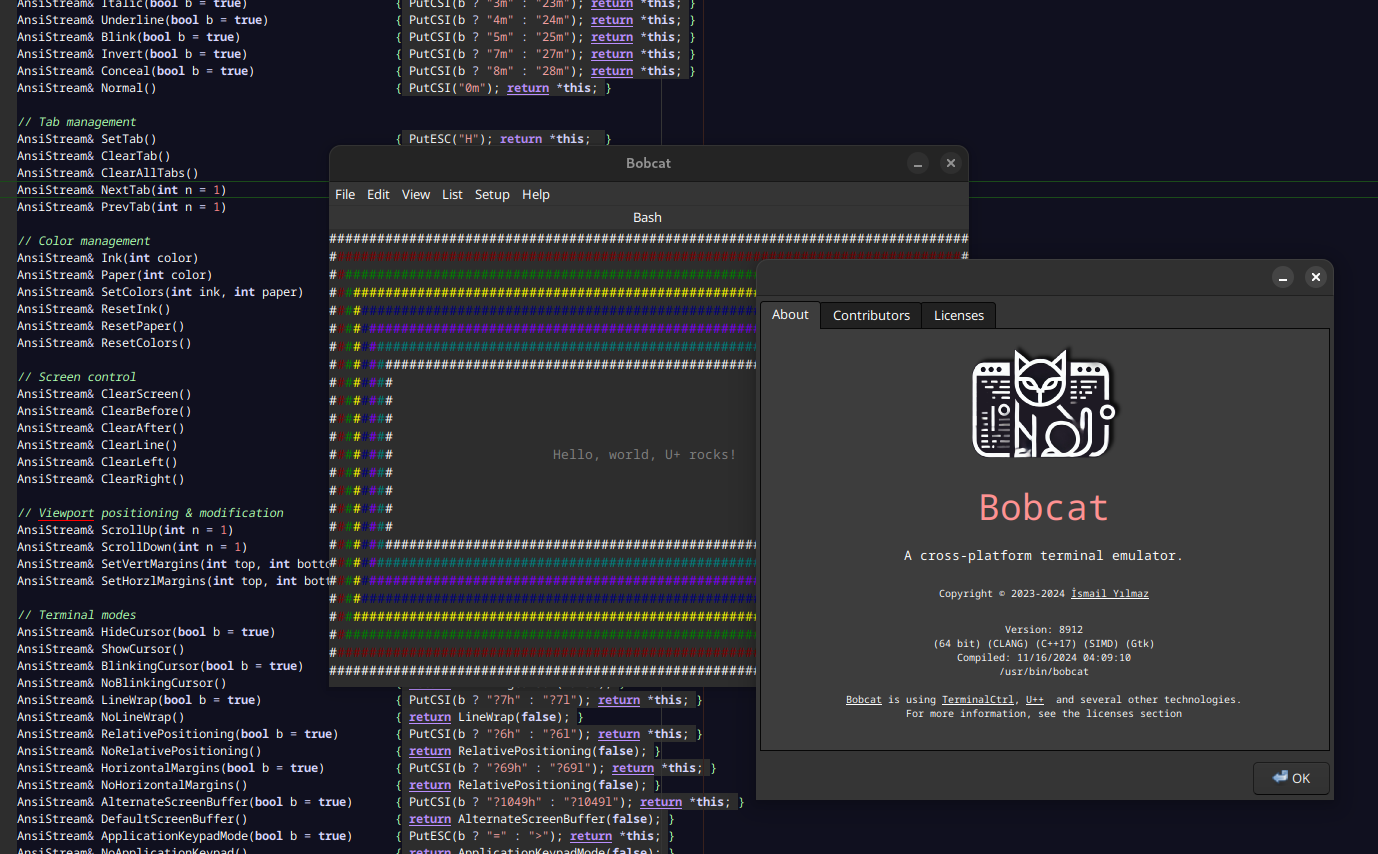
Notice that there is another goodie in the background that will be published (with TerminalCtrl's next release). It is called TerminalTools package.
As it names suggest, it was made for testing TerminalCtrl, but now I decided to publish it as a terminal tools package. It is pretty light-weight, yet it can be used to build text user interfaces (TUI), or prettify your console apps.
Stay tuned.
Best regards,
Oblivion
Github page: https://github.com/ismail-yilmaz
Bobcat the terminal emulator: https://github.com/ismail-yilmaz/Bobcat
TerminalCtrl package https://github.com/ismail-yilmaz/Terminal
|
|
|
|
|
|
|
|
|
|
| Re: Bobcat, a cross-platform terminal emulator [message #61375 is a reply to message #60347] |
Thu, 02 January 2025 20:21 |
Oblivion
Messages: 1275
Registered: August 2007
|
Senior Contributor |
|
|
Well, I've looked into the latest hyped terminal in terminal "scene": ghostty.
It is definitely a good terminal with some good performance benchmarks, no doubt about that, since it uses shaders, while Bobcat don't.
Still, a basic find command on linux with same page and font size below is the average result of 10 repeats in scroll performance (command: time find /usr/share):
ghostty:
real    0m0,843s
user    0m0,217s
sys     0m0,626s

Bobcat:
real    0m0,788s
user    0m0,198s
sys     0m0,583s
While the memory consumption is:
ghostty: 158.8 MiB
Bobcat:  20.3 MiB
Definitely, on some graphics performance ghostty will beat Bobcat, due to its direct access to GPU (which I don't care, terminals don't really need 60FPS anyway) but I really do think Bobcat goes somewhat underappreciated, given its features and ease of use.  
Best regards,
Oblivion
Github page: https://github.com/ismail-yilmaz
Bobcat the terminal emulator: https://github.com/ismail-yilmaz/Bobcat
TerminalCtrl package https://github.com/ismail-yilmaz/Terminal
[Updated on: Thu, 02 January 2025 20:23] Report message to a moderator |
|
|
|
| Re: Bobcat, a cross-platform terminal emulator [message #61387 is a reply to message #60347] |
Sun, 05 January 2025 23:11 |
Oblivion
Messages: 1275
Registered: August 2007
|
Senior Contributor |
|
|
Hi,
Bobcat's Navigator (overview mode) has gained some useful functionality and further polished.
1. Navigator: It is now possible to swap the position of terminals via overview mode. E.g. you can reorder them. (This functionality requires the updated StackCtrl, be sure to check it first).
2. Navigator: It is now possible to change key bindings of Navigator. ESC and RETURN are fixed keys. All others are (and will be) configurable.
3. Navigator: It is now possible to paste clips to terminals via Navigator. Just drag and drop your text & path onto the target terminal.
4. Navigator: Performance improvement by avoiding unnecessary synching the items.
Best regards,
Oblivion
Github page: https://github.com/ismail-yilmaz
Bobcat the terminal emulator: https://github.com/ismail-yilmaz/Bobcat
TerminalCtrl package https://github.com/ismail-yilmaz/Terminal
|
|
|
|
|
|
|
|
|
|
|
|
|
|
|
|
| Re: Bobcat, a cross-platform terminal emulator [message #61415 is a reply to message #61413] |
Fri, 31 January 2025 12:12 |
Oblivion
Messages: 1275
Registered: August 2007
|
Senior Contributor |
|
|
Hello Lionel,
Quote:
Hello Oblivion,
you already compared Bobcat to other Terminal emulators, thank you for these comparisons. I would love to see how it also compares to Terminology. I'm sure you can find the comparison interesting, and maybe there are some inspirations to take there!
Kind regards
Lionel
I think it would be better if I compile some statistics across the terminal emulator "scene". Maybe I'll do that later.
As for Terminology, I'll do a more detailed comparison (feature set & performance) later, but here is a "sneak-peek" version:
I've run extremely demanding notcurses demos on both Bobcat & Terminology. Below are the results:
Note:
Page size, font (Maple mono) and font size (13) is the same for both of the emulators.
However, it seems that Terminology doesn't support true color mode (or I couldn't find any settings for it), while Bobcat has true color mode. So, I have to run the benchmark/demo set in 256 color mode (TERM=xterm-256color):
Bobcat is on the left, and Terminology is on the right:

Also the average results of 10 rounds of "time /find/usr/share" command (write and scrolling performance, with a scrollback buffer of 1024 lines on both terminal emulators):
Bobcat:
real    0m0,830s
user    0m0,188s
sys     0m0,632s

Terminology:
real	0m1,120s
user	0m0,159s
sys	0m0,710s
It is not bad, is it?
Best regards,
Oblivion
Github page: https://github.com/ismail-yilmaz
Bobcat the terminal emulator: https://github.com/ismail-yilmaz/Bobcat
TerminalCtrl package https://github.com/ismail-yilmaz/Terminal
[Updated on: Fri, 31 January 2025 12:22] Report message to a moderator |
|
|
|
|
|
|
|
|
|
|
|
| Re: Bobcat, a cross-platform terminal emulator [message #61423 is a reply to message #60347] |
Sun, 02 February 2025 20:31 |
Oblivion
Messages: 1275
Registered: August 2007
|
Senior Contributor |
|
|
Hi,
As of today and with this githup PR, you can use Bobcat with TheIDE, if Bobcat is installed in your system (currently it supports linux, bsd & flatpak. (Windows will soon follow.)
Since there is no official installer (yet), you'll have to manually copy the bobcat executable to the "/usr/bin" (linux), /usr/local/bin" (bsd), "/run/host/bin" (flatpak).
Best regards,
Oblivion
Github page: https://github.com/ismail-yilmaz
Bobcat the terminal emulator: https://github.com/ismail-yilmaz/Bobcat
TerminalCtrl package https://github.com/ismail-yilmaz/Terminal
|
|
|
|
|
|
|
|
|
|
| Re: Bobcat, a cross-platform terminal emulator [message #61520 is a reply to message #60347] |
Sun, 02 March 2025 22:16 |
Oblivion
Messages: 1275
Registered: August 2007
|
Senior Contributor |
|
|
Hi,
Bobcat v0.9.1 is released:
Service Release includes an important bugfix and some small improvements:
CmdArg: Command handling is fixed.
CmdArg: Font listing and face & size setting are now possible. (Related new options: list-fonts, font-family, and font-size)
On Windows, simply download the zip file, extract it, and run Bobcat.
On *NIX variants, you can use the fast makefile, umk, or TheIDE to compile Bobcat. The next release of Bobcat will also include an Arch Linux/Pacman package (on GitHub) and, eventually, a Flatpak version.
Since Bobcat can use the re-written version of ConHost on Windows (OpenConsole.exe), it now supports many features that were previously exclusive to *NIX systems, out of the box.
For example, you can now run NeoVim and Yazi (an awesome terminal file manager) on Bobcat's Windows builds.
Here's a screenshot:

Best regards,
Oblivion
Github page: https://github.com/ismail-yilmaz
Bobcat the terminal emulator: https://github.com/ismail-yilmaz/Bobcat
TerminalCtrl package https://github.com/ismail-yilmaz/Terminal
[Updated on: Sun, 02 March 2025 22:17] Report message to a moderator |
|
|
|
|
|
|
|
Goto Forum:
Current Time: Wed Sep 02 12:11:46 GMT+2 2026
Total time taken to generate the page: 0.02800 seconds
|
 U++ framework
 Search
 Help
Help Members
 Register
 Login
Login Home
Home




