Home » U++ TheIDE » U++ TheIDE: Compiling, Linking, Debugging of your packages » Emscripten compilation & linking
| Emscripten compilation & linking [message #61970] |
Fri, 10 April 2026 23:55  |
 frederik.dumarey
Messages: 35
Registered: December 2021
Location: Belgium
|
Member |
|
|
I'm trying to use TheIDE as build method for emcc.
Emcc has been setup correctly, with all path environment variables. So emcc --version is working fine.
I added a build method with some settings:
builder: gcc
compiler name: emcc
common options: -o output.html
common c++ options: -s WASM=1 -O3
INCLUDE dir to emscripten\system\include
BIN dir to emscripten\system\bin
But when I'm building using this method CTRL-F7 or F7 I get some directories created, but never the html,js and wasm files.
Regards,
Frederik Dumarey
Belgium
|
|
|
|
| Re: Emscripten compilation & linking [message #61971 is a reply to message #61970] |
Sat, 11 April 2026 10:51  |
Oblivion
Messages: 1264
Registered: August 2007
|
Senior Contributor |
|
|
Hi Frederik,
Unless you're trying to compile U++ into wasm (good news, I am porting it to it and Core is already ported), here's what you need:
WASM=1 is default, you don't need to explicity set it.
In link options set: -sENVIRONMENT=web
If you are compiling a cpp project, use em++ instead of emcc.
Don't set the -o in builder. Instead, in output mode, set the target file override to myfile.js.
E.g:
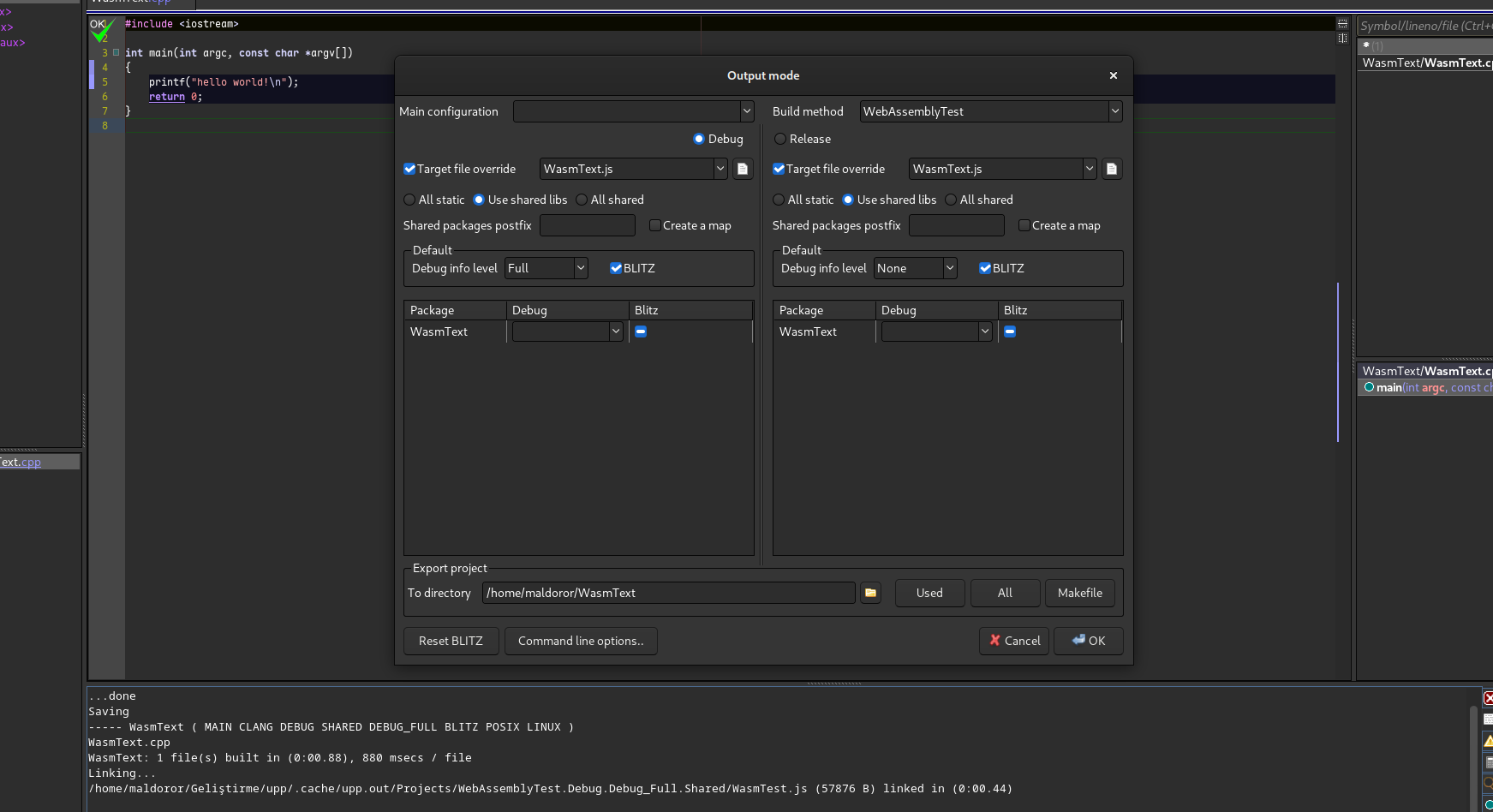
Path:
PATH = "/usr/lib/emscripten;/usr/lib/emscripten/system/bin";
Path:
LIB = "/usr/lib/emscripten/system/lib;/lib";
This is for archlinux, but the correct paths should be similar in other distros or on windows.
Best regards,
Oblivion
Github page: https://github.com/ismail-yilmaz
Bobcat the terminal emulator: https://github.com/ismail-yilmaz/Bobcat
[Updated on: Sat, 11 April 2026 10:52] Report message to a moderator |
|
|
|
| Re: Emscripten compilation & linking [message #61972 is a reply to message #61971] |
Sat, 11 April 2026 16:31 |
frederik.dumarey
Messages: 35
Registered: December 2021
Location: Belgium
|
Member |
|
|
Hello Oblivion,
Thanks! Works perfectly.
Great to read that Core is already ported, can't wait to see CtrlLib ported too 
With your settings you get the Javascript and the Wasm file right, if somebody wants a html test file, just add the -o output.html setting, and you get a html file which you can serve using a local web server with python -m http.server [port]. Run the last command in the directory where the html, js and wasm file have been compiled.
This will be added to the book. Just for your information: I also made an example with the SDL library for a GUI tutorial, also working fine with this options.
Regards,
Frederik.
Regards,
Frederik Dumarey
Belgium
|
|
|
|
Goto Forum:
Current Time: Sat Apr 25 03:32:32 GMT+2 2026
Total time taken to generate the page: 0.00537 seconds
|
 U++ framework
 Search
 Help
Help Members
 Register
 Login
Login Home
Home




