Home » Developing U++ » UppHub » Very Simple Report Generator (Use QTF format)
| Very Simple Report Generator (Use QTF format) [message #24050] |
Tue, 22 December 2009 23:14  |
|
|
I make my 3 cents in the common fund decisions.
For my needs, I made a simple report editor which allows users to easily edit the reporting forms.
Allows:
- Substitute the arbitrary variables and functions (defined at the stage of application programming);
- Generate reports on the database (well, or for any tabular data);
- Insert images, and graphics functions (including data from the database);
The end user is editing a report in a file qtf-template in a program such as UWord or directly in the program (qtf-template can be stored in a separate database table).
The idea is to standard qtf-file to use as a template simply by replacing the variables they refer to the real data.
Variables in the template are of the form ##VARIABLE - Report generator simply finds them in the template and replace.
Method of substitution is programmed using the Callback-functions.
That package.
-
 Attachment: RepGen.7z
(Size: 1.98KB, Downloaded 871 times)
SergeyNikitin<U++>( linux, wine )
{
under( Ubuntu || Debian || Raspbian );
}
|
|
|
|
|
|
| Re: Very Simple Report Generator (Use QTF format) [message #24052 is a reply to message #24051] |
Tue, 22 December 2009 23:22  |
|
|
Also, spread one of the examples in which the print function converted to RepGen.
It is necessary to put in a folder MyApps/AddressBookXML2_RepGen.
To choose the form of a report, you need to choose the menu command Select Report Template qtf one of the files in a subfolder of reports. and then print.
SergeyNikitin<U++>( linux, wine )
{
under( Ubuntu || Debian || Raspbian );
}
|
|
|
|
|
|
|
|
|
|
|
|
| Re: Very Simple Report Generator (Use QTF format) [message #24062 is a reply to message #24059] |
Wed, 23 December 2009 19:48 |
|
|
About placement in Bazaar - I do not know how to do it.
Maybe we need to write in this branch fixed topic on HOW TO PLACE PROJECTS IN BAZAAR?
I propose to join, and improve this generator. I think it will be useful to many, especially beginners.
I think that we'll get the conversion control is not using CallBacks, but by calling the virtual member functions. This is the first I saw.
SergeyNikitin<U++>( linux, wine )
{
under( Ubuntu || Debian || Raspbian );
}
|
|
|
|
| Re: Very Simple Report Generator (Use QTF format) [message #24063 is a reply to message #24059] |
Wed, 23 December 2009 20:22 |
 Didier
Messages: 740
Registered: November 2008
Location: France
|
Contributor |
|
|
Hello again Sergey,
Looks pretty good for a start, and I think it can easily be generalized to a more complexe loop mecanismes:
All we need is a depth counter that keeps track of:
- depth
- context zone ( dependant of depth )
==> example: [depth, [0, 0, ... ]]
##BP                [0,[0]]
  ##VAR1            .
  ##VAR2            .

  ##BP                [1,[0,0]]
    ##VAR31           .
    ##VAR32           .
  ##EP              .

  ##BP                [1,[0,1]]
    ##VAR41           .
    ##VAR42           .
  ##EP              .

  ##BP                [1,[0,2]]
    ##VAR51           .
    ##VAR52           .
  ##EP              .

  ##VAR5            .
##EP              .

##BP                [0,[1]]
  ##VAR6            .

  ##BP                [1,[1,0]]
    ##VAR31           .
    ##VAR32           .
  ##EP              .
##EP              .
The following callbacks could then be called with the depth/contex info as parameters
- RepGenCalculateStart
- RepGenCalculateBody
- RepGenCalculateFinish
The only other part would need modification is the "body string grabber" which needs to take in account the loop/context imbrication.
I think I'm gonna give it a shot 
If you don't have a better Idea of course 
|
|
|
|
| Re: Very Simple Report Generator (Use QTF format) [message #24067 is a reply to message #24063] |
Thu, 24 December 2009 01:35 |
|
|
I do not quite understand the question. Try to speak in other words.
As I understand it - you need Group Header / Group footer, or even SubGroupHeader and SubGroupFooter.
If so, then I'm going to raise the functional RepGen to functional GroupFooter / GroupHeader (with Totals / SubTotals), the more that make up this left quite a bit.
With all the improvements I want to interface would remain extremely simple.
SergeyNikitin<U++>( linux, wine )
{
under( Ubuntu || Debian || Raspbian );
}
|
|
|
|
| Re: Very Simple Report Generator (Use QTF format) [message #24068 is a reply to message #24052] |
Thu, 24 December 2009 09:13 |
|
|
| sergeynikitin wrote on Wed, 23 December 2009 00:22 |
Also, spread one of the examples in which the print function converted to RepGen.
It is necessary to put in a folder MyApps/AddressBookXML2_RepGen.
To choose the form of a report, you need to choose the menu command Select Report Template qtf one of the files in a subfolder of reports. and then print.
|
Nice work Sergey!
But how about to make this report templates visual editable?
Now I do report in Oracle BI Publisher for my company. It is very interesting because extract mechanism (DataTemplate) and visual template (LayoutTemplate) is separated.
The mechanism is follow:
- DataTemplate is a xml file with simplisted rules and sql selects.
- LayoutTemplate can be .rtf, .xls, .pdf, .xsl o .fo file format. I do Layout templates in .rtf and edit it easy in Microsoft word or OpenOffice writer.
Another interesting mechanism is Data Composition System in 1C (http://v8.1c.ru/overview/Term_000000093.htm#1)
Both variant I was tested. 1C mechanism is more interesting, because exists possibility to change data sets (add.remove columns, set filter, make layout template more flexible : http://v8.1c.ru/overview/Term_000000616.htm#1).
Regards, Ion (tojocky)
|
|
|
|
|
|
|
|
| Re: Very Simple Report Generator (Use QTF format) [message #24076 is a reply to message #24062] |
Thu, 24 December 2009 17:18 |
|
|
| sergeynikitin wrote on Wed, 23 December 2009 20:48 |
About placement in Bazaar - I do not know how to do it.
Maybe we need to write in this branch fixed topic on HOW TO PLACE PROJECTS IN BAZAAR?
I propose to join, and improve this generator. I think it will be useful to many, especially beginners.
I think that we'll get the conversion control is not using CallBacks, but by calling the virtual member functions. This is the first I saw.
|
Do you have access(username and password) to edit bazaar svn from google?
|
|
|
|
| Re: Very Simple Report Generator (Use QTF format) [message #24077 is a reply to message #24076] |
Thu, 24 December 2009 19:14 |
|
|
Reply to Tojocky:
As rightly said Didier this generator for a completely simple forms in which logic and business logic MUST hardcoded by author.
In addition, the method of editing is targeted specifically to users who are not at odds with the computer, but they managed to learn one of the office suites. For a more comprehensive report in fact need to apply more powerful tools.
About placement in Bazaar - I do not know how to do it:
I havn't password to google svn.
The answer to Didier:
With regexp in fact a problem. I discovered this when understood in pcre-regexp. The fact that the implementation, application of U++ is not quite standard - so not all described in the documentation work.
I have not watched your example. I'll see tonight. .
I do not understand wishes about the context. If you can repeat in other words about the context idea.
SergeyNikitin<U++>( linux, wine )
{
under( Ubuntu || Debian || Raspbian );
}
|
|
|
|
| Re: Very Simple Report Generator (Use QTF format) [message #24080 is a reply to message #24077] |
Thu, 24 December 2009 21:00 |
|
|
Hi Didier!
I looked at your addition to repgen.
I did not understand the purpose for which the right context and zone. (By the way calls ##BP and ##BT can not be nested)
If you somehow have to enumerate, it is easiest to do in client callbacks.
SergeyNikitin<U++>( linux, wine )
{
under( Ubuntu || Debian || Raspbian );
}
|
|
|
|
|
|
| Re: Very Simple Report Generator (Use QTF format) [message #24106 is a reply to message #24095] |
Sun, 27 December 2009 00:26 |
|
|
It's just a different terminology?
I feel no need to create additional entities.
This problem is perfectly solved by the presence of Group Header / Group Footer.
I'm trying to do 2 things:
- Group header / footer,
- Variable number of columns.
SergeyNikitin<U++>( linux, wine )
{
under( Ubuntu || Debian || Raspbian );
}
|
|
|
|
|
|
|
|
| Re: Very Simple Report Generator (Use QTF format) [message #24187 is a reply to message #24140] |
Sun, 03 January 2010 23:09 |
Didier
Messages: 740
Registered: November 2008
Location: France
|
Contributor |
|
|
Sergey,
I finally have a working example that manages the following points:
* Header/body/footer management
* nesting anywhere and with no limitations (you nest/nest/nest ...)
* body looping is managed outside the user code
==> The user code is therefore greatly simplified
* text replacement is managed automatically even when when a part
is separated into several parts due to nesting
==> all you have to do is reference the text replacements you
want to do and they will be done
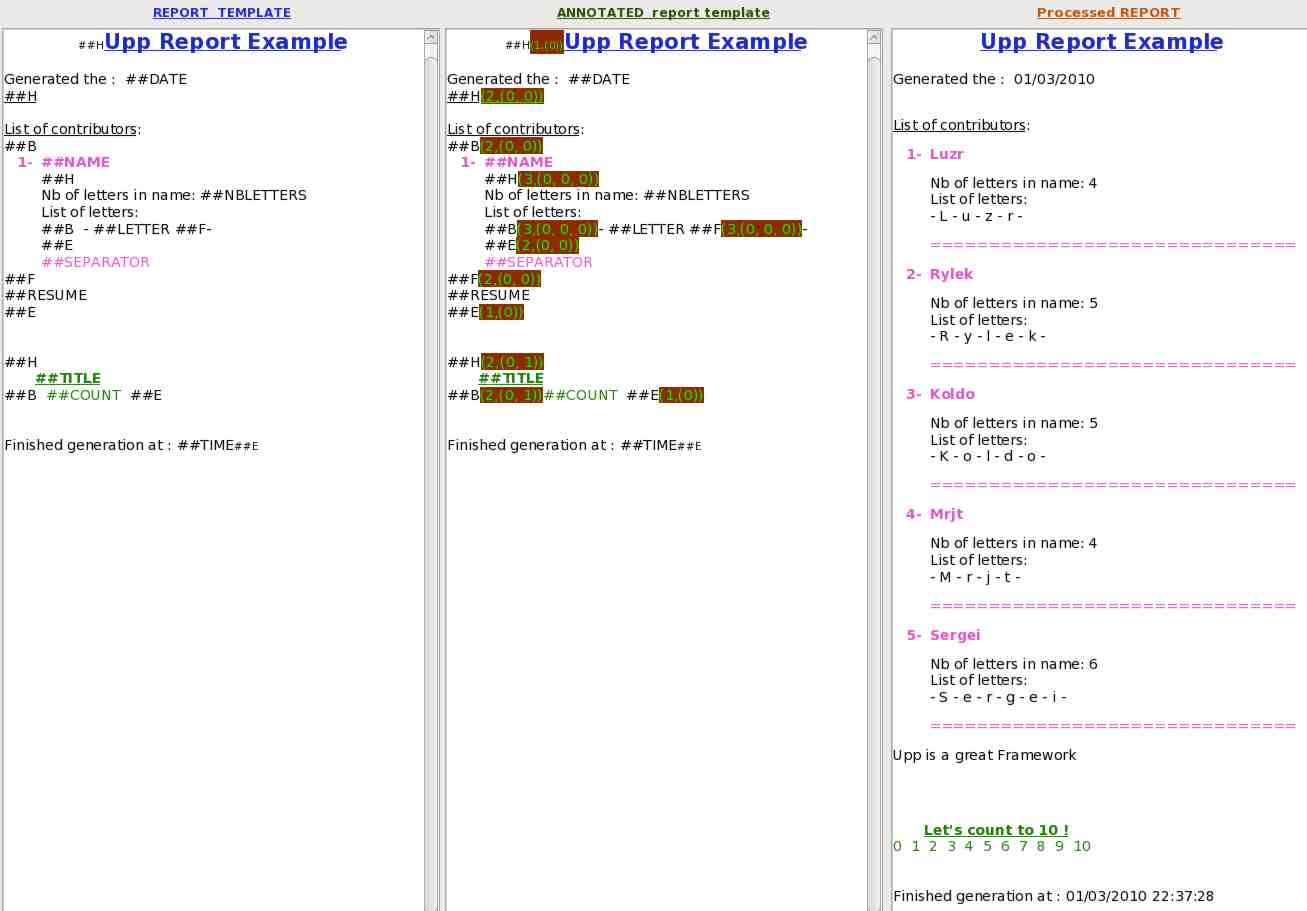
In order to help the coding of the user code, an annotated template can be generated:
It is annotated with the context information (see example below).
The code isn't finished so there are some restrictions for the moment:
* no table (row adding)management
* bad management of bullets (line adding)
The tags used are the following:
##H : Section start (and HEADER start)
##B : Section part BODY start (and also end of HEADER)
##F : Section part FOOTER start (and also end of HEADER or BODY)
##E : Section END (and also end of previous section part)
##H and ##E MUST BE present, the other two are optional !
Here is a screen-shot of the example application
[Updated on: Mon, 04 January 2010 11:38] Report message to a moderator |
|
|
|
|
|
| Re: Very Simple Report Generator (Use QTF format) [message #24196 is a reply to message #24188] |
Mon, 04 January 2010 12:29 |
|
|
Didier!. I looked at your code. It seemed to me that you're too complicated. Of course there may be problems which need such a decision.
I set the goal for their generators are somewhat different:
- Transparency and simplicity of the client code,
- Transparency and understandability document template,
- NOT a universal code for different types of reports
(the scheme and the availability of data groups and totals should be set in the client code, but not in the template)
It is necessary for very simple printed forms (documents, calculations, etc.)
I think that for a little more complex forms of documents, this scheme is not suitable.
I think that the QTF format is not designed for storing various information such as schema report, and it would be better to make some QTR format in which to store templates of the report, data schemas and calculation schemes.
To implement the format QTR (in contrast to the QTF) need a template editor and editor of data schemas. This is a problem. May need to take a closer look in the direction RichPara.
As for my version, the next step I plan to make a store QTF templates in SQL database, and a set of controls for easy embedding in the application of a simple reports system.
SergeyNikitin<U++>( linux, wine )
{
under( Ubuntu || Debian || Raspbian );
}
|
|
|
|
| Re: Very Simple Report Generator (Use QTF format) [message #24200 is a reply to message #24196] |
Mon, 04 January 2010 14:22 |
Didier
Messages: 740
Registered: November 2008
Location: France
|
Contributor |
|
|
Thank's for looking my version of Report Generator.
| sergeynikitin wrote on Mon, 04 January 2010 12:29 |
Didier!. I looked at your code. It seemed to me that you're too complicated. Of course there may be problems which need such a decision.
|
My example is more complicated only because I added nested groups with header/body/footer
and because my template document is completely filled with TAGs and replacement vars (not a lot of real text to catch on to)
| Quote: |
I set the goal for their generators are somewhat different:
- Transparency and simplicity of the client code,
- Transparency and understandability document template,
- NOT a universal code for different types of reports
(the scheme and the availability of data groups and totals should be set in the client code, but not in the template)
|
If the user code manages all the groups and body repetition, the user code will drag in unnecessary complexity. for ex. managing repetition is always necessary so why not doing it once for all ?
| Quote: |
It is necessary for very simple printed forms (documents, calculations, etc.)
|
Nesting comes in handy very quickly, and to be honest I need it for my spearfishing app (to print out competition results).
| Quote: |
I think that for a little more complex forms of documents, this scheme is not suitable.
I think that the QTF format is not designed for storing various information such as schema report, and it would be better to make some QTR format in which to store templates of the report, data schemas and calculation schemes.
To implement the format QTR (in contrast to the QTF) need a template editor and editor of data schemas. This is a problem. May need to take a closer look in the direction RichPara.
|
Yes I agree. But this way is the long way and it will take a lot of time to go!
| Quote: |
As for my version, the next step I plan to make a store QTF templates in SQL database, and a set of controls for easy embedding in the application of a simple reports system.
|
Great !
On my side I'm gonna push in tables and bullets so that it can be usable for almost anything.
At least it will be available while waiting for a better and more complete solution.
( Until now I was generating reports by using RichText or by assembling QTF strings, so when I wanted to change a color or the global appearance it was not easy. And the user code, in this case was VERY complicated !! )
|
|
|
|
|
|
| Re: Very Simple Report Generator (Use QTF format) [message #24243 is a reply to message #24233] |
Thu, 07 January 2010 05:49 |
|
|
No problem! That's all you can do in the Callbacks.
The idea is interesting, I'll try to think how this can be done more beautifully and transparently.
Perhaps the introduction of parameters will be the best.
SergeyNikitin<U++>( linux, wine )
{
under( Ubuntu || Debian || Raspbian );
}
|
|
|
|
| Re: Very Simple Report Generator (Use QTF format) [message #24283 is a reply to message #24243] |
Fri, 08 January 2010 17:53 |
|
|
Hello Luigi!
And why not make some IMAGEs, for example IMAGE_1, IMAGE_2, IMAGE_3. Or for example IMAGE_TINY, IMAGE_SMALL, IMAGE_MEDIUM, IMAGE_LARGE, IMAGE_XXL and so on. I think this is fundamentally solve the problem. To do this, Callback, we simply declare the different challenges PlaceImage with different sizes.
The only flexible way, which I see is the definition of additional methods
- SubstVar1 (SubstVar with one parameter)
- SubstVar2 (SubstVar with two parameters)
- SubstVar3 (SubstVar with three parameters)
and
- PlaceImage1 (SubstVar with one parameter)
- PlaceImage2 (SubstVar with two parameters)
- PlaceImage3 (SubstVar with three parameters)
But this is still only plans.
SergeyNikitin<U++>( linux, wine )
{
under( Ubuntu || Debian || Raspbian );
}
|
|
|
|
| Re: Very Simple Report Generator (Use QTF format) [message #24288 is a reply to message #24283] |
Fri, 08 January 2010 20:04 |
 |
forlano
Messages: 1244
Registered: March 2006
Location: Italy
|
Senior Contributor |
|
|
| sergeynikitin wrote on Fri, 08 January 2010 17:53 |
Hello Luigi!
And why not make some IMAGEs, for example IMAGE_1, IMAGE_2, IMAGE_3. Or for example IMAGE_TINY, IMAGE_SMALL, IMAGE_MEDIUM, IMAGE_LARGE, IMAGE_XXL and so on. I think this is fundamentally solve the problem. To do this, Callback, we simply declare the different challenges PlaceImage with different sizes.
The only flexible way, which I see is the definition of additional methods
- SubstVar1 (SubstVar with one parameter)
- SubstVar2 (SubstVar with two parameters)
- SubstVar3 (SubstVar with three parameters)
and
- PlaceImage1 (SubstVar with one parameter)
- PlaceImage2 (SubstVar with two parameters)
- PlaceImage3 (SubstVar with three parameters)
But this is still only plans.
|
Hello Sergey,
I like the idea of IMAGE_TINY, IMAGE_SMALL, ecc... Perhaps these sizes can be hardcoded by #define and the coder can set them according the purpose of his program.
Luigi
|
|
|
|
|
|
|
|
|
|
|
|
|
|
|
|
|
|
|
|
|
|
|
|
|
|
|
|
Goto Forum:
Current Time: Fri Sep 11 01:44:25 GMT+2 2026
Total time taken to generate the page: 0.01611 seconds
|
 U++ framework
 Search
 Help
Help Members
 Register
 Login
Login Home
Home




 .
.
 .
.


