Topic++
Table of contents
1. Introduction
2. Basics
3. Quick description of Topic++ editor
4. Using Topic++ to create code reference
5. Export
6. Technical background
1. Introduction
Topic++ is a documentation system designed for U++, but usable for any project. Its main purpose is to make dealing with application related documents as easy as possible. It can be used to provide RichText resources for applications (including help), to prepare printed manuals and also to document code. Most documents you have encountered when dealing with U++ were created and managed using Topic++ (including the website).
Topic++ documents (usually called just "topics") are organized in topic groups that are parts of packages. They are logically divided in several groups - some group names are standardized, "src" should contain code-reference, "srcdoc" is for other code-related documents, "app" are document resources for applications.
U++ library is capable of including topics into target executable and exploiting them in user code. To see how this can be done, see "Topic" reference example.
2. Basics
To create a new topic group, right-click in the lower left pane of TheIDE, where package files are listed. From context menu, choose Insert package directory file(s) as if you open/create any other file. To path write the group name with .tpp extension, e.g. "app.tpp". Now press enter or click on Open and Topic editor with new group will appear. Now you have to add some topic to it. Right click in the topic listing area (see the picture in next paragraph). In the dialog that comes up you choose a name for the topic and its language. You can also include a template, which contains some predefined styles.
The actual process of writing the docs is very similar to writing anything in common rich text editor. You can add hyperlinks to any other documentation topic as well as to the Internet. You can add tables, images, use various fonts and colors or even define paragraph styles to make the editing really simple. You can also add code reference, to associate given paragraph with a piece of code which can then be accessed from the documentation.
3. Quick description of Topic++ editor
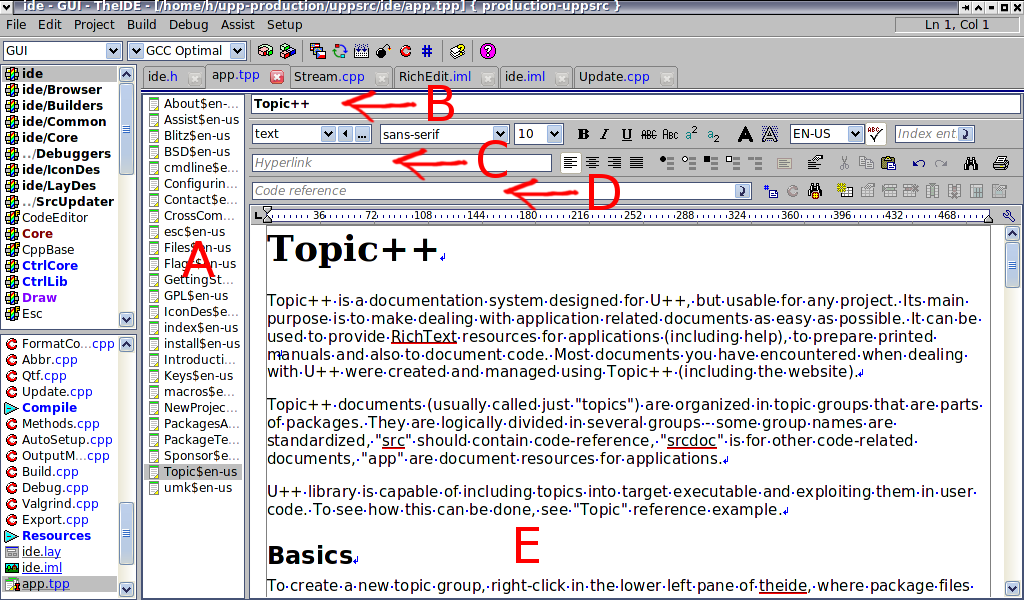
A List of topics in current group.
B Topic title. Will be displayed when using document as resource.
C Hyperlink. It can link to other topics or to external sources (http:// ....).
D Code reference. Connects actual paragraph with some source code element.
E Topic text.
4. Using Topic++ to create code reference
Topic++ is directly connected with Assist++ system to create and provide documentation of code elements. Each paragraph of topic can be connected with one code element using the paragraph label (F in Topic++ window description). This label contains unique code element signature - this way the paragraph can be connect with unambiguous code element.
There are two ways how to document a code element. Either directly from code editor or from Topic++ editor.

To add a documentation of code directly just click the green square in the left gutter. If the document is not documented, context menu will appear and let you select which topic group should be used or create a new one. Upon clicking on one of the option, the Topic++ editor will open at the newly added skeleton paragraph, which you can then edit to your liking.
To document one or more code elements from Topic++ editor, press  icon. Topic++ will bring the code browser dialog: icon. Topic++ will bring the code browser dialog:

Use the search fields to find the code elements you are interested in. Select elements you want to document by clicking on them (you can select more than one using Shift key) and press "OK":

As in the previous method, Topic++ inserts skeletons for documenting chosen code elements and binds them to the code via paragraph labels. All you have to do now is to fill in the description of elements and parameters.
To see the referenced piece of code click on the red  icon or press Alt+I. It work the other way around as well, from code editor you can access the docs by clicking on the icon or press Alt+I. It work the other way around as well, from code editor you can access the docs by clicking on the  little green squares an the left gutter at code editor, or you can just display a tool tip with the related paragraph by hovering mouse cursor over the green square. little green squares an the left gutter at code editor, or you can just display a tool tip with the related paragraph by hovering mouse cursor over the green square.
In order to detect problems with documentation, you can use two tools. Query in code browser dialog can be setup to display undocumented elements. "Find broken references" operation -  or Ctrl+F3 - searches through current group topic and detects any broken code references in paragraph labels. or Ctrl+F3 - searches through current group topic and detects any broken code references in paragraph labels.
5. Export
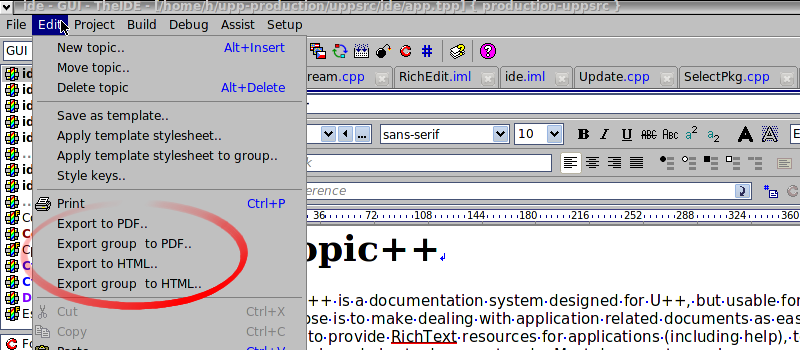
Aside from using the documentation directly inside your applications, it is also possible to export the documentation to HTML or Pdf files. To do so, just open the topic in editor and select one of the options in Edit menu:
6. Technical background
This paragraph is aimed at curious readers, who are interested in the inner machinery behind Topic++. Feel free to skip it if you want.
Each topic group is represented on hard drive as a directory, e.g. (uppsrc/Core/srcdoc.tpp/) which contains one *.tpp file for every topic. All *.tpp files are internally just a text file in QTF format (U++ specific rich formatted text format). TheIDE also creates "inclusion file" with .tppi extension for each topic and all.i file for each group. These files are useful for easy embedding the documentation into application (See the above mentioned "Topic" reference package).
|