U++ framework
Do not panic. Ask here before giving up.

Home » Developing U++ » UppHub » A terminal emulator widget for U++
Re: A terminal emulator widget for U++ [message #52143 is a reply to message #52139] Sat, 27 July 2019 11:30 Go to previous messageGo to next message
Oblivion is currently offline  Oblivion
Messages: 1267
Registered: August 2007
Senior Contributor
Hello Koldo,

Yeah it's very impressive tool. I enjoyed it.
It also helps a lot for testing.

Best regards,
Oblivion


Re: A terminal emulator widget for U++ [message #52153 is a reply to message #51415] Mon, 29 July 2019 23:23 Go to previous messageGo to next message
Oblivion is currently offline  Oblivion
Messages: 1267
Registered: August 2007
Senior Contributor
Hello,

A small but important update.

True/direct (24-bit) color support has landed.


It is added as a compile-time option this time. (It can be easily switched using TheIDE)
The reason for this decision is that true color support increases the size of each cell by 4 bytes. (Not worriyingly high but I'm being cautious. Smile )


Latest code of terminal package can be found at: https://github.com/ismail-yilmaz/upp-components/tree/master/ CtrlLib/Terminal


Best regards,
Oblivion


[Updated on: Mon, 29 July 2019 23:26]

Report message to a moderator

Re: A terminal emulator widget for U++ [message #52179 is a reply to message #51415] Fri, 02 August 2019 13:54 Go to previous messageGo to next message
Oblivion is currently offline  Oblivion
Messages: 1267
Registered: August 2007
Senior Contributor
Latest round of updates:

Terminal: Clipboard and DND operations improved.
Terminal: Drag animation for drag-copy operation implemented.
Terminal: WhenClip event added. (Allows client code to inspect/accept/reject pasted/dropped clips.
Terminal: Api doc updated accordingly.


Best regards,
Oblivion


Re: A terminal emulator widget for U++ [message #52195 is a reply to message #51415] Wed, 07 August 2019 21:24 Go to previous messageGo to next message
Oblivion is currently offline  Oblivion
Messages: 1267
Registered: August 2007
Senior Contributor
Hello,

Terminal package is updated.
Initial support for a rare but much requested feature in the world of terminal emulators has landed:

- Sixel graphics support is added to the Terminal package. It is now possible to view sixel images, using the Terminal package.  However, the initial support is only for external viewing. Embedded images are a TODO.

- A basic terminal example with sixel viewer is also added to the package.

- SixelRenderer class and a convenience function: RenderSixelImage is also added to the package. This class and the function can also be used as a stand-alone sixel renderer.

- Alt-key handling is improved.


A screenshot:
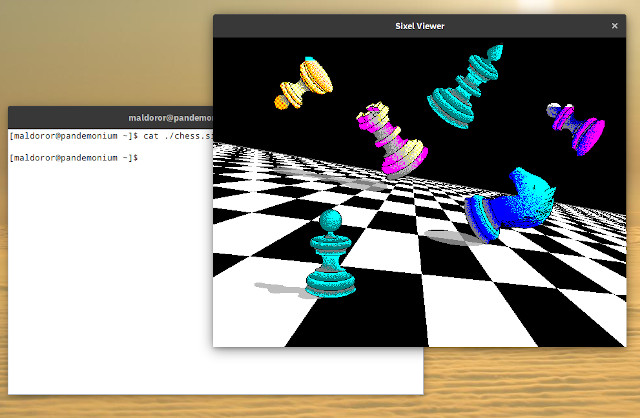
index.php?t=getfile&id=5882&private=0

The git repo address of upp-components: https://github.com/ismail-yilmaz/upp-components


Reviews, criticism, patches, bug reports, etc., are always welcome.

Best regards,
Oblivion


[Updated on: Wed, 07 August 2019 21:44]

Report message to a moderator

Re: A terminal emulator widget for U++ [message #52227 is a reply to message #51415] Mon, 12 August 2019 11:39 Go to previous messageGo to next message
Oblivion is currently offline  Oblivion
Messages: 1267
Registered: August 2007
Senior Contributor
Hello,

A small update on the progress of the Terminal ctrl's embedded image (sixel, etc.) support. Cool
(Note that I have yet to push changes. I'll problably push the changes next week, as there are some minor issues to solve.)

index.php?t=getfile&id=5891&private=0

This will not break the existing behavior. Sixel support will be available in both embedded and external mode.

Best regards,
Oblivion


[Updated on: Mon, 12 August 2019 11:40]

Report message to a moderator

Re: A terminal emulator widget for U++ [message #52252 is a reply to message #51415] Fri, 16 August 2019 14:29 Go to previous messageGo to next message
Oblivion is currently offline  Oblivion
Messages: 1267
Registered: August 2007
Senior Contributor
Hello,

A day for big updates Smile

Terminal ctrl has gained embedded images and Upp::Display support.

Terminal: Embedded images support  is added (currently, sixel).
Terminal: Renderer is improved and further optimized.
Terminal: Upp::Display support for image objects are added.
Terminal: LeftAlignedImageDisplay() and RightAlingnedImageDisplay() functions added.


Screenshot:

index.php?t=getfile&id=5894&private=0


You can always find the new version here:

https://github.com/ismail-yilmaz/upp-components/tree/master/ CtrlLib/Terminal

Best regards,
Oblivion


[Updated on: Fri, 16 August 2019 14:35]

Report message to a moderator

Re: A terminal emulator widget for U++ [message #52415 is a reply to message #51415] Sun, 22 September 2019 12:01 Go to previous messageGo to next message
Oblivion is currently offline  Oblivion
Messages: 1267
Registered: August 2007
Senior Contributor
Hello,

Terminal package is finally updated to v0.2.

Image rendering and handling mechanism is vastly improved. Smile

- Terminal: SixelRenderer class is rewritten;
- Terminal: SixelRaster class, a StreamRaster interface for sixel images, is added to the package.
- Terminal: A subset of xterm's window-op reports are implemented.
- Terminal: An I/O synchronization issue with the PtyProcess class that led to artifacts on screen on some setups is fixed.
- Terminal: Inline image support is improved.
- Terminal: Room is made for other inline image protocols.
- Terminal: WhenSixel event is removed in favor of a generic WhenImage event.
- Terminal: Image rendering strategy is changed to cell-level rendering for further flexibility.
- Terminal: An LRU-type shared image data cache is implemented.
- Terminal: Support for Jexer, a modern text user interface (TUI) and windowing system for terminal emulators, is added.
- Terminal: A general purpose data variable is added to the cell structure.
- Terminal: SGR image flag is added to the cell structure.
- Examples: Examples are further simplified.
- Various optimizations and fixes.
- Image gallery is updated.


The "final boss" for this release was the jexer support. Jexer is a modern text user interface and window manager that runs inside terminal emulators. (It is an advanced terminal multiplexer.)

There were only four high-end terminal emulators (xterm, mlterm, rlogin and jexer itself) fully supporting the jexer, Now they are five Smile

I've made short videos of Terminal ctrl.
The ssh terminal example on windows also demonstrates the power of Core/SSH package. (It connects to a Linux device over 300 km distance, and runs jexer with inline images support, which is very demanding). Cool


On Linux
- A basic terminal example with sixel graphics, and mouse tracking support.
- Used apps and tools: Jexer text user interface (TUI), GNUPlot, Emacs, Nano, htop, ncurses demos.
- Link: https://vimeo.com/359241367

On Windows
- A basic SSH2 terminal example with sixel graphics, and mouse tracking support.
- Used apps and tools: Jexer text user interface.
- Link: https://vimeo.com/361556973

On Turtle HTML-5 backend (in a web browser)
- A basic terminal example with sixel graphics, and mouse tracking support.
- Used apps and tools: Jexer text user interface.
- Link: https://vimeo.com/361558519

Screenshot (Windows, ssh terminal example):
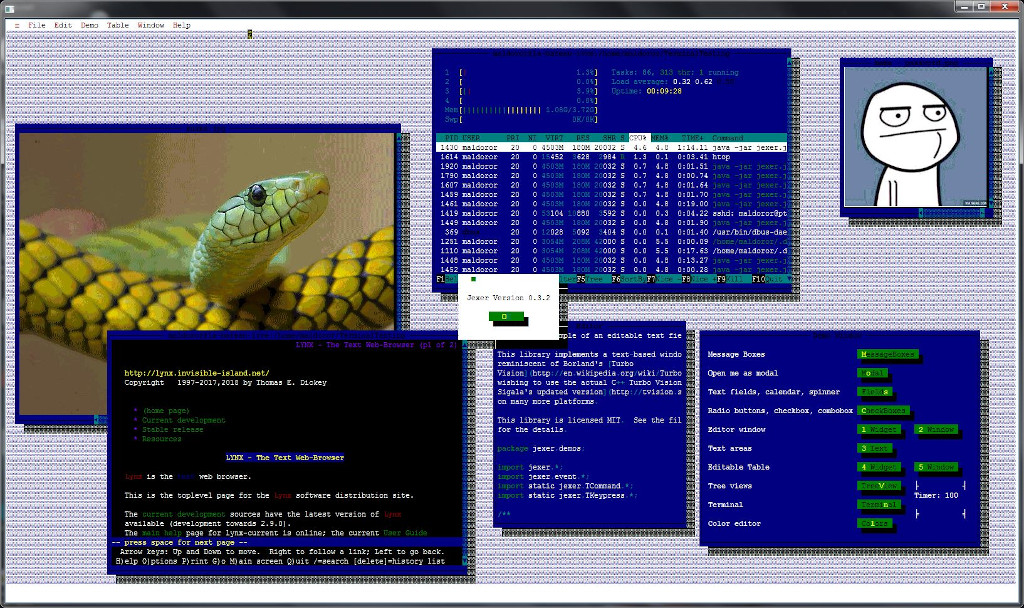
index.php?t=getfile&id=5912&private=0

Terminal@: https://github.com/ismail-yilmaz/upp-components/tree/master/ CtrlLib/Terminal

Best regards,
Oblivion


[Updated on: Sun, 22 September 2019 12:46]

Report message to a moderator

Re: A terminal emulator widget for U++ [message #52438 is a reply to message #51415] Sat, 28 September 2019 22:00 Go to previous messageGo to next message
Oblivion is currently offline  Oblivion
Messages: 1267
Registered: August 2007
Senior Contributor
Hello,

A new example is added to the package: Ssh terminal splitter.

This example demonstrates the interaction between the Terminal widget and Ultimate++'s Core/SSH package, in a multithreaded environment.
Therefore it also demonstrates the usage and power of U++s own Core/SSH package in a multithreaded GUI environment.


Link to a short video showing the ssh terminal splitter in action on Windows:

https://vimeo.com/362532208

A screenshot taken from the above video:

index.php?t=getfile&id=5915&private=0


Best regards,
Oblivion


[Updated on: Sat, 28 September 2019 22:02]

Report message to a moderator

Re: A terminal emulator widget for U++ [message #52644 is a reply to message #51415] Sun, 03 November 2019 15:03 Go to previous messageGo to next message
Oblivion is currently offline  Oblivion
Messages: 1267
Registered: August 2007
Senior Contributor
Hello,

Terminal package and Terminal ctrl is updated.

There are fixes and clean-ups here and there, but most notably a new feature is added:

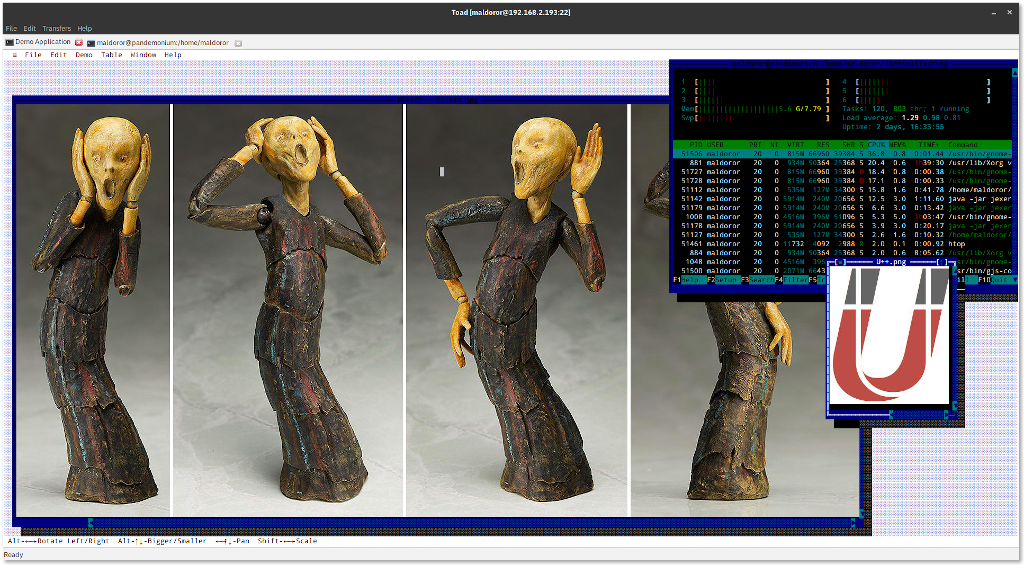
Terminal ctrl is now able to display 24-bit jpeg, gif, bmp, etc. raster formats, using the Jexer Image Protocol and Upp's own StreamRaster interface.


This means that if the raster images you are working with have registered decoders in upp/plugins, or somewhere else, Terminal ctrl will be able to display it.

Four main benefits of this inline images protocol is:

1) It is "8-bit clean". It can be safely deliver images over the network, and with Utf-8.
2) Popular image formats can be decoded much faster than sixels. (Up to 8 to 10 times faster on bigger image files), and usually have a lower bandwidth requirements.
3) Allows 24 bit (true color) images.
4) The wire protocol is very simple.


Screenshot with 24 bit images:
(Taken from the pre-alpha version of Toad, a cross-platform, multithreaded SSH2 client with tabs and splitter support, that will be available in -hopefully- January 2020):
index.php?t=getfile&id=5924&private=0


Best regards,
Oblivion


Re: A terminal emulator widget for U++ [message #52684 is a reply to message #51415] Sun, 10 November 2019 21:49 Go to previous messageGo to next message
Oblivion is currently offline  Oblivion
Messages: 1267
Registered: August 2007
Senior Contributor
Hello,

A new week, and another update with new features. Smile

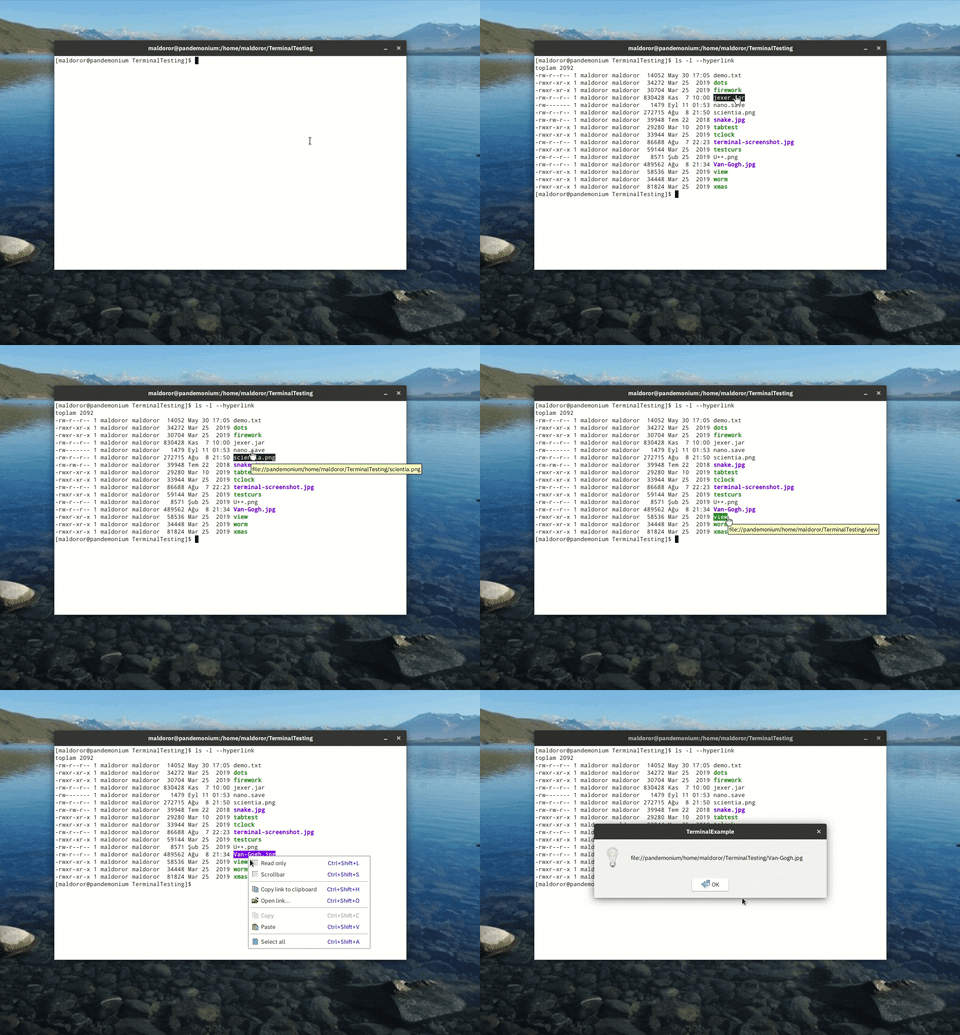
- Explicit hyperlinks support is added.
- Standard menu  improved and modularized.
- Cell tracking methods are implemented.
- Various fixes and cosmetics.
- Docs are updated accordingly.


Explicit hyperlinks are currently supported by GCC, ls, systemd, and a number of other high profile products.
One advantage of this hyperlinks protocol is that it is relatively well-defined and cheap.

To test it on linux, compile the TerminalExample, and run an updated version of the "ls" command:

ls -l --hyperlink


Gif:

https://media.giphy.com/media/Vd32ubXONJJdnhovpE/giphy.gif


Best regards,
Oblivion


[Updated on: Sun, 10 November 2019 23:23]

Report message to a moderator

Re: A terminal emulator widget for U++ [message #52697 is a reply to message #51415] Tue, 12 November 2019 16:36 Go to previous messageGo to next message
Oblivion is currently offline  Oblivion
Messages: 1267
Registered: August 2007
Senior Contributor
Hello,

I have pushed another update, which contains features that were brewing for a while:

- Terminal: Rectangle selection is now supported.
- Terminal: Iniline images can now be copied to clipboard or sent to client. (It uses the same mechanism as hyperlinks: CTRL + double click or context menu)
- Terminal: Options menu is implemented. Options menu contains the most relevant options for terminal. 


Screenshot:

index.php?t=getfile&id=5933&private=0


Best regards,
Oblivion


Re: A terminal emulator widget for U++ [message #52700 is a reply to message #51415] Tue, 12 November 2019 20:08 Go to previous messageGo to next message
Oblivion is currently offline  Oblivion
Messages: 1267
Registered: August 2007
Senior Contributor
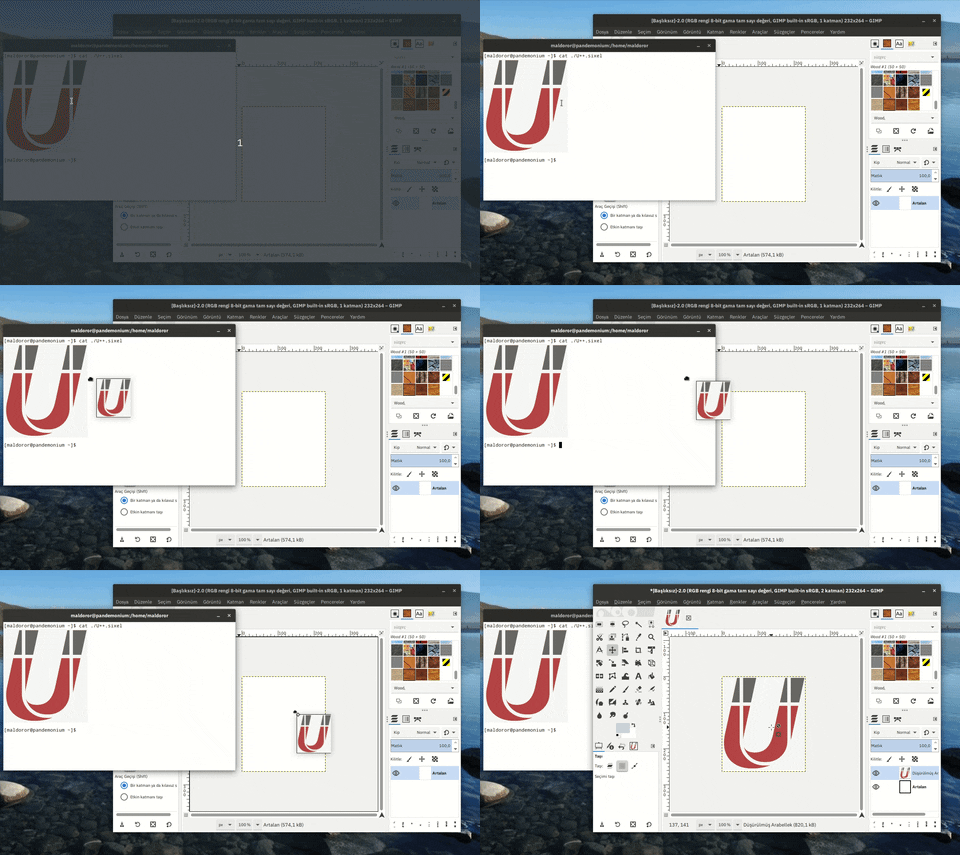
As a last minute bonus:

DnD operations and animations are added for both hyperlinks and inline images. (Activated with CTRL-key modifier)


Smile

Gif:

https://media.giphy.com/media/XZ0ohRJVbacfg0KFcc/giphy.gif


Enjoy!

Best regards,
Oblivion


Re: A terminal emulator widget for U++ [message #53262 is a reply to message #51415] Wed, 25 March 2020 14:20 Go to previous messageGo to next message
Oblivion is currently offline  Oblivion
Messages: 1267
Registered: August 2007
Senior Contributor
Hello,

Three months of silence is finally broken. Smile

Terminal package is scheduled to be updated to v0.3 on April 6, 2020.

Meanwhile the package has seen tons of improvements. (Note that the changes are not pushed to git yet).

Some highlights of the upcoming version:

- Initial steps for scripting support (using the Esc language).
- A proper double-width (Eastern-Asian/CJK) characters support.
- A proper tmux/screen support.
- A proper support for ISO 8613-6 true/indexed color formats.
- A much faster renderer. (In some torture tests (such as ncurses/dots on fulscreen mode) the performance gain can be up to %80.


And much more... (full list will be available with the release).

I am currently testing the package for regressions.


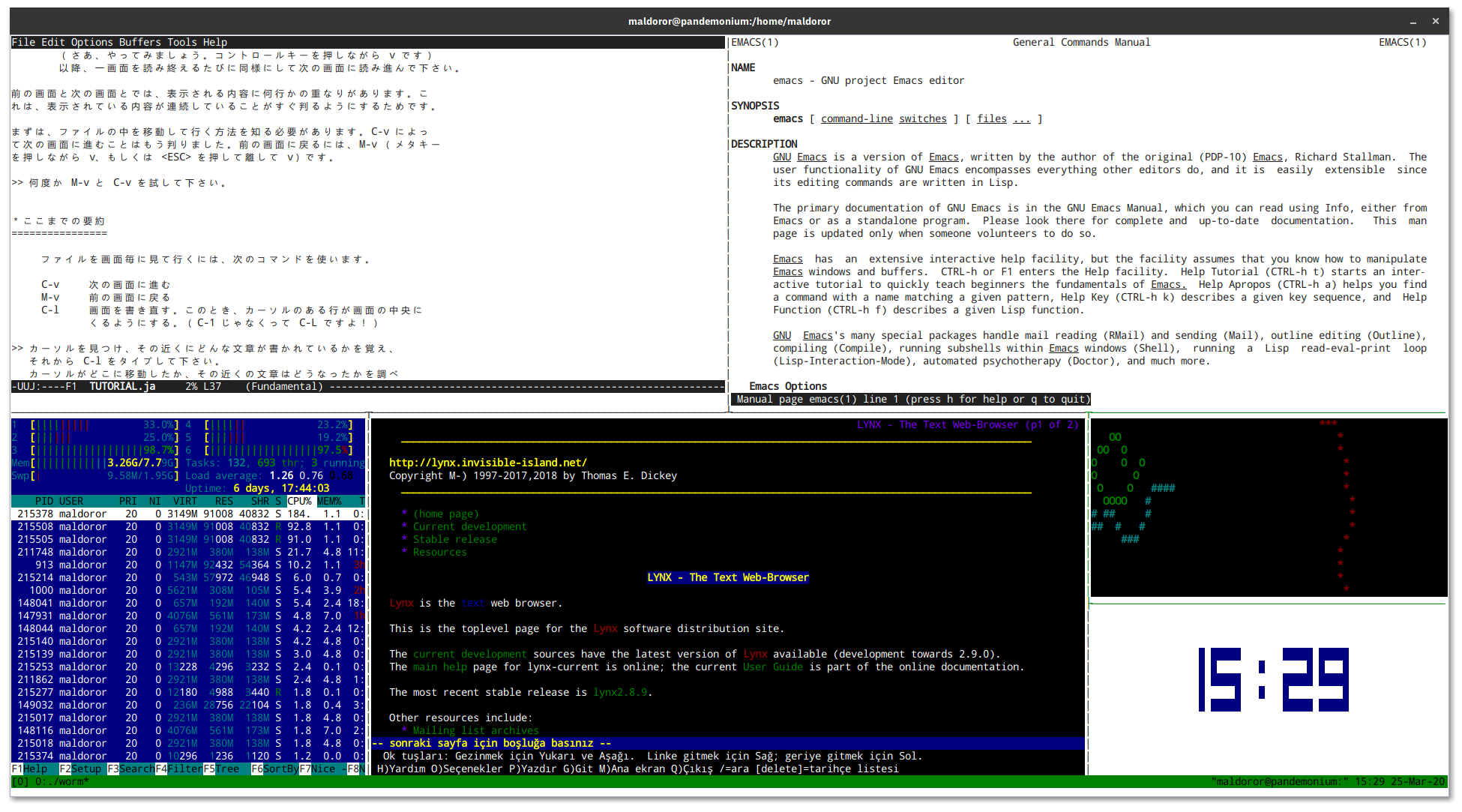
To whet yout appetite (tmux/screen, on Linux):
index.php?t=getfile&id=6022&private=0

Best regards,
Oblivion


[Updated on: Wed, 25 March 2020 14:34]

Report message to a moderator

Re: A terminal emulator widget for U++ [message #53277 is a reply to message #53262] Wed, 25 March 2020 19:12 Go to previous messageGo to next message
deep is currently offline  deep
Messages: 281
Registered: July 2011
Location: Bangalore
Experienced Member
Hi Oblivion

For double-width font support are you using Harfbuzz? Will it support Indic scripts?

Quote:
- A proper double-width (Eastern-Asian/CJK) characters support.


Warm Regards

Deepak
Re: A terminal emulator widget for U++ [message #53290 is a reply to message #53277] Thu, 26 March 2020 16:54 Go to previous messageGo to next message
Oblivion is currently offline  Oblivion
Messages: 1267
Registered: August 2007
Senior Contributor
Hello Deepak,


Quote:
Will it support Indic scripts?


This is my intention, with other scripts (Arabic, etc.) and Bi-directional rendering.

But unfortunately it will not happen in the upcoming v0.3 release.
At the moment what I can provide is double witdth support for CJK ideographs and other double width Asian characters.

As for the harfbuzz, currently I am using what U++ uses on GTK and/or X11.
And AFAIK, GTK 3.x uses harfbuzz by default.


Best regards,
Oblivion


Re: A terminal emulator widget for U++ [message #53542 is a reply to message #51415] Fri, 10 April 2020 02:17 Go to previous messageGo to next message
Oblivion is currently offline  Oblivion
Messages: 1267
Registered: August 2007
Senior Contributor
Hello,

The day has come. Terminal package is upgraded to v0.3. Smile

This is a huge release, with lots of changes, fixes, additions and improvements.

I am not going to list every change but some highlights here. If you want to see the full list, please check out the git history.

- Source code is restructured.
- Console class is ditched for the sake of simplicity. There is now only Terminal, deriving from Upp:CTrl.
- Eastern-Asian/CJK double width characters support is added.
- Text overline attribute is now supported.
- APCs (application programming commands) are now supported. This is the first step towards terminal scripting feature. APCs can be also be used by client code for private purposes.
- TRUECOLOR flag is removed. Terminal ctrl is now fully and officially a true color terminal emulator.
- Accordingly, CMY and CMYK color spaces are now supported too!
- Support for color text specifications (rgb, hash3, hash6, hash9, hash12) are added.
- xterm window actions are reports are implemented. It is now possible for host apps to move, resize, minimize, maximize, fullscreen the terminal.
- Renderer has seen a significat performance boost (up to 80% on some torture tests).
- tmux/screen is fully supported.
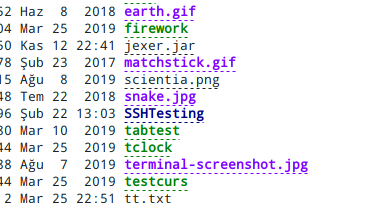
- Hyperlinks now show nice dots under their texts when they are "inactive" (i.e. no mouse hovering over them)
- API docs and specifications docs are significantly improved.


But how compliant is it?

Using George Nachmann's (iTerm2's developer) excellent and comprehensive test suite (it is analogous to the browser standard compliance tests), esctest, the results are as follows:


expected-terminal=xterm
max-vt-level=4

Terminal ctrl: v0.3, passed 407 tests, failed on 101 tests, 

Terminal ctrl: v0.2 passed only 160 of the same tests.


Let us now look at the latest stable version of Gnome terminal and Kitty, with same settings:

expected-terminal=xterm
max-vt-level=4

Gnome Terminal (v.3.36.1.1): passed 163 tests and failed on 345 tests.

Kitty: passed 122 tests, and failed on 386 tests.

xterm: Fassed all tests. (not suprisingly) 


Keep in mind that I am not even implying that Terminal ctrl is better. (It isn't. Gnome Terminal is a very high quality product with excellent features).

I am simply pointing out where our VT engine stands on the xterm compliance front (since xterm is the defacto standard), and the progress made with the nev version.


Hyperlinks with dots:
index.php?t=getfile&id=6040&private=0

You can find the new version on my git repo.

If you have any questions, suggestions, bug reports, patches, feature requests, etc. please feel free to contact me via my github address or this forum topic.

Enjoy!


Best regards,
Oblivion


[Updated on: Fri, 10 April 2020 11:40]

Report message to a moderator

Re: A terminal emulator widget for U++ [message #53551 is a reply to message #51415] Sat, 11 April 2020 00:30 Go to previous messageGo to next message
Oblivion is currently offline  Oblivion
Messages: 1267
Registered: August 2007
Senior Contributor
A last minute bonus:

Terminal ctrl now supports the popular iTerm2's inline image protocol too. Smile
(See api and specification docs for more details)

Best regards,
Oblivion


Re: A terminal emulator widget for U++ [message #53639 is a reply to message #51415] Fri, 17 April 2020 22:30 Go to previous messageGo to next message
Oblivion is currently offline  Oblivion
Messages: 1267
Registered: August 2007
Senior Contributor
Hello,

Terminal ctrl has received a small but important update:

Autowrap mode is fixed.


The mode setting somehow got lost in the v0.2 -> v0.3 transition. Embarassed

I recommend you to update the package as the autowrap feature is widely used by command line applications.

Best regards,
Oblivion


[Updated on: Fri, 17 April 2020 22:31]

Report message to a moderator

Re: A terminal emulator widget for U++ [message #53690 is a reply to message #51415] Tue, 21 April 2020 18:35 Go to previous messageGo to next message
Oblivion is currently offline  Oblivion
Messages: 1267
Registered: August 2007
Senior Contributor
Hello,

Terminal has gained two small features.

- Jsonization support is added.
- Xmlization support is added.


It is now possible to store/load the configuration (including color table) of Terminal ctrl instances in/from xml and json files, in a human readable form.

Also, missing tester methods (i.e, Isxxx()/Hasxxx()) are added and docs are updated accordingly.

Best regards,
Oblivion.


[Updated on: Tue, 21 April 2020 18:37]

Report message to a moderator

Re: A terminal emulator widget for U++ [message #53704 is a reply to message #51415] Wed, 22 April 2020 18:51 Go to previous messageGo to next message
Oblivion is currently offline  Oblivion
Messages: 1267
Registered: August 2007
Senior Contributor
A small but important news is that I've found a bottleneck in the Terminal ctrl's code that was puzzling me for some time.
It was in the display update and scrolling mechanism. Hopefully I have fixed it. Smile

However, I won't push the change to github before I test it thoroughly and be sure it doesn't break anything.

It appears that, after the fix, Terminal ctrl will be one of the most fastest out there.

Below statistics are the average results of a test automatically run 100 times:

All terminal emulators use the same font/page size settings, and run on Gnome 3.36


Results of command: time find /usr/share

Terminal Emulator                  real         user        sys
-----------------                 ----------   ----------   ----------
Terminal Ctrl (Current):          0m23,104s    0m1,297s     0m2,879s
Terminal Ctrl (with fix):       **0m4,002s     0m0,774s     0m1,622s**
xterm                             0m15,059s    0m0,991s     0m2,527s
Gnome Terminal                    0m4,217s     0m0,778s     0m1,773s
Kitty                             0m4,907s     0m0,887s     0m2,325s


If everything goes well, I will push this change next week.

Best regards,
Oblivion


[Updated on: Wed, 22 April 2020 18:55]

Report message to a moderator

Re: A terminal emulator widget for U++ [message #53731 is a reply to message #51415] Sat, 25 April 2020 00:36 Go to previous messageGo to next message
Oblivion is currently offline  Oblivion
Messages: 1267
Registered: August 2007
Senior Contributor
Hello,

I have pushed the the critical performance fix that I mentioned in my last message.

The main culprit was using a Vector where a BiVector was a much better option. In fact, it seems to be the optimal solution to the scrollback/hsitory buffer problem. Removing elements from the beginning of a Vector, especially when its length > 64K is -not surprisingly- very slow. BiVector solves exactly this problem because a scrollback buffer is mutated only from the either end.

There was also a constant display refresh happening when a page was scrolled, even when a single line scrolled, degrading performance. This is fixed too.

Now Terminal ctrl's scroll speed / throughput can be very fast. (It is Even faster than the above given numbers: ~3.5 secoonds on the same test while acting as a both SSH (using Upp/SSH package) and local terminal. ("time find /usr/share" command was outputting > 300.000 file paths in these tests, with the size of scrollback buffer of each terminal was set to 64 k)

However, you can't see the real difference if you use the provided reference example codes, because they have a very rudimentary event loop.

If you are curious and you want to test the scrolling/throughput performance of Terminal ctrl, you can use the below code: While still rudimentary, it is closer to real world scenarios.

#include <Terminal/Terminal.h>
#include <Terminal/PtyProcess.h>

using namespace Upp;

const char *nixshell = "/bin/bash";

struct TerminalExample : TopWindow {
	Terminal term;
	PtyProcess pty;
	
	TerminalExample()
	{
		SetRect(term.GetStdSize());
		Sizeable().Zoomable().CenterScreen().Add(term.SizePos());
		term.WhenBell   = [=]()                { BeepExclamation(); };
		term.WhenTitle  = [=](String s)        { Title(s);          };
		term.WhenOutput = [=](String s)        { pty.Write(s);      };
		term.WhenResize = [=]()                { pty.SetSize(term.GetPageSize()); };
		term.WhenLink   = [=](const String& s) { PromptOK(s);       };
		term.InlineImages().Hyperlinks().WindowOps().DynamicColors();
		term.SetHistorySize(65536);
	}
	
	void Run()
	{
		pty.Start(nixshell, Environment(), GetHomeDirectory());
		OpenMain();
		while(IsOpen() && pty.IsRunning()) {
			int ms = 16;
			String in = pty.Get();
			if(!IsNull(in)) {
				term.WriteUtf8(in);
				int len = in.GetLength();
				if(len >= 1024)
					ms = 1024 * 16 / len; // Scale to workload...
			}
			ProcessEvents();
			Sleep(ms);
		}
	}

};

GUI_APP_MAIN
{
	TerminalExample().Run();
}


There are other improvements and bug fixes too (mostly on serialization/xmlization/jsonization fronts).

If you have any questions, criticism, bug reports, patches, ideas, let me know.


Best regards,
Oblivion


[Updated on: Sat, 25 April 2020 01:06]

Report message to a moderator

Re: A terminal emulator widget for U++ [message #53928 is a reply to message #51415] Fri, 15 May 2020 18:01 Go to previous messageGo to next message
Oblivion is currently offline  Oblivion
Messages: 1267
Registered: August 2007
Senior Contributor
Hello,

Terminal ctrl is updated. It has gained a new feature that is found on most popular vt emulators:

- Auto-hide option for mouse cursor is added. Terminal ctrl can be configured to automatically hide the mouse pointer when the user types a text.


There are also small bug fixes here and there. Smile


Best regards,
Oblivion


Re: A terminal emulator widget for U++ [message #53956 is a reply to message #51415] Sun, 17 May 2020 22:20 Go to previous messageGo to next message
Oblivion is currently offline  Oblivion
Messages: 1267
Registered: August 2007
Senior Contributor
Hello,

Ranger, a terminal based file manager, can now show image previews via iterm2's inline image protocol, on terminal ctrl.

index.php?t=getfile&id=6079&private=0


By the way, I am planning to implement optional, range-based font substitution for Terminal ctrl v0.4 (2020.2, synced with U++).

My initial plan is to give the client the ability to compose a font list (using a simple structure called Terminal::RangeFont), and pass it to terminal ctrl instances so the client will be responsible for taking care of the list. (Similar to how Upp::Display objects are handled.)


If you have any other suggestions I have opened a ticket for it. Feel free to share your ideas.

Best regards,
Oblivion.


Re: A terminal emulator widget for U++ [message #54044 is a reply to message #51415] Fri, 22 May 2020 16:08 Go to previous messageGo to next message
Oblivion is currently offline  Oblivion
Messages: 1267
Registered: August 2007
Senior Contributor
Hello,

This week on Terminal ctrl: Smile

- Initial support for copy-on-select style (X11-style) text selection is added.
- Terminal ctrl recognizes CMY/CMYK and urxvt-style RGBA color text specifications via dynamic colors extension.


Best regards,
Oblivion


Re: A terminal emulator widget for U++ [message #54059 is a reply to message #54044] Thu, 28 May 2020 08:30 Go to previous messageGo to next message
slashupp is currently offline  slashupp
Messages: 231
Registered: July 2009
Experienced Member
Hi oblivion

Just found this - looks great!

I want to test if Terminal fits the needs of my app, but fail to find
a HowTo on installing it in my upp-dev-environment (which is standard)
in order to use/test using it in my app.

Can you pls supply a HowTo for access/use of Terminal in a blank/new project?

thx
Re: A terminal emulator widget for U++ [message #54061 is a reply to message #54059] Thu, 28 May 2020 11:36 Go to previous messageGo to next message
Oblivion is currently offline  Oblivion
Messages: 1267
Registered: August 2007
Senior Contributor
Hello slashupp,


Quote:
I want to test if Terminal fits the needs of my app, but fail to find
a HowTo on installing it in my upp-dev-environment (which is standard)


Yes, this is missing from the docs. I will update it next week. In the meantime,

How to get it:

Terminal is a regular ctrl. It does not require anything other than U++ (ver >= 2020.1, because I use some new color methods which simplified the color management code.)

If you want to try it out, you can:

a) Clone the upp-components git repository (This is the recommended way to get updates,etc.) and set up an assembly in TheIDE for upp-components/CtrlLib (It is no different than adding another "bazaar")

b) Simply download the repo, unzip it, and move the CtrlLib/Terminal folder to your preferred folder.


Now that you have the source code, It should compile out of the box. There should be no need for tweaking, etc.

How to use it:

Well, the upp-components/Examples section already contains example code for different, basic use cases, I suggest you check there and play with them first (if you haven't already).
They are pretty simple. A minimal example is here upp-components/Examples/TerminalExample

(That minimal example, by the way, can run almost anything, out of the box)

Steps to write your own code:
1) Check the API docs first. Terminal ctrl contains regular topic++ files for TheIDE. It should be available through TheIDE's help system.

2) Create a CtrlLib application (basic or with layout, it's up to you. Terminal ctrl contains a layout file, so you can use it in TheIDE's layout editor.)

3) Add Terminal ctrl to you app. As it is a regular ctrl, it can be added to your window or any other "parent" ctrl via Ctrl::Add() method.

4) If you are going to use it as a local terminal, using a pty (currently on POSIX only), then Terminal package contains a PtyProcess class.
   Add #include <Terminal/PtyProcess.h> to your app. Then all you need to do is set up the events and loop.
   Provided examples use a rudimentary loop which is sufficient for most cases but you can write much efficient loops that'll suit your personal need and use-case. 

5) If you are going to use it as a GUI front end for, say, SSH shells, add uppsrc/Core/SSH package to you app, and connect the loop. See the rudimentary upp-components/Examples/SshTerminalExample


Again, this is just generic information on how to install and use it.

If you have any specific questions in the meanitme, I'll be happy to address them. Smile

Best regards,
Oblivion


[Updated on: Thu, 28 May 2020 11:57]

Report message to a moderator

Re: A terminal emulator widget for U++ [message #54067 is a reply to message #54059] Fri, 29 May 2020 12:40 Go to previous messageGo to next message
Oblivion is currently offline  Oblivion
Messages: 1267
Registered: August 2007
Senior Contributor
An example demonstrating the absolute minimum setup for a standalone terminal app, and two different loops:


#include <Terminal/Terminal.h>
#include <Terminal/PtyProcess.h>

using namespace Upp;

struct MinimalTerminalExample : TopWindow {
    Terminal term;          // A terminal ctrl instance.
    PtyProcess pty;         // A pseudoconsole process instance.
    MinimalTerminalExample()
    {
        SetRect(0, 0, 800, 600);
        Sizeable().Zoomable().CenterScreen().Add(term.SizePos());
        term.WhenOutput = [=](String out)   { pty.Write(out);  };                       // Terminal output
        term.WhenResize = [=]               { pty.SetSize(term.GetPageSize()); };       // Notifies the pty about page size changes.
        pty.Start("/bin/bash", Environment(), GetHomeDirectory());                      // Start a shell process on pty.
        // For a reasonable throughput, a callback-based loop is sufficient.
        SetTimeCallback(-1, [=] { term.WriteUtf8(pty.Get()); if(!pty.IsRunning()) Break(); });
    }
    
//  For very high throughput, below loop (or something better) can be used.
//
//  void Run()
//  {
//      pty.Start("/bin/bash", Environment(), GetHomeDirectory());
//      OpenMain();
//      while(IsOpen() && pty.IsRunning()) {
//          ProcessEvents();
//          String s = pty.Get();   // PtyProcess reads are non-blocking.
//          if(!IsNull(s))
//              term.WriteUtf8(s);
//          int l = s.GetLength();
//          Sleep(l >= 1024 ? 1024 * 10 / l : 10); // Scale...
//      }
//  }

};

GUI_APP_MAIN
{
    MinimalTerminalExample().Run();
}


Best regards,
Oblivion


[Updated on: Fri, 29 May 2020 13:05]

Report message to a moderator

Re: A terminal emulator widget for U++ [message #54194 is a reply to message #51415] Sat, 06 June 2020 13:57 Go to previous messageGo to next message
Oblivion is currently offline  Oblivion
Messages: 1267
Registered: August 2007
Senior Contributor
Hello,

Terminal ctrl is updated. It has a number of under-the-hood improvements that lead to higher performance/throughput.
To give you an idea, here are some benchmark results I've been compiling (both synthetic and real-usage) for some time:

CPU:        AMD FX 6100 - Black Edition (Six-core processor)
Memory:     8 GiB, DDR-3 1800 Mhz
Storage:    128 Gib SSD, 1Tib HDD
Graphics:   AMD Radeon R7 240, 2GiB
Monitor:    LCD, HD (1080p)
OS/Kernel:  Arch/Linux 5.6 (x86_64)
Desktop:    GNOME 3.36 (X11)
Framework:  Ultimate++ 2020.1 (alpha)
Flags:      GUI
Compilers:  GCC 10.0.1 CLANG 10.0.0
Application: TerminalExample (with a high throughput loop).
Font:       The same IBM Plex Mono, monospace font used in all tests.

Disclaimer: The benchmarks below do not represent any competition.
            They don't represent any weak spots of the mentioned terminals. They are all high quality stuff.
            The sole purpose of these benchmarks is to give an idea as to where the Terminal ctrl's "engine" performance stands ATM.

Note: All benchmarks are repeated 50 times, automatically.
      The performance difference between GCC/CLANG builds is negligable.
      The latest stable versions of the mentioned terminals are used in these tests (as of May-June 2020).

Results of command: "time find /usr", file count: 415897, page size: 237 x 55, Monospace Font)

Terminal Emulator                  real         user        sys        Notes
-----------------                 ----------   ----------   ---------- ----------
Alacritty                         0m3,776s     0m1,134s     0m2,637s   Scrollback buffer size: 64k
Terminal ctrl                     0m4,126s     0m1,202s     0m2,466s   Scrollback buffer size: 64k
Kitty                             0m5,608s     0m1,224s     0m2,763s   Scrollback buffer size: 64k
Gnome Terminal                    0m6,785s     0m1,243s     0m3,015s   Scrollback buffer size: 64k
xterm                             0m24,368s    0m1,661s     0m3,766s   Scrollback buffer size: 64k

Terminal Emulator                  real         user        sys         Notes
-----------------                 ----------   ----------   ----------  ----------
Simple terminal (0.8)             0m3,791s     0m1,162s     0m2,533s    Has no scrollback buffer.
Terminal ctrl   (0.3)             0m3,971s     0m1,120s     0m2,472s    Scrollback disabled.

Terminal Emulator                  real         user        sys         Notes
-----------------                 ----------   ----------   ----------  ----------
Terminal ctrl   (0.3)             0m4,380s     0m1,479s     0m2,536s    localhost, Scrollback buffer size: 2000 lines, no compression, (SshTerminalExample is used)
PuTTY (0.73)                      0m40,828s    0m1,354s     0m3,071s    localhost, Scrollback buffer size: 2000 lines, no compression

// Vte-bench, benchmark 1: scrolling. page size: 237 x 55, Monospace Font.

Terminal Emulator                  real         user        sys        Notes
-----------------                 ----------   ----------   ---------- ----------
Alacritty                         0m1,936s     0m0,001s     0m0,946s
Kitty                             0m2,985s     0m0,000s     0m0,567s
Gnome Terminal                    0m3,758s     0m0,001s     0m0,940s
Terminal ctrl                     0m4,064s     0m0,000s     0m0,859s
Simple terminal (0.8)             0m4,623s     0m0,000s     0m1,105s 
xterm                             0m47,249s    0m0,000s     0m0,567s

// Vte-bench, benchmark 2: alt-screen-random-write, page size: 237 x 55, Monospace Font.

Terminal Emulator                  real         user        sys        Notes
-----------------                 ----------   ----------   ---------- ----------
Alacritty                         0m1,520s     0m0,000s     0m0,554s
Kitty                             0m2,750s     0m0,000s     0m0,408s
Gnome Terminal                    0m3,153s     0m0,004s     0m0,726s
Terminal ctrl                     0m3,790s     0m0,000s     0m0,474s
Simple terminal (0.8)             0m7,097s     0m0,001s     0m0,825s 
xterm                             0m19,797s    0m0,001s     0m0,993s

// Vte-bench, benchmark 3: scrolling-in-region, page size: 237 x 55, Monospace Font.

Terminal Emulator                  real         user        sys        Notes
-----------------                 ----------   ----------   ---------- ----------
Alacritty                         0m3,337s     0m0,001s     0m3,297s
Gnome Terminal                    0m5,280s     0m0,001s     0m3,254s
Kitty                             0m6,326s     0m0,001s     0m6,034s
Terminal ctrl                     0m6,739s     0m0,001s     0m4,033s
Simple terminal (0.8)             0m7,844s     0m0,001s     0m7,348s
xterm                             3m36,599s    0m0,001s     0m11,011s


(Eventually I will add the final benchmark results to the Terminal package as a markdown file. Consider the above mentioned results only as a preview.)

If you have any questions, feature requests, bug reports, suggestions, criticism, etc. let me know.

Best regards,
Oblivion


[Updated on: Sat, 06 June 2020 14:25]

Report message to a moderator

Re: A terminal emulator widget for U++ [message #54207 is a reply to message #51415] Tue, 09 June 2020 23:48 Go to previous messageGo to next message
Oblivion is currently offline  Oblivion
Messages: 1267
Registered: August 2007
Senior Contributor
Hello,

Terminal ctrl's TURTLE backend support was broken for some time.
The reason: Apparently there is no Upp::Append() method for image drag and drop (Or I am missing something...).
I've committed a patch to workaround this problem by disabling image drag-and-drops in Turtle backend.

A good news is that it is now possible to compile Terminal Ctrl for linux framebuffer, using the LinuxFrameBuffer package.

There are some rough edges (e.g. the mouse wheel does not work ATM), but it is basically working on linux framebuffer too. Smile

However, currently the support for linux framebuffer is "unofficial". If you are going to try it at all, TRY IT AT YOUR OWN RISK.

I will focus on these backends after the V0.4 release...


Best regards,
Oblivion.


[Updated on: Tue, 09 June 2020 23:50]

Report message to a moderator

Re: A terminal emulator widget for U++ [message #54210 is a reply to message #54207] Thu, 11 June 2020 00:13 Go to previous messageGo to next message
Zbych is currently offline  Zbych
Messages: 332
Registered: July 2009
Senior Member
Oblivion wrote on Tue, 09 June 2020 23:48

A good news is that it is now possible to compile Terminal Ctrl for linux framebuffer, using the LinuxFrameBuffer package.
There are some rough edges (e.g. the mouse wheel does not work ATM), but it is basically working on linux framebuffer too. Smile


Hi Oblivion,

I've added wheel event to framebuffer package. Please check it.
Re: A terminal emulator widget for U++ [message #54214 is a reply to message #54210] Thu, 11 June 2020 11:08 Go to previous messageGo to next message
Oblivion is currently offline  Oblivion
Messages: 1267
Registered: August 2007
Senior Contributor
Hello Zbych,

Thank you for your efforts!

Indeed, it is working now. Smile

Since you are here, allow me to point out two problems I've encountered while testing both terminal package and others (uword, for example).

- Text mode is not disabled on linuxframebuffer based apps when they are run from the linux (tested with v5.6) console. (The framebuffer display is overwritten by text and messages). The "fix" seems to be setting the STDINPUT to KD_GRAPHICS and resetting it to KD_TEXT before the app exits (using ioctl). But since I don't know the specifics of LinuxFrameBuffer package, I can't give more info as to where the problem lies.

- Both on UWord and Terminal package, the return/enter keys are sending the keycode twice (or so it appears: text cursor is not moved to next line but two lines below.)

Best regards,
Oblivion


[Updated on: Thu, 11 June 2020 11:08]

Report message to a moderator

Re: A terminal emulator widget for U++ [message #54276 is a reply to message #51415] Thu, 18 June 2020 00:36 Go to previous messageGo to next message
Oblivion is currently offline  Oblivion
Messages: 1267
Registered: August 2007
Senior Contributor
Hi,

I'm still working on range-based font substituiton feature. And I have finally prototyped the mechanism.

The screenshot below uses the legacy demo.txt file for demonstration. It displays four (default + additional three) fonts for different glyph ranges on the same page.

Font configuration:
IBM Plex  Mono: 0x0020-0x07FF (Base glyphs)
Fira Code Mono: 0x2500-0x259f (Box drawing glyphs)
GNU Free  Mono: 0x2800-0x28FF (Braille glyphs)
Awesome   Mono: ------------- (Other glyphs) 


index.php?t=getfile&id=6114&private=0

It has its rough edges, but "it works" fine with a negligable performance hit. Smile

Note that this feature will not be available before v0.4.

Best regards,
Oblivion


[Updated on: Thu, 18 June 2020 00:39]

Report message to a moderator

Re: A terminal emulator widget for U++ [message #54291 is a reply to message #51415] Sun, 21 June 2020 19:35 Go to previous messageGo to next message
Oblivion is currently offline  Oblivion
Messages: 1267
Registered: August 2007
Senior Contributor
Hello,

A screengrab of Terminal ctrl on Linux framebuffer. Smile

https://i.imgur.com/EZqngTw.jpg?1


Note: This is only an experimental feature yet to be refined and still unofficial.

However, Thanks to Zbych, the LinuxFrameBuffer package has been updated, and line feeds are working as expected now.
(There are other similar problems but I'm noting them down, so that I can provide feedback.

Best regards,
Oblivion


Re: A terminal emulator widget for U++ [message #54292 is a reply to message #54214] Sun, 21 June 2020 22:16 Go to previous messageGo to next message
Zbych is currently offline  Zbych
Messages: 332
Registered: July 2009
Senior Member
Oblivion wrote on Thu, 11 June 2020 11:08

- Text mode is not disabled on linuxframebuffer based apps when they are run from the linux (tested with v5.6) console. (The framebuffer display is overwritten by text and messages). The "fix" seems to be setting the STDINPUT to KD_GRAPHICS and resetting it to KD_TEXT before the app exits (using ioctl)


I did some research and it appears that turning keyboard off in virtual terminal is correct solution.
Unfortunately neither ioctl(tty_handle, KDSKBMUTE, 1) nor ioctl(tty_handle, KDSKBMODE, K_OFF) solves the problem with keys leaking to the console.
They simply return error "Operation not permitted".

In case you want to do more tests:
https://chromium.googlesource.com/chromium/chromium/+/trunk/ ui/ozone/platform/dri/virtual_terminal_manager.cc
https://github.com/LuaDist/sdl/blob/master/src/input/evdev/S DL_evdev.c#L395

[Updated on: Sun, 21 June 2020 22:47]

Report message to a moderator

Re: A terminal emulator widget for U++ [message #54293 is a reply to message #54292] Sun, 21 June 2020 22:36 Go to previous messageGo to next message
Oblivion is currently offline  Oblivion
Messages: 1267
Registered: August 2007
Senior Contributor
Hello Zbych,

Quote:

I did some research and it appears that turning keyboard off in virtual terminal is correct solution.
Unfortunately neither ioctl(tty_handle, KDSKBMUTE, 1) nor ioctl(tty_handle, KDSKBMODE, K_RAW) solves the problem with keys leaking to the console.
They simply return error "Operation not permitted".


Again, thank you very much for your efforts!
Also thanks for the links.

I am going to look into LinuxFrameBuffer code in the following days and if I can come up with a workaround or solution, I'll send a patch to review.

By the way, did you try to set STDIN_FILENO to KD_GRAPHICS too? because IIRC, that (Setting both input and output to graphics mode) was the trick used by an app whose name I forgot now, some time ago.)

I'd really love to see Terminal ctrl run on linux frame buffer, because then I can get rid of unnecessary cruft on my personal servers.

Best regards,
Oblivion


Re: A terminal emulator widget for U++ [message #54294 is a reply to message #54293] Sun, 21 June 2020 22:47 Go to previous messageGo to next message
Zbych is currently offline  Zbych
Messages: 332
Registered: July 2009
Senior Member
Oblivion wrote on Sun, 21 June 2020 22:36

By the way, did you try to set STDIN_FILENO to KD_GRAPHICS too?


Do you mean using STDIN_FILENO in ioctl(STDIN_FILENO, KDSETMODE, KD_GRAPHICS)?
it returns error: Inappropriate ioctl for device (25)

In my tests I pass path to virtual terminal manually (for example /dev/tty3), I decided to leave tty number autodetection as next step.

[Updated on: Sun, 21 June 2020 22:55]

Report message to a moderator

Re: A terminal emulator widget for U++ [message #54295 is a reply to message #54294] Sun, 21 June 2020 22:54 Go to previous messageGo to next message
Oblivion is currently offline  Oblivion
Messages: 1267
Registered: August 2007
Senior Contributor
Yeah, but I am not sure as to how, ATM. (Maybe I am not remembering it correctly).
I'll do some investigation and let you know.

Best regards,
Oblivion


Re: A terminal emulator widget for U++ [message #54335 is a reply to message #54292] Thu, 25 June 2020 08:36 Go to previous messageGo to next message
Oblivion is currently offline  Oblivion
Messages: 1267
Registered: August 2007
Senior Contributor
Hello Zbych,


I've -hopefully- solved the "key leakage" problem in LinuxFrameBuffer package. Smile
It required sone changes in the existing code and some additions.
I will upload the patched code for you to review on this weedkend.


Best regards,
Oblivion


Re: A terminal emulator widget for U++ [message #54338 is a reply to message #54335] Thu, 25 June 2020 20:40 Go to previous messageGo to next message
Zbych is currently offline  Zbych
Messages: 332
Registered: July 2009
Senior Member
Oblivion wrote on Thu, 25 June 2020 08:36

I've -hopefully- solved the "key leakage" problem in LinuxFrameBuffer package. Smile


I am glad you've found the solution.
Re: A terminal emulator widget for U++ [message #54345 is a reply to message #54338] Sun, 28 June 2020 11:57 Go to previous messageGo to previous message
Oblivion is currently offline  Oblivion
Messages: 1267
Registered: August 2007
Senior Contributor
Hello Zbych,


I have attached the patched LinuxFrameBuffer package for you to review. Feel free to comment on it.

Package is compiled with the latest stable GCC and CLANG on Linux v5.4 and v5.6 machines.
For testing, I used the supplied LinuxFrameBufferExample (UWord) code, Terminal ctrl, and some other U++ examples made to run on FB backend.

Changes/additions:

- Automatic VT allocation mechanism is implemented. 
  Since U++ suppports function keys from F1 to F12, I have limited the valid VT numbers within tty1-tty12 range (This can be easily changed if required).

- Accordingly, VT switching is implemented.
  Since we mute the vt keyboard input, this required manual handling of the linux signals, and as a result the vt handle had to be made a global static integeer (atomic).

- To prevent any screen buffer damage, U++ linuxframebuffer backend now does not copy the drawn image onto framebuffer when the
  vt is switched away (i,e., whem it loses focus).

- Accordingly, CTRL + ALT + [F1-f12] key combinations are reserved for VT switching.


Remaining issues:


- SHIFT keys are not working properly. (Can't get any capital letters.)

- No double click.

- No key repeat.


I am not sure about the security implications though. If you find any problem, let me know.


Best regards,
Oblivion


[Updated on: Sun, 28 June 2020 12:04]

Report message to a moderator

Previous Topic: SerialPort & SerialPortListener class
Next Topic: Added NetCDF library
Goto Forum:


Current Time: Wed Jun 10 17:20:50 GMT+2 2026

Total time taken to generate the page: 0.01207 seconds